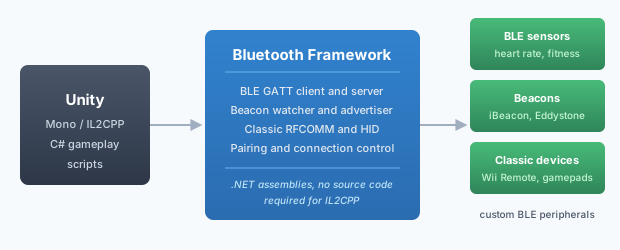
The Bluetooth Framework adds Bluetooth Low Energy, classic Bluetooth, and beacon support to Unity games and applications. Connect BLE sensors, beacons, classic controllers, and custom peripherals using Mono or IL2CPP. The framework handles device enumeration, GATT communication, advertisement parsing, pairing, and connection management so that the game code can focus on gameplay.
Unity is a cross-platform game engine used to build 2D, 3D, VR, and AR games and applications. Its API surface covers graphics, physics, audio, input, and networking, but it does not include a Bluetooth API. Applications that need to talk to a BLE sensor, read a beacon advertisement, or connect to a classic game controller have to step outside Unity. This article explains why that happens, which workarounds exist, and how the Bluetooth Framework closes the gap.
The Bluetooth Framework is part of the Wireless Communication Library. Unity examples are available on GitHub.
The Bluetooth problem in Unity
Unity exposes input events for operating-system-managed Bluetooth controllers through the Input System, but that is the
full extent of its Bluetooth support. There is no UnityEngine.Bluetooth class and no built-in way to enumerate
BLE devices, read a GATT characteristic, subscribe to a notification, receive a beacon advertisement, or open a classic
RFCOMM channel. Applications that need any of these capabilities have to choose between the .NET BCL, a third-party library,
or a hand-written native plugin for every target platform.
The most natural first attempt is one of the standard .NET Bluetooth APIs: WinRT projections such as
Windows.Devices.Bluetooth, or the newer System.Device.Bluetooth. Both compile cleanly, both look
familiar, and both work in the Unity Editor on Windows. The problem appears at build time, and it is caused by the way Unity
compiles managed code for each scripting backend. This is the same trap that developers hit with
System.IO.Ports, as described in the Serial Framework and Unity article.
Why standard .NET Bluetooth APIs fail
WinRT projections — the Windows.Devices.Bluetooth and
Windows.Devices.Bluetooth.Advertisement namespaces — are available to C# through a runtime projection that
is supplied by Windows itself. IL2CPP converts C# assemblies to C++ and links them against a native runtime that Unity
generates. That runtime does not contain the WinRT projection, so every call that reaches into the operating system fails
at runtime, even though the same call succeeds in the Editor. The failure surfaces in several forms:
PlatformNotSupportedException— thrown when a WinRT Bluetooth type is loaded or one of its methods is called.TypeLoadException— thrown when the projection of a WinRT type cannot be resolved by the IL2CPP runtime.- Empty results — a device watcher starts but never raises a single event, or a GATT service query returns an empty collection.
- Silent failures — the constructor of a device object succeeds, but the connection never completes and no error is reported.
System.Device.Bluetooth is the newer managed Bluetooth API that ships with .NET 5 and later.
It is not part of the BCL that Unity ships, and its Windows implementation relies on native dependencies that are not
included in an IL2CPP player. Even if the assembly is added manually, the result is the same set of runtime failures as
with WinRT, and the API is unavailable outside Windows.
A third option — writing a custom native plugin per platform — works, but it means maintaining a separate C++ project for Windows, a separate Objective-C or Swift project for macOS, and separate Android and iOS plugins, each of which has to implement device enumeration, connection management, GATT and advertisement parsing, and pairing. That is a significant amount of platform-specific code that has nothing to do with gameplay.
The other limitation of the standard APIs concerns connection management. The WinRT GATT API, which is the only BLE option on Windows that is officially supported by Microsoft, has no way to force a disconnection from a peripheral, and it has no way to notify a GATT server when a client connects or disconnects. Both of these limitations apply inside a Unity player just as they do inside a Windows application, and both are discussed in GATT connection state change detection.
BLE and classic Bluetooth
Unity projects typically need both Bluetooth flavours. BLE is the right choice for low-power sensors, fitness trackers, beacons, and custom peripherals that expose a GATT database. Classic Bluetooth is the right choice for game controllers, the Wii Remote, audio devices, and any device that speaks RFCOMM or one of the OBEX profiles. For a broader overview of how the two families differ, see the Bluetooth Classic profiles overview and the BLE GATT communication article.
The WinRT API covers BLE and a small subset of classic Bluetooth through the BluetoothDevice class, but it
does not expose RFCOMM channels, HID reports, or OBEX sessions, and on Unity it is not usable with IL2CPP at all.
System.IO.Ports can act as an RFCOMM client on Windows and macOS under the Mono backend, but only through a
virtual COM port that the user has to pair and configure manually. Neither option is a complete solution, and neither
works reliably in a shipped Unity build.
A production Unity project needs a library that implements both BLE and classic Bluetooth on top of the operating system's native Bluetooth stack, and that ships as a managed assembly usable with both scripting backends.
How the Bluetooth Framework solves it
The Bluetooth Framework implements the native Bluetooth layer once and exposes it
to managed code through .NET assemblies. Instead of relying on WinRT or on System.Device.Bluetooth, it calls
the operating system's Bluetooth APIs directly through P/Invoke, and it delivers the same managed API regardless of the
underlying driver. The result is a single set of classes that work in the Editor and in the built player, on Mono and on
IL2CPP.
The capabilities that matter for a Unity project are grouped into four areas.
BLE GATT client and server. The wclGattClient and wclGattServer classes
implement the full GATT client and GATT server roles: service discovery, characteristic and descriptor access, value
reads and writes, subscriptions, notifications, indications, and per-client connection parameters. The server side
delivers real OnClientConnected and OnClientDisconnected events, so an application that acts as
a peripheral knows the moment a central arrives or leaves. This is a capability that the WinRT GATT provider does not
offer, as explained in GATT connection state change detection.
Beacon reception and transmission. The wclBluetoothLeBeaconWatcher class receives BLE
advertisement packets and decodes the common formats: iBeacon, Eddystone UID, Eddystone URL, Eddystone TLM, AltBeacon,
Apple Continuity, Microsoft CDP, Drone Remote ID, and manufacturer-specific or raw frames. The
wclBluetoothLeAdvertiser class transmits advertisements, including the extended advertising format
introduced in Bluetooth 5. See Bluetooth LE beacon formats and
Bluetooth LE advertisement for the full protocol details.
Classic Bluetooth. The wclRfCommClient and wclRfCommServer classes implement
the RFCOMM client and server roles, which cover the Serial Port Profile and any other RFCOMM-based profile. HID support
covers the Wii Remote, game controllers, and other input devices. The OBEX-based profiles OPP and FTP are implemented
through the corresponding OBEX classes. See Classic Bluetooth communication and
Object Exchange for the details.
Pairing and connection management. The wclBluetoothManager class delivers the full pairing
workflow through OnIoCapabilityRequest, OnProtectLevelRequest, OnConfirm,
OnPasskeyRequest, OnPasskeyNotification, OnNumericComparison, and
OnAuthenticationCompleted. Explicit pairing and unpairing are available through RemotePair and
RemoteUnpair. Connected devices can be enumerated with EnumConnectedDevices and disconnected
with RemoteDisconnect, a capability that Windows does not expose through any public API. See
BLE pairing and bonding and Disconnect any Bluetooth device.
The framework also provides per-connection configuration that the standard APIs either do not expose or expose only on
recent Windows versions: reading the active PHY through GetConnectionPhyInfo, changing the connection
parameters through SetConnectionParams, and configuring the scanner through the
ScanParametersType property. These are covered in Bluetooth LE PHY,
Bluetooth LE connection parameters, and
Bluetooth LE scan parameters.
Scripting backends
Unity offers two scripting backends. Mono uses a Just-In-Time compiler and runs precompiled managed assemblies directly. IL2CPP converts C# assemblies to C++ and links them against a native runtime that Unity generates for the target platform. IL2CPP is the default backend, it is mandatory on iOS, and it is strongly recommended on Android, consoles, and WebGL.
The Bluetooth Framework supports both backends. For the Mono backend, adding the framework's assembly to the Unity project is sufficient; the JIT compiler uses the assembly as shipped. For the IL2CPP backend, the current release of the framework no longer requires the source-code edition. The precompiled assemblies can be added directly to the Unity project and compiled into the IL2CPP player without further changes. The P/Invoke bindings that the framework uses to reach the operating system's Bluetooth APIs are preserved through IL2CPP, and the native dependencies that the framework requires are packaged with the framework itself.
This is a change from earlier guidance. Previous articles in this library, including WCL and Unity and Serial Framework and Unity, described a requirement for the source-code edition under IL2CPP. That requirement applied to older releases of the framework, when IL2CPP could not process the precompiled assemblies directly. The current release removes the limitation.
For a general comparison of the two backends and the other frameworks in the library, refer to WCL and Unity.
Use cases in Unity
The Bluetooth Framework is used in Unity projects across several categories.
- BLE sensors and wearables — heart rate monitors, fitness trackers, environmental sensors, and any device that exposes data through a GATT service. The framework's GATT client reads characteristics and subscribes to notifications in the same way it does in a desktop application.
- Beacons and proximity — location-based gameplay, proximity triggers, and AR anchoring through iBeacon, Eddystone, and AltBeacon advertisements. The beacon watcher delivers decoded fields directly, so the game code does not parse raw advertisement bytes.
- Classic controllers and HID — the Wii Remote, custom gamepads, and other input devices that use the HID or RFCOMM profiles. See Wii Remote and Bluetooth Framework for a complete walkthrough of a HID integration.
- IoT and smart home — lamps, drones, robots, and other devices that expose a BLE GATT service or a classic RFCOMM channel.
- Custom BLE peripherals — a Unity application that acts as a GATT server and advertises its own service to nearby phones and tablets. This is useful for companion applications, for local multiplayer discovery, and for prototypes that need a phone to control a PC game.
- Wrapped frameworks — the LEGO WeDo Framework is an open-source library built on top of the Bluetooth Framework. It exposes WeDo 2.0 motors and sensors as strongly typed C# objects and can be referenced from a Unity project through its .NET Standard assemblies.
Platform specifics
Bluetooth support varies significantly between the platforms that Unity can target, and a Unity project that ships on more than one platform has to account for these differences.
- Windows — full support for BLE, beacons, classic Bluetooth, GATT client and server, and extended advertising. The framework uses the Windows Bluetooth stack through P/Invoke. GATT client and server roles require Windows 10 version 1703 or later. Extended advertising requires Windows 10 version 2004 or later and a Bluetooth 5 radio. See Bluetooth 5 extended advertising.
- Legacy Windows — Windows XP, Vista, and 7 do not expose BLE APIs. The BLED112 USB dongle provides BLE support on those platforms by bypassing the Microsoft Bluetooth stack entirely.
- macOS — supported through a separate platform layer in the framework. BLE and classic Bluetooth are available, and the same managed API is used as on Windows.
- Mobile (Android and iOS) — both operating systems restrict third-party access to Bluetooth hardware. Unity projects that target mobile usually use the platform's native BLE API for the mobile build and the Bluetooth Framework for the desktop build, sharing the game logic through a common interface.
The BLED112 dongle is also useful on modern Windows when an application needs full control
over GATT and advertising beyond what the Microsoft stack permits, or when a peripheral does not implement the client
configuration descriptor required by the WinRT GATT API. The DFRobot Bluno article describes
the most common case of the latter and shows the ForceNotifications workaround.
Examples
Ready-to-run Unity projects that demonstrate Bluetooth communication with the Bluetooth Framework are available in the btframework/Unity repository on GitHub. The samples cover device discovery, connection management, GATT characteristic reads and writes, notification subscriptions, beacon advertisement reception, and classic Bluetooth connections through RFCOMM.
The same repository also contains Unity examples for the Serial Framework and the Wi-Fi Framework, which can be combined with the Bluetooth examples in a single Unity project because all three frameworks are part of the Wireless Communication Library.
Frequently asked questions
- Does Unity support Bluetooth natively?
- No. Unity has no built-in Bluetooth API. It cannot enumerate BLE devices, read GATT characteristics, receive beacon advertisements, or open a classic RFCOMM channel without a third-party library or a custom native plugin.
- Why do WinRT and
System.Device.Bluetoothfail with IL2CPP? - IL2CPP compiles C# to C++ but does not ship the WinRT projections or the native
System.Device.Bluetoothimplementation. Calls that require operating-system access throwPlatformNotSupportedException, return empty results, or fail silently in the built player even though the same code runs in the Editor. - Does the Bluetooth Framework work with IL2CPP?
- Yes. The current release of the Bluetooth Framework no longer requires the source-code edition for IL2CPP. The precompiled assemblies can be added to a Unity project and compiled into the player with either the Mono or the IL2CPP scripting backend.
- Which platforms does the Bluetooth Framework support in Unity?
- Full support is available on Windows. macOS is supported through a separate platform layer. Mobile operating systems restrict Bluetooth access for third-party libraries, so Unity projects targeting Android or iOS usually combine the Bluetooth Framework on desktop with native mobile plugins.
- Can I use BLE and Classic Bluetooth in the same Unity project?
- Yes. Both are part of the same Bluetooth Framework assembly. A single Unity project can run a BLE GATT client, receive beacon advertisements, and connect to a classic RFCOMM device at the same time.
- Do I need a BLED112 dongle?
- Only in specific cases: on legacy Windows versions that do not expose the required BLE APIs, or when the application needs full control over GATT and advertising in bypass of the Microsoft Bluetooth stack. On modern Windows the built-in radio is sufficient.