The standard Microsoft UWP GATT API has fundamental problems with device connection management. When an application connects to a remote GATT-enabled device, it cannot disconnect in an easy way — the device sometimes remains connected even after the application closes. And when the application acts as a GATT server, there is no event to notify it when a remote client connects or disconnects. The Bluetooth Framework solves both problems.
UWP GATT API limitations
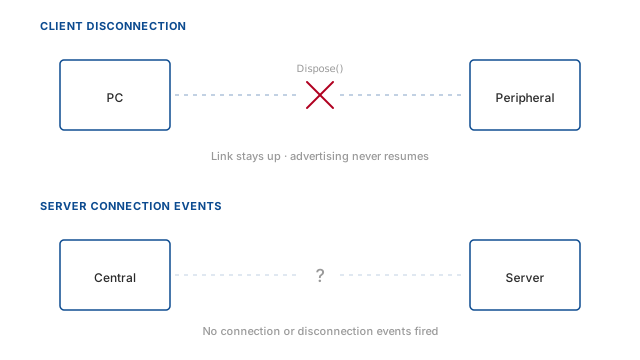
Client disconnection problem
The root of the disconnect problem lies in the architecture of the UWP Bluetooth API. When you connect to a GATT peripheral using
BluetoothLEDevice, the system manages the connection internally. The API provides only a Dispose or
Close method on the device object, but these merely release local resources — they do not force the radio to terminate the
link. Microsoft's intention was for the system to handle connection lifetime automatically, but in practice the peripheral can remain
bound until a system-wide timeout or a power cycle.
This causes severe issues. A device that stays connected invisibly will drain its battery, refuse new connections, and remain undiscoverable because advertising has stopped. Developers often resort to unpairing the device or restarting the Bluetooth adapter, which is unacceptable for a polished application.
When the GATT client finishes its work with a peripheral, disconnection is critical. Most peripheral devices will not accept any new connections while there is an active one. Peripheral devices usually stop advertising when any connection exists. So neither your application nor any other is able to find the peripheral, because the WinRT API did not close the connection. You need to close the application and start again to release the device — and even that may not work if the device is paired, since the system can keep the device connected and require unpairing.
Server connection blindness
On the server side, the UWP GattServiceProvider allows you to create a GATT service and advertise it, but it exposes no
connection-oriented events. The only way to infer that a client is present is to wait for characteristic subscriptions or read/write
requests. This means you cannot perform a handshake or initialization when a central device first connects; you must lazily prepare data
on first access, which complicates state management.
Moreover, when the client disconnects, you receive no notification at all. Your application cannot reclaim resources, reset internal state, or log the disconnection. If a client crashes or moves out of range, your server remains unaware, potentially serving stale data to a ghost connection.
If your application is a GATT server, you need to know when a remote client is connected to and disconnected from your server. There are many reasons — preparing data, initializing internal state, cleaning up on departure. The standard Microsoft UWP GATT API provides no events to notify your application about a remote client's connection state. You cannot even know when a client has disconnected in order to do a cleanup.
How Bluetooth Framework fixes it
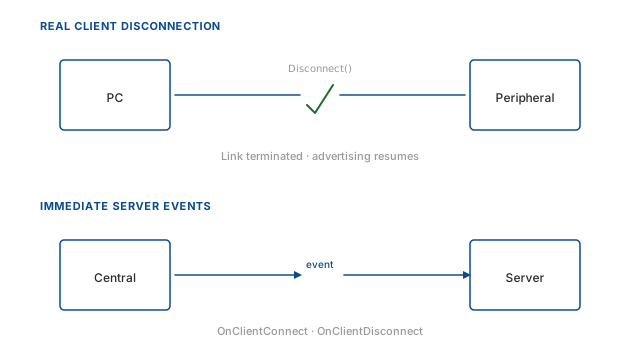
Real disconnection
When an application connected to a remote GATT-enabled device finishes communication and needs to disconnect, the Bluetooth Framework executes a real disconnection immediately. The link is terminated at the radio level, and the peripheral is released. It can be discovered and connected again without delay, without unpairing, and without restarting anything.
The Bluetooth Framework also detects when a remote GATT server terminates the connection from its side,
for any reason — including power-off. The application receives an OnDisconnect event with the actual reason code, so it can react
immediately rather than waiting for a system timeout.
To see this feature in action, use the GattClient sample application included in the
Bluetooth Framework package.
Server-side events
The Bluetooth Framework performs real client connection detection. The library detects when a client connects to the server without needing to subscribe, read, or write a characteristic. A notification is delivered to your application immediately when a client connects and when it disconnects.
Each connected client is represented by a wclGattServerClient object that carries the client's Bluetooth address and per-client
state. The server can also force-disconnect a misbehaving client — something the standard UWP provider cannot do.
To see this unique feature, use the GattServer sample application from the
Bluetooth Framework package. It demonstrates connection events, client enumeration, and forced
disconnection.
How it works under the hood
For client disconnection, the library uses a combination of lower-level Windows Bluetooth interfaces and smart resource management to terminate the link at the radio level. This guarantees that the peripheral is immediately released, resumes advertising, and accepts new connections without delay. The disconnect operation is synchronous and verifies that the physical link is torn down before returning control to your application.
For GATT server connection detection, the Bluetooth Framework integrates with the native Bluetooth LE
stack beneath the UWP layer. It listens to connection and disconnection events from the Bluetooth radio itself, correlating them with the
local GATT service. This allows it to fire OnClientConnect and OnClientDisconnect events the moment a link is
established or dropped, without waiting for any characteristic interaction. Your application receives the client's Bluetooth address and
can immediately begin session-specific initialization, and you get a reliable disconnection notification even if the remote device powers
off abruptly.
Frequently asked questions
- Why can't I disconnect from a GATT peripheral using the standard UWP API?
- The Microsoft UWP GATT API does not provide a
Disconnectmethod.Disposeonly releases local resources, so the peripheral may remain connected even after closing your application. The Bluetooth Framework provides a real disconnection that terminates the radio link. - How can my GATT server detect client connections and disconnections?
- The Bluetooth Framework adds
OnClientConnectandOnClientDisconnectevents to the GATT server, allowing immediate notification when a client connects or disconnects without waiting for characteristic operations. - Does the Bluetooth Framework help with UWP GATT connection management?
- Yes. It solves the two main UWP GATT problems: missing disconnect functionality for the client, and the absence of client connection state events for the server.