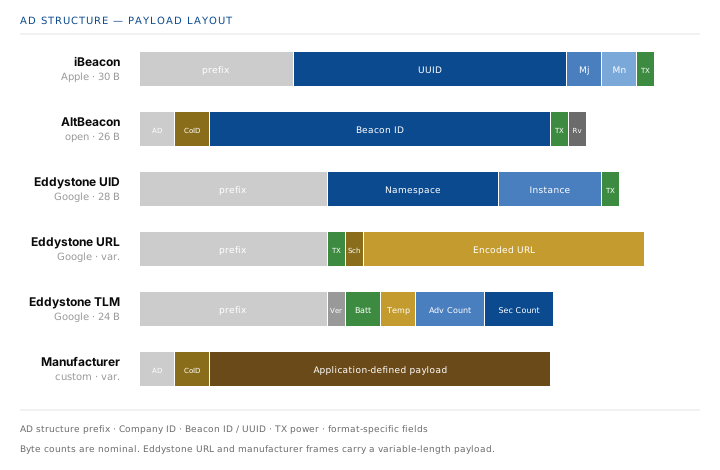
Every Bluetooth LE beacon is, at the radio level, exactly the same thing: an advertising packet broadcast at regular intervals. What makes iBeacon different from Eddystone or from a manufacturer-specific frame is only the content of the AD structure inside that packet. The format is a convention, not a technology.
That convention matters because it defines what a receiver can do with the payload. A shared format means every receiver knows how to decode the fields — a UUID, a URL, a battery level — without any prior coordination. A proprietary format means the receiver must be told what to expect, but in return it can carry arbitrary structured data.
The Bluetooth Framework implements native support for the most common formats on both sides — creation and parsing — and additionally exposes a raw byte-level interface for anything the standard formats do not cover. This article walks through each of them in turn, then compares them, then shows how to transmit and receive them.
What a beacon really is
Underneath the branding, a beacon is an advertising packet. BLE devices broadcast these packets on channels 37, 38, and 39 at a configurable interval — usually between 100 ms and 1 s for beacon use cases. Any device in radio range can receive the packet without pairing, without connecting, and without any prior knowledge of the transmitter.
The packet itself is a sequence of AD structures. Each structure is a length byte, a type byte, and a payload. The type byte tells the receiver how to interpret the payload — 0x01 for flags, 0x09 for the complete local name, 0xFF for manufacturer-specific data, and so on. Beacon formats are conventions for what that payload contains.
Because the payload is limited, a legacy advertisement packet carries at most 31 bytes. Beacon formats are designed to fit inside that limit, which is why iBeacon uses a 16-byte UUID plus two 16-bit numbers, and why Eddystone URL uses a compressed URL encoding. Extended Advertising lifts that ceiling but is only available on Bluetooth 5 hardware.
Beacon formats
Six formats are widely deployed today. They are not mutually exclusive — a single radio can transmit several of them simultaneously — and each was designed for a specific set of priorities.
iBeacon
Apple's iBeacon is the oldest and the most widely deployed format. It carries three identifiers and a transmitter power reference:
- UUID — a 128-bit identifier that represents the beacon operator or the deployment.
- Major — a 16-bit number that groups beacons inside a deployment, for example one per building.
- Minor — a 16-bit number that identifies the individual beacon, for example one per room.
- TX Power — a signed byte with the measured RSSI at one metre from the beacon. Receivers use it to estimate distance.
The identifiers are fixed and meaningless to the transmitter — an iBeacon just broadcasts them. It is up to the receiving application to map a UUID/Major/Minor triplet to an actual meaning, typically by querying a backend. This is deliberate: the beacon operator can change what a beacon means without touching the hardware.
AltBeacon
AltBeacon was created by Radius Networks as an openly licensed alternative to iBeacon. The format is structurally similar — a beacon ID followed by a reference RSSI — but is explicitly not tied to any vendor's ecosystem and does not require a licence to use.
The beacon ID is 20 bytes instead of iBeacon's 20-byte equivalent (16+2+2). It is usually interpreted as UUID + Major + Minor, matching iBeacon in practice, but the specification does not require that interpretation. A manufacturer ID and a reserved byte complete the payload. AltBeacon's main advantage is legal: it can be deployed without any concern about Apple's licensing terms for iBeacon.
Eddystone UID
Google's Eddystone is not a single format but a family of four. The UID frame is the closest analogue to iBeacon. It carries a 10-byte Namespace and a 6-byte Instance, plus a transmitter power reference byte. Both identifiers are application-defined and are normally mapped to a meaning through a backend service.
Compared to iBeacon, Eddystone UID is more compact: 17 bytes of payload versus iBeacon's 21. This leaves more room in the packet for other AD structures, which matters when a device wants to broadcast more than one thing at once.
Eddystone URL
Eddystone URL is the format that made physical web experiments practical. Instead of an opaque identifier, the payload contains an actual URL, compressed to fit inside a 31-byte packet. A URL like https://www.btframework.com fits into roughly 12 bytes of payload after compression.
The compression scheme uses a one-byte scheme prefix (0x00 for http://www., 0x01 for https://www., 0x02 for http://, 0x03 for https://) and a table of one-byte substitutions for common top-level domains. Receivers reverse the encoding and present the URL to the user. The Bluetooth Framework returns the fully decoded URL string directly.
Eddystone TLM
Eddystone TLM is not a beacon format in the usual sense — it does not carry an identifier, and it is not meant to be scanned by end-user applications. It carries telemetry about the transmitter itself:
- Battery voltage — a 16-bit value in millivolts.
- Temperature — a signed 16-bit value in units of 1/256 °C.
- Advertisement count — a 32-bit counter of advertisements sent since boot.
- Seconds since boot — a 32-bit counter that allows the receiver to compute a rough estimate of how long the beacon has been running.
TLM frames are usually interleaved with UID or URL frames on the same beacon — for example, every tenth advertisement is a TLM frame and the rest are UID frames. This is how operators monitor a deployed fleet without visiting the physical devices.
Microsoft CDP
The Microsoft Connected Devices Platform (CDP) uses BLE advertisements for proximity-based features like Near Share. The advertisement carries a scenario type, a device type, a hash derived from the current user's identity, a salt value, and several status bits. The protocol is not intended for third-party use as a beacon format, but the Bluetooth Framework can decode it because it appears in the wild whenever Windows devices are nearby.
Applications that decode CDP frames typically use them for presence detection — distinguishing an Android phone from an iPhone from a Windows laptop without any cooperation from the user — rather than for beacon-style identification.
Custom and manufacturer-specific frames
Standard beacon formats cover the common cases, but they impose structure. When an application needs to broadcast something that does not fit iBeacon or Eddystone — a proprietary telemetry payload, a device-specific state machine, or a proprietary protocol that predates the framework — the raw advertisement interface takes over.
There are two distinct ways to broadcast a custom payload, and the difference matters.
Manufacturer-specific data
Manufacturer-specific data is a standard BLE concept. Its AD type is 0xFF, and its payload always begins with a 16-bit Company Identifier assigned by the Bluetooth SIG. The rest of the payload is defined by the company that owns the identifier. Any receiver that sees this advertisement knows immediately which vendor's convention applies.
The wclBluetoothLeManufacturerAdvertisement class models this. It takes a company identifier and a byte array:
if cbAdvertiserManufacturer.Checked then begin
  Data := nil;
  SetLength(Data, 2);
  Data[0] := $12;
  Data[1] := $34;
  Adv := TwclBluetoothLeManufacturerAdvertisement.Create($010E, Data);
  AddAdvertisement(Adv);
end;
// Create and add manufacturer specific advertisement.
if (cbAdvertiserManufacturer.GetCheck())
{
Data.resize(2);
Data[0] = 0x12;
Data[1] = 0x34;
Adv = new CwclBluetoothLeManufacturerAdvertisement(0x010E, Data);
AddAdvertisement(Adv);
}if (cbAdvertiserManufacturer.Checked)
{
Data = new Byte[2];
Data[0] = 0x12;
Data[1] = 0x34;
Adv = new wclBluetoothLeManufacturerAdvertisement(0x010E, Data);
AddAdvertisement(Adv);
}If cbAdvertiserManufacturer.Checked Then
ReDim Data(2)
Data(0) = &H12
Data(1) = &H34
Adv = New wclBluetoothLeManufacturerAdvertisement(&H10E, Data)
AddAdvertisement(Adv)
End If// Create and add manufacturer specific advertisement.
if (cbAdvertiserManufacturer.GetCheck())
{
Data.resize(2);
Data[0] = 0x12;
Data[1] = 0x34;
Adv = new CwclBluetoothLeManufacturerAdvertisement(0x010E, Data);
AddAdvertisement(Adv);
}The 0x010E in the example is a placeholder company identifier. Real deployments use the identifier assigned to their organisation by the Bluetooth SIG. Any value in the range that is not assigned to another company is technically allowed but will confuse receivers that expect the format to follow a known convention.
Fully custom raw frame
A raw advertisement goes further. It does not assume any AD type, any company identifier, and any payload structure. The application supplies the complete byte sequence, including the length byte and the AD type byte of each structure. The wclBluetoothLeRawAdvertisement class is the escape hatch for anything that does not fit a defined format:
if cbAdvertiserCustom.Checked then begin
  Data := nil;
  SetLength(Data, 20);

  // 16 bit Service Data
  Data[0] := $09;                            // Length.
  Data[1] := LE_GAP_AD_TYPE_SERVICE_DATA_16; // Data type.
  Data[2] := $12;                            // 16 UUID LO BYTE
  Data[3] := $34;                            // 16 UUID HI BYTE
  Data[4] := $FF;                            // Data 1st byte
  Data[5] := $FE;                            // Data 2st byte
  Data[6] := $FD;                            // Data 3st byte
  Data[7] := $FC;                            // Data 4st byte
  Data[8] := $FB;                            // Data 5st byte
  Data[9] := $FA;                            // Data 6st byte
  // Manufacturer specific data.
  Data[10] := $09;                           // Length.
  Data[11] := LE_GAP_AD_TYPE_MANUFACTURER;   // Data type.
  Data[12] := $10;                           // Company ID.
  Data[13] := $12;                           // Company ID.
  Data[14] := $01;                           // Data 1st byte
  Data[15] := $02;                           // Data 2st byte
  Data[16] := $03;                           // Data 3st byte
  Data[17] := $04;                           // Data 4st byte
  Data[18] := $05;                           // Data 5st byte
  Data[19] := $06;                           // Data 6st byte

  Adv := TwclBluetoothLeRawAdvertisement.Create(Data);
  AddAdvertisement(Adv);
end;
if (cbAdvertiserCustom.GetCheck())
{
Data.resize(20);
// 16 bit Service Data
Data[0] = 0x09; // Length.
Data[1] = LE_GAP_AD_TYPE_SERVICE_DATA_16; // Data type.
Data[2] = 0x12; // 16 UUID LO BYTE
Data[3] = 0x34; // 16 UUID HI BYTE
Data[4] = 0xFF; // Data 1st byte
Data[5] = 0xFE; // Data 2st byte
Data[6] = 0xFD; // Data 3st byte
Data[7] = 0xFC; // Data 4st byte
Data[8] = 0xFB; // Data 5st byte
Data[9] = 0xFA; // Data 6st byte
// Manufacturer specific data.
Data[10] = 0x09; // Length.
Data[11] = LE_GAP_AD_TYPE_MANUFACTURER; // Data type.
Data[12] = 0x10; // Company ID.
Data[13] = 0x12; // Company ID.
Data[14] = 0x01; // Data 1st byte
Data[15] = 0x02; // Data 2st byte
Data[16] = 0x03; // Data 3st byte
Data[17] = 0x04; // Data 4st byte
Data[18] = 0x05; // Data 5st byte
Data[19] = 0x06; // Data 6st byte
Adv = new CwclBluetoothLeRawAdvertisement(Data);
AddAdvertisement(Adv);
}if (cbAdvertiserCustom.Checked)
{
Data = new Byte[20];
// 16 bit Service Data
Data[0] = 0x09; // Length.
Data[1] = wclUUIDs.LE_GAP_AD_TYPE_SERVICE_DATA_16; // Data type.
Data[2] = 0x12; // 16 UUID LO BYTE
Data[3] = 0x34; // 16 UUID HI BYTE
Data[4] = 0xFF; // Data 1st byte
Data[5] = 0xFE; // Data 2st byte
Data[6] = 0xFD; // Data 3st byte
Data[7] = 0xFC; // Data 4st byte
Data[8] = 0xFB; // Data 5st byte
Data[9] = 0xFA; // Data 6st byte
// Manufacturer specific data.
Data[10] = 0x09; // Length.
Data[11] = wclUUIDs.LE_GAP_AD_TYPE_MANUFACTURER; // Data type.
Data[12] = 0x10; // Company ID.
Data[13] = 0x12; // Company ID.
Data[14] = 0x01; // Data 1st byte
Data[15] = 0x02; // Data 2st byte
Data[16] = 0x03; // Data 3st byte
Data[17] = 0x04; // Data 4st byte
Data[18] = 0x05; // Data 5st byte
Data[19] = 0x06; // Data 6st byte
Adv = new wclBluetoothLeRawAdvertisement(Data);
AddAdvertisement(Adv);
}If cbAdvertiserCustom.Checked Then
ReDim Data(20)
' 16 bit Service Data
Data(0) = &H9 ' Length.
Data(1) = wclUUIDs.LE_GAP_AD_TYPE_SERVICE_DATA_16 ' Data type.
Data(2) = &H12 ' 16 UUID LO BYTE
Data(3) = &H34 ' 16 UUID HI BYTE
Data(4) = &HFF ' Data 1st byte
Data(5) = &HFE ' Data 2st byte
Data(6) = &HFD ' Data 3st byte
Data(7) = &HFC ' Data 4st byte
Data(8) = &HFB ' Data 5st byte
Data(9) = &HFA ' Data 6st byte
' Manufacturer specific data.
Data(10) = &H9 ' Length.
Data(11) = wclUUIDs.LE_GAP_AD_TYPE_MANUFACTURER ' Data type.
Data(12) = &H10 ' Company ID.
Data(13) = &H12 ' Company ID.
Data(14) = &H1 ' Data 1st byte
Data(15) = &H2 ' Data 2st byte
Data(16) = &H3 ' Data 3st byte
Data(17) = &H4 ' Data 4st byte
Data(18) = &H5 ' Data 5st byte
Data(19) = &H6 ' Data 6st byte
Adv = New wclBluetoothLeRawAdvertisement(Data)
AddAdvertisement(Adv)
End Ifif (cbAdvertiserCustom.GetCheck())
{
Data.resize(20);
// 16 bit Service Data
Data[0] = 0x09; // Length.
Data[1] = LE_GAP_AD_TYPE_SERVICE_DATA_16; // Data type.
Data[2] = 0x12; // 16 UUID LO BYTE
Data[3] = 0x34; // 16 UUID HI BYTE
Data[4] = 0xFF; // Data 1st byte
Data[5] = 0xFE; // Data 2st byte
Data[6] = 0xFD; // Data 3st byte
Data[7] = 0xFC; // Data 4st byte
Data[8] = 0xFB; // Data 5st byte
Data[9] = 0xFA; // Data 6st byte
// Manufacturer specific data.
Data[10] = 0x09; // Length.
Data[11] = LE_GAP_AD_TYPE_MANUFACTURER; // Data type.
Data[12] = 0x10; // Company ID.
Data[13] = 0x12; // Company ID.
Data[14] = 0x01; // Data 1st byte
Data[15] = 0x02; // Data 2st byte
Data[16] = 0x03; // Data 3st byte
Data[17] = 0x04; // Data 4st byte
Data[18] = 0x05; // Data 5st byte
Data[19] = 0x06; // Data 6st byte
Adv = new CwclBluetoothLeRawAdvertisement(Data);
AddAdvertisement(Adv);
}The example constructs two standard AD structures packed into a single byte array: a 16-bit Service Data structure and a Manufacturer-specific Data structure. The framework sends the bytes verbatim. The receiver sees exactly what the application wrote — nothing is added, nothing is interpreted.
This is the most powerful option and also the most dangerous one. A raw frame bypasses every check the framework would normally perform on the payload structure. If the length byte does not match the actual data length, the packet will be malformed, and receivers will either reject it or misparse it. A raw frame is a tool for applications that have a fully specified wire format, not for general use.
When to use which
- Manufacturer-specific data — the payload is application-defined, but it lives inside a well-defined AD structure with a company identifier. Receivers know where to find it and who it belongs to.
- Raw frame — the application needs full control over the entire byte sequence, including multiple AD structures or non-standard AD types.
- Standard beacon format — the payload matches an existing convention (iBeacon, Eddystone, AltBeacon) and interoperability with a wider ecosystem is the goal.
Comparison table
| Format | Payload | Carries | Licence | Best for |
|---|---|---|---|---|
| iBeacon | ~30 B | UUID + Major + Minor + TX | Apple (royalty-free in practice) | Widest compatibility, iOS-first deployments |
| AltBeacon | ~26 B | Beacon ID + Ref RSSI + Manufacturer ID | Open | Open-spec deployments, iBeacon alternative |
| Eddystone UID | ~28 B | Namespace + Instance + TX | Open | Compact identifier, cross-platform |
| Eddystone URL | variable | Encoded URL + TX | Open | Direct web-link broadcast, no app required |
| Eddystone TLM | ~24 B | Battery + Temperature + Counters | Open | Remote fleet monitoring, interleaved with UID/URL |
| Microsoft CDP | variable | Scenario, device type, hash, salt | Microsoft | Presence detection of Windows / Apple / Android devices |
| Manufacturer data | variable | Company ID + application payload | Proprietary | Proprietary protocols with a registered company ID |
| Raw frame | variable | Fully application-defined AD structures | N/A | Fully custom wire formats, non-standard AD types |
Choosing a format
The right format depends on what the receiver is expected to do with the advertisement, and who else has to understand it.
- If the receiver is a native mobile app you wrote — any of the standard formats will work. Pick the one that carries the fields you need. Eddystone UID is the most compact. iBeacon is the most familiar to mobile developers.
- If the receiver is a web browser or an operating system feature — Eddystone URL is the only format that produces a clickable link without a dedicated application on the receiving device. This is its entire reason to exist.
- If the deployment has many beacons that need remote monitoring — Eddystone UID or URL interleaved with Eddystone TLM. The TLM frames give you battery and uptime without visiting the devices.
- If the format is a contract with a third party — use the format that the third party expects, even if it is less compact or older. Interoperability beats elegance.
- If the payload does not fit any existing convention — manufacturer-specific data, or a raw frame if even the AD type must be under your control.
It is also worth remembering that a single radio can transmit several formats at once. Nothing prevents a device from broadcasting iBeacon to legacy scanners, Eddystone URL to browsers, and a manufacturer-specific payload to a proprietary fleet-management tool, all in the same advertising interval. The Combining formats section below shows how.
Transmitting beacons
All beacon transmission goes through the wclBluetoothLeAdvertiser class. The workflow is always the same three steps: clear any previous content with Clear, add one or more advertisement objects with Add, then call Start with a working radio.
Standard beacon classes
Each standard format has a dedicated class. The Beacons sample creates all of them in a single advertising session, gated by user-selected checkboxes:
const
  BEACON_UUID: TGUID = '{09039835-4A80-443B-87AA-DC565D09EA61}';

begin
  Radio := GetRadio;
  if Radio <> nil then begin
    LeAdvertiser.Clear;

    // iBeacon.
    if cbAdvertiserBeacon.Checked then begin
      Adv := TwclBluetoothLeiBeaconAdvertisement.Create(-5, $0101, $0202,
        BEACON_UUID);
      AddAdvertisement(Adv);
    end;

    // AltBeacon.
    if cbAdvertiserAltBeacon.Checked then begin
      Adv := TwclBluetoothLeAltBeaconAdvertisement.Create(-5, $0101, $0202,
        BEACON_UUID, $FFFE, $11);
      AddAdvertisement(Adv);
    end;

    // Eddystone UID.
    if cbAdvertiserEddystoneUid.Checked then begin
      Adv := TwclBluetoothLeEddystoneUidBeaconAdvertisement.Create(-5,
        BEACON_UUID);
      AddAdvertisement(Adv);
    end;

    // Eddystone URL.
    if cbAdvertiserEddystoneUrl.Checked then begin
      Adv := TwclBluetoothLeEddystoneUrlBeaconAdvertisement.Create(-5,
        'https://www.btframework.com');
      AddAdvertisement(Adv);
    end;

    if LeAdvertiser.Count = 0 then
      ShowMessage('Select at least one advertisement type.')
    else begin
      LeAdvertiser.Interval := StrToInt(edAdvertiserInterval.Text);
      Res := LeAdvertiser.Start(Radio);
      if Res <> WCL_E_SUCCESS then
        Trace('Start advertiser', Res);
    end;
  end;
end;
static const GUID BEACON_UUID = {
0x09039835, 0x4A80, 0x443B,
{ 0x87, 0xAA, 0xDC, 0x56, 0x5D, 0x09, 0xEA, 0x61 }
};
CwclBluetoothRadio* Radio = GetRadio();
if (Radio != NULL)
{
LeAdvertiser.Clear();
CwclBluetoothLeAdvertisement* Adv;
// Create and add iBeacon advertisement.
if (cbAdvertiserBeacon.GetCheck())
{
Adv = new CwclBluetoothLeiBeaconAdvertisement(-5, 0x0101, 0x0202,
BEACON_UUID);
AddAdvertisement(Adv);
}
// Create and add Alt Beacon advertisement.
if (cbAdvertiserAltBeacon.GetCheck())
{
Adv = new CwclBluetoothLeAltBeaconAdvertisement(-5, 0x0101, 0x0202,
BEACON_UUID, 0xFFFE, 0x11);
AddAdvertisement(Adv);
}
// Create and add Eddystone UID advertisement.
if (cbAdvertiserEddystoneUid.GetCheck())
{
Adv = new CwclBluetoothLeEddystoneUidBeaconAdvertisement(-5,
BEACON_UUID);
AddAdvertisement(Adv);
}
// Create and add Eddystone URL.
if (cbAdvertiserEddystoneUrl.GetCheck())
{
Adv = new CwclBluetoothLeEddystoneUrlBeaconAdvertisement(-5,
_T("https://www.btframework.com"));
AddAdvertisement(Adv);
}
if (LeAdvertiser.Count == 0)
AfxMessageBox(_T("Select at least one advertisement type."));
else
{
CString s;
edAdvertiserInterval.GetWindowText(s);
LeAdvertiser.Interval = LOWORD(_ttoi(s.GetBuffer()));
int Res = LeAdvertiser.Start(Radio);
if (Res != WCL_E_SUCCESS)
Trace(_T("Start advertiser"), Res);
}
}Guid BEACON_UUID = new Guid("{09039835-4A80-443B-87AA-DC565D09EA61}");
wclBluetoothRadio Radio = GetRadio();
if (Radio != null)
{
LeAdvertiser.Clear();
wclBluetoothLeAdvertisement Adv;
if (cbAdvertiserBeacon.Checked)
{
Adv = new wclBluetoothLeiBeaconAdvertisement(-5, 0x0101, 0x0202, BEACON_UUID);
AddAdvertisement(Adv);
}
if (cbAdvertiserAltBeacon.Checked)
{
Adv = new wclBluetoothLeAltBeaconAdvertisement(-5, 0x0101, 0x0202,
BEACON_UUID, 0xFFFE, 0x11);
AddAdvertisement(Adv);
}
if (cbAdvertiserEddystoneUid.Checked)
{
Adv = new wclBluetoothLeEddystoneUidBeaconAdvertisement(-5, BEACON_UUID);
AddAdvertisement(Adv);
}
if (cbAdvertiserEddystoneUrl.Checked)
{
Adv = new wclBluetoothLeEddystoneUrlBeaconAdvertisement(-5, "https://www.btframework.com");
AddAdvertisement(Adv);
}
if (LeAdvertiser.Count == 0)
MessageBox.Show("Select at least one advertisement type.");
else
{
LeAdvertiser.Interval = Convert.ToUInt16(edAdvertiserInterval.Text);
Int32 Res = LeAdvertiser.Start(Radio);
if (Res != wclErrors.WCL_E_SUCCESS)
Trace("Start advertiser", Res);
}
}Dim BEACON_UUID As Guid = New Guid("{09039835-4A80-443B-87AA-DC565D09EA61}")
Dim Radio As wclBluetoothRadio = GetRadio()
If Radio IsNot Nothing Then
LeAdvertiser.Clear()
Dim Adv As wclBluetoothLeAdvertisement
If cbAdvertiserBeacon.Checked Then
Adv = New wclBluetoothLeiBeaconAdvertisement(-5, &H101, &H202, BEACON_UUID)
AddAdvertisement(Adv)
End If
If cbAdvertiserAltBeacon.Checked Then
Adv = New wclBluetoothLeAltBeaconAdvertisement(-5, &H101, &H202,
BEACON_UUID, &HFFFE, &H11)
AddAdvertisement(Adv)
End If
If cbAdvertiserEddystoneUid.Checked Then
Adv = New wclBluetoothLeEddystoneUidBeaconAdvertisement(-5, BEACON_UUID)
AddAdvertisement(Adv)
End If
If cbAdvertiserEddystoneUrl.Checked Then
Adv = New wclBluetoothLeEddystoneUrlBeaconAdvertisement(-5, "https://www.btframework.com")
AddAdvertisement(Adv)
End If
If LeAdvertiser.Count = 0 Then
MessageBox.Show("Select at least one advertisement type.")
Else
LeAdvertiser.Interval = Convert.ToUInt16(edAdvertiserInterval.Text)
Dim Res As Int32 = LeAdvertiser.Start(Radio)
If Res <> wclErrors.WCL_E_SUCCESS Then Trace("Start advertiser", Res)
End If
End Ifstatic const GUID BEACON_UUID = {
0x09039835, 0x4A80, 0x443B,
{ 0x87, 0xAA, 0xDC, 0x56, 0x5D, 0x09, 0xEA, 0x61 }
};
CwclBluetoothRadio* Radio = GetRadio();
if (Radio != NULL)
{
LeAdvertiser.Clear();
CwclBluetoothLeAdvertisement* Adv;
if (cbAdvertiserBeacon.GetCheck())
{
Adv = new CwclBluetoothLeiBeaconAdvertisement(-5, 0x0101, 0x0202, BEACON_UUID);
AddAdvertisement(Adv);
}
if (cbAdvertiserAltBeacon.GetCheck())
{
Adv = new CwclBluetoothLeAltBeaconAdvertisement(-5, 0x0101, 0x0202,
BEACON_UUID, 0xFFFE, 0x11);
AddAdvertisement(Adv);
}
if (cbAdvertiserEddystoneUid.GetCheck())
{
Adv = new CwclBluetoothLeEddystoneUidBeaconAdvertisement(-5, BEACON_UUID);
AddAdvertisement(Adv);
}
if (cbAdvertiserEddystoneUrl.GetCheck())
{
Adv = new CwclBluetoothLeEddystoneUrlBeaconAdvertisement(-5,
_T("https://www.btframework.com"));
AddAdvertisement(Adv);
}
if (LeAdvertiser.Count == 0)
AfxMessageBox(_T("Select at least one advertisement type."));
else
{
CString s;
edAdvertiserInterval.GetWindowText(s);
LeAdvertiser.Interval = LOWORD(_ttoi(s.GetBuffer()));
int Res = LeAdvertiser.Start(Radio);
if (Res != WCL_E_SUCCESS)
Trace(_T("Start advertiser"), Res);
}
}Manufacturer and raw frames
The manufacturer-specific and raw classes take byte arrays instead of structured identifiers. They are shown in the Custom and manufacturer-specific frames section above. The same three-step pattern applies: create, add, start.
For the wclBluetoothLeProximityBeaconAdvertisement class (which is also supported by the advertiser), the constructor additionally takes the company identifier and follows the same pattern:
if cbAdvertiserProximityBeacon.Checked then begin
  Adv := TwclBluetoothLeProximityBeaconAdvertisement.Create(-5, $0101,
    $0202, BEACON_UUID, $FFFE);
  AddAdvertisement(Adv);
end;
if (cbAdvertiserProximityBeacon.GetCheck())
{
Adv = new CwclBluetoothLeProximityBeaconAdvertisement(-5, 0x0101, 0x0202,
BEACON_UUID, 0xFFFE);
AddAdvertisement(Adv);
}if (cbAdvertiserProximityBeacon.Checked)
{
Adv = new wclBluetoothLeProximityBeaconAdvertisement(-5, 0x0101, 0x0202,
BEACON_UUID, 0xFFFE);
AddAdvertisement(Adv);
}If cbAdvertiserProximityBeacon.Checked Then
Adv = New wclBluetoothLeProximityBeaconAdvertisement(-5, &H101, &H202, BEACON_UUID, &HFFFE)
AddAdvertisement(Adv)
End Ifif (cbAdvertiserProximityBeacon.GetCheck())
{
Adv = new CwclBluetoothLeProximityBeaconAdvertisement(-5, 0x0101, 0x0202,
BEACON_UUID, 0xFFFE);
AddAdvertisement(Adv);
}Receiving and parsing
Reception is handled by the wclBluetoothLeBeaconWatcher class. Each supported format has its own event, and each event delivers a strongly-typed payload that is already decoded — the application does not need to parse raw bytes for the standard formats.
Events
The watcher exposes a distinct event per format. Registering them takes one line each in C++ Builder and one Handles clause per method in VB.NET. The complete set that maps to the beacon formats in this article is:
OnAppleiBeaconFrame— decoded iBeacon.OnAltBeaconFrame— decoded AltBeacon.OnEddystoneUidFrame— decoded Eddystone UID.OnEddystoneUrlFrame— decoded Eddystone URL, with the URL returned as a string.OnEddystoneTlmFrame— decoded Eddystone TLM.OnManufacturerRawFrame— any manufacturer-specific frame, delivered as company ID plus raw bytes.OnMicrosoftCdpBeaconFrame— decoded Microsoft CDP.OnAdvertisementRawFrame— any other AD structure, delivered as data type plus raw bytes.OnAdvertisementReceived— the entire advertisement, delivered as a single raw byte stream.
Each event handler is a thin wrapper that builds a frame object and stores it. The Beacons sample is representative:
// In FormCreate - the framework wires each event through the .dfm binding,
// but the handler signatures are declared on TfmMain. The important part is
// the shape of each handler - it just constructs a frame storage object.

procedure TfmMain.BeaconWatcherAltBeaconFrame(Sender: TObject;
  const Address: Int64; const Timestamp: Int64; const Rssi: SByte;
  const CompanyId: Word; const Major: Word; const Minor: Word;
  const Uuid: TGUID; const TxRssi: SByte; const Reserved: Byte;
  const Data: TwclBluetoothLeAdvertisementFrameRawData);
var
  Frame: TFrameStorage;
begin
  Frame := TAltBeaconFrame.Create(Address, Timestamp, Rssi, Data, Uuid,
    CompanyId, Major, Minor, TxRssi, Reserved);
  AddFrame(Frame);
end;
// In OnInitDialog:
__hook(&CwclBluetoothLeBeaconWatcher::OnAppleiBeaconFrame, &BeaconWatcher,
&CBeaconsDlg::BeaconWatcherAppleiBeaconFrame);
__hook(&CwclBluetoothLeBeaconWatcher::OnAltBeaconFrame, &BeaconWatcher,
&CBeaconsDlg::BeaconWatcherAltBeaconFrame);
__hook(&CwclBluetoothLeBeaconWatcher::OnEddystoneTlmFrame, &BeaconWatcher,
&CBeaconsDlg::BeaconWatcherEddystoneTlmFrame);
__hook(&CwclBluetoothLeBeaconWatcher::OnEddystoneUidFrame, &BeaconWatcher,
&CBeaconsDlg::BeaconWatcherEddystoneUidFrame);
__hook(&CwclBluetoothLeBeaconWatcher::OnEddystoneUrlFrame, &BeaconWatcher,
&CBeaconsDlg::BeaconWatcherEddystoneUrlFrame);
__hook(&CwclBluetoothLeBeaconWatcher::OnManufacturerRawFrame, &BeaconWatcher,
&CBeaconsDlg::BeaconWatcherManufacturerRawFrame);
__hook(&CwclBluetoothLeBeaconWatcher::OnMicrosoftCdpBeaconFrame, &BeaconWatcher,
&CBeaconsDlg::BeaconWatcherMicrosoftCdpBeaconFrame);
// Handler example:
void __fastcall TfmMain::BeaconWatcherAltBeaconFrame(TObject *Sender,
const __int64 Address, const __int64 Timestamp, const SByte Rssi,
const WORD CompanyId, const WORD Major, const WORD Minor,
const TGUID &Uuid, const SByte TxRssi, const BYTE Reserved,
const TwclBluetoothLeAdvertisementFrameRawData Data)
{
TFrameStorage* Frame = new TAltBeaconFrame(Address, Timestamp, Rssi,
Data, Uuid, CompanyId, Major, Minor, TxRssi, Reserved);
AddFrame(Frame);
}// In fmMainLoad:
BeaconWatcher.OnAppleiBeaconFrame += new wclBluetoothLeAppleiBeaconFrameEvent(BeaconWatcher_OnAppleiBeaconFrame);
BeaconWatcher.OnAltBeaconFrame += new wclBluetoothLeAltBeaconFrameEvent(BeaconWatcherAltBeaconFrame);
BeaconWatcher.OnEddystoneTlmFrame += new wclBluetoothLeEddystoneTlmFrameEvent(BeaconWatcherEddystoneTlmFrame);
BeaconWatcher.OnEddystoneUidFrame += new wclBluetoothLeEddystoneUidFrameEvent(BeaconWatcherEddystoneUidFrame);
BeaconWatcher.OnEddystoneUrlFrame += new wclBluetoothLeEddystoneUrlFrameEvent(BeaconWatcherEddystoneUrlFrame);
BeaconWatcher.OnManufacturerRawFrame += new wclBluetoothLeManufacturerRawFrameEvent(BeaconWatcherManufacturerRawFrame);
BeaconWatcher.OnMicrosoftCdpBeaconFrame += new wclBluetoothLeMicrosoftCdpBeaconFrameEvent(BeaconWatcherMicrosoftCdpBeaconFrame);
// Handler example:
void BeaconWatcherAltBeaconFrame(object Sender, long Address, long Timestamp, sbyte Rssi,
ushort CompanyId, ushort Major, ushort Minor, Guid Uuid, sbyte TxRssi, byte Reserved,
byte[] Data)
{
FrameStorage Frame = new AltBeaconFrame(Address, Timestamp, Rssi, Data, Uuid,
CompanyId, Major, Minor, TxRssi, Reserved);
AddFrame(Frame);
}' In fmMainLoad - VB.NET uses Handles clauses instead of explicit
' subscription. Each event handler carries a Handles clause:
Private Sub BeaconWatcherAltBeaconFrame(Sender As Object, Address As Long, Timestamp As Long,
Rssi As SByte, CompanyId As UShort, Major As UShort, Minor As UShort, Uuid As System.Guid,
TxRssi As SByte, Reserved As Byte, Data() As Byte) Handles BeaconWatcher.OnAltBeaconFrame
Dim Frame As FrameStorage = New AltBeaconFrame(Address, Timestamp, Rssi, Data, Uuid,
CompanyId, Major, Minor, TxRssi, Reserved)
AddFrame(Frame)
End Sub// In OnInitDialog:
__hook(&CwclBluetoothLeBeaconWatcher::OnAltBeaconFrame, &BeaconWatcher,
&CBeaconsDlg::BeaconWatcherAltBeaconFrame);
__hook(&CwclBluetoothLeBeaconWatcher::OnEddystoneTlmFrame, &BeaconWatcher,
&CBeaconsDlg::BeaconWatcherEddystoneTlmFrame);
__hook(&CwclBluetoothLeBeaconWatcher::OnEddystoneUidFrame, &BeaconWatcher,
&CBeaconsDlg::BeaconWatcherEddystoneUidFrame);
__hook(&CwclBluetoothLeBeaconWatcher::OnEddystoneUrlFrame, &BeaconWatcher,
&CBeaconsDlg::BeaconWatcherEddystoneUrlFrame);
__hook(&CwclBluetoothLeBeaconWatcher::OnManufacturerRawFrame, &BeaconWatcher,
&CBeaconsDlg::BeaconWatcherManufacturerRawFrame);
// Handler example:
void CBeaconsDlg::BeaconWatcherAltBeaconFrame(void* Sender, const __int64 Address,
const __int64 Timestamp, const char Rssi, const unsigned short CompanyId,
const unsigned short Major, const unsigned short Minor, const GUID& Uuid,
const char TxRssi, const unsigned char Reserved,
const wclBluetoothLeAdvertisementFrameRawData& Data)
{
UNREFERENCED_PARAMETER(Sender);
CAltBeaconFrame* Frame = new CAltBeaconFrame(Address, Timestamp, Rssi, Data, Uuid,
CompanyId, Major, Minor, TxRssi, Reserved);
AddFrame(Frame);
}Reading fields
Once the event has fired, the fields of each format can be read directly from the event parameters, or from the frame object that was stored. The Beacons sample uses the latter approach, and the code is instructive because it shows exactly what each format carries.
iBeacon
procedure TfmMain.ShowAppleiBeaconFrame(const Frame: TAppleiBeaconFrame);
begin
  ShowFrameBaseData(Frame);

  ShowData('UUID', GUIDToString(Frame.Data.Uuid));
  ShowData('Major', IntToHex(Frame.Data.Major, 4));
  ShowData('Minor', IntToHex(Frame.Data.Minor, 4));
  ShowData('TX RSSI', IntToStr(Frame.Data.TxRssi));
end;
void __fastcall TfmMain::ShowAppleiBeaconFrame(TAppleiBeaconFrame* const Frame)
{
ShowFrameBaseData(Frame);
ShowData("UUID", Sysutils::GUIDToString(Frame->Data.Uuid));
ShowData("Major", IntToHex(Frame->Data.Major, 4));
ShowData("Minor", IntToHex(Frame->Data.Minor, 4));
ShowData("TX RSSI", IntToStr(Frame->Data.TxRssi));
}private void ShowAppleiBeaconFrame(AppleiBeaconFrame Frame)
{
ShowFrameBaseData(Frame);
ShowData("UUID", Frame.Data.Uuid.ToString());
ShowData("Major", Frame.Data.Major.ToString("X4"));
ShowData("Minor", Frame.Data.Minor.ToString("X4"));
ShowData("TX RSSI", Frame.Data.TxRssi.ToString());
}Private Sub ShowAppleiBeaconFrame(Frame As AppleiBeaconFrame)
ShowFrameBaseData(Frame)
ShowData("UUID", Frame.Data.Uuid.ToString())
ShowData("Major", Frame.Data.Major.ToString("X4"))
ShowData("Minor", Frame.Data.Minor.ToString("X4"))
ShowData("TX RSSI", Frame.Data.TxRssi.ToString())
End Subvoid CBeaconsDlg::ShowAppleiBeaconFrame(CAppleiBeaconFrame* const Frame)
{
ShowFrameBaseData(Frame);
ShowData(_T("UUID"), GUIDToString(Frame->Data.Uuid));
ShowData(_T("Major"), IntToHex(Frame->Data.Major, 4));
ShowData(_T("Minor"), IntToHex(Frame->Data.Minor, 4));
ShowData(_T("TX RSSI"), IntToStr(Frame->Data.TxRssi));
}AltBeacon
procedure TfmMain.ShowAltBeaconFrame(const Frame: TAltBeaconFrame);
begin
  ShowFrameBaseData(Frame);

  ShowData('UUID', GUIDToString(Frame.Uuid));
  ShowData('CompanyId', IntToHex(Frame.CompanyId, 4));
  ShowData('Major', IntToHex(Frame.Major, 4));
  ShowData('Minor', IntToHex(Frame.Minor, 4));
  ShowData('TX RSSI', IntToStr(Frame.TxRssi));
  ShowData('Reserved', IntToHex(Frame.Reserved, 2));

  ShowFrameRawData(Frame.Data);
end;
void __fastcall TfmMain::ShowAltBeaconFrame(TAltBeaconFrame* const Frame)
{
ShowFrameBaseData(Frame);
ShowData("UUID", Sysutils::GUIDToString(Frame->Uuid));
ShowData("CompanyId", IntToHex(Frame->CompanyId, 4));
ShowData("Major", IntToHex(Frame->Major, 4));
ShowData("Minor", IntToHex(Frame->Minor, 4));
ShowData("TX RSSI", IntToStr(Frame->TxRssi));
ShowData("Reserved", IntToHex(Frame->Reserved, 2));
ShowFrameRawData(Frame->Data);
}private void ShowAltBeaconFrame(AltBeaconFrame Frame)
{
ShowFrameBaseData(Frame);
ShowData("UUID", Frame.Uuid.ToString());
ShowData("CompanyId", Frame.CompanyId.ToString("X4"));
ShowData("Major", Frame.Major.ToString("X4"));
ShowData("Minor", Frame.Minor.ToString("X4"));
ShowData("TX RSSI", Frame.TxRssi.ToString());
ShowData("Reserved", Frame.Reserved.ToString("X2"));
ShowFrameRawData(Frame.Data);
}Private Sub ShowAltBeaconFrame(Frame As AltBeaconFrame)
ShowFrameBaseData(Frame)
ShowData("UUID", Frame.Uuid.ToString())
ShowData("CompanyId", Frame.CompanyId.ToString("X4"))
ShowData("Major", Frame.Major.ToString("X4"))
ShowData("Minor", Frame.Minor.ToString("X4"))
ShowData("TX RSSI", Frame.TxRssi.ToString())
ShowData("Reserved", Frame.Reserved.ToString("X2"))
ShowFrameRawData(Frame.Data)
End Subvoid CBeaconsDlg::ShowAltBeaconFrame(CAltBeaconFrame* const Frame)
{
ShowFrameBaseData(Frame);
ShowData(_T("UUID"), GUIDToString(Frame->Uuid));
ShowData(_T("CompanyId"), IntToHex(Frame->CompanyId, 4));
ShowData(_T("Major"), IntToHex(Frame->Major, 4));
ShowData(_T("Minor"), IntToHex(Frame->Minor, 4));
ShowData(_T("TX RSSI"), IntToStr(Frame->TxRssi));
ShowData(_T("Reserved"), IntToHex(Frame->Reserved, 2));
ShowFrameRawData(Frame->Data);
}Eddystone UID
procedure TfmMain.ShowEddystoneUidFrame(const Frame: TEddystoneUidFrame);
begin
  ShowFrameBaseData(Frame);

  ShowData('UUID', GUIDToString(Frame.Uuid));
  ShowData('TX RSSI', IntToStr(Frame.TxRssi));

  ShowFrameRawData(Frame.Data);
end;
void __fastcall TfmMain::ShowEddystoneUidFrame(TEddystoneUidFrame* const Frame)
{
ShowFrameBaseData(Frame);
ShowData("UUID", Sysutils::GUIDToString(Frame->Uuid));
ShowData("TX RSSI", IntToStr(Frame->TxRssi));
ShowFrameRawData(Frame->Data);
}private void ShowEddystoneUidFrame(EddystoneUidFrame Frame)
{
ShowFrameBaseData(Frame);
ShowData("UUID", Frame.Uuid.ToString());
ShowData("TX RSSI", Frame.TxRssi.ToString());
ShowFrameRawData(Frame.Data);
}Private Sub ShowEddystoneUidFrame(Frame As EddystoneUidFrame)
ShowFrameBaseData(Frame)
ShowData("UUID", Frame.Uuid.ToString())
ShowData("TX RSSI", Frame.TxRssi.ToString())
ShowFrameRawData(Frame.Data)
End Subvoid CBeaconsDlg::ShowEddystoneUidFrame(CEddystoneUidFrame* const Frame)
{
ShowFrameBaseData(Frame);
ShowData(_T("UUID"), GUIDToString(Frame->Uuid));
ShowData(_T("TX RSSI"), IntToStr(Frame->TxRssi));
ShowFrameRawData(Frame->Data);
}Eddystone URL
procedure TfmMain.ShowEddystoneUrlFrame(const Frame: TEddystoneUrlFrame);
begin
  ShowFrameBaseData(Frame);

  ShowData('TX RSSI', IntToStr(Frame.TxRssi));
  ShowData('URL', Frame.Url);
end;
void __fastcall TfmMain::ShowEddystoneUrlFrame(TEddystoneUrlFrame* const Frame)
{
ShowFrameBaseData(Frame);
ShowData("TX RSSI", IntToStr(Frame->TxRssi));
ShowData("URL", Frame->Url);
}private void ShowEddystoneUrlFrame(EddystoneUrlFrame Frame)
{
ShowFrameBaseData(Frame);
ShowData("TX RSSI", Frame.TxRssi.ToString());
ShowData("URL", Frame.Url);
}Private Sub ShowEddystoneUrlFrame(Frame As EddystoneUrlFrame)
ShowFrameBaseData(Frame)
ShowData("TX RSSI", Frame.TxRssi.ToString())
ShowData("URL", Frame.Url)
End Subvoid CBeaconsDlg::ShowEddystoneUrlFrame(CEddystoneUrlFrame* const Frame)
{
ShowFrameBaseData(Frame);
ShowData(_T("TX RSSI"), IntToStr(Frame->TxRssi));
ShowData(_T("URL"), CString(Frame->Url.c_str()));
}Eddystone TLM
procedure TfmMain.ShowEddystoneTlmFrame(const Frame: TEddystoneTlmFrame);
begin
  ShowFrameBaseData(Frame);

  ShowData('Advertisements Counter', IntToStr(Frame.AdvCnt));
  ShowData('Battery status', IntToStr(Frame.Batt));
  ShowData('Seconds', IntToStr(Frame.SecCnt));
  ShowData('Temperature', FloatToStr(Frame.Temp));

  ShowFrameRawData(Frame.Data);
end;
void __fastcall TfmMain::ShowEddystoneTlmFrame(TEddystoneTlmFrame* const Frame)
{
ShowFrameBaseData(Frame);
ShowData("Advertisements Counter", IntToStr((int)Frame->AdvCnt));
ShowData("Battery status", IntToStr(Frame->Batt));
ShowData("Seconds", IntToStr((int)Frame->SecCnt));
ShowData("Temperature", FloatToStr(Frame->Temp));
ShowFrameRawData(Frame->Data);
}private void ShowEddystoneTlmFrame(EddystoneTlmFrame Frame)
{
ShowFrameBaseData(Frame);
ShowData("Advertisements Counter", Frame.AdvCnt.ToString());
ShowData("Battery status", Frame.Batt.ToString());
ShowData("Seconds", Frame.SecCnt.ToString());
ShowData("Temperature", Frame.Temp.ToString());
ShowFrameRawData(Frame.Data);
}Private Sub ShowEddystoneTlmFrame(Frame As EddystoneTlmFrame)
ShowFrameBaseData(Frame)
ShowData("Advertisements Counter", Frame.AdvCnt.ToString())
ShowData("Battery status", Frame.Batt.ToString())
ShowData("Seconds", Frame.SecCnt.ToString())
ShowData("Temperature", Frame.Temp.ToString())
ShowFrameRawData(Frame.Data)
End Subvoid CBeaconsDlg::ShowEddystoneTlmFrame(CEddystoneTlmFrame* const Frame)
{
ShowFrameBaseData(Frame);
ShowData(_T("Advertisements Counter"), IntToStr(Frame->AdvCnt));
ShowData(_T("Battery status"), IntToStr(Frame->Batt));
ShowData(_T("Seconds"), IntToStr(Frame->SecCnt));
ShowData(_T("Temperature"), FloatToStr(Frame->Temp));
ShowFrameRawData(Frame->Data);
}Manufacturer-specific data
Manufacturer-specific frames arrive through OnManufacturerRawFrame. The company identifier is already decoded and the payload is available as a raw byte array — the application decides how to interpret it.
procedure TfmMain.ShowManufacturerFrame(const Frame: TManufacturerFrame);
begin
  ShowFrameBaseData(Frame);

  ShowData('Company ID', IntToHex(Frame.CompanyId, 4));

  ShowFrameRawData(Frame.Data);
end;
void __fastcall TfmMain::ShowManufacturerFrame(TManufacturerFrame* const Frame)
{
ShowFrameBaseData(Frame);
ShowData("Company ID", IntToHex(Frame->CompanyId, 4));
ShowFrameRawData(Frame->Data);
}private void ShowManufacturerFrame(ManufacturerFrame Frame)
{
ShowFrameBaseData(Frame);
ShowData("Company ID", Frame.CompanyId.ToString("X4"));
ShowFrameRawData(Frame.Data);
}Private Sub ShowManufacturerFrame(Frame As ManufacturerFrame)
ShowFrameBaseData(Frame)
ShowData("Company ID", Frame.CompanyId.ToString("X4"))
ShowFrameRawData(Frame.Data)
End Subvoid CBeaconsDlg::ShowManufacturerFrame(CManufacturerFrame* const Frame)
{
ShowFrameBaseData(Frame);
ShowData(_T("Company ID"), IntToHex(Frame->CompanyId, 4));
ShowFrameRawData(Frame->Data);
}Two more events exist for frames that do not fit any of the standard classes. OnAdvertisementRawFrame delivers individual AD structures that the framework did not decode — it carries the data type byte and the raw payload. OnAdvertisementReceived delivers the complete advertisement as a single byte stream, including all AD structures, and is the escape hatch for applications that need the raw bytes end to end.
Combining formats
The most useful property of the advertiser is that it does not force a single format. A single radio can broadcast several advertisement objects in the same interval. This is exactly what the Beacons sample does — every checkbox that is ticked adds one more advertisement to the same advertiser.
Three practical combinations are common in the field:
- iBeacon + Eddystone URL — one payload for native iOS applications that already understand iBeacon, and a second payload for browsers and passive scanners that can present a link. Both audiences are served by one device.
- Eddystone UID + Eddystone TLM — the UID identifies the beacon, and the TLM frames report battery and uptime. Fleet managers can monitor the deployment without visiting each physical device.
- Manufacturer-specific + iBeacon — a proprietary protocol for the vendor's own tooling, broadcast alongside iBeacon so that generic beacon apps still see the device.
There is one caveat. Legacy advertising has a 31-byte limit for the whole packet, so if two formats are combined and the combined payload exceeds 31 bytes, the framework may not be able to include both. On Bluetooth 5 hardware the application can switch to extended advertising, which removes the size limit but requires the receiver to also support the extended format.
Troubleshooting
Advertisement does not fit in 31 bytes. Combining iBeacon with Eddystone URL or with a manufacturer-specific frame can easily exceed the legacy limit. On Bluetooth 5 hardware, enable extended advertising. On older hardware, reduce the number of formats or shorten the payload.
Manufacturer-specific frame is received but the company ID is not recognised. The receiver's parser does not know how to interpret that specific company identifier's convention. This is expected — the sender must either use a company identifier that the receiver already understands, or the receiver must be updated to add a parser for the new company.
Eddystone URL is delivered as raw bytes instead of a decoded string. Some framings — for example an Eddystone URL with a custom scheme byte — cannot be decoded as a URL, and the framework falls back to delivering the raw payload. Check that the URL uses one of the four standard scheme prefixes.
iBeacon TX power field seems wrong. The value is not measured. It is the declared transmit power at the antenna at one metre, as configured by the beacon manufacturer. Different hardware has different calibration accuracy. Receivers that use the field for distance estimation should treat it as approximate.
The raw frame is rejected by the driver. Raw frames must be well-formed AD structures — the length byte must match the actual payload length, and the AD type byte must be a value the driver allows. Driver restrictions are documented in Bluetooth LE Advertisement.
Frequently asked questions
- Which BLE beacon format should I use?
- Use iBeacon for the widest compatibility, Eddystone URL for direct web-link broadcasting, Eddystone TLM when you need remote telemetry, AltBeacon for an open specification, and manufacturer-specific frames when the payload is proprietary.
- Can a device transmit several beacon formats at once?
- Yes. The Bluetooth Framework's
wclBluetoothLeAdvertiserclass accepts multiple advertisement objects, so an application can broadcast iBeacon, Eddystone, and manufacturer-specific frames from the same radio in the same advertising interval. - What is the difference between manufacturer-specific data and a custom raw frame?
- Manufacturer-specific data uses the standard AD type
0xFFwith a registered company identifier, so the receiver already knows how to route the payload. A custom raw frame is a fully application-defined AD structure with no assumed meaning — the receiver must be told how to decode it. - Do I need a registered company identifier?
- Yes, for any real deployment. The Bluetooth SIG assigns 16-bit company identifiers to member organisations. Using an unassigned value is technically possible on the wire but will confuse receivers that expect the format to follow a known convention.