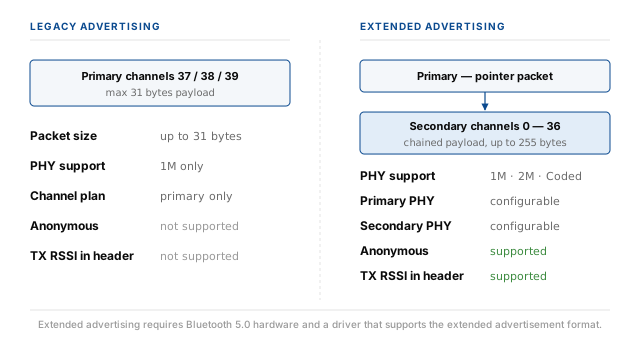
Legacy Bluetooth Low Energy advertising has a hard limit of 31 bytes of payload per packet and only ever
transmits on three channels — 37, 38, and 39 — using a single 1M PHY. That was enough for beacons,
device names, and small service UUIDs, but not enough for modern use cases that need to broadcast larger structured data, extended
range, or higher throughput.
Bluetooth 5.0 introduced Extended Advertising. It increases the maximum payload, separates the advertisement into a small primary packet and a set of secondary packets chained together, and lets the application choose the PHY independently on each role. It also adds two optional features that were previously impossible: broadcasting without a device address, and inserting the transmit power level directly into the advertisement header.
The Bluetooth Framework exposes extended advertising through a small set of properties on
wclBluetoothLeAdvertiser (for transmission) and a single dedicated event on wclBluetoothLeBeaconWatcher
(for reception). The result is that a fully-featured extended advertiser takes only a handful of property assignments to configure.
When to use it
Extended advertising is the right choice in four situations.
- The payload is larger than 31 bytes. Extended advertising allows the total payload to reach up to 255 bytes on the secondary channels. This is essential for broadcasting structured data — multi-field telemetry, large UUID sets, or chained manufacturer-specific frames.
- The physical range matters. The Coded PHY trades raw throughput for a longer, more robust radio link. This roughly doubles or quadruples the range compared to 1M PHY, at the cost of a lower symbol rate.
- The device must not expose its address. Anonymous mode hides the device address from the advertisement header, so passive observers cannot track the transmitter by its MAC address.
- Receivers need to know the transmit power. When the TX RSSI is included in the header, any receiver can compute the approximate path loss from its own RSSI reading and the declared transmit power, without prior knowledge of the transmitter's hardware.
Legacy vs extended
The two formats coexist and are not mutually exclusive. A Bluetooth 5 device can transmit both legacy and extended advertisements, sometimes in the same interval. The differences that matter to an application are:
| Property | Legacy Advertising | Extended Advertising |
|---|---|---|
| Maximum payload | 31 bytes | Up to 255 bytes, chained across secondary packets |
| Primary channels | 37, 38, 39 | 37, 38, 39 (still, for backward compatibility) |
| Secondary channels | Not used | 0 through 36 (the data channels) |
| PHY selection | 1M only | 1M, 2M, or Coded, on each role independently |
| Anonymous mode | Not supported | Device address can be omitted |
| TX RSSI in header | Not supported | Transmit power can be included |
| Minimum hardware | Bluetooth 4.0 | Bluetooth 5.0 |
From an application perspective, the choice is almost always driven by payload size first. If the payload fits in 31 bytes and there is no need for Coded PHY, anonymous mode, or TX RSSI, legacy advertising is simpler and remains compatible with every BLE device ever made. The moment the payload grows, or one of the optional features is required, extended advertising becomes the only option.
Primary and secondary PHY
The most visible structural change in extended advertising is the split between a primary PHY and a secondary PHY. They are configured separately and they play different roles in the transaction.
Primary PHY
The primary PHY carries the small advertisement packet on channels 37, 38, and 39. This packet
contains the flags, the address (if not anonymous), and — in extended mode — a pointer that tells the receiver where to find
the secondary packets. Because the primary packet must be receivable by legacy Bluetooth 4.2 devices and by any scanner that has not
been told about extended advertising, the primary PHY is usually kept at 1M. The other two options, 2M and
Coded, are permitted on the primary channel but reduce compatibility.
Secondary PHY
The secondary PHY carries the chained payload on channels 0 through 36. This is where the actual data lives. The
secondary PHY can be chosen freely:
- Uncoded 1M — same rate as legacy, useful only when the payload no longer fits in a single legacy packet.
- Uncoded 2M — double the symbol rate, roughly half the air time for the same payload. Requires both sides to support Bluetooth 5.
- Coded — a lower effective rate with heavy forward error correction, used to extend range at the cost of throughput. Ideal for beacons that must reach dozens of metres.
In the Bluetooth Framework, the two PHY values are set through the PrimaryPhy and
SecondaryPhy properties on the wclBluetoothLeAdvertiser class. If a property is left at phUnspecified,
the framework does not change whatever value the driver had set, and the driver chooses a default.
Enabling extended advertisement
Extended advertising is enabled through the UseExtendedAdvertisement property. It has two dependent
features — Anonymous and IncludeTxRssi — that only make sense when extended mode is active. The
Beacons sample enforces this relationship in the UI, and the code mirrors that:
LeAdvertiser.UseExtendedAdvertisement := cbAdvertiserExtended.Checked;
LeAdvertiser.Anonymous := cbAdvertiserAnonymous.Checked;
LeAdvertiser.IncludeTxRssi := cbAdvertiserTxRssi.Checked;
LeAdvertiser.PreferredTxRssi := 10;
LeAdvertiser->UseExtendedAdvertisement = cbAdvertiserExtended->Checked;
LeAdvertiser->Anonymous = cbAdvertiserAnonymous->Checked;
LeAdvertiser->IncludeTxRssi = cbAdvertiserTxRssi->Checked;
LeAdvertiser->PreferredTxRssi = 10;LeAdvertiser.UseExtendedAdvertisement = cbAdvertiserExtended.Checked;
LeAdvertiser.Anonymous = cbAdvertiserAnonymous.Checked;
LeAdvertiser.IncludeTxRssi = cbAdvertiserTxRssi.Checked;
LeAdvertiser.PreferredTxRssi = 10;LeAdvertiser.UseExtendedAdvertisement = cbAdvertiserExtended.Checked
LeAdvertiser.Anonymous = cbAdvertiserAnonymous.Checked
LeAdvertiser.IncludeTxRssi = cbAdvertiserTxRssi.Checked
LeAdvertiser.PreferredTxRssi = 10LeAdvertiser.UseExtendedAdvertisement = (cbAdvertiserExtended.GetCheck() != FALSE);
LeAdvertiser.Anonymous = (cbAdvertiserAnonymous.GetCheck() != FALSE);
LeAdvertiser.IncludeTxRssi = (cbAdvertiserTxRssi.GetCheck() != FALSE);
LeAdvertiser.PreferredTxRssi = 10;The Beacons sample also disables the two dependent checkboxes while extended mode is off, and enables them the
moment it is turned on. This is a UI convention, not a framework requirement, but it prevents a confusing state where the user has
ticked Anonymous without having enabled extended advertising:
procedure TfmMain.cbAdvertiserExtendedClick(Sender: TObject);
begin
  cbAdvertiserAnonymous.Enabled := cbAdvertiserExtended.Checked;
  cbAdvertiserTxRssi.Enabled := cbAdvertiserExtended.Checked;
end;
void __fastcall TfmMain::cbAdvertiserExtendedClick(TObject *Sender)
{
cbAdvertiserAnonymous->Enabled = cbAdvertiserExtended->Checked;
cbAdvertiserTxRssi->Enabled = cbAdvertiserExtended->Checked;
}private void cbAdvertiserExtendedClick(object sender, EventArgs e)
{
cbAdvertiserAnonymous.Enabled = cbAdvertiserExtended.Checked;
cbAdvertiserTxRssi.Enabled = cbAdvertiserExtended.Checked;
}Private Sub cbAdvertiserExtendedClick(sender As System.Object, e As System.EventArgs) Handles cbAdvertiserExtended.Click
cbAdvertiserAnonymous.Enabled = cbAdvertiserExtended.Checked
cbAdvertiserTxRssi.Enabled = cbAdvertiserExtended.Checked
End Subvoid CBeaconsDlg::OnBnClickedCheckAdvertiserExtended()
{
cbAdvertiserAnonymous.EnableWindow(cbAdvertiserExtended.GetCheck());
cbAdvertiserTxRssi.EnableWindow(cbAdvertiserExtended.GetCheck());
}Configuring PHY
The primary and secondary PHY are configured independently. In the Beacons sample both are exposed through combo boxes
with the same four entries — Unspecified, Uncoded 1M, Uncoded 2M, and Coded. The mapping from
combo index to enum value is a straightforward switch:
case cbPrimaryPhy.ItemIndex of
  1: LeAdvertiser.PrimaryPhy := phUncoded1M;
  2: LeAdvertiser.PrimaryPhy := phUncoded2M;
  3: LeAdvertiser.PrimaryPhy := phCoded;
  else LeAdvertiser.PrimaryPhy := phUnspecified;
end;
case cbSecondaryPhy.ItemIndex of
  1: LeAdvertiser.SecondaryPhy := phUncoded1M;
  2: LeAdvertiser.SecondaryPhy := phUncoded2M;
  3: LeAdvertiser.SecondaryPhy := phCoded;
  else LeAdvertiser.SecondaryPhy := phUnspecified;
end;
switch (cbPrimaryPhy->ItemIndex)
{
case 1:
LeAdvertiser->PrimaryPhy = phUncoded1M;
break;
case 2:
LeAdvertiser->PrimaryPhy = phUncoded2M;
break;
case 3:
LeAdvertiser->PrimaryPhy = phCoded;
break;
default:
LeAdvertiser->PrimaryPhy = phUnspecified;
break;
}
switch (cbSecondaryPhy->ItemIndex)
{
case 1:
LeAdvertiser->SecondaryPhy = phUncoded1M;
break;
case 2:
LeAdvertiser->SecondaryPhy = phUncoded2M;
break;
case 3:
LeAdvertiser->SecondaryPhy = phCoded;
break;
default:
LeAdvertiser->SecondaryPhy = phUnspecified;
break;
}switch (cbPrimaryPhy.SelectedIndex)
{
case 1:
LeAdvertiser.PrimaryPhy = wclBluetoothLeAdvertisementPhy.phUncoded1M;
break;
case 2:
LeAdvertiser.PrimaryPhy = wclBluetoothLeAdvertisementPhy.phUncoded2M;
break;
case 3:
LeAdvertiser.PrimaryPhy = wclBluetoothLeAdvertisementPhy.phCoded;
break;
default:
LeAdvertiser.PrimaryPhy = wclBluetoothLeAdvertisementPhy.phUnspecified;
break;
}
switch (cbSecondaryPhy.SelectedIndex)
{
case 1:
LeAdvertiser.SecondaryPhy = wclBluetoothLeAdvertisementPhy.phUncoded1M;
break;
case 2:
LeAdvertiser.SecondaryPhy = wclBluetoothLeAdvertisementPhy.phUncoded2M;
break;
case 3:
LeAdvertiser.SecondaryPhy = wclBluetoothLeAdvertisementPhy.phCoded;
break;
default:
LeAdvertiser.SecondaryPhy = wclBluetoothLeAdvertisementPhy.phUnspecified;
break;
}Select Case cbPrimaryPhy.SelectedIndex
Case 1
LeAdvertiser.PrimaryPhy = wclBluetoothLeAdvertisementPhy.phUncoded1M
Case 2
LeAdvertiser.PrimaryPhy = wclBluetoothLeAdvertisementPhy.phUncoded2M
Case 3
LeAdvertiser.PrimaryPhy = wclBluetoothLeAdvertisementPhy.phCoded
Case Else
LeAdvertiser.PrimaryPhy = wclBluetoothLeAdvertisementPhy.phUnspecified
End Select
Select Case cbSecondaryPhy.SelectedIndex
Case 1
LeAdvertiser.SecondaryPhy = wclBluetoothLeAdvertisementPhy.phUncoded1M
Case 2
LeAdvertiser.SecondaryPhy = wclBluetoothLeAdvertisementPhy.phUncoded2M
Case 3
LeAdvertiser.SecondaryPhy = wclBluetoothLeAdvertisementPhy.phCoded
Case Else
LeAdvertiser.SecondaryPhy = wclBluetoothLeAdvertisementPhy.phUnspecified
End Selectswitch (cbPrimaryPhy.GetCurSel())
{
case 1:
LeAdvertiser.PrimaryPhy = phUncoded1M;
break;
case 2:
LeAdvertiser.PrimaryPhy = phUncoded2M;
break;
case 3:
LeAdvertiser.PrimaryPhy = phCoded;
break;
default:
LeAdvertiser.PrimaryPhy = phUnspecified;
break;
}
switch (cbSecondaryPhy.GetCurSel())
{
case 1:
LeAdvertiser.SecondaryPhy = phUncoded1M;
break;
case 2:
LeAdvertiser.SecondaryPhy = phUncoded2M;
break;
case 3:
LeAdvertiser.SecondaryPhy = phCoded;
break;
default:
LeAdvertiser.SecondaryPhy = phUnspecified;
break;
}There is no requirement that the primary and secondary PHY match. In practice, the primary is often left at 1M or
Unspecified, and the secondary is tuned to the use case. The BLED112 dongle is a special case:
it ignores the PHY settings entirely because the underlying Silicon Labs chip predates Bluetooth 5. Applications that may run on that
dongle should therefore not rely on a specific PHY being negotiated.
Anonymous advertising
Anonymous advertising is enabled by setting the Anonymous property to true while UseExtendedAdvertisement
is also true. When active, the advertisement header no longer carries the transmitter's Bluetooth device address.
The effect is simple and useful: passive observers in the area can still receive the advertisement and read its payload, but they cannot associate consecutive advertisements with the same physical transmitter by MAC address. The address is the only field that is hidden — flags, payload, and everything else remain visible. This is not encryption and should not be treated as such. It is purely an anti-tracking measure.
One consequence to keep in mind: because the device address is not transmitted, a receiver cannot use the address to correlate advertisements with other information about the device, and cannot initiate a connection to it based on the advertisement. Anonymous advertising is therefore only useful for scenarios where the payload is the point, and no follow-up connection is expected. Beacons, telemetry broadcasts, and presence detection all fit. Pairing and GATT interaction do not.
TX RSSI in the header
The IncludeTxRssi property, when set to true, inserts the transmitter's declared transmit power into the
advertisement header. The value reported is the transmit power level at the antenna, in dBm, as declared by the hardware. It is not
measured — the transmitter does not know how much of its signal will actually reach any given receiver.
The PreferredTxRssi property requests a specific transmit power level from the radio. The value is in dBm and is treated
as a hint: the driver and the hardware may ignore it, round it, or clamp it to a supported level. Setting it to -127 disables
the request and lets the hardware use its default. In the Beacons sample the value is fixed at 10 dBm:
LeAdvertiser.IncludeTxRssi := cbAdvertiserTxRssi.Checked;
LeAdvertiser.PreferredTxRssi := 10;
LeAdvertiser->IncludeTxRssi = cbAdvertiserTxRssi->Checked;
LeAdvertiser->PreferredTxRssi = 10;LeAdvertiser.IncludeTxRssi = cbAdvertiserTxRssi.Checked;
LeAdvertiser.PreferredTxRssi = 10;LeAdvertiser.IncludeTxRssi = cbAdvertiserTxRssi.Checked
LeAdvertiser.PreferredTxRssi = 10LeAdvertiser.IncludeTxRssi = (cbAdvertiserTxRssi.GetCheck() != FALSE);
LeAdvertiser.PreferredTxRssi = 10;On the receiving side, the declared transmit power is delivered through the extended frame information event and can be combined with
the measured RSSI to estimate path loss. A receiver that reads the advertisement's TX Power field at 10 dBm
and measures an RSSI of -60 dBm can conclude that the signal has attenuated by roughly 70 dB, which places the
transmitter at a well-defined distance for the given antenna and environment.
Receiving extended advertisements
Reception is handled by the wclBluetoothLeBeaconWatcher class. It must be explicitly told that it is allowed to receive
extended frames, and it delivers them through a dedicated event that is separate from the legacy advertisement events.
Enabling extended scanning
The watcher has a single boolean property, AllowExtendedAdvertisements, that turns extended reception on and off. It is
set before the watcher is started:
BeaconWatcher.AllowExtendedAdvertisements :=
  cbWatcherEnableExtended.Checked;
BeaconWatcher->AllowExtendedAdvertisements =
cbWatcherEnableExtended->Checked;BeaconWatcher.AllowExtendedAdvertisements = cbWatcherEnableExtended.Checked;BeaconWatcher.AllowExtendedAdvertisements = cbWatcherEnableExtended.CheckedBeaconWatcher.AllowExtendedAdvertisements =
(cbWatcherEnableExtended.GetCheck() != FALSE);Handling the event
Extended frames are delivered through the OnAdvertisementExtFrameInformation event. It fires once per extended
advertisement received, and it carries the fields that the extended format exposes: the address type, the transmit power, the extended
frame flags, and the primary and secondary PHY in use:
procedure TfmMain.BeaconWatcherAdvertisementExtFrameInformation(
  Sender: TObject; const Address, Timestamp: Int64; const Rssi: SByte;
  const AddressType: TwclBluetoothAddressType; const TxPower: SByte;
  const Flags: TwclBluetoothLeExtendedFrameFlags;
  const PrimaryPhy: TwclBluetoothLeAdvertisementPhy;
  const SecondaryPhy: TwclBluetoothLeAdvertisementPhy);
var
  Frame: TFrameStorage;
begin
  Frame := TExtInformationFrame.Create(Address, Timestamp, Rssi, AddressType,
    Flags, TxPower, PrimaryPhy, SecondaryPhy);
  AddFrame(Frame);
end;
void __fastcall TfmMain::BeaconWatcherAdvertisementExtFrameInformation(
TObject *Sender, const __int64 Address, const __int64 Timestamp,
const SByte Rssi, const TwclBluetoothAddressType AddressType,
const SByte TxPower, const TwclBluetoothLeExtendedFrameFlags Flags,
const TwclBluetoothLeAdvertisementPhy PrimaryPhy,
const TwclBluetoothLeAdvertisementPhy SecondaryPhy)
{
AddFrame(new TExtInformationFrame(Address, Timestamp, Rssi, AddressType,
Flags, TxPower, PrimaryPhy, SecondaryPhy));
}void BeaconWatcherAdvertisementExtFrameInformation(object Sender, long Address, long Timestamp, sbyte Rssi,
wclBluetoothAddressType AddressType, sbyte TxPower, wclBluetoothLeExtendedFrameFlag Flags,
wclBluetoothLeAdvertisementPhy PrimaryPhy, wclBluetoothLeAdvertisementPhy SecondaryPhy)
{
FrameStorage Frame = new ExtInformationFrame(Address, Timestamp, Rssi, AddressType, Flags, TxPower,
PrimaryPhy, SecondaryPhy);
AddFrame(Frame);
}Private Sub BeaconWatcherAdvertisementExtFrameInformation(Sender As Object, Address As Long, Timestamp As Long, Rssi As SByte, AddressType As wclBluetooth.wclBluetoothAddressType, TxPower As SByte, Flags As wclBluetooth.wclBluetoothLeExtendedFrameFlag, PrimaryPhy As wclBluetooth.wclBluetoothLeAdvertisementPhy, SecondaryPhy As wclBluetooth.wclBluetoothLeAdvertisementPhy) Handles BeaconWatcher.OnAdvertisementExtFrameInformation
Dim Frame As FrameStorage = New ExtInformationFrame(Address, Timestamp, Rssi, AddressType, Flags, TxPower, PrimaryPhy, SecondaryPhy)
AddFrame(Frame)
End Subvoid CBeaconsDlg::BeaconWatcherAdvertisementExtFrameInformation(void* Sender,
const __int64 Address, const __int64 Timestamp, const char Rssi,
const wclBluetoothAddressType AddressType, const char TxPower,
const wclBluetoothLeExtendedFrameFlags& Flags,
const wclBluetoothLeAdvertisementPhy PrimaryPhy,
const wclBluetoothLeAdvertisementPhy SecondaryPhy)
{
UNREFERENCED_PARAMETER(Sender);
CExtInformationFrame* Frame = new CExtInformationFrame(Address, Timestamp, Rssi, AddressType,
Flags, TxPower, PrimaryPhy, SecondaryPhy);
AddFrame(Frame);
}Parsing the frame
Once the event has delivered the frame, the fields can be decoded and displayed. The Beacons sample maps each enum
value to a human-readable string. The address type identifies whether the transmitter used a public, random, or classic address; the
flags indicate which extended features are active on this particular frame; and the two PHY values describe the radio configuration
that was negotiated:
procedure TfmMain.ShowExtInformationFrame(const Frame: TExtInformationFrame);
var
  Str: string;
begin
  ShowFrameBaseData(Frame);

  case Frame.AddressType of
    atClassic: Str := 'Classic';
    atPublic: Str := 'Public';
    atRandom: Str := 'Random';
    atUnspecified: Str := 'Unpecified';
    else Str := 'Unknonw';
  end;
  ShowData('Address type', Str);

  Str := '';
  if efAnonymous in Frame.Flags then
    Str := Str + ' [Anonymous]';
  if efConnectable in Frame.Flags then
    Str := Str + ' [Connectable]';
  if efDirected in Frame.Flags then
    Str := Str + ' [Directed]';
  if efScannable in Frame.Flags then
    Str := Str + ' [Scannable]';
  if efScanResponse in Frame.Flags then
    Str := Str + ' [Scan Response]';
  Str := Str + ' ';
  ShowData('Flags', Str);

  ShowData('TX Power', IntToStr(Frame.TxPower));

  case Frame.PrimaryPhy of
    phUncoded1M: Str := 'Uncoded 1M';
    phUncoded2M: Str := 'Uncoded 2M';
    phCoded:     Str := 'Coded';
    else         Str := 'Unspecified';
  end;
  ShowData('Primary PHY', Str);

  case Frame.SecondaryPhy of
    phUncoded1M: Str := 'Uncoded 1M';
    phUncoded2M: Str := 'Uncoded 2M';
    phCoded:     Str := 'Coded';
    else         Str := 'Unspecified';
  end;
  ShowData('Secondary PHY', Str);
end;
void __fastcall TfmMain::ShowExtInformationFrame(TExtInformationFrame* const Frame)
{
ShowFrameBaseData(Frame);
String Str;
switch (Frame->AddressType)
{
case atClassic:
Str = "Classic";
break;
case atPublic:
Str = "Public";
break;
case atRandom:
Str = "Random";
break;
case atUnspecified:
Str = "Unpecified";
break;
default:
Str = "Unknonw";
break;
}
ShowData("Address type", Str);
Str = "";
if (Frame->Flags.Contains(efAnonymous))
Str = Str + " [Anonymous]";
if (Frame->Flags.Contains(efConnectable))
Str = Str + " [Connectable]";
if (Frame->Flags.Contains(efDirected))
Str = Str + " [Directed]";
if (Frame->Flags.Contains(efScannable))
Str = Str + " [Scannable]";
if (Frame->Flags.Contains(efScanResponse))
Str = Str + " [Scan Response]";
Str = Str + " ";
ShowData("Flags", Str);
ShowData("TX Power", IntToStr(Frame->TxPower));
switch (Frame->PrimaryPhy)
{
case phUncoded1M:
Str = "Uncoded 1M";
break;
case phUncoded2M:
Str = "Uncoded 2M";
break;
case phCoded:
Str = "Coded";
break;
default:
Str = "Unspecified";
break;
}
ShowData("Primary PHY", Str);
switch (Frame->SecondaryPhy)
{
case phUncoded1M:
Str = "Uncoded 1M";
break;
case phUncoded2M:
Str = "Uncoded 2M";
break;
case phCoded:
Str = "Coded";
break;
default:
Str = "Unspecified";
break;
}
ShowData("Secondary PHY", Str);
}private void ShowExtInformationFrame(ExtInformationFrame Frame)
{
ShowFrameBaseData(Frame);
String Str;
switch (Frame.AddressType)
{
case wclBluetoothAddressType.atClassic:
Str = "Classic";
break;
case wclBluetoothAddressType.atPublic:
Str = "Public";
break;
case wclBluetoothAddressType.atRandom:
Str = "Random";
break;
case wclBluetoothAddressType.atUnspecified:
Str = "Unpecified";
break;
default:
Str = "Unknonw";
break;
}
ShowData("Address type", Str);
Str = "";
if ((Frame.Flags & wclBluetoothLeExtendedFrameFlag.efAnonymous) != 0)
Str += " [Anonymous]";
if ((Frame.Flags & wclBluetoothLeExtendedFrameFlag.efConnectable) != 0)
Str += " [Connectable]";
if ((Frame.Flags & wclBluetoothLeExtendedFrameFlag.efDirected) != 0)
Str += " [Directed]";
if ((Frame.Flags & wclBluetoothLeExtendedFrameFlag.efScannable) != 0)
Str += " [Scannable]";
if ((Frame.Flags & wclBluetoothLeExtendedFrameFlag.efScanResponse) != 0)
Str += " [Scan Response]";
Str += " ";
ShowData("Flags", Str);
ShowData("TX Power", Frame.TxPower.ToString());
switch (Frame.PrimaryPhy)
{
case wclBluetoothLeAdvertisementPhy.phUncoded1M:
Str = "Uncoded 1M";
break;
case wclBluetoothLeAdvertisementPhy.phUncoded2M:
Str = "Uncoded 2M";
break;
case wclBluetoothLeAdvertisementPhy.phCoded:
Str = "Coded";
break;
default:
Str = "Unspecified";
break;
}
ShowData("Primary PHY", Str);
switch (Frame.SecondaryPhy)
{
case wclBluetoothLeAdvertisementPhy.phUncoded1M:
Str = "Uncoded 1M";
break;
case wclBluetoothLeAdvertisementPhy.phUncoded2M:
Str = "Uncoded 2M";
break;
case wclBluetoothLeAdvertisementPhy.phCoded:
Str = "Coded";
break;
default:
Str = "Unspecified";
break;
}
ShowData("Secondary PHY", Str);
}Private Sub ShowExtInformationFrame(Frame As ExtInformationFrame)
ShowFrameBaseData(Frame)
Dim Str As String
Select Case Frame.AddressType
Case wclBluetoothAddressType.atClassic
Str = "Classic"
Case wclBluetoothAddressType.atPublic
Str = "Public"
Case wclBluetoothAddressType.atRandom
Str = "Random"
Case wclBluetoothAddressType.atUnspecified
Str = "Unpecified"
Case Else
Str = "Unknonw"
End Select
ShowData("Address type", Str)
Str = ""
If (Frame.Flags And wclBluetoothLeExtendedFrameFlag.efAnonymous) <> 0 Then Str += " [Anonymous]"
If (Frame.Flags And wclBluetoothLeExtendedFrameFlag.efConnectable) <> 0 Then Str += " [Connectable]"
If (Frame.Flags And wclBluetoothLeExtendedFrameFlag.efDirected) <> 0 Then Str += " [Directed]"
If (Frame.Flags And wclBluetoothLeExtendedFrameFlag.efScannable) <> 0 Then Str += " [Scannable]"
If (Frame.Flags And wclBluetoothLeExtendedFrameFlag.efScanResponse) <> 0 Then Str += " [Scan Response]"
Str += " "
ShowData("Flags", Str)
ShowData("TX Power", Frame.TxPower.ToString())
Select Case Frame.PrimaryPhy
Case wclBluetoothLeAdvertisementPhy.phUncoded1M
Str = "Uncoded 1M"
Case wclBluetoothLeAdvertisementPhy.phUncoded2M
Str = "Uncoded 2M"
Case wclBluetoothLeAdvertisementPhy.phCoded
Str = "Coded"
Case Else
Str = "Unspecified"
End Select
ShowData("Primary PHY", Str)
Select Case Frame.SecondaryPhy
Case wclBluetoothLeAdvertisementPhy.phUncoded1M
Str = "Uncoded 1M"
Case wclBluetoothLeAdvertisementPhy.phUncoded2M
Str = "Uncoded 2M"
Case wclBluetoothLeAdvertisementPhy.phCoded
Str = "Coded"
Case Else
Str = "Unspecified"
End Select
ShowData("Secondary PHY", Str)
End Subvoid CBeaconsDlg::ShowExtInformationFrame(CExtInformationFrame* const Frame)
{
ShowFrameBaseData(Frame);
CString Str;
switch (Frame->AddressType)
{
case atClassic:
Str = _T("Classic");
break;
case atPublic:
Str = _T("Public");
break;
case atRandom:
Str = _T("Random");
break;
case atUnspecified:
Str = _T("Unpecified");
break;
default:
Str = _T("Unknonw");
break;
}
ShowData(_T("Address type"), Str);
Str = _T("");
wclBluetoothLeExtendedFrameFlags Flags = Frame->Flags;
if (Flags.find(efAnonymous) != Flags.end())
Str += _T(" [Anonymous]");
if (Flags.find(efConnectable) != Flags.end())
Str += _T(" [Connectable]");
if (Flags.find(efDirected) != Flags.end())
Str += _T(" [Directed]");
if (Flags.find(efScannable) != Flags.end())
Str += _T(" [Scannable]");
if (Flags.find(efScanResponse) != Flags.end())
Str += _T(" [Scan Response]");
Str += _T(" ");
ShowData(_T("Flags"), Str);
ShowData(_T("TX Power"), IntToStr(Frame->TxPower));
switch (Frame->PrimaryPhy)
{
case phUncoded1M:
Str = _T("Uncoded 1M");
break;
case phUncoded2M:
Str = _T("Uncoded 2M");
break;
case phCoded:
Str = _T("Coded");
break;
default:
Str = _T("Unspecified");
break;
}
ShowData(_T("Primary PHY"), Str);
switch (Frame->SecondaryPhy)
{
case phUncoded1M:
Str = _T("Uncoded 1M");
break;
case phUncoded2M:
Str = _T("Uncoded 2M");
break;
case phCoded:
Str = _T("Coded");
break;
default:
Str = _T("Unspecified");
break;
}
ShowData(_T("Secondary PHY"), Str);
}The flags field is a bitset and any combination of the five flags can be present in a single frame. Anonymous
tells the receiver that the device address has been omitted. Connectable and Directed indicate that
the advertisement can be responded to, and that it is aimed at one specific receiver. Scannable indicates that the
transmitter will accept a scan request on the primary channel. Scan Response marks a frame as the response to
such a request.
Troubleshooting
WCL_E_BLUETOOTH_LE_EXT_ADV_NOT_SUPPORTED from LeAdvertiser.Start. The radio or the driver
does not support the extended advertisement format. Verify that the adapter is Bluetooth 5.0 or later and that the driver version
supports extended advertising. Windows 10 build 2004 and above is required on the Microsoft Bluetooth driver. Older Windows 10 builds
and most pre-Bluetooth-5 adapters will reject the call.
Extended advertisements are transmitted but never received. The watcher has AllowExtendedAdvertisements
disabled. Enable it before calling Start. Without it, the watcher filters out extended frames and only reports
legacy advertisements.
Anonymous has no visible effect. Anonymous mode requires UseExtendedAdvertisement to be
set to true. If extended advertising is off, Anonymous is silently ignored and the device address is
transmitted as usual.
The PHY setting seems to be ignored. The BLED112 dongle ignores the primary and secondary PHY properties entirely because the underlying Silicon Labs chip predates Bluetooth 5. Setting PHY values on a system that uses only BLED112 will not change the radio configuration. Also check that the adapter supports the requested PHY — most Bluetooth 5 adapters support 2M and Coded, but some low-cost chipsets only implement 1M.
Payload is still truncated at 31 bytes. Extended advertising only increases the payload limit when the entire advertisement is transmitted in extended format. Any legacy advertising data unit that is added to the same advertiser is still capped at 31 bytes and is transmitted on the primary channel only. Mixed mode is legal, but the two formats have different limits.
Frequently asked questions
- What is Bluetooth LE Extended Advertising?
- Extended Advertising is a Bluetooth 5.0 feature that increases the maximum payload size, separates the primary and secondary channels into distinct PHY roles, and adds optional features such as anonymous mode and TX RSSI insertion. It complements, rather than replaces, legacy advertising.
- What is the difference between the primary and secondary PHY?
- The primary PHY carries the small pointer packet on channels 37, 38, and 39 — it must remain compatible with Bluetooth 4.2 receivers. The secondary PHY carries the chained payload on channels 0 through 36 and can be configured independently.
- Does the Bluetooth Framework require Bluetooth 5 hardware for extended advertising?
- Yes. The radio must be Bluetooth 5.0 or later and the driver must support the extended advertisement format. If the hardware or
driver does not,
WCL_E_BLUETOOTH_LE_EXT_ADV_NOT_SUPPORTEDis returned when the advertiser is started.