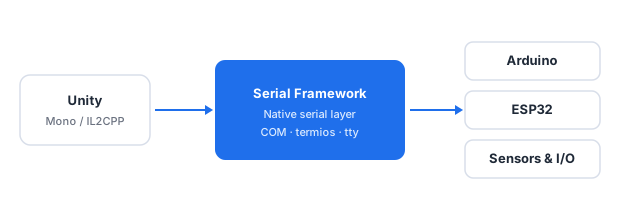
The Serial Framework adds reliable serial communication to Unity games and applications. Connect Arduino boards, ESP32 modules, sensors, and custom controllers using Mono or IL2CPP. The framework handles port enumeration, configuration, timeouts, and asynchronous reads so you can focus on gameplay instead of platform-specific native code.
Unity is a cross-platform game engine used to build 2D, 3D, VR, and AR games and applications.
It does not, however, expose any serial port API, and the managed serial class that developers naturally reach
for — System.IO.Ports.SerialPort — is incompatible with the IL2CPP scripting backend. This article
explains why that happens, which workarounds exist, and how the Serial Framework
closes the gap.
Unity examples are available on GitHub.
The serial problem in Unity
Unity's API surface covers graphics, physics, audio, input, and networking — but not serial ports. There is no
UnityEngine.Serial class and no built-in way to enumerate or open a COM port, a tty device, or a
USB-serial adapter. Applications that need to talk to microcontrollers, sensors, or custom hardware have to step
outside Unity and use one of three options: the .NET BCL, a third-party library, or a hand-written native plugin.
The most natural first attempt is System.IO.Ports.SerialPort. It compiles without errors, the API
looks familiar, and it works in the Unity Editor. The problem appears at build time, and it is not specific to a
single platform — it is caused by the way Unity compiles managed code for each scripting backend.
Why System.IO.Ports fails with IL2CPP
IL2CPP converts C# assemblies to C++ and links them against a native runtime. That runtime is
generated by Unity and contains only the parts of the BCL that Unity ships. System.IO.Ports.SerialPort
is not part of that set: there is no native implementation behind it, and no P/Invoke targets are provided for it in
an IL2CPP player. The code compiles, but every call that needs operating-system access fails at runtime.
The failure surfaces in several ways:
PlatformNotSupportedException— thrown when aSerialPortinstance is created or one of its methods is called.- Silent failures — the constructor succeeds, but
Open()has no effect andIsOpenstaysfalse. - Empty port list —
SerialPort.GetPortNames()returns an empty array even though the device is present in the operating system. IOExceptionwith "port does not exist" — thrown for a port that exists and works in the Editor.DllNotFoundException: MonoPosixHelper— on some mobile targets, when the runtime cannot resolve a dependency required by the managed serial layer.
The trap is that all of these fail at runtime, not at compile time. The Editor build behaves correctly, which makes the problem appear only on the target device.
The Mono backend and its limits
Switching the scripting backend from IL2CPP to Mono makes System.IO.Ports work on
Windows and macOS, because Mono provides a working implementation of the class. For a prototype or an internal tool,
this is often enough.
For a production build it is not. IL2CPP is the default backend, it is mandatory on iOS, and it is strongly
recommended on Android, consoles, and WebGL. Mono is not available on several of those platforms, and even where it
is, its serial support is limited and inconsistent. The real fix is to remove the dependency on
System.IO.Ports and use a library that talks to the operating system directly.
Platform specifics
Each operating system exposes serial communication through a different API, and each one expects a different device identifier:
- Windows — the Win32 API (
CreateFile,ReadFile,WriteFile,SetCommState,SetCommTimeouts). Ports are addressed as\\.\COM<n>. - macOS and Linux — the POSIX
termiosinterface (open,read,write,tcsetattr,cfsetspeed). Devices appear as/dev/tty.*or/dev/cu.*on macOS, and/dev/tty*on Linux. - Mobile — the OS either hides serial ports or blocks access entirely. Connecting to serial hardware on a phone usually means going through Bluetooth SPP or USB OTG, which is a separate stack.
A Unity application that supports more than one platform must handle all of these, which is exactly the kind of work the framework exists to remove.
How the Serial Framework solves it
The Serial Framework implements the serial layer once and exposes it to managed
code through .NET assemblies. Instead of calling System.IO.Ports, the framework calls the operating
system directly:
- On Windows it uses P/Invoke bindings to
kernel32and the Win32 serial API. - On macOS and Linux it uses P/Invoke bindings to the POSIX
termiosinterface. - Port enumeration, opening, configuration (baud rate, data bits, parity, stop bits, flow control), timeouts, and asynchronous reads are handled inside the framework, so the same managed code runs on every supported platform.
Data reception is event-driven: incoming bytes are delivered through events rather than a busy polling loop. Error conditions — a port being removed, a write timeout, a framing error — are surfaced as structured exceptions instead of silent failures.
The framework does not depend on System.IO.Ports, so it works with IL2CPP as well as
with Mono. That single fact removes the biggest obstacle to using serial hardware from a Unity
build. The Serial Framework is also part of the Wireless Communication Library, so the same
assemblies can be reused for Bluetooth and Wi-Fi communication in the same project.
Scripting backends and the Serial Framework
The setup follows the same rules as the rest of the Wireless Communication Library:
- Mono — add the framework's assembly to the Unity project. Mono uses the precompiled assembly directly, so nothing else is required.
- IL2CPP — use the framework with source code, and add the framework's assemblies' source to the Unity project. The IL2CPP compiler then recompiles those assemblies together with your game, producing a player that contains a working serial implementation for the target platform.
For an in-depth comparison of the two backends, see WCL and Unity — Unity's scripting backends.
Examples
Ready-to-run Unity projects that demonstrate serial communication with the Serial Framework are available in the btframework/Unity repository on GitHub. The samples show port enumeration, opening a connection, sending and receiving data, and handling errors inside a Unity scene.
Frequently asked questions
- Does Unity support serial communication natively?
- No. Unity has no built-in serial API. Developers must use a third-party library such as the Serial Framework, or write a custom native plugin for each target platform.
- Why does
System.IO.Portsfail with IL2CPP? - IL2CPP compiles C# to C++ but does not ship a native implementation of
System.IO.Ports. Calls that require operating-system access throwPlatformNotSupportedException, return empty results, or fail silently at runtime, even though the same code runs correctly in the Editor. - Does the Serial Framework work with IL2CPP?
- Yes. The source-code version of the framework is required so that the IL2CPP compiler can recompile the assemblies for the target platform.
- Which platforms are supported?
- The Serial Framework officially supports Windows and macOS. On mobile targets the operating system restricts access to serial ports, so Bluetooth SPP or USB OTG are the usual workarounds.