Every GATT operation on a Bluetooth LE link — reading a heart rate characteristic, writing a configuration value, subscribing to notifications — travels over an unencrypted connection by default. Any device in radio range that has captured the pairing exchange or hijacked the link can read or modify that traffic. Pairing is what closes this gap.
Pairing is the process by which two BLE devices establish a shared secret key and use it to encrypt (and optionally authenticate) the link. It is not the same as connecting. Connecting creates a physical link. Pairing decides whether that link will carry plaintext or ciphertext — and whether the remote device can prove it is who it claims to be.
The Bluetooth Framework exposes the entire pairing workflow through the wclBluetoothManager
class. Applications configure their IO capabilities and MITM requirements, provide PINs and passkeys when requested, and receive a
single completion event that carries the final result.
Pairing vs bonding
The two terms are often used interchangeably, but they describe different things.
Pairing is the act of establishing a shared encryption key. The key exists for the duration of the connection and is discarded when the link drops — unless bonding is enabled.
Bonding is the act of saving the keys in non-volatile storage on both sides, so that the next time the devices meet they can skip the pairing exchange and go straight to an encrypted link using the stored keys.
The practical difference matters at every layer of the API. In the Bluetooth Framework, a device
that has been paired but not bonded will report GetRemotePaired as true only while the link is active. A
bonded device reports true even before a connection is established, because the bond record persists on the host and on
the peripheral.
Bonding is controlled by the MITM protection flags described later in this article — specifically, the
mitmProtectionNotRequiredBonding and mitmProtectionRequiredBonding variants request bonding in addition
to plain pairing.
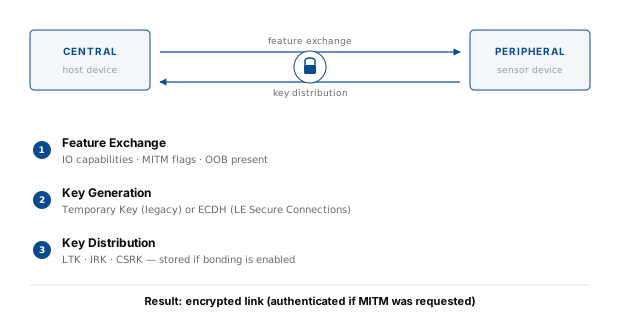
The three phases of pairing
The Bluetooth Core Specification defines three phases that every pairing procedure goes through.
Phase 1 — Pairing Feature Exchange. The two devices exchange their IO capabilities, their authentication requirements (MITM or not), and any flags indicating whether bonding, secure connections, and OOB are supported. The result of this phase determines which pairing method will be used.
Phase 2 — Key Generation. Depending on the negotiated method, the devices either exchange a Temporary Key derived from a 6-digit PIN (legacy pairing), or perform an Elliptic-Curve Diffie-Hellman exchange (LE Secure Connections, available in Bluetooth 4.2 and above). The output is a Short Term Key used to encrypt the link.
Phase 3 — Key Distribution. The encrypted link is now used to distribute the long-term keys: the Long Term Key (LTK) for future reconnections, the Identity Resolving Key (IRK) for resolving random private addresses, and the Connection Signature Resolving Key (CSRK) for signed writes. If bonding is enabled, these keys are stored on both sides.
The Bluetooth Framework handles all three phases transparently. Applications observe only the events that Phase 1 requires user interaction for: IO capability requests, MITM requests, and the specific method event (Just Works confirmation, PIN, passkey, or numeric comparison).
Pairing methods
Four pairing methods exist. Which one is selected depends entirely on the IO capabilities exchanged in Phase 1.
Just Works
Both devices have no display and no keyboard (or they are configured to behave that way). The pairing proceeds without any user interaction beyond an optional confirmation. The link is encrypted, but it is not protected against a Man-in-the-Middle attacker who relays the pairing exchange between the two legitimate devices.
Just Works is common for low-power sensors, fitness trackers, and any device where a display would be too costly. It is acceptable when the sensitivity of the data is low, and unacceptable for anything that carries credentials, biometrics, or control over physical infrastructure.
In the Bluetooth Framework, Just Works pairing fires the OnConfirm event. The
application either accepts or rejects the pairing. The GattClient sample accepts unconditionally:
procedure TfmMain.wclBluetoothManagerConfirm(Sender: TObject;
  const Radio: TwclBluetoothRadio; const Address: Int64;
  out Confirm: Boolean);
begin
  // Accept any pairing.
  Confirm := True;
  TraceEvent(Address, 'Just works pairing', 'Accept', 'True');
end;
void __fastcall TfmMain::wclBluetoothManagerConfirm(TObject *Sender,
const TwclBluetoothRadio *Radio, const __int64 Address, bool& Confirm)
{
// Accept any pairing.
Confirm = true;
TraceEvent(Address, "Just works pairing", "Accept", "True");
}void Manager_OnConfirm(Object Sender, wclBluetoothRadio Radio, Int64 Address,
out Boolean Confirm)
{
// Accept any pairing.
Confirm = true;
TraceEvent(Address, "Just works pairing", "Accept", "True");
}Private Sub Manager_OnConfirm(Sender As Object, Radio As wclBluetooth.wclBluetoothRadio,
Address As Long, ByRef Confirm As Boolean) Handles Manager.OnConfirm
' Accept any pairing.
Confirm = True
TraceEvent(Address, "Just works pairing", "Accept", "True")
End Subvoid CGattClientDlg::wclBluetoothManagerConfirm(void* Sender, CwclBluetoothRadio* const Radio,
const __int64 Address, bool& Confirm)
{
UNREFERENCED_PARAMETER(Radio);
UNREFERENCED_PARAMETER(Sender);
// Accept any pairing.
Confirm = true;
TraceEvent(Address, _T("Just works pairing"), _T("Accept"), _T("True"));
}Passkey Entry
One device displays a 6-digit passkey, and the user types it into the other device. Both devices contribute to the final key in a way that proves the user was present on both sides — so MITM protection is provided.
Two events are involved:
OnPasskeyNotificationfires on the device that displays the passkey. The application should show it to the user.OnPasskeyRequestfires on the device that inputs the passkey. The application should ask the user for it and return the value.
The sample implements both:
procedure TfmMain.wclBluetoothManagerPasskeyNotification(Sender: TObject;
  const Radio: TwclBluetoothRadio; const Address: Int64;
  const Passkey: Cardinal);
begin
  TraceEvent(Address, 'Passkey notification', 'Passkey', IntToStr(Passkey));
end;

procedure TfmMain.wclBluetoothManagerPasskeyRequest(Sender: TObject;
  const Radio: TwclBluetoothRadio; const Address: Int64;
  out Passkey: Cardinal);
begin
  // Use 123456 as passkey.
  Passkey := 123456;
  TraceEvent(Address, 'Passkey request', 'Passkey', IntToStr(Passkey));
end;
void __fastcall TfmMain::wclBluetoothManagerPasskeyNotification(
TObject *Sender, const TwclBluetoothRadio *Radio,
const __int64 Address, const DWORD Passkey)
{
TraceEvent(Address, "Passkey notification", "Passkey", IntToStr((int)Passkey));
}
void __fastcall TfmMain::wclBluetoothManagerPasskeyRequest(TObject *Sender,
const TwclBluetoothRadio *Radio, const __int64 Address,
DWORD& Passkey)
{
// Use 123456 as passkey.
Passkey = 123456;
TraceEvent(Address, "Passkey request", "Passkey", IntToStr((int)Passkey));
}void Manager_OnPasskeyNotification(Object Sender, wclBluetoothRadio Radio,
Int64 Address, UInt32 Passkey)
{
TraceEvent(Address, "Passkey notification", "Passkey", Passkey.ToString());
}
void Manager_OnPasskeyRequest(Object Sender, wclBluetoothRadio Radio,
Int64 Address, out UInt32 Passkey)
{
// Use 123456 as passkey.
Passkey = 123456;
TraceEvent(Address, "Passkey request", "Passkey", Passkey.ToString());
}Private Sub Manager_OnPasskeyNotification(ByVal Sender As Object,
ByVal Radio As wclBluetooth.wclBluetoothRadio, ByVal Address As Long,
ByVal Passkey As UInteger) Handles Manager.OnPasskeyNotification
TraceEvent(Address, "Passkey notification", "Passkey", Passkey.ToString())
End Sub
Private Sub Manager_OnPasskeyRequest(ByVal Sender As Object,
ByVal Radio As wclBluetooth.wclBluetoothRadio, ByVal Address As Long,
ByRef Passkey As UInteger) Handles Manager.OnPasskeyRequest
' Use 123456 as passkey.
Passkey = 123456
TraceEvent(Address, "Passkey request", "Passkey", Passkey.ToString())
End Subvoid CGattClientDlg::wclBluetoothManagerPasskeyNotification(void* Sender,
CwclBluetoothRadio* const Radio, const __int64 Address, const unsigned long Passkey)
{
UNREFERENCED_PARAMETER(Sender);
UNREFERENCED_PARAMETER(Radio);
TraceEvent(Address, _T("Passkey notification"), _T("Passkey"), IntToStr((int)Passkey));
}
void CGattClientDlg::wclBluetoothManagerPasskeyRequest(void* Sender,
CwclBluetoothRadio* const Radio, const __int64 Address, unsigned long& Passkey)
{
UNREFERENCED_PARAMETER(Sender);
UNREFERENCED_PARAMETER(Radio);
// Use 123456 as passkey.
Passkey = 123456;
TraceEvent(Address, _T("Passkey request"), _T("Passkey"), IntToStr((int)Passkey));
}In a real application, OnPasskeyNotification would display a modal dialog, and OnPasskeyRequest would
show an input prompt. The sample uses a hardcoded value to keep the demonstration deterministic.
Numeric Comparison
Both devices have a display capable of showing a 6-digit number, and at least one has a yes/no confirmation button. Both devices compute the same number from their shared secret and display it. The user compares the two numbers and confirms that they match. If they do not, an attacker is present.
The Bluetooth Framework exposes this through OnNumericComparison. The Number
parameter contains the value both devices must show:
procedure TfmMain.wclBluetoothManagerNumericComparison(Sender: TObject;
  const Radio: TwclBluetoothRadio; const Address: Int64;
  const Number: Cardinal; out Confirm: Boolean);
begin
  // Accept any pairing.
  Confirm := True;
  TraceEvent(Address, 'Numeric comparison', 'Number', IntToStr(Number));
end;
void __fastcall TfmMain::wclBluetoothManagerNumericComparison(
TObject *Sender, const TwclBluetoothRadio *Radio,
const __int64 Address, const DWORD Number, bool& Confirm)
{
// Accept any pairing.
Confirm = true;
TraceEvent(Address, "Numeric comparison", "Number", IntToStr((int)Number));
}void Manager_OnNumericComparison(Object Sender, wclBluetoothRadio Radio,
Int64 Address, UInt32 Number, out Boolean Confirm)
{
// Accept any pairing.
Confirm = true;
TraceEvent(Address, "Numeric comparison", "Number", Number.ToString());
}Private Sub Manager_OnNumericComparison(ByVal Sender As Object,
ByVal Radio As wclBluetooth.wclBluetoothRadio, ByVal Address As Long,
ByVal Number As UInteger, ByRef Confirm As Boolean) Handles Manager.OnNumericComparison
' Accept any pairing.
Confirm = True
TraceEvent(Address, "Numeric comparison", "Number", Number.ToString())
End Subvoid CGattClientDlg::wclBluetoothManagerNumericComparison(void* Sender,
CwclBluetoothRadio* const Radio, const __int64 Address,
const unsigned long Number, bool& Confirm)
{
UNREFERENCED_PARAMETER(Sender);
UNREFERENCED_PARAMETER(Radio);
// Accept any pairing.
Confirm = true;
TraceEvent(Address, _T("Numeric comparison"), _T("Number"), IntToStr((int)Number));
}Numeric Comparison is the strongest method that does not require OOB hardware. It is used by modern devices with displays: smartphones, laptops, and appliances with LCD panels.
Out of Band
The pairing key is transferred through a channel that is not the Bluetooth LE link — typically an NFC tap, a QR code, or a wired connection. Because the attacker cannot see the OOB channel, MITM is impossible.
The OnIoCapabilityRequest event includes an OobPresent output parameter. When the application sets it to
true, the framework attempts to use OOB data. The GattClient sample always sets it to false
because no OOB hardware is assumed. Applications that support OOB would set it to true in the appropriate circumstances.
IO capabilities and MITM protection
The four pairing methods are selected by a matrix of IO capabilities. The Bluetooth Framework
models these as two enumerations, both set through the OnIoCapabilityRequest event.
wclBluetoothIoCapability describes what the local device can do:
| Value | Meaning |
|---|---|
iocapDisplayOnly | Has a display, cannot enter data |
iocapDisplayYesNo | Has a display and a yes/no button |
iocapKeyboardOnly | Has a keyboard, no display |
iocapNoInputNoOutput | No display, no keyboard |
iocapDisplayKeyboard | Both display and keyboard |
iocapNotDefined | Let the stack decide |
wclBluetoothMitmProtection describes the level of protection the application requires:
| Value | Meaning |
|---|---|
mitmProtectionNotRequired | Encrypt the link, no authentication |
mitmProtectionRequired | Authenticate the link |
mitmProtectionNotRequiredBonding | Encrypt, save keys |
mitmProtectionRequiredBonding | Authenticate, save keys |
mitmProtectionNotRequiredGeneralBonding | Encrypt, save keys including CSRK |
mitmProtectionRequiredGeneralBonding | Authenticate, save keys including CSRK |
mitmProtectionNotDefined | Let the stack decide |
The OnIoCapabilityRequest event carries both. The application sets the values and returns:
procedure TfmMain.wclBluetoothManagerIoCapabilityRequest(Sender: TObject;
  const Radio: TwclBluetoothRadio; const Address: Int64;
  out Mitm: TwclBluetoothMitmProtection;
  out IoCapability: TwclBluetoothIoCapability; out OobPresent: Boolean);
begin
  case cbMitmProtection.ItemIndex of
    0: Mitm := mitmProtectionNotRequired;
    1: Mitm := mitmProtectionRequired;
    2: Mitm := mitmProtectionNotRequiredBonding;
    3: Mitm := mitmProtectionRequiredBonding;
    4: Mitm := mitmProtectionNotRequiredGeneralBonding;
    5: Mitm := mitmProtectionRequiredGeneralBonding;
    else Mitm := mitmProtectionNotDefined;
  end;

  case cbIoCap.ItemIndex of
    0: IoCapability := iocapDisplayOnly;
    1: IoCapability := iocapDisplayYesNo;
    2: IoCapability := iocapKeyboardOnly;
    3: IoCapability := iocapNoInputNoOutput;
    4: IoCapability := iocapDisplayKeyboard;
    else IoCapability := iocapNotDefined;
  end;

  OobPresent := False;
end;
void __fastcall TfmMain::wclBluetoothManagerIoCapabilityRequest(
TObject *Sender, const TwclBluetoothRadio *Radio,
const __int64 Address, TwclBluetoothMitmProtection& Mitm,
TwclBluetoothIoCapability& IoCapability, bool& OobPresent)
{
switch (cbMitmProtection->ItemIndex)
{
case 0:
Mitm = mitmProtectionNotRequired;
break;
case 1:
Mitm = mitmProtectionRequired;
break;
case 2:
Mitm = mitmProtectionNotRequiredBonding;
break;
case 3:
Mitm = mitmProtectionRequiredBonding;
break;
case 4:
Mitm = mitmProtectionNotRequiredGeneralBonding;
break;
case 5:
Mitm = mitmProtectionRequiredGeneralBonding;
break;
default:
Mitm = mitmProtectionNotDefined;
break;
}
switch (cbIoCap->ItemIndex)
{
case 0:
IoCapability = iocapDisplayOnly;
break;
case 1:
IoCapability = iocapDisplayYesNo;
break;
case 2:
IoCapability = iocapKeyboardOnly;
break;
case 3:
IoCapability = iocapNoInputNoOutput;
break;
case 4:
IoCapability = iocapDisplayKeyboard;
break;
default:
IoCapability = iocapNotDefined;
break;
}
OobPresent = false;
}void Manager_OnIoCapabilityRequest(Object Sender, wclBluetoothRadio Radio, Int64 Address,
out wclBluetoothMitmProtection Mitm, out wclBluetoothIoCapability IoCapability,
out Boolean OobPresent)
{
switch (cbMitmProtection.SelectedIndex)
{
case 0:
Mitm = wclBluetoothMitmProtection.mitmProtectionNotRequired;
break;
case 1:
Mitm = wclBluetoothMitmProtection.mitmProtectionRequired;
break;
case 2:
Mitm = wclBluetoothMitmProtection.mitmProtectionNotRequiredBonding;
break;
case 3:
Mitm = wclBluetoothMitmProtection.mitmProtectionRequiredBonding;
break;
case 4:
Mitm = wclBluetoothMitmProtection.mitmProtectionNotRequiredGeneralBonding;
break;
case 5:
Mitm = wclBluetoothMitmProtection.mitmProtectionRequiredGeneralBonding;
break;
default:
Mitm = wclBluetoothMitmProtection.mitmProtectionNotDefined;
break;
}
switch (cbIoCap.SelectedIndex)
{
case 0:
IoCapability = wclBluetoothIoCapability.iocapDisplayOnly;
break;
case 1:
IoCapability = wclBluetoothIoCapability.iocapDisplayYesNo;
break;
case 2:
IoCapability = wclBluetoothIoCapability.iocapKeyboardOnly;
break;
case 3:
IoCapability = wclBluetoothIoCapability.iocapNoInputNoOutput;
break;
case 4:
IoCapability = wclBluetoothIoCapability.iocapDisplayKeyboard;
break;
default:
IoCapability = wclBluetoothIoCapability.iocapNotDefined;
break;
}
OobPresent = false;
}Private Sub Manager_OnIoCapabilityRequest(Sender As Object,
Radio As wclBluetooth.wclBluetoothRadio, Address As Long,
ByRef Mitm As wclBluetooth.wclBluetoothMitmProtection,
ByRef IoCapability As wclBluetooth.wclBluetoothIoCapability,
ByRef OobPresent As Boolean) Handles Manager.OnIoCapabilityRequest
Select cbMitmProtection.SelectedIndex
Case 0
Mitm = wclBluetoothMitmProtection.mitmProtectionNotRequired
Case 1
Mitm = wclBluetoothMitmProtection.mitmProtectionRequired
Case 2
Mitm = wclBluetoothMitmProtection.mitmProtectionNotRequiredBonding
Case 3
Mitm = wclBluetoothMitmProtection.mitmProtectionRequiredBonding
Case 4
Mitm = wclBluetoothMitmProtection.mitmProtectionNotRequiredGeneralBonding
Case 5
Mitm = wclBluetoothMitmProtection.mitmProtectionRequiredGeneralBonding
Case Else
Mitm = wclBluetoothMitmProtection.mitmProtectionNotDefined
End Select
Select Case cbIoCap.SelectedIndex
Case 0
IoCapability = wclBluetoothIoCapability.iocapDisplayOnly
Case 1
IoCapability = wclBluetoothIoCapability.iocapDisplayYesNo
Case 2
IoCapability = wclBluetoothIoCapability.iocapKeyboardOnly
Case 3
IoCapability = wclBluetoothIoCapability.iocapNoInputNoOutput
Case 4
IoCapability = wclBluetoothIoCapability.iocapDisplayKeyboard
Case Else
IoCapability = wclBluetoothIoCapability.iocapNotDefined
End Select
OobPresent = False
End Subvoid CGattClientDlg::wclBluetoothManagerIoCapabilityRequest(void* Sender,
CwclBluetoothRadio* const Radio, const __int64 Address, wclBluetoothMitmProtection& Mitm,
wclBluetoothIoCapability& IoCapability, bool& OobPresent)
{
UNREFERENCED_PARAMETER(Sender);
UNREFERENCED_PARAMETER(Radio);
UNREFERENCED_PARAMETER(Address);
switch (cbMitm.GetCurSel())
{
case 0:
Mitm = mitmProtectionNotRequired;
break;
case 1:
Mitm = mitmProtectionRequired;
break;
case 2:
Mitm = mitmProtectionNotRequiredBonding;
break;
case 3:
Mitm = mitmProtectionRequiredBonding;
break;
case 4:
Mitm = mitmProtectionNotRequiredGeneralBonding;
break;
case 5:
Mitm = mitmProtectionRequiredGeneralBonding;
break;
default:
Mitm = mitmProtectionNotDefined;
break;
}
switch (cbIoCap.GetCurSel())
{
case 0:
IoCapability = iocapDisplayOnly;
break;
case 1:
IoCapability = iocapDisplayYesNo;
break;
case 2:
IoCapability = iocapKeyboardOnly;
break;
case 3:
IoCapability = iocapNoInputNoOutput;
break;
case 4:
IoCapability = iocapDisplayKeyboard;
break;
default:
IoCapability = iocapNotDefined;
break;
}
OobPresent = false;
}The framework combines the two values with the peer's capabilities to select the pairing method automatically. Applications do not choose the method directly.
Security levels
Once pairing is complete, the link is protected according to the negotiated level. The Bluetooth Framework exposes two distinct enumerations for this.
wclBluetoothLeProtectionLevel is used during pairing itself, negotiated through
OnProtectionLevelRequest. It controls how the pairing exchange proceeds:
| Value | Meaning |
|---|---|
pplNone | No protection — the link stays unencrypted |
pplDefault | Use the driver default |
pplEncryption | Encrypt the link, but do not authenticate |
pplEncryptionAndAuthentication | Encrypt and authenticate — full MITM protection |
procedure TfmMain.wclBluetoothManagerProtectionLevelRequest(
  Sender: TObject; const Radio: TwclBluetoothRadio; const Address: Int64;
  out Protection: TwclBluetoothLeProtectionLevel);
begin
  case cbProtection.ItemIndex of
    0: Protection := pplNone;
    1: Protection := pplDefault;
    2: Protection := pplEncryption;
    3: Protection := pplEncryptionAndAuthentication
  end;
end;
void __fastcall TfmMain::wclBluetoothManagerProtectionLevelRequest(
TObject *Sender, const TwclBluetoothRadio *Radio,
const __int64 Address, TwclBluetoothLeProtectionLevel& Protection)
{
switch (cbProtection->ItemIndex)
{
case 0:
Protection = pplNone;
break;
case 1:
Protection = pplDefault;
break;
case 2:
Protection = pplEncryption;
break;
case 3:
Protection = pplEncryptionAndAuthentication;
break;
default:
Protection = pplDefault;
break;
}
}void Manager_OnProtectionLevelRequest(Object Sender, wclBluetoothRadio Radio, Int64 Address,
out wclBluetoothLeProtectionLevel Protection)
{
switch (cbProtection.SelectedIndex)
{
case 0:
Protection = wclBluetoothLeProtectionLevel.pplNone;
break;
case 1:
Protection = wclBluetoothLeProtectionLevel.pplDefault;
break;
case 2:
Protection = wclBluetoothLeProtectionLevel.pplEncryption;
break;
case 3:
Protection = wclBluetoothLeProtectionLevel.pplEncryptionAndAuthentication;
break;
default:
Protection = wclBluetoothLeProtectionLevel.pplDefault;
break;
}
}Private Sub Manager_OnProtectionLevelRequest(Sender As Object,
Radio As wclBluetooth.wclBluetoothRadio, Address As Int64,
ByRef Protection As wclBluetooth.wclBluetoothLeProtectionLevel) Handles Manager.OnProtectionLevelRequest
Select Case cbProtection.SelectedIndex
Case 0
Protection = wclBluetoothLeProtectionLevel.pplNone
Case 1
Protection = wclBluetoothLeProtectionLevel.pplDefault
Case 2
Protection = wclBluetoothLeProtectionLevel.pplEncryption
Case 3
Protection = wclBluetoothLeProtectionLevel.pplEncryptionAndAuthentication
Case Else
Protection = wclBluetoothLeProtectionLevel.pplDefault
End Select
End Subvoid CGattClientDlg::wclBluetoothManagerProtectionLevelRequest(void* Sender,
CwclBluetoothRadio* const Radio, const __int64 Address,
wclBluetoothLeProtectionLevel& Protection)
{
UNREFERENCED_PARAMETER(Sender);
UNREFERENCED_PARAMETER(Radio);
UNREFERENCED_PARAMETER(Address);
switch (cbProtection.GetCurSel())
{
case 0:
Protection = pplNone;
break;
case 1:
Protection = pplDefault;
break;
case 2:
Protection = pplEncryption;
break;
case 3:
Protection = pplEncryptionAndAuthentication;
break;
default:
Protection = pplDefault;
break;
}
}wclGattProtectionLevel is used at the GATT operation level, passed to every read, write, and
descriptor operation. It tells the framework what level of protection the individual operation requires:
| Value | Meaning |
|---|---|
plNone | No protection required |
plAuthentication | Authentication required |
plEncryption | Encryption required |
plEncryptionAndAuthentication | Both required |
function TfmMain.Protection: TwclGattProtectionLevel;
begin
  case cbProtection.ItemIndex of
    0: Result := plNone;
    1: Result := plAuthentication;
    2: Result := plEncryption;
    3: Result := plEncryptionAndAuthentication;
  else
    Result := plNone;
  end;
end;
TwclGattProtectionLevel TfmMain::Protection()
{
switch (cbProtection->ItemIndex)
{
case 0:
return plNone;
case 1:
return plAuthentication;
case 2:
return plEncryption;
case 3:
return plEncryptionAndAuthentication;
default:
return plNone;
}
}private wclGattProtectionLevel Protection()
{
switch (cbProtection.SelectedIndex)
{
case 0:
return wclGattProtectionLevel.plNone;
case 1:
return wclGattProtectionLevel.plAuthentication;
case 2:
return wclGattProtectionLevel.plEncryption;
case 3:
return wclGattProtectionLevel.plEncryptionAndAuthentication;
default:
return wclGattProtectionLevel.plNone;
}
}Private Function Protection() As wclGattProtectionLevel
Select Case cbProtection.SelectedIndex
Case 0
Return wclGattProtectionLevel.plNone
Case 1
Return wclGattProtectionLevel.plAuthentication
Case 2
Return wclGattProtectionLevel.plEncryption
Case 3
Return wclGattProtectionLevel.plEncryptionAndAuthentication
Case Else
Return wclGattProtectionLevel.plNone
End Select
End FunctionwclGattProtectionLevel CGattClientDlg::Protection() const
{
switch (cbProtection.GetCurSel())
{
case 0:
return plNone;
case 1:
return plAuthentication;
case 2:
return plEncryption;
case 3:
return plEncryptionAndAuthentication;
default:
return plNone;
}
}The two levels work together. If the pairing negotiated pplEncryptionAndAuthentication, then any GATT operation
requesting plAuthentication or plEncryptionAndAuthentication will succeed. If the pairing only achieved
pplEncryption, then a GATT operation requesting plAuthentication will fail with
WCL_E_BLUETOOTH_LE_AUTH_ACCESS_DENIED.
Pairing in the Bluetooth Framework
Protection level
The protection level is set through the same combo box in the sample, and read back at the moment of each GATT operation. The combo contains four entries (None, Authentication, Encryption, Encryption And Authentication) and the selection drives both the pairing request and the GATT operation requests.
IO capabilities and MITM
Both values are set through OnIoCapabilityRequest as shown above. They are stored on the wclBluetoothManager
class for the lifetime of the pairing exchange. The combo boxes cbMitmProtection and cbIoCap are populated
during form initialization:
cbMitmProtection.ItemIndex := 0;
cbIoCap.ItemIndex := 0;
cbMitm.AddString("mitmProtectionNotRequired");
cbMitm.AddString("mitmProtectionRequired");
cbMitm.AddString("mitmProtectionNotRequiredBonding");
cbMitm.AddString("mitmProtectionRequiredBonding");
cbMitm.AddString("mitmProtectionNotRequiredGeneralBonding");
cbMitm.AddString("mitmProtectionRequiredGeneralBonding");
cbMitm.AddString("mitmProtectionNotDefined");
cbMitm.SetCurSel(0);
cbIoCap.AddString("iocapDisplayOnly");
cbIoCap.AddString("iocapDisplayYesNo");
cbIoCap.AddString("iocapKeyboardOnly");
cbIoCap.AddString("iocapNoInputNoOutput");
cbIoCap.AddString("iocapDisplayKeyboard");
cbIoCap.AddString("iocapNotDefined");
cbIoCap.SetCurSel(0);cbMitmProtection.SelectedIndex = 0;
cbIoCap.SelectedIndex = 0;cbMitmProtection.SelectedIndex = 0
cbIoCap.SelectedIndex = 0cbMitm.AddString(_T("mitmProtectionNotRequired"));
cbMitm.AddString(_T("mitmProtectionRequired"));
cbMitm.AddString(_T("mitmProtectionNotRequiredBonding"));
cbMitm.AddString(_T("mitmProtectionRequiredBonding"));
cbMitm.AddString(_T("mitmProtectionNotRequiredGeneralBonding"));
cbMitm.AddString(_T("mitmProtectionRequiredGeneralBonding"));
cbMitm.AddString(_T("mitmProtectionNotDefined"));
cbMitm.SetCurSel(0);
cbIoCap.AddString(_T("iocapDisplayOnly"));
cbIoCap.AddString(_T("iocapDisplayYesNo"));
cbIoCap.AddString(_T("iocapKeyboardOnly"));
cbIoCap.AddString(_T("iocapNoInputNoOutput"));
cbIoCap.AddString(_T("iocapDisplayKeyboard"));
cbIoCap.AddString(_T("iocapNotDefined"));
cbIoCap.SetCurSel(0);Pairing events
Eight events make up the complete pairing workflow:
| Event | Purpose |
|---|---|
OnIoCapabilityRequest | Negotiate IO capabilities and MITM requirements |
OnProtectionLevelRequest | Choose the target security level |
OnConfirm | Answer Just Works pairing |
OnPasskeyNotification | Display a passkey to the user |
OnPasskeyRequest | Ask the user for a passkey |
OnNumericComparison | Confirm a 6-digit number |
OnPinRequest | Provide a legacy PIN |
OnAuthenticationCompleted | Receive the final result |
Only OnAuthenticationCompleted is guaranteed to fire on every pairing attempt. The others fire depending on the method selected:
procedure TfmMain.wclBluetoothManagerAuthenticationCompleted(
  Sender: TObject; const Radio: TwclBluetoothRadio; const Address: Int64;
  const Error: Integer);
begin
  TraceEvent(Address, 'Authentication completed', 'Error', IntToHex(Error, 8));
end;
void __fastcall TfmMain::wclBluetoothManagerAuthenticationCompleted(
TObject *Sender, const TwclBluetoothRadio *Radio,
const __int64 Address, const int Error)
{
TraceEvent(Address, "Authentication completed", "Error", IntToHex(Error, 9));
}void Manager_OnAuthenticationCompleted(Object Sender, wclBluetoothRadio Radio,
Int64 Address, Int32 Error)
{
TraceEvent(Address, "Authentication completed", "Error", Error.ToString("X8"));
}Private Sub Manager_OnAuthenticationCompleted(Sender As Object,
Radio As wclBluetooth.wclBluetoothRadio, Address As Long,
[Error] As Integer) Handles Manager.OnAuthenticationCompleted
TraceEvent(Address, "Authentication completed", "Error", [Error].ToString("X8"))
End Subvoid CGattClientDlg::wclBluetoothManagerAuthenticationCompleted(void* Sender,
CwclBluetoothRadio* const Radio, const __int64 Address, const int Error)
{
UNREFERENCED_PARAMETER(Radio);
UNREFERENCED_PARAMETER(Sender);
TraceEvent(Address, _T("Authentication completed"), _T("Error"), IntToHex(Error, 9));
}The Error parameter is WCL_E_SUCCESS on success or one of the pairing error codes on failure.
WCL_E_BLUETOOTH_LE_ALREADY_PAIRED indicates the device was already bonded — this is not a failure, and the
application should treat it as success. WCL_E_BLUETOOTH_PAIRED_BY_OTHER indicates the device is bonded to a
different host and the local pair request was rejected.
Manual pairing
By default, pairing happens automatically as a side effect of the first protected GATT operation. The framework triggers pairing when a read, write, or subscription requires a level of protection that the current link does not provide.
Some applications need to pair explicitly, before any GATT operation. The RemotePair method on
wclBluetoothRadio does exactly that:
procedure TfmMain.btPairClick(Sender: TObject);
var
  Res: Integer;
  Item: TListItem;
begin
  if lvDevices.Selected = nil then
    MessageDlg('Select device', mtWarning, [mbOK], 0)

  else begin
    Item := lvDevices.Selected;
    Res := TwclBluetoothRadio(Item.Data).RemotePair(StrToInt64('$' +
      Item.Caption), pmLe);
    if Res <> WCL_E_SUCCESS then
      MessageDlg('Error: 0x' + IntToHex(Res, 8), mtError, [mbOK], 0);
  end;
end;
void __fastcall TfmMain::btPairClick(TObject *Sender)
{
if (lvDevices->Selected == NULL)
MessageDlg("Select device", mtWarning, TMsgDlgButtons() << mbOK, 0);
else
{
TListItem* Item = lvDevices->Selected;
int Res = ((TwclBluetoothRadio*)Item->Data)->RemotePair(StrToInt64("$" + Item->Caption),
pmLe);
if (Res != WCL_E_SUCCESS)
{
MessageDlg("Error: 0x" + IntToHex(Res, 8), mtError,
TMsgDlgButtons() << mbOK, 0);
}
}
}private void btPair_Click(Object sender, EventArgs e)
{
if (lvDevices.SelectedItems.Count == 0)
MessageBox.Show("Select device", "Warning", MessageBoxButtons.OK, MessageBoxIcon.Warning);
else
{
ListViewItem Item = lvDevices.SelectedItems[0];
Int32 Res = ((wclBluetoothRadio)Item.Tag).RemotePair(Convert.ToInt64(Item.Text, 16),
wclBluetoothPairingMethod.pmLe);
if (Res != wclErrors.WCL_E_SUCCESS)
{
MessageBox.Show("Error: 0x" + Res.ToString("X8"), "Error",
MessageBoxButtons.OK, MessageBoxIcon.Error);
}
}
}Private Sub btPair_Click(sender As System.Object, e As System.EventArgs) Handles btPair.Click
If lvDevices.SelectedItems.Count = 0 Then
MessageBox.Show("Select device", "Warning", MessageBoxButtons.OK, MessageBoxIcon.Warning)
Else
Dim Item As ListViewItem = lvDevices.SelectedItems(0)
Dim Res As Integer = (CType(Item.Tag, wclBluetoothRadio)).RemotePair(Convert.ToInt64(Item.Text, 16),
wclBluetoothPairingMethod.pmLe)
If Res <> wclErrors.WCL_E_SUCCESS Then
MessageBox.Show("Error: 0x" + Res.ToString("X8"), "Error", MessageBoxButtons.OK, MessageBoxIcon.Error)
End If
End If
End Subvoid CGattClientDlg::OnBnClickedButtonPair()
{
POSITION Pos = lvDevices.GetFirstSelectedItemPosition();
if (Pos == NULL)
AfxMessageBox(_T("Select device"));
else
{
int Item = lvDevices.GetNextSelectedItem(Pos);
int Res = ((CwclBluetoothRadio*)lvDevices.GetItemData(Item))->RemotePair(StrToInt64(lvDevices.GetItemText(Item, 0)),
pmLe);
if (Res != WCL_E_SUCCESS)
AfxMessageBox(_T("Error: 0x") + IntToHex(Res));
}
}The second parameter is the pairing method. pmLe forces BLE pairing; pmClassic forces
classic Bluetooth; pmAuto lets the framework choose based on the device type. Explicit BLE pairing is useful
when the device supports both classic and BLE, or when the pairing must happen before any connection attempt.
Unpairing and bond management
Removing a bond is done through RemoteUnpair. The device must be selected from the device list, and the pairing
method must match the one used during the initial pair:
procedure TfmMain.btUnpairClick(Sender: TObject);
var
  Res: Integer;
  Item: TListItem;
begin
  if lvDevices.Selected = nil then
    MessageDlg('Select device', mtWarning, [mbOK], 0)

  else begin
    Item := lvDevices.Selected;
    Res := TwclBluetoothRadio(Item.Data).RemoteUnpair(StrToInt64('$' +
      Item.Caption), pmLe);
    if Res <> WCL_E_SUCCESS then
      MessageDlg('Error: 0x' + IntToHex(Res, 8), mtError, [mbOK], 0);
  end;
end;
void __fastcall TfmMain::btUnpairClick(TObject *Sender)
{
if (lvDevices->Selected == NULL)
MessageDlg("Select device", mtWarning, TMsgDlgButtons() << mbOK, 0);
else
{
TListItem* Item = lvDevices->Selected;
int Res = ((TwclBluetoothRadio*)Item->Data)->RemoteUnpair(StrToInt64("$" +
Item->Caption), pmLe);
if (Res != WCL_E_SUCCESS)
MessageDlg("Error: 0x" + IntToHex(Res, 8), mtError, TMsgDlgButtons() << mbOK, 0);
}
}private void btUnpair_Click(Object sender, EventArgs e)
{
if (lvDevices.SelectedItems.Count == 0)
MessageBox.Show("Select device");
else
{
ListViewItem Item = lvDevices.SelectedItems[0];
Int32 Res = ((wclBluetoothRadio)Item.Tag).RemoteUnpair(Convert.ToInt64(Item.Text, 16),
wclBluetoothPairingMethod.pmLe);
if (Res != wclErrors.WCL_E_SUCCESS)
MessageBox.Show("Error: 0x" + Res.ToString("X8"));
}
}Private Sub btUnpair_Click(sender As System.Object, e As System.EventArgs) Handles btUnpair.Click
If lvDevices.SelectedItems.Count = 0 Then
MessageBox.Show("Select device", "Warning", MessageBoxButtons.OK, MessageBoxIcon.Warning)
Else
Dim Item As ListViewItem = lvDevices.SelectedItems(0)
Dim Res As Integer = (CType(Item.Tag, wclBluetoothRadio)).RemoteUnpair(Convert.ToInt64(Item.Text, 16),
wclBluetoothPairingMethod.pmLe)
If Res <> wclErrors.WCL_E_SUCCESS Then
MessageBox.Show("Error: 0x" + Res.ToString("X8"), "Error", MessageBoxButtons.OK, MessageBoxIcon.Error)
End If
End If
End Subvoid CGattClientDlg::OnBnClickedButtonUnpair()
{
POSITION Pos = lvDevices.GetFirstSelectedItemPosition();
if (Pos == NULL)
AfxMessageBox(_T("Select device"));
else
{
int Item = lvDevices.GetNextSelectedItem(Pos);
int Res = ((CwclBluetoothRadio*)lvDevices.GetItemData(Item))->RemoteUnpair(StrToInt64(lvDevices.GetItemText(Item, 0)),
pmLe);
if (Res != WCL_E_SUCCESS)
AfxMessageBox(_T("Error: 0x") + IntToHex(Res));
}
}Enumerating all currently bonded devices is done through EnumPairedDevices. The Kind parameter
filters by device type — dkBle, dkClassic, or dkAll:
procedure TfmMain.btEnumPairedClick(Sender: TObject);
var
  Res: Integer;
  Radio: TwclBluetoothRadio;
  Devices: TwclBluetoothAddresses;
  i: Integer;
  Item: TListItem;
  Name: string;
  DevType: TwclBluetoothDeviceType;
  Paired: Boolean;
begin
  Radio := GetRadio;
  if Radio <> nil then begin
    lvDevices.Items.Clear;

    Res := Radio.EnumPairedDevices(dkBle, Devices);
    if Res <> WCL_E_SUCCESS then
      ShowMessage('Enum paired failed: 0x' + IntToHex(Res, 8))

    else begin
      if Length(Devices) > 0 then begin
        for i := 0 to Length(Devices) - 1 do begin
          Item := lvDevices.Items.Add;
          Item.Data := Radio;

          Item.Caption := IntToHex(Devices[i], 12);

          Res := Radio.GetRemoteName(Devices[i], Name);
          if Res = WCL_E_SUCCESS then
            Item.SubItems.Add(Name)
          else
            Item.SubItems.Add('Error: 0x' + IntToHex(Res, 8));

          Res := Radio.GetRemoteDeviceType(Devices[i], DevType);
          if Res <> WCL_E_SUCCESS then
            Item.SubItems.Add('Error: 0x' + IntToHex(Res, 8))
          else begin
            case DevType of
              dtClassic: Item.SubItems.Add('Classic');
              dtBle: Item.SubItems.Add('BLE');
              dtMixed: Item.SubItems.Add('Mixed');
              else Item.SubItems.Add('Unknown');
            end;
          end;

          Res := Radio.GetRemotePaired(Devices[i], Paired);
          if Res <> WCL_E_SUCCESS then
            Item.SubItems.Add('Error: 0x' + IntToHex(Res, 8))
          else begin
            if Paired then
              Item.SubItems.Add('True')
            else
              Item.SubItems.Add('False');
          end;
        end;
      end;
    end;
  end;
end;
void __fastcall TfmMain::btEnumPairedClick(TObject *Sender)
{
TwclBluetoothRadio* Radio = GetRadio();
if (Radio != NULL)
{
lvDevices->Items->Clear();
TwclBluetoothAddresses Devices;
int Res = Radio->EnumPairedDevices(dkBle, Devices);
if (Res != WCL_E_SUCCESS)
ShowMessage("Enum paired failed: 0x" + IntToHex(Res, 8));
else
{
if (Devices.Length > 0)
{
for (int i = 0; i < Devices.Length; i++)
{
TListItem* Item = lvDevices->Items->Add();
Item->Data = Radio;
Item->Caption = IntToHex(Devices[i], 12);
String Name = "";
Res = Radio->GetRemoteName(Devices[i], Name);
if (Res == WCL_E_SUCCESS)
Item->SubItems->Add(Name);
else
Item->SubItems->Add("Error: 0x" + IntToHex(Res, 8));
TwclBluetoothDeviceType DevType = dtMixed;
Res = Radio->GetRemoteDeviceType(Devices[i], DevType);
if (Res != WCL_E_SUCCESS)
Item->SubItems->Add("Error: 0x" + IntToHex(Res, 8));
else
{
switch (DevType)
{
case dtClassic:
Item->SubItems->Add("Classic");
break;
case dtBle:
Item->SubItems->Add("BLE");
break;
case dtMixed:
Item->SubItems->Add("Mixed");
break;
default:
Item->SubItems->Add("Unknown");
break;
}
}
bool Paired = false;
Res = Radio->GetRemotePaired(Devices[i], Paired);
if (Res != WCL_E_SUCCESS)
Item->SubItems->Add("Error: 0x" + IntToHex(Res, 8));
else
{
if (Paired)
Item->SubItems->Add("True");
else
Item->SubItems->Add("False");
}
}
}
}
}
}private void btEnumPaired_Click(object sender, EventArgs e)
{
wclBluetoothRadio Radio = GetRadio();
if (Radio != null)
{
lvDevices.Items.Clear();
Int64[] Devices;
Int32 Res = Radio.EnumPairedDevices(wclBluetoothDiscoverKind.dkBle, out Devices);
if (Res != wclErrors.WCL_E_SUCCESS)
MessageBox.Show("Enum paired failed: 0x" + Res.ToString("X8"));
else
{
if (Devices != null && Devices.Length > 0)
{
foreach (Int64 Device in Devices)
{
ListViewItem Item = lvDevices.Items.Add(Device.ToString("X12"));
Item.Tag = Radio;
String Name;
Res = Radio.GetRemoteName(Device, out Name);
if (Res == wclErrors.WCL_E_SUCCESS)
Item.SubItems.Add(Name);
else
Item.SubItems.Add("Error: 0x" + Res.ToString("X8"));
wclBluetoothDeviceType DevType;
Res = Radio.GetRemoteDeviceType(Device, out DevType);
if (Res != wclErrors.WCL_E_SUCCESS)
Item.SubItems.Add("Error: 0x" + Res.ToString("X8"));
else
{
switch (DevType)
{
case wclBluetoothDeviceType.dtClassic:
Item.SubItems.Add("Classic");
break;
case wclBluetoothDeviceType.dtBle:
Item.SubItems.Add("BLE");
break;
case wclBluetoothDeviceType.dtMixed:
Item.SubItems.Add("Mixed");
break;
default:
Item.SubItems.Add("Unknown");
break;
}
}
Boolean Paired;
Res = Radio.GetRemotePaired(Device, out Paired);
if (Res != wclErrors.WCL_E_SUCCESS)
Item.SubItems.Add("Error: 0x" + Res.ToString("X8"));
else
{
if (Paired)
Item.SubItems.Add("True");
else
Item.SubItems.Add("False");
}
}
}
}
}
}Private Sub btEnumPaired_Click(sender As System.Object, e As System.EventArgs) Handles btEnumPaired.Click
Dim Radio As wclBluetoothRadio = GetRadio()
If Radio IsNot Nothing Then
lvDevices.Items.Clear()
Dim Devices() As Int64 = Nothing
Dim Res As Integer = Radio.EnumPairedDevices(wclBluetoothDiscoverKind.dkBle, Devices)
If Res <> wclErrors.WCL_E_SUCCESS Then
MessageBox.Show("Enum paired failed: 0x" + Res.ToString("X8"))
Else
If Devices IsNot Nothing AndAlso Devices.Length > 0 Then
For Each Device As Int64 In Devices
Dim Item As ListViewItem = lvDevices.Items.Add(Device.ToString("X12"))
Item.Tag = Radio
Dim Name As String = ""
Res = Radio.GetRemoteName(Device, Name)
If Res = wclErrors.WCL_E_SUCCESS Then
Item.SubItems.Add(Name)
Else
Item.SubItems.Add("Error: 0x" + Res.ToString("X8"))
End If
Dim DevType As wclBluetoothDeviceType = wclBluetoothDeviceType.dtMixed
Res = Radio.GetRemoteDeviceType(Device, DevType)
If Res <> wclErrors.WCL_E_SUCCESS Then
Item.SubItems.Add("Error: 0x" + Res.ToString("X8"))
Else
Select Case DevType
Case wclBluetoothDeviceType.dtClassic
Item.SubItems.Add("Classic")
Case wclBluetoothDeviceType.dtBle
Item.SubItems.Add("BLE")
Case wclBluetoothDeviceType.dtMixed
Item.SubItems.Add("Mixed")
Case Else
Item.SubItems.Add("Unknown")
End Select
End If
Dim Paired As Boolean = False
Res = Radio.GetRemotePaired(Device, Paired)
If Res <> wclErrors.WCL_E_SUCCESS Then
Item.SubItems.Add("Error: 0x" + Res.ToString("X8"))
Else
If Paired Then
Item.SubItems.Add("True")
Else
Item.SubItems.Add("False")
End If
End If
Next
End If
End If
End If
End Subvoid CGattClientDlg::OnBnClickedButtonEnumPaired()
{
CwclBluetoothRadio* Radio = GetRadio();
if (Radio != NULL)
{
lvDevices.DeleteAllItems();
wclBluetoothAddresses Devices;
int Res = Radio->EnumPairedDevices(dkBle, Devices);
if (Res != WCL_E_SUCCESS)
AfxMessageBox(_T("Enum paired failed: 0x:") + IntToHex(Res));
else
{
if (Devices.size() > 0)
{
for (wclBluetoothAddresses::iterator Device = Devices.begin(); Device != Devices.end(); Device++)
{
int Item = lvDevices.GetItemCount();
lvDevices.InsertItem(Item, IntToHex(*Device));
lvDevices.SetItemData(Item, (DWORD_PTR)Radio);
tstring Name;
Res = Radio->GetRemoteName(*Device, Name);
if (Res == WCL_E_SUCCESS)
lvDevices.SetItemText(Item, 1, Name.c_str());
else
lvDevices.SetItemText(Item, 1, _T("Error: 0x") + IntToHex(Res));
wclBluetoothDeviceType DevType = dtMixed;
Res = Radio->GetRemoteDeviceType(*Device, DevType);
if (Res != WCL_E_SUCCESS)
lvDevices.SetItemText(Item, 2, _T("Error: 0x") + IntToHex(Res));
else
{
switch (DevType)
{
case dtClassic:
lvDevices.SetItemText(Item, 2, _T("Classic"));
break;
case dtBle:
lvDevices.SetItemText(Item, 2, _T("BLE"));
break;
case dtMixed:
lvDevices.SetItemText(Item, 2, _T("Mixed"));
break;
default:
lvDevices.SetItemText(Item, 2, _T("Unknown"));
}
}
bool Paired = false;
Res = Radio->GetRemotePaired(*Device, Paired);
if (Res != WCL_E_SUCCESS)
lvDevices.SetItemText(Item, 3, _T("Error: 0x") + IntToHex(Res));
else
{
if (Paired)
lvDevices.SetItemText(Item, 3, _T("Paired"));
else
lvDevices.SetItemText(Item, 3, _T("Unpaired"));
}
}
}
}
}
}Checking whether a specific device is currently bonded is a single call. The GattClient sample uses it when
populating the device list after discovery:
Res := Radio.GetRemotePaired(Address, Paired);
if Res <> WCL_E_SUCCESS then
  Item.SubItems.Add('Error: 0x' + IntToHex(Res, 8))
else begin
  if Paired then
    Item.SubItems.Add('True')
  else
    Item.SubItems.Add('False');
end;
bool Paired = false;
Res = ((TwclBluetoothRadio*)Radio)->GetRemotePaired(Address, Paired);
if (Res != WCL_E_SUCCESS)
Item->SubItems->Add("Error: 0x" + IntToHex(Res, 8));
else
{
if (Paired)
Item->SubItems->Add("True");
else
Item->SubItems->Add("False");
}Boolean Paired;
Res = Radio.GetRemotePaired(Address, out Paired);
if (Res != wclErrors.WCL_E_SUCCESS)
Item.SubItems.Add("Error: 0x" + Res.ToString("X8"));
else
{
if (Paired)
Item.SubItems.Add("True");
else
Item.SubItems.Add("False");
}Dim Paired As Boolean = False
Res = Radio.GetRemotePaired(Address, Paired)
If Res <> wclErrors.WCL_E_SUCCESS Then
Item.SubItems.Add("Error: 0x" + Res.ToString("X8"))
Else
If Paired Then
Item.SubItems.Add("True")
Else
Item.SubItems.Add("False")
End If
End Ifbool Paired = false;
Res = Radio->GetRemotePaired(Address, Paired);
if (Res != WCL_E_SUCCESS)
lvDevices.SetItemText(Item, 3, _T("Error: 0x") + IntToHex(Res));
else
{
if (Paired)
lvDevices.SetItemText(Item, 3, _T("True"));
else
lvDevices.SetItemText(Item, 3, _T("False"));
}The paired status is displayed in the fourth column of the device list. It reflects the OS-level bond record — the same record that Windows stores in its device manager.
Troubleshooting
WCL_E_BLUETOOTH_LE_ALREADY_PAIRED from RemotePair. The device is already bonded. This is not
an error — the bond exists and can be used directly. Applications that need to re-pair should call RemoteUnpair first.
WCL_E_BLUETOOTH_PAIRED_BY_OTHER from RemotePair. The device is bonded to a different host,
or the peripheral side has a stale bond record that does not match the current host. RemoteUnpair followed by
RemotePair usually resolves it.
WCL_E_BLUETOOTH_LE_AUTH_ACCESS_DENIED from a GATT operation. The link is encrypted but not authenticated,
and the characteristic requires authentication. The application should request pairing with pplEncryptionAndAuthentication
and try again.
WCL_E_BLUETOOTH_LE_MANUAL_PAIRING_REQUIRED. On Windows 11, some devices cannot be paired programmatically
and require the user to go through the Windows Settings dialog. This is a platform limitation, not a framework limitation.
Bluno boards and other devices without a Client Configuration Descriptor. Some low-cost peripherals have incomplete
GATT databases and require ForceNotifications = true on the wclGattClient instance. See
DFRobot Bluno Boards for the full story.
Pairing on Windows 10 1607. This version has a bug in the Microsoft Bluetooth stack that prevents certain pairing flows. Devices that cannot be paired through the standard path may pair successfully with the BLED112 dongle, which bypasses the Microsoft stack entirely.
Frequently asked questions
- What is the difference between pairing and bonding?
- Pairing establishes a shared encryption key for the current connection. Bonding saves that key so future connections can skip the
pairing exchange. In the Bluetooth Framework, bonded devices report
GetRemotePaired = trueeven when disconnected. - Why does my BLE device require a PIN instead of using Just Works?
- Just Works is only selected when both devices have no input and no output capability. If your device's IO capabilities are configured as
anything that can display or input, the framework may choose a different method. Check
OnIoCapabilityRequest— the values you return there determine the outcome. - Can pairing happen without user interaction?
- Yes — Just Works performs the entire pairing without any user prompt. But it does not provide MITM protection. For devices that handle
sensitive data, use
pplEncryptionAndAuthenticationand an IO capability that enables Passkey Entry or Numeric Comparison. - How do I force pairing to happen before any GATT operation?
- Call
RemotePairwithpmLeon the target radio. This initiates pairing immediately, without waiting for a GATT operation to trigger it. - How do I remove a bond?
- Call
RemoteUnpairwith the same pairing method that was used to establish the bond. On Windows, the bond is removed from the system device manager, and the peripheral side discards the shared keys.