Bluetooth Classic is not a single protocol. It is a small constellation of specifications, each describing how one class of device should talk to another: a headset to a phone, a keyboard to a PC, a phone to a car stereo, a camera to a printer. Those specifications are called profiles. Understanding them is the difference between knowing that two devices can connect and knowing what they will actually do after they connect.
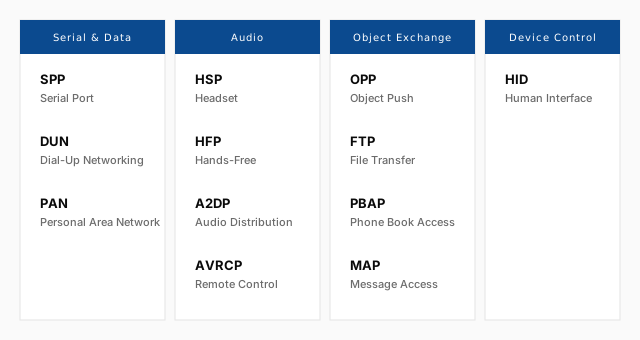
The word "profile" is used loosely in the Bluetooth world. In marketing material it often means "feature": a device is said to support the A2DP profile, meaning it can stream stereo audio. In the specification, a profile is something more precise — it is a complete vertical slice through the stack, from the use case at the top down to the radio at the bottom, with a defined set of roles, message sequences, parameters, and error conditions. A profile is what makes two independently developed devices interoperate without ever having seen each other before.
This article is a tour of the Bluetooth Classic profiles that matter in practice. It explains how profiles are structured, how a device advertises which profiles it supports, and what each of the major profiles actually does. Along the way it points out the profiles that are frequently confused with each other — HFP and HSP, A2DP and AVRCP, OPP and FTP, PAN and DUN — and shows how the Bluetooth Framework maps onto them.
What a profile really is
A Bluetooth profile is a specification of interoperability. It does not describe the radio. It does not describe how bits are modulated or how packets are addressed. Those things are already defined by the core specification, which is shared by every Bluetooth device. A profile sits on top of the core and answers a narrower question: for this particular use case, what exactly should two devices say to each other?
That question has several parts, and every profile answers all of them:
- Roles. Which side initiates, which side accepts. Some profiles have a clear asymmetry — a keyboard is always the HID device, a PC is always the HID host. Others are symmetric or allow either side to take either role.
- Protocols used. Which layers of the Bluetooth stack are involved, and in what order. A profile may use only L2CAP, or L2CAP plus RFCOMM, or L2CAP plus RFCOMM plus OBEX, and so on.
- Parameters. Channel numbers, packet sizes, security requirements, timing constraints. These are the numbers that make the difference between "works in the lab" and "works on the bus".
- Message flows. The exact sequence of operations that constitute a successful session. The order matters, because each side is implemented independently and expects the other to follow the same script.
- Error conditions. What to do when something goes wrong, and which errors are recoverable versus terminal.
Because every profile answers all of these questions, a device that claims to support a profile is making a specific promise: any other device that also supports the profile can complete the corresponding use case with it, without a prior agreement about the details.
Profiles and the protocol stack
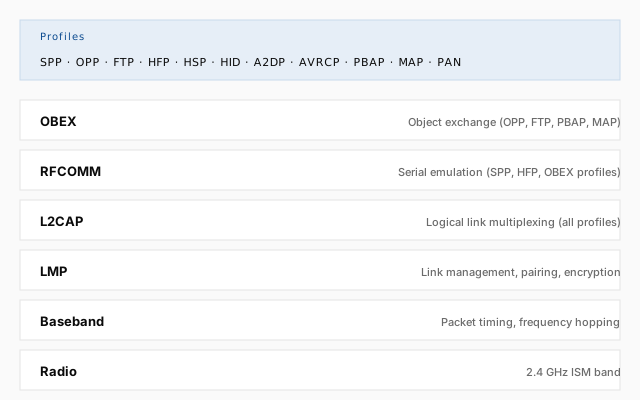
Before profiles can be described individually, it helps to see the stack they sit on. Every Bluetooth Classic connection passes through the same layers, and each profile picks a subset of them.
At the bottom is the radio and the baseband, which handle frequency hopping, packet timing, and physical link management. Above that, LMP (Link Manager Protocol) controls the link itself — pairing, authentication, encryption, and power modes. Those two layers are almost never touched directly by an application.
The first layer an application is aware of is L2CAP (Logical Link Control and Adaptation Protocol). L2CAP multiplexes several logical channels over a single physical link and handles segmentation and reassembly of larger packets. Every Bluetooth Classic profile ultimately runs over L2CAP, either directly or through a layer above it.
Directly on top of L2CAP sits RFCOMM, which emulates a serial port — the RS-232 abstraction that predates Bluetooth by decades. RFCOMM is the transport for a large family of profiles that need a stream of bytes rather than a stream of packets. The Serial Port Profile is the smallest possible profile: it is essentially just "use RFCOMM".
Above RFCOMM sits OBEX, a lightweight object-exchange protocol originally designed for infrared and later adopted by Bluetooth. OBEX takes the RFCOMM byte stream and turns it into a request-response conversation about "objects" — files, contacts, calendar entries. The Object Push and File Transfer profiles are OBEX profiles.
In parallel to this vertical stack runs SDP (Service Discovery Protocol), which is not a transport at all but a directory. When a device connects for the first time, SDP is how it asks the other side "what profiles do you support, and on which channels?" The answer is a set of service records, each describing one profile instance, its UUID, its RFCOMM channel, and a few optional attributes.
A profile, then, is defined by which of these layers it uses and how. The Serial Port Profile uses L2CAP → RFCOMM. The Object Push Profile uses L2CAP → RFCOMM → OBEX. The Hands-Free Profile uses L2CAP → RFCOMM plus a set of AT commands that travel over that RFCOMM channel. The A2DP profile does not use RFCOMM at all: it talks directly to L2CAP, because audio does not want to be slowed down by the serial abstraction.
Service discovery and UUIDs
Every Bluetooth Classic profile is identified by a UUID, a 128-bit number that is usually written in its shortened 16-bit form. The Serial Port Profile is 0x1101. The Hands-Free Profile is 0x111E. The Advanced Audio Distribution Profile is 0x110D. These UUIDs are assigned by the Bluetooth SIG and are the same on every device in the world that implements the profile.
When a device wants to use a profile, the first thing it does is ask the remote device, through SDP, for the service records associated with that UUID. Each returned record contains the information needed to establish the connection: the RFCOMM channel number for profiles that use RFCOMM, the L2CAP PSM (Protocol/Service Multiplexer) for profiles that talk to L2CAP directly, and a set of optional attributes such as the service name, the provider, and a protocol descriptor list.
The SDP exchange is a small query-response protocol, and it is one of the few places in Bluetooth where an application sometimes has to look at raw data. A device may advertise several services with the same UUID — for example, a phone may expose more than one Serial Port Profile channel — and the only way to tell them apart is by their service records. The application reads the name of each record and decides which one it needs.
The Classic Bluetooth guide covers the mechanics of this exchange in detail: how to enumerate services, how to resolve the RFCOMM channel, and how to connect to the correct instance when several candidates exist.
Profile categories
The Bluetooth SIG groups profiles into a handful of categories, and the grouping is useful because it reflects what the profiles are designed to do. The five categories that matter most for Classic Bluetooth are:
- Cable replacement. Profiles that replace a physical cable with a wireless link: Serial Port, Dial-Up Networking, Personal Area Networking, and several others.
- Audio. Profiles for voice and music: Headset, Hands-Free, Advanced Audio Distribution, Audio/Video Remote Control.
- Object exchange. Profiles for moving files and records between devices: Object Push, File Transfer, Phone Book Access, Message Access.
- Device control. Profiles for input devices and remote controls: Human Interface Device, and some smaller profiles like the Video Distribution Profile.
- Health and fitness. Profiles for medical and fitness devices: Health Device Profile, and the older Health Thermometer and Heart Rate profiles, most of which have now migrated to Bluetooth Low Energy.
The rest of this article walks through the individual profiles in the first four categories, plus a short note on the fifth.
Serial and data profiles
Serial Port Profile (SPP)
The Serial Port Profile is the smallest, oldest, and most widely implemented Classic profile. It does one thing: it makes a Bluetooth connection look like a serial cable. Both sides get a stream of bytes with no framing, no structure, and no built-in reliability beyond what RFCOMM already provides.
UUID: 0x1101. Transport: L2CAP → RFCOMM.
SPP is what most industrial and embedded Bluetooth modules use. A barcode scanner, a GPS receiver, an Arduino shield, a medical sensor, a CNC controller — if it has a Bluetooth radio and no support for anything fancier, it is almost certainly talking SPP. On the Windows side, SPP is often presented to the user as a virtual COM port, which lets legacy applications use a Bluetooth link without knowing that Bluetooth exists.
The profile itself is nearly empty. The Bluetooth SIG defined it mostly to say "use RFCOMM, with these security and role conventions". Everything above RFCOMM — what bytes actually mean — is left to the application. That is why the same profile can carry a dozen incompatible protocols: SPP is a pipe, not a language.
Dial-Up Networking Profile (DUN)
The Dial-Up Networking Profile is the profile that lets one device use another device's modem. It was the original "Bluetooth internet" before tethering became a built-in feature of phones. UUID: 0x1103. Transport: L2CAP → RFCOMM.
DUN defines a set of AT commands that a client sends to a server to establish, configure, and tear down a modem connection. The commands are modeled on the traditional Hayes modem command set, and they cover everything from dialing a number to reading signal strength to hanging up. The server is typically a phone or a cellular modem; the client is typically a laptop or a PDA.
In modern practice, DUN has been almost entirely replaced by Personal Area Networking (PAN) on Bluetooth and by USB and Wi-Fi tethering on phones. A few embedded modules still expose DUN, and some industrial modems still use it, but it is rare in consumer devices.
Personal Area Networking Profile (PAN)
The Personal Area Networking Profile does not use RFCOMM at all. It runs directly on L2CAP and, in its most common role, provides IP connectivity between two or more Bluetooth devices — a small ad-hoc network over Bluetooth. UUIDs include 0x1115 (PAN User), 0x1116 (Network Access Point), and 0x1117 (Group Ad-hoc Network).
There are three roles. The Network Access Point acts as a bridge between the Bluetooth network and an external network, typically the internet. The Group Ad-hoc Network provides a peer-to-peer network without any external connectivity. The PAN User is the client that joins one of the two.
Under the hood, PAN uses BNEP (Bluetooth Network Encapsulation Protocol), which frames Ethernet packets over L2CAP. From the operating system's point of view, a PAN connection is a network interface — it can carry IPv4, IPv6, DHCP, DNS, and anything else that fits inside an Ethernet frame.
PAN is what phone tethering used before USB and Wi-Fi became the default. It is still used in some embedded scenarios, especially where a low-power mesh of devices needs IP connectivity without a Wi-Fi access point.
Audio profiles
Audio is where Bluetooth Classic has its most visible presence, and also where the profiles are most often confused. Four profiles are involved in almost every Bluetooth audio experience: HSP, HFP, A2DP, and AVRCP. Two carry audio, two carry control.
Headset Profile (HSP)
The Headset Profile is the oldest of the audio profiles and the simplest. It defines how a headset and a phone exchange monaural, voice-grade audio — the kind of audio needed for a phone call, and nothing more. UUID: 0x1108. Transport: L2CAP → RFCOMM with an AT command channel, plus a separate synchronous connection for the audio itself.
HSP supports exactly two audio directions: from the headset microphone to the phone, and from the phone to the headset earpiece. It does not support stereo, it does not support music playback, and it does not expose any control beyond a small set of AT commands (answer, hang up, set volume, and a few others).
HSP is essentially legacy. Modern headsets implement HFP instead, and it is rare to find a device that supports only HSP. But the profile is still in the specification, and some very old headsets still rely on it.
Hands-Free Profile (HFP)
The Hands-Free Profile is the modern replacement for HSP, and the profile that almost every Bluetooth headset, car kit, and speakerphone uses for voice calls. UUID: 0x111E. Transport: L2CAP → RFCOMM with a much richer AT command set than HSP.
HFP defines two roles. The Audio Gateway is the device that has the cellular connection — a phone, typically. The Hands-Free Unit is the device that provides the microphone and speaker — a headset, a car kit, a speakerphone. The two exchange a well-defined set of AT commands that cover everything from answering a call to reading the caller ID to managing a list of recent calls.
HFP also supports a feature called eSCO (extended Synchronous Connection Oriented), which improves the audio quality of the voice link and provides better error correction than the original SCO channel. Modern HFP implementations on modern hardware use eSCO by default.
HFP does not carry music. A device that "supports Bluetooth audio" and plays music is using A2DP, not HFP. HFP is only for the voice channel of a call. When a phone and a headset are connected, they often maintain both an HFP link (for calls) and an A2DP link (for music) at the same time.
Advanced Audio Distribution Profile (A2DP)
The Advanced Audio Distribution Profile is the profile that streams music. UUID: 0x110D. Transport: L2CAP directly, without RFCOMM, because audio does not want the overhead of the serial abstraction.
A2DP defines two roles. The Source is the device that has the audio — a phone, a laptop, a media player. The Sink is the device that plays it — headphones, a speaker, a car stereo, an AV receiver. The source encodes the audio into a compressed stream and sends it over L2CAP; the sink decodes it and plays it.
The audio codec used by A2DP is negotiated during connection setup. The mandatory codec is SBC (Sub-Band Coding), which every A2DP device must support. Optional codecs include AAC, aptX, aptX HD, LDAC, and Samsung Scalable Codec. A device that supports a better codec can use it when both sides agree; otherwise both sides fall back to SBC.
A2DP has nothing to do with remote control. The player controls — play, pause, skip, volume, and so on — travel over a separate profile called AVRCP, which is described next. A device that supports only A2DP can stream audio but cannot be controlled by the other side; a device that supports both A2DP and AVRCP can stream and be controlled.
Audio/Video Remote Control Profile (AVRCP)
The Audio/Video Remote Control Profile is what makes Bluetooth headphones interactive. UUID: 0x110E. Transport: L2CAP → AVCTP (Audio/Video Control Transport Protocol), and for some versions also L2CAP → AVCTP → BIP for browsing.
AVRCP has two roles. The Controller is the device that sends commands — a headset with a play button, a car stereo with a next-track button, a smartwatch with a volume slider. The Target is the device that receives commands — a phone, a media player, a TV. The two roles are often reversed for different commands: a phone may be the Target for playback control but the Controller for volume adjustment.
AVRCP has evolved through several versions, and the version matters a lot in practice:
- AVRCP 1.0 — basic commands: play, pause, stop, next, previous, volume up, volume down.
- AVRCP 1.3 — adds metadata: track title, artist, album, duration, current position.
- AVRCP 1.4 — adds browsing: the controller can list the contents of the target's media library and select a specific track.
- AVRCP 1.5 — adds more browsing features and improves the browsing protocol.
- AVRCP 1.6 — adds cover art and a few other refinements; the version most modern headphones support.
Most modern Bluetooth headphones implement AVRCP 1.3 at minimum, which means a phone can display the current track on the headphone's display (if it has one) or use the track info for other purposes. AVRCP 1.4 and above are needed for a headset to browse a phone's music library and select a specific album, and this is what makes "next track" and "previous track" work reliably across a wide range of players.
Object exchange profiles
The object exchange profiles all run over OBEX. The full details of the OBEX protocol — its headers, its operations, and its session model — are described in the Object Exchange guide. Here we focus on what distinguishes the four profiles that matter: OPP, FTP, PBAP, and MAP.
Object Push Profile (OPP)
The Object Push Profile is the simplest OBEX profile. UUID: 0x1105. It defines how one device sends a small object to another — a vCard, a vCalendar entry, an image, a short note — with a single PUT operation, and how the receiver accepts or rejects it.
OPP is asymmetric in a subtle way. The sender is called the client and the receiver the server, but the interaction is not a two-way exchange: the sender pushes, the receiver acknowledges. There is no browsing, no listing, no pulling. If the receiver wants to send something back, it opens a separate OPP connection in the opposite direction.
Because OPP is so simple, it is also very widely implemented. Every smartphone, every PC, every tablet supports it. It is the profile behind "send this contact to that phone" and "beam this photo to the other device".
File Transfer Profile (FTP)
The File Transfer Profile is the OBEX profile that gives a client access to a server's file system. UUID: 0x1106. It supports four operations: list the contents of a folder, get a file from the server, put a file to the server, and delete a file or folder.
FTP is more complex than OPP because it has a session model. The client opens a session with the server, navigates its folder structure, performs one or more operations, and then closes the session. Error handling is also more elaborate: the server can reject an operation for a specific reason (file not found, permission denied, folder not empty), and the client has to handle each case.
FTP is what lets a PC browse the file system of a phone over Bluetooth, or a phone browse the file system of a PC. It is less common in consumer devices than it used to be — modern phones usually prefer MTP over USB or a cloud service — but it is still supported by many devices and is the natural choice for embedded systems that need to expose a file store over Bluetooth.
Phone Book Access Profile (PBAP)
The Phone Book Access Profile is the profile that lets a car kit or a headset read a phone's contact list. UUID: 0x1130. It is an OBEX profile, so it runs over RFCOMM, but its object model is different from OPP and FTP: it defines a specific folder structure for phone book data and a specific set of vCard formats.
PBAP defines two roles. The Phone Book Access Server is the device that has the phone book — a phone, typically. The Phone Book Access Client is the device that reads it — a car kit, a headset, a PC. The client can list the phone book, read individual contacts, and search by name or number.
PBAP also defines several phone book sources: the main phone book, the SIM phone book, the list of received calls, the list of dialed calls, the list of missed calls, and a few others. A car kit typically reads the main phone book and the recent-calls lists, and it does so once when the phone connects, keeping a local cache for later.
Message Access Profile (MAP)
The Message Access Profile is the profile that lets a car kit read, send, and receive SMS and MMS messages through a phone. UUID: 0x1134. It is an OBEX profile, and its object model is similar to PBAP's: a specific folder structure, a specific set of message formats.
MAP defines two roles. The Message Access Server is the device that has the messages — a phone. The Message Access Client is the device that reads them — a car kit, a headset, a PC. The client can list folders, list messages, read individual messages, mark messages as read or unread, and send new messages.
MAP is what makes a modern car stereo show incoming text messages and allow the driver to reply with a predefined response. It is a relatively recent profile — introduced in 2009 — and support for it is uneven. Some car kits implement it fully, some implement only the read side, and some ignore it entirely.
Human Interface Device Profile (HID)
The Human Interface Device Profile is the profile that lets a Bluetooth keyboard, mouse, gamepad, or remote control talk to a host. UUID: 0x1124. Transport: L2CAP → HID Control and HID Interrupt channels, with a report protocol modeled on USB HID.
HID has two roles. The Host is the device that receives input — a PC, a phone, a tablet. The Device is the device that produces input — a keyboard, a mouse, a gamepad, a presenter remote. The profile defines how the device describes its reports (the same report descriptor format as USB HID), how the host requests a report, and how the device pushes reports when the user presses a button or moves the mouse.
HID is interesting because it has two flavors. The original HID profile over Bluetooth Classic is the one described above. A newer profile, HID over GATT (HOGP), runs the same report protocol over Bluetooth Low Energy. Modern wireless keyboards and mice increasingly use HOGP because it consumes less power, but Classic HID remains widespread, especially in gaming peripherals where latency matters more than battery life.
The Wii Remote article shows what HID looks like from the application side: the Wii Remote is a HID device, and the Bluetooth Framework's HID support is what makes it possible to read its buttons, accelerometer, and IR sensor from a Windows application.
Health and fitness profiles
Bluetooth has historically had a small family of profiles for health and fitness devices. The two most common were the Health Device Profile (HDP, UUID 0x1400) and the older Health Thermometer Profile (HTP) and Heart Rate Profile (HRP). HDP defined a full medical-grade data exchange, including a continuation protocol for streaming multiple measurements, and was used by blood pressure monitors, weight scales, and glucose meters.
In practice, almost all of these profiles have migrated to Bluetooth Low Energy, where the same use cases are covered by GATT services (Heart Rate Service, Health Thermometer Service, Blood Pressure Service, and so on). Classic HDP still exists in the specification, and some legacy medical devices still use it, but new designs almost always choose BLE.
Profiles vs GATT services
It is tempting to say that GATT services are the Bluetooth Low Energy equivalent of Bluetooth Classic profiles. That is close enough for a first approximation, but it hides an important difference.
A Classic profile is a specification of behavior. It defines not just what data is exchanged but also the exact sequence of messages, the roles of the two sides, and the state machine that each side follows. A device that implements the A2DP profile has to implement a specific streaming protocol, with specific timing and specific codecs.
A GATT service is a specification of data. It defines the structure of a small database — the characteristics, their properties, their formats — but it does not define how a client uses that data, how often it reads it, or what it does with the values. The behavior is left to the application, guided by conventions rather than by an enforced state machine.
In practice, this means that Classic profiles tend to be heavier and more rigid, and BLE services tend to be lighter and more flexible. A Classic profile is what makes a car stereo work with any phone in the world; a GATT service is what makes a fitness tracker expose its step count to any app that knows how to read it.
The GATT guide covers the BLE side in detail. For the rest of this article, we stay on the Classic side.
Profiles in the Bluetooth Framework
The Bluetooth Framework is organized around profiles. Each major profile has its own set of classes, events, and methods, and the framework handles the SDP exchange, the RFCOMM channel resolution, and the profile-specific protocol details so that the application does not have to.
The profiles that the framework supports directly are:
- Serial Port Profile (SPP) — through the
wclRfCommClientandwclRfCommServerclasses, which implement the RFCOMM client and server roles. See the Classic Bluetooth guide for the full workflow. - Object Push Profile (OPP) — through the OBEX OPP client and server classes, described in the Object Exchange guide. The
OppClientandOppServersample applications show both roles. - File Transfer Profile (FTP) — through the OBEX FTP client class, also described in the Object Exchange guide. The
FtpClientsample application shows the full workflow. - Audio profiles (HFP, HSP, A2DP) — through the audio device classes, described in the Bluetooth Audio guide. The framework handles device enumeration, connection, disconnection, and the switching of the system default audio endpoint.
- Human Interface Device (HID) — through the HID host and device classes, used in the Wii Remote support and other input-device integrations.
Profiles that the framework does not implement directly — such as PBAP, MAP, or the various audio sub-profiles — can still be reached through the OBEX base classes or through raw RFCOMM, because the underlying protocol stack is exposed.
Choosing the right profile
When designing a Bluetooth Classic application, the first question is usually which profile to use. A short decision path:
- Is the data audio? For music, use A2DP (and AVRCP for control). For voice calls, use HFP (or HSP for very old devices). Never try to send music over SPP — the bitrate is not there.
- Is the data a file or a small object? For a single small object pushed to a peer, use OPP. For browsing and transferring files in both directions, use FTP. Both are OBEX profiles.
- Is the data a continuous byte stream? Use SPP. This is the right choice for sensors, controllers, and any device that speaks a custom protocol over what used to be a serial cable.
- Is the data an IP packet? Use PAN. This gives the two devices a real network interface and lets the operating system do the rest.
- Is the data input from a user? Use HID. This is what keyboards, mice, gamepads, and remotes use, and what the operating system already knows how to handle.
- Is the data from a phone book or a message store? Use PBAP or MAP. These are specialized OBEX profiles that define a specific object model for contacts and messages.
If the answer to none of these questions is "yes" — if the application needs something that no standard profile covers — the fallback is SPP with a custom protocol, or (on BLE) a custom GATT service. The Bluetooth Framework supports both, and the same application can use SPP for one device and BLE for another if the hardware requires it.
Frequently asked questions
- What is a Bluetooth profile?
- A Bluetooth profile is a specification that describes how a specific use case is implemented on top of the Bluetooth protocol stack. It defines the roles, the required protocols, and the exact procedures that two devices must follow to interoperate for that use case.
- What is the difference between a profile and a protocol?
- A protocol is a layer of the Bluetooth stack (L2CAP, RFCOMM, OBEX, SDP) that moves bytes. A profile is a specification that says which protocols to use, in which order, with which parameters, and with which message flows to accomplish a real use case.
- Which Bluetooth Classic profiles does the Bluetooth Framework support?
- The Bluetooth Framework supports SPP (as RFCOMM client and server), the OBEX-based profiles OPP and FTP (client and server for OPP, client for FTP), HID host and device support, and full Bluetooth audio control through A2DP, HFP, and HSP profiles.
- Can one device implement more than one profile at the same time?
- Yes, and most devices do. A smartphone implements dozens of profiles simultaneously — HFP, A2DP, AVRCP, PBAP, MAP, OPP, PAN — and the user can run two or three of them against different peers at the same time.