The Wi-Fi Framework adds Wi-Fi, Wi-Fi Direct, SoftAP, and network monitoring to Unity games and applications. Scan for networks, connect to access points, manage WLAN profiles, create a software access point, capture raw Wi-Fi frames, and monitor connectivity — using Mono or IL2CPP. The framework handles interface enumeration, profile management, IP settings, and event delivery so that the game code can focus on gameplay.
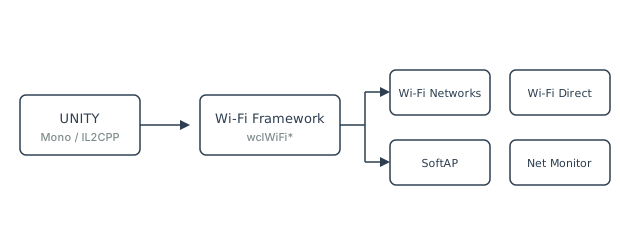
Unity is a cross-platform game engine used to build 2D, 3D, VR, and AR games and applications. Its API surface covers graphics, physics, audio, input, and high-level networking, but it does not include a Wi-Fi API. Applications that need to scan for networks, connect to a specific access point, read BSS information, or create a SoftAP have to step outside Unity. This article explains why that happens, which workarounds exist, and how the Wi-Fi Framework closes the gap.
The Wi-Fi Framework is part of the Wireless Communication Library. Unity examples are available on GitHub.
The Wi-Fi problem in Unity
Unity exposes high-level networking through UnityEngine.Networking and the Netcode packages, but that covers
TCP/IP and UDP sockets after a connection already exists. It does not cover the WLAN layer itself: there is no
UnityEngine.WiFi class and no built-in way to enumerate WLAN interfaces, scan for available networks, read BSS
information elements, manage saved WLAN profiles, connect to a specific access point by MAC address, or create a software access
point. Applications that need any of these capabilities have to choose between the .NET BCL, a third-party library, or a hand-written
native plugin for every target platform.
The most natural first attempt is the standard Windows Wi-Fi API: the WinRT projection Windows.Devices.WiFi. It
compiles cleanly, it looks familiar, and it works in the Unity Editor on Windows. The problem appears at build time, and it is
caused by the way Unity compiles managed code for each scripting backend. This is the same trap that developers hit with
Windows.Devices.Bluetooth and System.IO.Ports, as described in the
Bluetooth Framework and Unity and Serial Framework and Unity
articles.
Why standard .NET Wi-Fi APIs fail
WinRT Wi-Fi — the Windows.Devices.WiFi and Windows.Devices.WiFiDirect namespaces —
are available to C# through a runtime projection that is supplied by Windows itself. IL2CPP converts C# assemblies to C++ and
links them against a native runtime that Unity generates. That runtime does not contain the WinRT projection, so every call that
reaches into the operating system fails at runtime, even though the same call succeeds in the Editor. The failure surfaces in
several forms:
PlatformNotSupportedException— thrown when a WinRT Wi-Fi type is loaded or one of its methods is called.TypeLoadException— thrown when the projection of a WinRT type cannot be resolved by the IL2CPP runtime.- Empty results — a network scan starts but returns an empty list, or an interface query returns no adapters.
- Silent failures — the constructor of a Wi-Fi adapter object succeeds, but the connection never completes and no error is reported.
The Win32 Native Wi-Fi API (wlanapi.dll) is the other standard option. It is available to .NET
through P/Invoke, but it is insanely complex: manual memory management, pointer juggling, and a strict requirement to call
WlanFreeMemory at the right time. A single byte mistake can crash the entire Unity player. It also does not solve
the SoftAP problem — the legacy Hosted Network was deprecated in Windows 10 version 1703, and the modern Wi-Fi Direct SoftAP
requires a completely different set of APIs. Neither Win32 nor WinRT gives the application full peer control on a SoftAP, and
neither exposes raw frame capture or advanced driver parameters.
A third option — writing a custom native plugin per platform — works, but it means maintaining a separate C++ project for Windows, plus separate Android and iOS plugins, each of which has to implement interface enumeration, scanning, profile management, connection logic, and event handling. That is a significant amount of platform-specific code that has nothing to do with gameplay.
For a broader comparison of Win32 and WinRT against the framework, see Why Wi-Fi Framework Beats Win32 and WinRT.
Wi-Fi Framework capabilities
The Wi-Fi Framework implements the native WLAN layer once and exposes it to managed code through .NET assemblies. Instead of relying on WinRT or on the Win32 API directly, it calls the operating system's WLAN APIs through P/Invoke, and it delivers the same managed API regardless of the underlying driver. The capabilities that matter for a Unity project are grouped into six areas.
Client operations. The wclWiFiClient class enumerates WLAN interfaces, scans for available
networks, reads the BSS list, and connects to a network using one of four connection modes: cmProfile (saved
profile), cmTemporaryProfile (XML built on the fly), cmDiscoverySecure, or
cmDiscoveryUnsecure. A connection can be pinned to a specific access point by its MAC address. See
Wi-Fi Client for the full walkthrough.
Profile management. The wclWiFiProfilesManager class enumerates, reads, writes, renames, and
deletes WLAN profiles. Profiles are XML documents, the same format that Windows uses internally, so an application can capture a
profile from one machine, adjust it, and install it on another.
SoftAP and Wi-Fi Direct. The wclWiFiSoftAp and wclWiFiHostedNetwork classes turn the
PC into a software access point. Wi-Fi Direct SoftAP provides a dedicated virtual adapter, fine-grained peer management (accept,
reject, disconnect), and a Black List / White List mechanism to control which devices are allowed to connect. See
Wi-Fi SoftAP and Hosted Network for the full comparison between the legacy Hosted Network and
the modern Wi-Fi Direct SoftAP.
Network monitoring. The wclNetworkListManager class enumerates network connections and adapters,
determines whether the connection is local or has Internet access, and delivers notifications when connectivity changes.
wclPowerEventsMonitor reports suspend and resume events, which is important for applications that run Wi-Fi in the
background. See Network List Manager for details.
Raw frame capture. The wclWiFiSniffer class captures raw Wi-Fi frames in monitor mode, decodes known
frame types, and lets the application switch RF channels. It requires a Wi-Fi adapter with monitor mode support and Microsoft
Network Monitor installed. See Capture Raw Wi-Fi Frames for prerequisites and usage.
Advanced driver parameters. The wclWiFiInterface class reads and writes vendor-specific driver
parameters, including band selection. On dual-band adapters, the application can switch the operating band between 2.4 GHz and
5 GHz before starting a SoftAP. See WLAN interface advanced parameters for the full procedure.
How the Wi-Fi Framework solves it
The framework solves the Unity problem in three ways. First, it does not depend on WinRT or on System.IO.Ports, so
it works with IL2CPP as well as with Mono. That single fact removes the biggest obstacle to
using Wi-Fi from a Unity build. Second, it exposes a single managed API that works in the Editor and in the built player, on
Windows, without requiring different code paths for different Windows versions or different driver implementations. Third, it
includes functionality that the standard APIs do not expose at all: full peer control on a SoftAP, raw frame capture, advanced
driver parameters, and Dual STA support.
The Wi-Fi Framework package includes a set of Unity examples that reproduce the reference WinForms samples 1:1 using the same public API. The examples cover interface enumeration, network and BSS discovery, profile management, all four connection modes, IP configuration, Dual STA, the full Wi-Fi event stream, Wi-Fi Direct advertising and discovery, SoftAP, Hosted Network, Mobile Hotspot, and the Network List Manager. They are available in the btframework/Unity repository on GitHub.
Scripting backends
Unity offers two scripting backends. Mono uses a Just-In-Time compiler and runs precompiled managed assemblies directly. IL2CPP converts C# assemblies to C++ and links them against a native runtime that Unity generates for the target platform. IL2CPP is the default backend, it is mandatory on iOS, and it is strongly recommended on Android, consoles, and WebGL.
The Wi-Fi Framework supports both backends. For the Mono backend, adding the framework's assembly to the Unity project is sufficient; the JIT compiler uses the assembly as shipped. For the IL2CPP backend, the current release of the framework no longer requires the source-code edition. The precompiled assemblies can be added directly to the Unity project and compiled into the IL2CPP player without further changes. The P/Invoke bindings that the framework uses to reach the operating system's WLAN APIs are preserved through IL2CPP, and the native dependencies that the framework requires are packaged with the framework itself.
This is a change from earlier guidance. Previous articles in this library, including WCL and Unity, described a requirement for the source-code edition under IL2CPP. That requirement applied to older releases of the framework, when IL2CPP could not process the precompiled assemblies directly. The current release removes the limitation.
Use cases in Unity
The Wi-Fi Framework is used in Unity projects across several categories.
- Multiplayer and local discovery — scanning for networks, connecting to a specific access point by MAC address, and reading BSS information to pick the best signal. Once the connection is established, the game can use TCP/IP or UDP sockets as usual.
- IoT and smart device control — connecting to lights, drones, robots, or other devices that expose a Wi-Fi interface. The framework's profile management and connection modes make it possible to provision credentials on the fly.
- SoftAP and local multiplayer — turning the PC into a software access point so that phones, tablets, or other PCs can join a local multiplayer session without a router. The Black List and White List provide control over which devices are allowed to connect.
- Network monitoring and diagnostics — receiving notifications when the connection state, IP address, or signal
quality changes. The
wclNetworkListManagerclass reports whether the connection has Internet access, which is useful for games that need to switch between online and offline modes. - Protocol analysis and security research — capturing raw Wi-Fi frames in monitor mode for debugging, protocol analysis, or security monitoring. The sniffer decodes known frame types and passes unknown packets as raw byte streams.
- Hybrid Bluetooth + Wi-Fi projects — the Wi-Fi Framework is part of the same Wireless Communication Library as the Bluetooth Framework and the Serial Framework, so a single Unity project can combine Wi-Fi, BLE, and serial communication without pulling in three separate libraries.
Platform specifics
Wi-Fi support varies significantly between the platforms that Unity can target, and a Unity project that ships on more than one platform has to account for these differences.
- Windows — full support for Wi-Fi, Wi-Fi Direct, SoftAP, Hosted Network, profile management, network monitoring, raw frame capture, advanced driver parameters, and Dual STA. The framework uses the Windows WLAN API through P/Invoke. Some features have minimum Windows version requirements: Wi-Fi Direct SoftAP requires Windows 8 or later, Mobile Hotspot requires Windows 10 or later, and Dual STA requires Windows 11.
- Mobile (Android and iOS) — both operating systems restrict third-party access to Wi-Fi hardware. Unity projects that target mobile usually use the platform's native Wi-Fi API for the mobile build and the Wi-Fi Framework for the desktop build, sharing the game logic through a common interface.
- Raw frame capture — requires a Wi-Fi adapter that supports monitor mode and Microsoft Network Monitor installed on the system. The application that captures frames must be compiled for the same processor architecture (x86 or x64) as the installed Network Monitor. See Capture Raw Wi-Fi Frames for the full list of prerequisites.
Examples
Ready-to-run Unity projects that demonstrate Wi-Fi communication with the Wi-Fi Framework are available in the btframework/Unity repository on GitHub. The samples cover interface enumeration, network and BSS discovery, profile management, all four connection modes, IP configuration, Dual STA, the full Wi-Fi event stream, Wi-Fi Direct advertising and discovery, SoftAP, Hosted Network, Mobile Hotspot, and the Network List Manager.
The same repository also contains Unity examples for the Bluetooth Framework and the Serial Framework, which can be combined with the Wi-Fi examples in a single Unity project because all three frameworks are part of the Wireless Communication Library.
Frequently asked questions
- Does Unity support Wi-Fi natively?
- No. Unity has no built-in Wi-Fi API. It cannot enumerate WLAN interfaces, scan for networks, read BSS information, manage WLAN profiles, or create a SoftAP without a third-party library or a custom native plugin.
- Why do WinRT Wi-Fi APIs fail with IL2CPP?
- IL2CPP compiles C# to C++ but does not ship the WinRT projections used by
Windows.Devices.WiFi. Calls that require operating-system access throwPlatformNotSupportedException, return empty results, or fail silently in the built player even though the same code runs in the Editor. - Does the Wi-Fi Framework work with IL2CPP?
- Yes. The current release of the Wi-Fi Framework no longer requires the source-code edition for IL2CPP. The precompiled assemblies can be added to a Unity project and compiled into the player with either the Mono or the IL2CPP scripting backend.
- Which platforms does the Wi-Fi Framework support in Unity?
- Full support is available on Windows. Mobile operating systems restrict third-party access to Wi-Fi hardware, so Unity projects targeting Android or iOS usually combine the Wi-Fi Framework on desktop with native mobile plugins.
- Can I use Wi-Fi and Bluetooth in the same Unity project?
- Yes. Both are part of the same Wireless Communication Library. A single Unity project can scan Wi-Fi networks, run a SoftAP, and communicate with BLE devices at the same time.