The Wi-Fi Framework's client side gives Windows applications full programmatic access to the WLAN subsystem — the same underlying API that Windows itself uses to populate the network list and switch connections. Enumerate interfaces, scan for and connect to networks, manage the saved WLAN profiles, control IP settings and Dual STA — and receive notifications when anything changes.
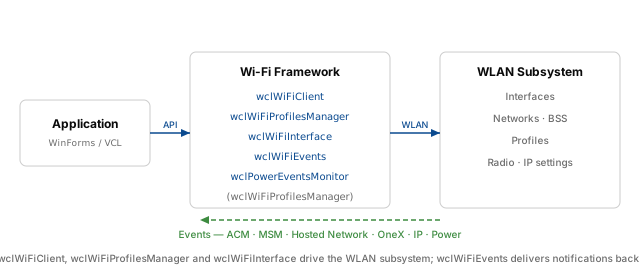
The framework splits the client work across four classes. wclWiFiClient is the main entry point: it opens the WLAN subsystem, enumerates interfaces and networks, scans, connects, and disconnects. wclWiFiProfilesManager handles the saved WLAN profiles — enumeration, rename, delete, and reading or writing the profile XML. wclWiFiInterface represents a single wireless adapter and exposes operations that are specific to it: turning the radio on or off, reading and changing IP settings, and enabling or disabling Dual STA. wclWiFiEvents is a separate class that delivers all WLAN notifications, from ACM and MSM events to 802.1X authentication updates and IP change events.
The Wi-Fi Framework package includes two demo applications that cover the client side. The WiFiClient sample demonstrates every operation that the client classes expose — from opening the subsystem to reading the profile XML. The WiFiEvents sample is dedicated to the events: it opens the wclWiFiEvents object, hooks every event the framework provides, and logs them in real time. This article follows both samples.
Related topics: WLAN interface advanced parameters (band selection and driver-level options), Wi-Fi SoftAP and Hosted Network (turning the PC into an access point), Network List Manager (higher-level connectivity monitoring), and Capture raw Wi-Fi frames (monitor mode).
Opening the client
Every Wi-Fi operation starts by opening the wclWiFiClient object. The Open method connects the client to the WLAN subsystem and prepares it for further calls. Once the client is open, the framework fires the AfterOpen event — the natural place to open the profile manager (wclWiFiProfilesManager.Open) and enable the user interface controls. When the application is done with Wi-Fi, Close releases the subsystem. The framework fires BeforeClose first, which the sample uses to close the profile manager and to clear all lists.
procedure TfmMain.btClientOpenClick(Sender: TObject);
begin
  ShowResult(wclWiFiClient.Open);
end;

procedure TfmMain.btClientCloseClick(Sender: TObject);
begin
  ShowResult(wclWiFiClient.Close);
end;

procedure TfmMain.wclWiFiClientAfterOpen(Sender: TObject);
begin
  wclWiFiProfilesManager.Open;
  UpdateUI(True);
end;

procedure TfmMain.wclWiFiClientBeforeClose(Sender: TObject);
begin
  wclWiFiProfilesManager.Close;
  ClientClearInterfaces;
  ClientClearNetworks;
  ClientClearBss;
  ClientClearProfiles;
  UpdateUI(False);
end;
void __fastcall TfmMain::btClientOpenClick(TObject *Sender)
{
ShowResult(wclWiFiClient->Open());
}
void __fastcall TfmMain::btClientCloseClick(TObject *Sender)
{
ShowResult(wclWiFiClient->Close());
}
void __fastcall TfmMain::wclWiFiClientAfterOpen(TObject *Sender)
{
wclWiFiProfilesManager->Open();
UpdateUI(true);
}
void __fastcall TfmMain::wclWiFiClientBeforeClose(TObject *Sender)
{
wclWiFiProfilesManager->Close();
ClientClearInterfaces();
ClientClearNetworks();
ClientClearBss();
ClientClearProfiles();
UpdateUI(false);
}private void btClientOpen_Click(object sender, EventArgs e)
{
ShowResult(Client.Open());
}
private void btClientClose_Click(object sender, EventArgs e)
{
ShowResult(Client.Close());
}
void Client_AfterOpen(object sender, EventArgs e)
{
ProfilesManager.Open();
UpdateUI(true);
}
void Client_BeforeClose(object sender, EventArgs e)
{
ProfilesManager.Close();
ClientClearInterfaces();
ClientClearNetworks();
ClientClearBss();
ClientClearProfiles();
UpdateUI(false);
}Private Sub btClientOpen_Click(ByVal sender As System.Object, ByVal e As System.EventArgs) Handles btClientOpen.Click
ShowResult(Client.Open())
End Sub
Private Sub btClientClose_Click(ByVal sender As System.Object, ByVal e As System.EventArgs) Handles btClientClose.Click
ShowResult(Client.Close())
End Sub
Private Sub Client_AfterOpen(ByVal sender As Object, ByVal e As System.EventArgs) Handles Client.AfterOpen
ProfilesManager.Open()
UpdateUI(True)
End Sub
Private Sub Client_BeforeClose(ByVal sender As Object, ByVal e As System.EventArgs) Handles Client.BeforeClose
ProfilesManager.Close()
ClientClearInterfaces()
ClientClearNetworks()
ClientClearBss()
ClientClearProfiles()
UpdateUI(False)
End Subvoid CWiFiClientDlg::OnBnClickedButtonClientOpen()
{
ShowResult(wclWiFiClient.Open());
}
void CWiFiClientDlg::OnBnClickedButtonClientClose()
{
ShowResult(wclWiFiClient.Close());
}
void CWiFiClientDlg::ClientAfterOpen(void* Sender)
{
UNREFERENCED_PARAMETER(Sender);
wclWiFiProfilesManager.Open();
UpdateUI(true);
}
void CWiFiClientDlg::ClientBeforeClose(void* Sender)
{
UNREFERENCED_PARAMETER(Sender);
wclWiFiProfilesManager.Close();
ClientClearInterfaces();
ClientClearNetworks();
ClientClearBss();
ClientClearProfiles();
UpdateUI(false);
}Enumerating interfaces
The first operation after opening the client is normally to enumerate the wireless interfaces available on the machine. The EnumInterfaces method returns an array of wclWiFiInterfaceData records, each carrying the interface's unique ID (a GUID), a human-readable description, and a flag indicating whether it is the primary interface. Every other operation in the client API takes an interface ID as its first argument — you enumerate once at startup and reuse the ID of the interface the user selects.
procedure TfmMain.btClientEnumInterfacesClick(Sender: TObject);
var
  Interfaces: TwclWiFiInterfaces;
  i: Integer;
  Item: TListItem;
begin
  ClientClearInterfaces;
  if ShowResult(wclWiFiClient.EnumInterfaces(Interfaces)) then begin
    try
      for i := 0 to Length(Interfaces) - 1 do begin
        Item := lvClientInterfaces.Items.Add;
        Item.Caption := GUIDToString(Interfaces[i].Id);
        Item.SubItems.Add(Interfaces[i].Description);
        Item.SubItems.Add(BoolToStr(Interfaces[i].Primary, True));
      end;
    finally
      Interfaces := nil;
    end;
  end;
end;
void __fastcall TfmMain::btClientEnumInterfacesClick(TObject *Sender)
{
TwclWiFiInterfaces Interfaces;
ClientClearInterfaces();
if (ShowResult(wclWiFiClient->EnumInterfaces(Interfaces)))
{
__try
{
for (int i = 0; i < Interfaces.Length; i++)
{
TListItem* Item = lvClientInterfaces->Items->Add();
Item->Caption = Sysutils::GUIDToString(Interfaces[i].Id);
Item->SubItems->Add(Interfaces[i].Description);
Item->SubItems->Add(BoolToStr(Interfaces[i].Primary, true));
}
}
__finally
{
Interfaces.Length = 0;
}
}
}private void btClientEnumInterfaces_Click(object sender, EventArgs e)
{
wclWiFiInterfaceData[] Interfaces = null;
ClientClearInterfaces();
if (ShowResult(Client.EnumInterfaces(out Interfaces)))
{
if (Interfaces != null)
{
for (Int32 i = 0; i < Interfaces.Length; i++)
{
ListViewItem Item = lvClientInterfaces.Items.Add(Interfaces[i].Id.ToString());
Item.SubItems.Add(Interfaces[i].Description);
Item.SubItems.Add(Interfaces[i].Primary.ToString());
}
}
}
}Private Sub btClientEnumInterfaces_Click(ByVal sender As System.Object, ByVal e As System.EventArgs) Handles btClientEnumInterfaces.Click
Dim Interfaces() As wclWiFi.wclWiFiInterfaceData = Nothing
ClientClearInterfaces()
If ShowResult(Client.EnumInterfaces(Interfaces)) Then
If Interfaces IsNot Nothing Then
Dim i As Int32
For i = 0 To Interfaces.Length - 1
Dim Item As ListViewItem = lvIClientnterfaces.Items.Add(Interfaces(i).Id.ToString())
Item.SubItems.Add(Interfaces(i).Description)
Item.SubItems.Add(Interfaces(i).Primary.ToString())
Next i
End If
End If
End Subvoid CWiFiClientDlg::OnBnClickedButtonClientEnumIntrfaces()
{
ClientClearInterfaces();
wclWiFiInterfaces Interfaces;
if (ShowResult(wclWiFiClient.EnumInterfaces(Interfaces)))
{
if (Interfaces.size() > 0)
{
for (unsigned int i = 0; i < Interfaces.size(); i++)
{
lvClientInterfaces.InsertItem(i, GuidToString(Interfaces[i].Id));
lvClientInterfaces.SetItemText(i, 1, Interfaces[i].Description.c_str());
lvClientInterfaces.SetItemText(i, 2, BoolToStr(Interfaces[i].Primary));
}
}
}
}Scanning for networks
By default, Windows performs background scans periodically and populates the network list on its own. An application can also request an immediate scan through the Scan method of the wclWiFiClient class. The method takes the interface ID and an optional SSID. When the SSID is empty, all channels are scanned; when it is set, the adapter performs a directed scan for that network only, which is faster and cheaper in terms of radio time. The result of a scan is not returned synchronously — the scan itself just starts, and the application observes progress through the events delivered by wclWiFiEvents (see the ACM events section below).
procedure TfmMain.btClientScanClick(Sender: TObject);
var
  Id: TGUID;
begin
  if ClientGetInterfaceId(Id) then begin
    if ShowResult(wclWiFiClient.Scan(Id, edClientScanSSID.Text)) then
      ShowInfo('Scan started. Use EventsDemo to see scan events.');
  end;
end;
void __fastcall TfmMain::btClientScanClick(TObject *Sender)
{
TGUID Id;
if (ClientGetInterfaceId(Id))
{
if (ShowResult(wclWiFiClient->Scan(Id, edClientScanSSID->Text)))
ShowInfo("Scan started. Use EventsDemo to see scan events.");
}
}private void btClientScan_Click(object sender, EventArgs e)
{
Guid Id = Guid.Empty;
if (ClientGetInterfaceId(out Id))
{
if (ShowResult(Client.Scan(Id, edClientScanSsid.Text)))
MessageBox.Show("Scan started. Use EventsDemo to see scan events.");
}
}Private Sub btClientScan_Click(ByVal sender As System.Object, ByVal e As System.EventArgs) Handles btClientScan.Click
Dim Id As Guid = Guid.Empty
If ClientGetInterfaceId(Id) Then
If ShowResult(Client.Scan(Id, edClientScanSsid.Text)) Then
MessageBox.Show("Scan started. Use EventsDemo to see scan events.")
End If
End If
End Subvoid CWiFiClientDlg::OnBnClickedButtonClientScan()
{
GUID Id;
if (ClientGetInterfaceId(Id))
{
CString s;
edClientScanSsid.GetWindowText(s);
if (ShowResult(wclWiFiClient.Scan(Id, tstring(s.GetBuffer()))))
AfxMessageBox(_T("Scan started. Use EventsDemo to see scan events."));
}
}Enumerating networks and BSS
Once the scan has populated the network list, the application reads it with EnumAvailableNetworks. The method takes the interface ID and an optional filter that tells the framework whether to include ad-hoc profiles and hidden manual profiles in the result. Each wclWiFiAvailableNetwork record exposes the SSID, the profile name (if one exists), the BSS type, the number of BSS entries visible for this network, whether the network is currently connectable, the supported PHY types, the signal quality, whether the network is encrypted, the default authentication and cipher algorithms, and a set of flags (connected, has profile).
To see the individual access points that make up a network, use EnumBss. A single network may be served by several access points — for example, a mesh of repeaters with the same SSID — and the BSS list exposes each one separately, with its MAC address, RSSI, link quality, PHY type, beacon period, and the raw information elements (IEs) received in the beacon. A BSS list is often used before connecting, so that the application can target a specific access point by its MAC address instead of letting Windows pick one.
procedure TfmMain.btClientEnumNetworksClick(Sender: TObject);
var
  Filters: TwclWiFiAvailableNetworkFilters;
  Networks: TwclWiFiAvailableNetworks;
  Id: TGUID;
  i: Integer;
  Item: TListItem;
begin
  ClientClearNetworks;

  if ClientGetInterfaceId(Id) then begin
    Filters := [];
    if cbClientAdHocProfiles.Checked then
      Include(Filters, ffIncludeAllAdhocProfiles);
    if cbClientHiddenProfiles.Checked then
      Include(Filters, ffIncludeAllManualHiddenProfiles);

    if ShowResult(wclWiFiClient.EnumAvailableNetworks(Id, Filters, Networks)) then
    begin
      try
        for i := 0 to Length(Networks) - 1 do begin
          Item := lvClientNetworks.Items.Add;
          Item.Caption := Networks[i].ProfileName;
          Item.SubItems.Add(Networks[i].Ssid);
          Item.SubItems.Add(GetEnumName(Networks[i].BssType));
          Item.SubItems.Add(IntToStr(Networks[i].NumberOfBssids));
          Item.SubItems.Add(BoolToStr(Networks[i].NetworkConnectable, True));
          Item.SubItems.Add(IntToStr(Networks[i].SignalQuality));
          Item.SubItems.Add(BoolToStr(Networks[i].SecurityEnabled, True));
          // ...authentication, cipher, PHY types, flags...
        end;
      finally
        Networks := nil;
      end;
    end;
  end;
end;

procedure TfmMain.btClientEnumBSSClick(Sender: TObject);
var
  Id: TGUID;
  Ssid: string;
  BssType: TwclWiFiBssType;
  BssList: TwclWiFiBssArray;
  i: Integer;
  Item: TListItem;
  Res: Integer;
  SecurityEnabled: Boolean;
begin
  ClientClearBss;

  if ClientGetInterfaceId(Id) then begin
    Ssid := '';
    SecurityEnabled := False;
    BssType := bssAny;

    if cbClientUseSSID.Checked then begin
      if lvClientNetworks.Selected = nil then begin
        ShowWarning('Select network');
        Exit;
      end;

      Ssid := lvClientNetworks.Selected.SubItems[0];
      SecurityEnabled := StrToBool(lvClientNetworks.Selected.SubItems[8]);
      BssType := ClientGetNetworkBss;
    end;

    Res := wclWiFiClient.EnumBss(Id, Ssid, BssType, SecurityEnabled, BssList);
    if ShowResult(Res) then begin
      try
        for i := 0 to Length(BssList) - 1 do begin
          Item := lvClientBss.Items.Add;
          Item.Caption := BssList[i].Ssid;
          Item.SubItems.Add(BssList[i].Mac);
          Item.SubItems.Add(GetEnumName(BssList[i].BssType));
          Item.SubItems.Add(GetEnumName(BssList[i].PhyType));
          Item.SubItems.Add(IntToStr(BssList[i].Rssi));
          Item.SubItems.Add(IntToStr(BssList[i].LinkQuality));
          // ...beacon period, timestamps, capability, IEs...
        end;
      finally
        BssList := nil;
      end;
    end;
  end;
end;
void __fastcall TfmMain::btClientEnumNetworksClick(TObject *Sender)
{
ClientClearNetworks();
TGUID Id;
TwclWiFiAvailableNetworkFilters Filters;
if (ClientGetInterfaceId(Id))
{
Filters.Clear();
if (cbClientAdHocProfiles->Checked)
Filters << ffIncludeAllAdhocProfiles;
if (cbClientHiddenProfiles->Checked)
Filters << ffIncludeAllManualHiddenProfiles;
TwclWiFiAvailableNetworks Networks;
if (ShowResult(wclWiFiClient->EnumAvailableNetworks(Id, Filters, Networks)))
{
__try
{
for (int i = 0; i < Networks.Length; i++)
{
TListItem* Item = lvClientNetworks->Items->Add();
Item->Caption = Networks[i].ProfileName;
Item->SubItems->Add(Networks[i].Ssid);
Item->SubItems->Add(GetEnumName(Networks[i].BssType));
Item->SubItems->Add(IntToStr((int)Networks[i].NumberOfBssids));
Item->SubItems->Add(BoolToStr(Networks[i].NetworkConnectable, true));
Item->SubItems->Add(IntToStr((int)Networks[i].SignalQuality));
Item->SubItems->Add(BoolToStr(Networks[i].SecurityEnabled, true));
// ...authentication, cipher, PHY types, flags...
}
}
__finally
{
Networks.Length = 0;
}
}
}
}
void __fastcall TfmMain::btClientEnumBSSClick(TObject *Sender)
{
ClientClearBss();
TGUID Id;
if (ClientGetInterfaceId(Id))
{
String Ssid = "";
bool SecurityEnabled = false;
TwclWiFiBssType BssType = bssAny;
if (cbClientUseSSID->Checked)
{
if (lvClientNetworks->Selected == NULL)
{
ShowWarning("Select network");
return;
}
Ssid = lvClientNetworks->Selected->SubItems->Strings[0];
SecurityEnabled = StrToBool(lvClientNetworks->Selected->SubItems->Strings[8]);
BssType = ClientGetNetworkBss();
}
TwclWiFiBssArray BssList;
int Res = wclWiFiClient->EnumBss(Id, Ssid, BssType, SecurityEnabled, BssList);
if (ShowResult(Res))
{
__try
{
for (int i = 0; i < BssList.Length; i++)
{
TListItem* Item = lvClientBss->Items->Add();
Item->Caption = BssList[i].Ssid;
Item->SubItems->Add(BssList[i].Mac);
Item->SubItems->Add(GetEnumName(BssList[i].BssType));
Item->SubItems->Add(GetEnumName(BssList[i].PhyType));
Item->SubItems->Add(IntToStr(BssList[i].Rssi));
Item->SubItems->Add(IntToStr((int)BssList[i].LinkQuality));
// ...beacon period, timestamps, capability, IEs...
}
}
__finally
{
for (int i = 0; i < BssList.Length; i++)
{
BssList[i].Rates.Length = 0;
BssList[i].IeRaw.Length = 0;
}
BssList.Length = 0;
}
}
}
}private void btClientEnumNetworks_Click(object sender, EventArgs e)
{
Guid Id = Guid.Empty;
ClientClearNetworks();
if (ClientGetInterfaceId(out Id))
{
wclWiFiAvailableNetworkFilter Filters = 0;
if (cbClientAdHocProfiles.Checked)
Filters |= wclWiFiAvailableNetworkFilter.ffIncludeAllAdhocProfiles;
if (cbClientHiddenProfiles.Checked)
Filters |= wclWiFiAvailableNetworkFilter.ffIncludeAllManualHiddenProfiles;
wclWiFiAvailableNetwork[] Networks = null;
if (ShowResult(Client.EnumAvailableNetworks(Id, Filters, out Networks)))
{
if (Networks != null)
{
for (Int32 i = 0; i < Networks.Length; i++)
{
ListViewItem Item = lvClientNetworks.Items.Add(Networks[i].ProfileName);
Item.SubItems.Add(Networks[i].Ssid);
Item.SubItems.Add(Networks[i].BssType.ToString());
Item.SubItems.Add(Networks[i].NumberOfBssids.ToString());
Item.SubItems.Add(Networks[i].NetworkConnectable.ToString());
Item.SubItems.Add(Networks[i].SignalQuality.ToString());
Item.SubItems.Add(Networks[i].SecurityEnabled.ToString());
// ...authentication, cipher, PHY types, flags...
}
}
}
}
}
private void btClientEnumBss_Click(object sender, EventArgs e)
{
ClientClearBss();
Guid Id = Guid.Empty;
if (ClientGetInterfaceId(out Id))
{
String Ssid = "";
Boolean SecurityEnabled = false;
wclWiFiBssType BssType = wclWiFiBssType.bssAny;
if (cbClientUseSsid.Checked)
{
if (lvClientNetworks.SelectedItems.Count == 0)
{
MessageBox.Show("Select network");
return;
}
Ssid = lvClientNetworks.SelectedItems[0].SubItems[1].Text;
SecurityEnabled = Convert.ToBoolean(lvClientNetworks.SelectedItems[0].SubItems[9].Text);
BssType = ClientGetNetworkBss();
}
wclWiFiBss[] BssList = null;
if (ShowResult(Client.EnumBss(Id, Ssid, BssType, SecurityEnabled, out BssList)))
{
if (BssList != null)
{
for (Int32 i = 0; i < BssList.Length; i++)
{
ListViewItem Item = lvClientBss.Items.Add(BssList[i].Ssid);
Item.SubItems.Add(BssList[i].Mac);
Item.SubItems.Add(BssList[i].BssType.ToString());
Item.SubItems.Add(BssList[i].PhyType.ToString());
Item.SubItems.Add(BssList[i].Rssi.ToString());
Item.SubItems.Add(BssList[i].LinkQuality.ToString());
// ...beacon period, timestamps, capability, IEs...
}
}
}
}
}Private Sub btClientEnumNetworks_Click(ByVal sender As System.Object, ByVal e As System.EventArgs) Handles btClientEnumNetworks.Click
Dim Id As Guid = Guid.Empty
ClientClearNetworks()
If ClientGetInterfaceId(Id) Then
Dim Filters As wclWiFi.wclWiFiAvailableNetworkFilter = 0
If cbClientAdHocProfiles.Checked Then
Filters = Filters Or wclWiFi.wclWiFiAvailableNetworkFilter.ffIncludeAllAdhocProfiles
End If
If cbClientHiddenProfiles.Checked Then
Filters = Filters Or wclWiFi.wclWiFiAvailableNetworkFilter.ffIncludeAllManualHiddenProfiles
End If
Dim Networks() As wclWiFi.wclWiFiAvailableNetwork = Nothing
If ShowResult(Client.EnumAvailableNetworks(Id, Filters, Networks)) Then
If Networks IsNot Nothing Then
Dim i As Int32
For i = 0 To Networks.Length - 1
Dim Item As ListViewItem = lvClientNetworks.Items.Add(Networks(i).ProfileName)
Item.SubItems.Add(Networks(i).Ssid)
Item.SubItems.Add(Networks(i).BssType.ToString())
Item.SubItems.Add(Networks(i).NumberOfBssids.ToString())
Item.SubItems.Add(Networks(i).NetworkConnectable.ToString())
Item.SubItems.Add(Networks(i).SignalQuality.ToString())
Item.SubItems.Add(Networks(i).SecurityEnabled.ToString())
' ...authentication, cipher, PHY types, flags...
Next i
End If
End If
End If
End Sub
Private Sub btClientEnumBss_Click(ByVal sender As System.Object, ByVal e As System.EventArgs) Handles btClientEnumBss.Click
ClientClearBss()
Dim Id As Guid = Guid.Empty
If ClientGetInterfaceId(Id) Then
Dim Ssid As String = ""
Dim SecurityEnabled As Boolean = False
Dim BssType As wclWiFi.wclWiFiBssType = wclWiFi.wclWiFiBssType.bssAny
If cbClientUseSsid.Checked Then
If lvClientNetworks.SelectedItems.Count = 0 Then
MessageBox.Show("Select network")
Return
End If
Ssid = lvClientNetworks.SelectedItems(0).SubItems(1).Text
SecurityEnabled = Convert.ToBoolean(lvClientNetworks.SelectedItems(0).SubItems(9).Text)
BssType = ClientGetNetworkBss()
End If
Dim BssList() As wclWiFi.wclWiFiBss = Nothing
If ShowResult(Client.EnumBss(Id, Ssid, BssType, SecurityEnabled, BssList)) Then
If BssList IsNot Nothing Then
Dim i As Int32
For i = 0 To BssList.Length - 1
Dim Item As ListViewItem = lvClientBss.Items.Add(BssList(i).Ssid)
Item.SubItems.Add(BssList(i).Mac)
Item.SubItems.Add(BssList(i).BssType.ToString())
Item.SubItems.Add(BssList(i).PhyType.ToString())
Item.SubItems.Add(BssList(i).Rssi.ToString())
Item.SubItems.Add(BssList(i).LinkQuality.ToString())
' ...beacon period, timestamps, capability, IEs...
Next i
End If
End If
End If
End Subvoid CWiFiClientDlg::OnBnClickedButtonClientEnumNetworks()
{
ClientClearNetworks();
GUID Id;
if (ClientGetInterfaceId(Id))
{
wclWiFiAvailableNetworkFilters Filters;
if (cbClientAdHocProfiles.GetCheck())
Filters.insert(ffIncludeAllAdhocProfiles);
if (cbClientHiddenProfiles.GetCheck())
Filters.insert(ffIncludeAllManualHiddenProfiles);
wclWiFiAvailableNetworks Networks;
if (ShowResult(wclWiFiClient.EnumAvailableNetworks(Id, Filters, Networks)))
{
if (Networks.size() > 0)
{
for (unsigned int i = 0; i < Networks.size(); i++)
{
lvClientNetworks.InsertItem(i, Networks[i].ProfileName.c_str());
lvClientNetworks.SetItemText(i, 1, Networks[i].Ssid.c_str());
lvClientNetworks.SetItemText(i, 2, GetEnumName(Networks[i].BssType));
lvClientNetworks.SetItemText(i, 3, IntToStr((int)Networks[i].NumberOfBssids));
lvClientNetworks.SetItemText(i, 4, BoolToStr(Networks[i].NetworkConnectable));
lvClientNetworks.SetItemText(i, 8, IntToStr((int)Networks[i].SignalQuality));
lvClientNetworks.SetItemText(i, 9, BoolToStr(Networks[i].SecurityEnabled));
// ...authentication, cipher, PHY types, flags...
}
}
}
}
}
void CWiFiClientDlg::OnBnClickedButtonClientEnumBss()
{
ClientClearBss();
GUID Id;
if (ClientGetInterfaceId(Id))
{
CString Ssid = _T("");
bool SecurityEnabled = false;
wclWiFiBssType BssType = bssAny;
if (cbClientUseSsid.GetCheck())
{
POSITION Pos = lvClientNetworks.GetFirstSelectedItemPosition();
if (Pos == NULL)
{
AfxMessageBox(_T("Select network"));
return;
}
int Item = lvClientNetworks.GetNextSelectedItem(Pos);
Ssid = lvClientNetworks.GetItemText(Item, 1);
SecurityEnabled = (lvClientNetworks.GetItemText(Item, 9) == _T("True"));
BssType = ClientGetNetworkBss();
}
wclWiFiBssArray BssList;
if (ShowResult(wclWiFiClient.EnumBss(Id, tstring(Ssid.GetBuffer()), BssType, SecurityEnabled, BssList)))
{
if (BssList.size() > 0)
{
for (unsigned int i = 0; i < BssList.size(); i++)
{
lvClientBss.InsertItem(i, BssList[i].Ssid.c_str());
lvClientBss.SetItemText(i, 2, BssList[i].Mac.c_str());
lvClientBss.SetItemText(i, 3, GetEnumName(BssList[i].BssType));
lvClientBss.SetItemText(i, 4, GetEnumName(BssList[i].PhyType));
lvClientBss.SetItemText(i, 5, IntToStr((int)BssList[i].Rssi));
lvClientBss.SetItemText(i, 6, IntToStr((int)BssList[i].LinkQuality));
// ...beacon period, timestamps, capability, IEs...
}
}
}
}
}Managing WLAN profiles
Windows stores WLAN configuration as XML profiles managed by the WLAN AutoConfig service. A profile describes the SSID, the security settings, and other per-network parameters. The Wi-Fi Framework wraps this XML-centric API in the wclWiFiProfilesManager class, which is opened together with the client and exposes methods for enumerating, reading, writing, renaming, and deleting profiles.
Enumerating profiles
GetProfileList returns an array of wclWiFiProfileData records, each carrying the profile name and a set of wclWiFiProfileFlag flags. The flags indicate whether the profile is set by a group policy, whether it is a per-user profile, and whether it allows retrieving the plain-text key (a property that the application can request explicitly when reading the profile XML).
procedure TfmMain.ClientEnumProfiles;
var
  Id: TGUID;
  Profiles: TwclWiFiProfiles;
  i: Integer;
  Item: TListItem;
begin
  ClientClearProfiles;

  if ClientGetInterfaceId(Id) then begin
    if ShowResult(wclWiFiProfilesManager.GetProfileList(Id, Profiles)) then
    begin
      try
        if Profiles <> nil then begin
          for i := 0 to Length(Profiles) - 1 do begin
            Item := lvClientProfiles.Items.Add;
            Item.Caption := Profiles[i].Name;
            Item.SubItems.Add('');
          end;
        end;
      finally
        Profiles := nil;
      end;
    end;
  end;
end;
void TfmMain::ClientEnumProfiles()
{
ClientClearProfiles();
TGUID Id;
TwclWiFiProfiles Profiles;
if (ClientGetInterfaceId(Id))
{
if (ShowResult(wclWiFiProfilesManager->GetProfileList(Id, Profiles)))
{
__try
{
for (int i = 0; i < Profiles.Length; i++)
{
TListItem* Item = lvClientProfiles->Items->Add();
Item->Caption = Profiles[i].Name;
Item->SubItems->Add("");
}
}
__finally
{
Profiles.Length = 0;
}
}
}
}private void ClientEnumProfiles()
{
ClientClearProfiles();
Guid Id;
if (ClientGetInterfaceId(out Id))
{
wclWiFiProfileData[] Profiles;
if (ShowResult(ProfilesManager.GetProfileList(Id, out Profiles)))
{
if (Profiles != null)
{
for (Int32 i = 0; i < Profiles.Length; i++)
{
ListViewItem Item = lvClientProfiles.Items.Add(Profiles[i].Name);
Item.SubItems.Add(Profiles[i].Flags.ToString());
}
}
}
}
}Private Sub ClientEnumProfiles()
ClientClearProfiles()
Dim Id As Guid
If ClientGetInterfaceId(Id) Then
Dim Profiles() As wclWiFi.wclWiFiProfileData = Nothing
If ShowResult(ProfilesManager.GetProfileList(Id, Profiles)) Then
If Profiles IsNot Nothing Then
Dim I As Int32
For I = 0 To Profiles.Length - 1
Dim Item As ListViewItem = lvClientProfiles.Items.Add(Profiles(I).Name)
Item.SubItems.Add(Profiles(I).Flags.ToString())
Next I
End If
End If
End If
End Subvoid CWiFiClientDlg::ClientEnumProfiles()
{
ClientClearProfiles();
GUID Id;
if (ClientGetInterfaceId(Id))
{
wclWiFiProfiles Profiles;
if (ShowResult(wclWiFiProfilesManager.GetProfileList(Id, Profiles)))
{
if (Profiles.size() > 0)
{
for (unsigned int i = 0; i < Profiles.size(); i++)
{
lvClientProfiles.InsertItem(i, Profiles[i].Name.c_str());
lvClientProfiles.SetItemText(i, 1, _T(""));
}
}
}
}
}Reading a profile's XML
GetProfile returns the complete profile XML as a string. Two additional arguments control the returned XML: a set of flags that can include pfGetPlaintextKey to request the passphrase in plain text (otherwise it is returned encrypted), and the output string that receives the XML. The XML is the same format that Windows uses internally, so any element that Windows recognizes can be present in the returned document.
procedure TfmMain.btClientGetProfileXmlClick(Sender: TObject);
var
  Id: TGUID;
  Profile: string;
  Flags: TwclWiFiProfileFlags;
  Xml: string;
  List: TStringList;
  Res: Integer;
begin
  if ClientGetInterfaceId(Id) then begin
    if ClientGetProfile(Profile) then begin
      if cbPlainText.Checked then
        Flags := [pfGetPlaintextKey]
      else
        Flags := [];
      Res := wclWiFiProfilesManager.GetProfile(Id, Profile, Flags, Xml);
      if ShowResult(Res) then begin
        SaveDialog.FileName := Profile + '.xml';
        if SaveDialog.Execute then begin
          List := TStringList.Create;
          try
            List.Text := Xml;
            List.SaveToFile(SaveDialog.FileName);
          finally
            List.Free;
          end;
        end;
      end;
    end;
  end;
end;
void __fastcall TfmMain::btClientGetProfileXmlClick(TObject *Sender)
{
TGUID Id;
String Profile;
if (ClientGetInterfaceId(Id))
{
if (ClientGetProfile(Profile))
{
TwclWiFiProfileFlags Flags;
Flags.Clear();
if (cbPlainText->Checked)
Flags << pfGetPlaintextKey;
String Xml;
int Res = wclWiFiProfilesManager->GetProfile(Id, Profile, Flags, Xml);
if (ShowResult(Res))
{
SaveDialog->FileName = Profile + ".xml";
if (SaveDialog->Execute())
{
TStringList* List = new TStringList();
__try
{
List->Text = Xml;
List->SaveToFile(SaveDialog->FileName);
}
__finally
{
List->Free();
}
}
}
}
}
}private void btClientGetprofileXml_Click(object sender, EventArgs e)
{
Guid Id;
if (ClientGetInterfaceId(out Id))
{
String Profile;
if (ClientGetProfile(out Profile))
{
wclWiFiProfileFlag Flags = 0;
if (cbPlainText.Checked)
Flags |= wclWiFiProfileFlag.pfGetPlaintextKey;
String Xml;
if (ShowResult(ProfilesManager.GetProfile(Id, Profile, ref Flags, out Xml)))
{
saveFileDialog.FileName = Profile + ".xml";
if (saveFileDialog.ShowDialog() == DialogResult.OK)
System.IO.File.WriteAllText(saveFileDialog.FileName, Xml);
}
}
}
}Private Sub btClientGetProfileXml_Click(ByVal sender As System.Object, ByVal e As System.EventArgs) Handles btClientGetProfileXml.Click
Dim Id As Guid
If ClientGetInterfaceId(Id) Then
Dim Profile As String = ""
If ClientGetProfile(Profile) Then
Dim Flags As wclWiFi.wclWiFiProfileFlag = 0
If cbPlainText.Checked Then
Flags = Flags Or wclWiFi.wclWiFiProfileFlag.pfGetPlaintextKey
End If
Dim Xml As String = ""
If ShowResult(ProfilesManager.GetProfile(Id, Profile, Flags, Xml)) Then
saveFileDialog.FileName = Profile + ".xml"
If saveFileDialog.ShowDialog = DialogResult.OK Then
System.IO.File.WriteAllText(saveFileDialog.FileName, Xml)
End If
End If
End If
End If
End Subvoid CWiFiClientDlg::OnBnClickedButtonClientGetProfileXml()
{
GUID Id;
if (ClientGetInterfaceId(Id))
{
CString Profile;
if (ClientGetProfile(Profile))
{
wclWiFiProfileFlags Flags;
if (cbPlainText.GetCheck())
Flags.insert(pfGetPlaintextKey);
tstring Xml;
if (ShowResult(wclWiFiProfilesManager.GetProfile(Id, tstring(Profile), Flags, Xml)))
{
CString strFilter = _T("XML Files (*.xml)|*.xml|");
Profile = Profile + _T(".xml");
CFileDialog FileDlg(FALSE, CString(".xml"), Profile, 0, strFilter);
if (FileDlg.DoModal() == IDOK)
{
CStdioFile file;
if (file.Open(FileDlg.GetPathName(), CFile::modeCreate | CFile::modeWrite))
{
CString XmlStr(Xml.c_str());
file.WriteString(XmlStr);
}
}
}
}
}
}Setting a profile's XML
Writing a profile back is a mirror of reading one: SetProfile takes the interface ID, an optional set of flags, the XML text, and a boolean that tells the framework to overwrite the existing profile if one with the same name is already present. The framework accepts the same XML format that Windows does, so applications can capture a profile from one machine, adjust it, and install it on another.
procedure TfmMain.btClientSetProfileXmlClick(Sender: TObject);
var
  Id: TGUID;
  Flags: TwclWiFiProfileFlags;
  List: TStringList;
begin
  if ClientGetInterfaceId(Id) then begin
    OpenDialog.FileName := '';

    if OpenDialog.Execute then begin
      List := TStringList.Create;
      try
        List.LoadFromFile(OpenDialog.FileName);

        Flags := [];
        ShowResult(wclWiFiProfilesManager.SetProfile(Id, Flags,
          List.Text, True));

      finally
        List.Free;
      end;
    end;
  end;
end;
void __fastcall TfmMain::btClientSetProfileXmlClick(TObject *Sender)
{
TGUID Id;
if (ClientGetInterfaceId(Id))
{
OpenDialog->FileName = "";
if (OpenDialog->Execute())
{
TStringList* List = new TStringList();
__try
{
List->LoadFromFile(OpenDialog->FileName);
TwclWiFiProfileFlags Flags;
Flags.Clear();
ShowResult(wclWiFiProfilesManager->SetProfile(Id, Flags,
List->Text, true));
}
__finally
{
List->Free();
}
}
}
}private void btClientSetProfileXml_Click(object sender, EventArgs e)
{
Guid Id;
if (ClientGetInterfaceId(out Id))
{
openFileDialog.FileName = "";
if (openFileDialog.ShowDialog() == DialogResult.OK)
{
String Xml;
Xml = System.IO.File.ReadAllText(openFileDialog.FileName);
ShowResult(ProfilesManager.SetProfile(Id, 0, Xml, true));
}
}
}Private Sub btClientSetProfileXml_Click(ByVal sender As System.Object, ByVal e As System.EventArgs) Handles btClientSetProfileXml.Click
Dim Id As Guid
If ClientGetInterfaceId(Id) Then
openFileDialog.FileName = ""
If openFileDialog.ShowDialog = DialogResult.OK Then
Dim Xml As String
Xml = System.IO.File.ReadAllText(openFileDialog.FileName)
ShowResult(ProfilesManager.SetProfile(Id, 0, Xml, True))
End If
End If
End Subvoid CWiFiClientDlg::OnBnClickedButtonClientSetProfileExml()
{
GUID Id;
if (ClientGetInterfaceId(Id))
{
CString strFilter = _T("XML Files (*.xml)|*.xml|");
CFileDialog FileDlg(TRUE, CString(".xml"), NULL, 0, strFilter);
if (FileDlg.DoModal() == IDOK)
{
CStdioFile file;
if (file.Open(FileDlg.GetPathName(), CFile::modeRead | CFile::typeText))
{
CString Xml;
CString str;
while (file.ReadString(str))
Xml = Xml + str;
ShowResult(wclWiFiProfilesManager.SetProfile(Id, wclWiFiProfileFlags(), tstring(Xml), true));
}
}
}
}Connecting to a network
Connection modes
The Connect method of wclWiFiClient supports four connection modes. Each mode corresponds to a wclWiFiConnectionMode enumeration value and defines where the framework should get the network parameters from:
cmProfile— connect using an existing saved profile, identified by its name. This is the normal mode when the network has been used before on this machine.cmTemporaryProfile— connect using a temporary profile that the application builds as XML and passes as a string. The profile is not saved to the system; this is the right mode for connecting to a network once, with credentials provided on the spot.cmDiscoverySecure— connect to a network discovered in the scan list, with secure discovery (the SSID is sent only after the target has been confirmed).cmDiscoveryUnsecure— connect to a network discovered in the scan list, with unsecure discovery (the SSID is broadcast in probe requests).
Independently of the mode, the caller may provide an optional MAC address that pins the connection to a specific BSS — useful when a network is served by several access points and the application has already picked one through EnumBss.
The Connect call
The Connect method takes the interface ID, the connection mode, the profile name (for cmProfile), the SSID (for discovery modes), the BSS type, a set of connection flags, and the optional BSS MAC address. The WiFiClient sample implements the four modes as separate methods, and the simplest one — connecting with a saved profile — is shown below.
procedure TfmMain.ClientConnectUsingNetworkProfile;
var
  Id: TGUID;
  Mac: string;
begin
  if ClientGetInterfaceId(Id) then begin
    if lvClientNetworks.Selected = nil then begin
      ShowWarning('Select network');
      Exit;
    end;

    if cbUseBssMac.Checked and (lvClientBss.Selected = nil) then begin
      ShowWarning('Select Bss');
      Exit;
    end;

    if cbUseBssMac.Checked then
      Mac := lvClientBss.Selected.SubItems[1]
    else
      Mac := '';

    ShowResult(wclWiFiClient.Connect(Id, cmProfile,
      lvClientNetworks.Selected.Caption, '', ClientGetNetworkBss, [], Mac));
  end;
end;
void TfmMain::ClientConnectUsingNetworkProfile()
{
TGUID Id;
if (ClientGetInterfaceId(Id))
{
if (lvClientNetworks->Selected == NULL)
ShowWarning("Select network");
else
{
if (cbUseBssMac->Checked && lvClientBss->Selected == NULL)
ShowWarning("Select Bss");
else
{
String Mac = "";
if (cbUseBssMac->Checked)
Mac = lvClientBss->Selected->SubItems->Strings[1];
ShowResult(wclWiFiClient->Connect(Id, cmProfile,
lvClientNetworks->Selected->Caption, "", ClientGetNetworkBss(),
TwclWiFiConnectFlags(), Mac));
}
}
}
}private void ClientConnectUsingNetworkProfile()
{
Guid Id;
if (ClientGetInterfaceId(out Id))
{
if (lvClientNetworks.SelectedItems.Count == 0)
MessageBox.Show("Select network");
else
{
if (cbUseBssMac.Checked && lvClientBss.SelectedItems.Count == 0)
MessageBox.Show("Select Bss");
else
{
String Mac = "";
if (cbUseBssMac.Checked)
Mac = lvClientBss.SelectedItems[0].SubItems[2].Text;
ShowResult(Client.Connect(Id, wclWiFiConnectionMode.cmProfile,
lvClientNetworks.SelectedItems[0].Text, "", ClientGetNetworkBss(),
0, Mac));
}
}
}
}Private Sub ClientConnectUsingNetworkProfile()
Dim Id As Guid
If ClientGetInterfaceId(Id) Then
If lvClientNetworks.SelectedItems.Count = 0 Then
MessageBox.Show("Select network")
Else
If cbUseBssMac.Checked AndAlso lvClientBss.SelectedItems.Count = 0 Then
MessageBox.Show("Select Bss")
Else
Dim Mac As String = ""
If cbUseBssMac.Checked Then
Mac = lvClientBss.SelectedItems(0).SubItems(2).Text
End If
ShowResult(Client.Connect(Id, wclWiFi.wclWiFiConnectionMode.cmProfile, _
lvClientNetworks.SelectedItems(0).Text, "", ClientGetNetworkBss(), 0, Mac))
End If
End If
End If
End Subvoid CWiFiClientDlg::ClientConnectUsingNetworkProfile()
{
GUID Id;
if (ClientGetInterfaceId(Id))
{
POSITION Pos = lvClientNetworks.GetFirstSelectedItemPosition();
if (Pos == NULL)
AfxMessageBox(_T("Select network"));
else
{
int Item = lvClientNetworks.GetNextSelectedItem(Pos);
CString Ssid = lvClientNetworks.GetItemText(Item, 0);
Pos = lvClientBss.GetFirstSelectedItemPosition();
if (cbUseBssMac.GetCheck() && Pos == NULL)
AfxMessageBox(_T("Select Bss"));
else
{
CString Mac = _T("");
if (cbUseBssMac.GetCheck())
{
Item = lvClientBss.GetNextSelectedItem(Pos);
Mac = lvClientBss.GetItemText(Item, 2);
}
ShowResult(wclWiFiClient.Connect(Id, cmProfile, tstring(Ssid), tstring(_T("")),
ClientGetNetworkBss(), wclWiFiConnectFlags(), tstring(Mac)));
}
}
}
}Disconnecting
Disconnecting is a single call: Disconnect takes the interface ID and instructs Windows to drop the current connection. The call returns immediately and the actual state transition is reported through the events described in the ACM events section below. The sample uses Disconnect to provide a "Disconnect" button in the user interface.
procedure TfmMain.btClientDisconnectClick(Sender: TObject);
var
  Id: TGUID;
begin
  if ClientGetInterfaceId(Id) then
    ShowResult(wclWiFiClient.Disconnect(Id));
end;
void __fastcall TfmMain::btClientDisconnectClick(TObject *Sender)
{
TGUID Id;
if (ClientGetInterfaceId(Id))
ShowResult(wclWiFiClient->Disconnect(Id));
}private void btClientDisconnect_Click(object sender, EventArgs e)
{
Guid Id = Guid.Empty;
if (ClientGetInterfaceId(out Id))
ShowResult(Client.Disconnect(Id));
}Private Sub btClientDisconnect_Click(ByVal sender As System.Object, ByVal e As System.EventArgs) Handles btClientDisconnect.Click
Dim Id As Guid = Guid.Empty
If ClientGetInterfaceId(Id) Then
ShowResult(Client.Disconnect(Id))
End If
End Subvoid CWiFiClientDlg::OnBnClickedButtonClientDisconnect()
{
GUID Id;
if (ClientGetInterfaceId(Id))
ShowResult(wclWiFiClient.Disconnect(Id));
}Interface control
Operations that are specific to a single wireless adapter are exposed through the wclWiFiInterface class. The application creates an interface object from the interface ID, calls Open, performs the operation, and then calls Close. The WiFiClient sample demonstrates three groups of interface operations: turning the radio on and off, reading and changing IP settings, and enabling or disabling Dual STA.
Turn on and off
On Windows 10 and newer, the radio can be switched on or off programmatically. This is useful for applications that need to save power on laptops with intermittent connectivity, or that must ensure the radio is on before initiating a connection. The TurnOn and TurnOff methods are on wclWiFiInterface — see the Wi-Fi Framework release notes for the Windows versions that support this feature.
procedure TfmMain.ClientSwitchState(const Id: TGUID; const Off: Boolean);
var
  Iface: TwclWiFiInterface;
begin
  Iface := TwclWiFiInterface.Create(Id);
  try
    if ShowResult(Iface.Open) then begin
      try
        if Off then
          ShowResult(Iface.TurnOff)
        else
          ShowResult(Iface.TurnOn);
      finally
        Iface.Close;
      end;
    end;
  finally
    Iface.Free;
  end;
end;
void TfmMain::ClientSwitchState(TGUID Id, bool Off)
{
TwclWiFiInterface* Iface = new TwclWiFiInterface(Id);
try
{
if (ShowResult(Iface->Open()))
{
try
{
if (Off)
ShowResult(Iface->TurnOff());
else
ShowResult(Iface->TurnOn());
}
__finally
{
Iface->Close();
}
}
}
__finally
{
Iface->Free();
}
}private void ClientSwitchState(Guid Id, Boolean Off)
{
wclWiFiInterface Iface = new wclWiFiInterface(Id);
try
{
if (ShowResult(Iface.Open()))
{
try
{
if (Off)
ShowResult(Iface.TurnOff());
else
ShowResult(Iface.TurnOn());
}
finally
{
Iface.Close();
}
}
}
finally
{
Iface = null;
}
}Private Sub ClientSwitchState(ByVal Id As Guid, ByVal Off As Boolean)
Dim Iface As wclWiFi.wclWiFiInterface = New wclWiFi.wclWiFiInterface(Id)
Try
If ShowResult(Iface.Open()) Then
Try
If Off Then
ShowResult(Iface.TurnOff())
Else
ShowResult(Iface.TurnOn())
End If
Finally
Iface.Close()
End Try
End If
Finally
Iface = Nothing
End Try
End Subvoid CWiFiClientDlg::ClientSwitchState(const GUID& Id, const bool Off)
{
CwclWiFiInterface* Iface = new CwclWiFiInterface(Id);
if (ShowResult(Iface->Open()))
{
if (Off)
ShowResult(Iface->TurnOff());
else
ShowResult(Iface->TurnOn());
Iface->Close();
}
delete Iface;
}IP settings
The framework exposes the IPv4 configuration of an interface through three operations. GetCurrentIp returns the address actually assigned to the interface right now, together with the subnet mask, the default gateway, and up to two DNS servers — this is what the machine is using at this moment, whether it came from DHCP or from a static configuration. GetIpSettings returns the persisted configuration (static or DHCP) that the interface is set to use next time. EnableDhcp and SetStaticIp change that persisted configuration: the first switches the interface to DHCP, the second installs a static address, mask, gateway, and up to two DNS servers.
procedure TfmMain.btGetIpSettingsClick(Sender: TObject);
var
  Id: TGUID;
  Iface: TwclWiFiInterface;
  Res: Integer;
  Static: Boolean;
  Dns1: string;
  Dns2: string;
  Address: string;
  Gateway: string;
  Mask: string;
  Msg: string;
begin
  if ClientGetInterfaceId(Id) then begin
    Iface := TwclWiFiInterface.Create(Id);
    if ShowResult(Iface.Open) then begin
      Res := Iface.GetIpSettings(Static, Address, Mask, Gateway, Dns1, Dns2);
      if ShowResult(Res) then begin
        if Static then
          Msg := 'Static IP' + #13#10
        else
          Msg := 'DHCP' + #13#10;
        Msg := Msg + 'Address: ' + Address + #13#10 +
                     'Subnet mask: ' + Mask + #13#10 +
                     'Default gateway: ' + Gateway + #13#10 +
                     'Name server 1: ' + Dns1 + #13#10 +
                     'Name server 2: ' + Dns2;
        ShowMessage(Msg);
      end;
      Iface.Close;
    end;
    Iface.Free;
  end;
end;

procedure TfmMain.btEnableDhcpClick(Sender: TObject);
var
  Id: TGUID;
  Iface: TwclWiFiInterface;
begin
  if ClientGetInterfaceId(Id) then begin
    Iface := TwclWiFiInterface.Create(Id);
    if ShowResult(Iface.Open) then begin
      ShowResult(Iface.EnableDhcp);
      Iface.Close;
    end;
    Iface.Free;
  end;
end;

procedure TfmMain.btEnableStaticIpClick(Sender: TObject);
var
  Id: TGUID;
  Iface: TwclWiFiInterface;
begin
  if ClientGetInterfaceId(Id) then begin
    Iface := TwclWiFiInterface.Create(Id);
    if ShowResult(Iface.Open) then begin
      ShowResult(Iface.SetStaticIp('192.168.1.210', '255.255.255.0',
        '192.168.1.1', '192.168.1.1', ''));
      Iface.Close;
    end;
    Iface.Free;
  end;
end;
void __fastcall TfmMain::btGetIpSettingsClick(TObject *Sender)
{
GUID Id;
if (ClientGetInterfaceId(Id))
{
TwclWiFiInterface* Iface = new TwclWiFiInterface(Id);
if (ShowResult(Iface->Open()))
{
bool Static = false;
String Address = "";
String Mask = "";
String Gateway = "";
String Dns1 = "";
String Dns2 = "";
int Res = Iface->GetIpSettings(Static, Address, Mask, Gateway, Dns1, Dns2);
if (ShowResult(Res))
{
String Msg;
if (Static)
Msg = "Static IP\n";
else
Msg = "DHCP\n";
Msg = Msg + "Address: " + Address +
"\nSubnet mask: " + Mask +
"\nDefault gateway: " + Gateway +
"\nName server 1: " + Dns1 +
"\nName server 2: " + Dns2;
ShowMessage(Msg);
}
Iface->Close();
}
Iface->Free();
}
}
void __fastcall TfmMain::btEnableDhcpClick(TObject *Sender)
{
GUID Id;
if (ClientGetInterfaceId(Id))
{
TwclWiFiInterface* Iface = new TwclWiFiInterface(Id);
if (ShowResult(Iface->Open()))
{
ShowResult(Iface->EnableDhcp());
Iface->Close();
}
Iface->Free();
}
}
void __fastcall TfmMain::btEnableStaticIpClick(TObject *Sender)
{
GUID Id;
if (ClientGetInterfaceId(Id))
{
TwclWiFiInterface* Iface = new TwclWiFiInterface(Id);
if (ShowResult(Iface->Open()))
{
ShowResult(Iface->SetStaticIp("192.168.1.210", "255.255.255.0",
"192.168.1.1", "192.168.1.1", ""));
Iface->Close();
}
Iface->Free();
}
}private void btGetIpSettings_Click(object sender, EventArgs e)
{
Guid Id;
if (ClientGetInterfaceId(out Id))
{
wclWiFiInterface Iface = new wclWiFiInterface(Id);
if (ShowResult(Iface.Open()))
{
Boolean Static;
String Dns1;
String Dns2;
String Address;
String Gateway;
String Mask;
Int32 Res = Iface.GetIpSettings(out Static, out Address, out Mask,
out Gateway, out Dns1, out Dns2);
if (ShowResult(Res))
{
String Msg;
if (Static)
Msg = "Static IP\n";
else
Msg = "DHCP\n";
Msg = Msg + "Address: " + Address + "\n" +
"Subnet mask: " + Mask + "\n" +
"Default gateway: " + Gateway + "\n" +
"Name server 1: " + Dns1 + "\n" +
"Name server 2: " + Dns2;
MessageBox.Show(Msg);
}
Iface.Close();
}
Iface = null;
}
}
private void btEnableDhcp_Click(object sender, EventArgs e)
{
Guid Id;
if (ClientGetInterfaceId(out Id))
{
wclWiFiInterface Iface = new wclWiFiInterface(Id);
if (ShowResult(Iface.Open()))
{
ShowResult(Iface.EnableDhcp());
Iface.Close();
}
Iface = null;
}
}
private void btEnableStaticIp_Click(object sender, EventArgs e)
{
Guid Id;
if (ClientGetInterfaceId(out Id))
{
wclWiFiInterface Iface = new wclWiFiInterface(Id);
if (ShowResult(Iface.Open()))
{
ShowResult(Iface.SetStaticIp("192.168.1.210", "255.255.255.0",
"192.168.1.1", "192.168.1.1", ""));
Iface.Close();
}
Iface = null;
}
}Private Sub btGetIpSettings_Click(ByVal sender As System.Object, ByVal e As System.EventArgs) Handles btGetIpSettings.Click
Dim Id As Guid
If ClientGetInterfaceId(Id) Then
Dim Iface As wclWiFi.wclWiFiInterface = New wclWiFi.wclWiFiInterface(Id)
If ShowResult(Iface.Open()) Then
Dim [Static] As Boolean
Dim Dns1 As String = ""
Dim Dns2 As String = ""
Dim Address As String = ""
Dim Gateway As String = ""
Dim Mask As String = ""
Dim Res As Int32 = Iface.GetIpSettings([Static], Address, Mask, Gateway, Dns1, Dns2)
If ShowResult(Res) Then
Dim Msg As String
If [Static] Then
Msg = "Static IP" + vbCrLf
Else
Msg = "DHCP" + vbCrLf
End If
Msg = Msg + "Address: " + Address + vbCrLf + _
"Subnet mask: " + Mask + vbCrLf + _
"Default gateway: " + Gateway + vbCrLf + _
"Name server 1: " + Dns1 + vbCrLf + _
"Name server 2: " + Dns2
MessageBox.Show(Msg)
Iface.Close()
End If
Iface = Nothing
End If
End If
End Sub
Private Sub btEnableDhcp_Click(ByVal sender As System.Object, ByVal e As System.EventArgs) Handles btEnableDhcp.Click
Dim Id As Guid
If ClientGetInterfaceId(Id) Then
Dim Iface As wclWiFi.wclWiFiInterface = New wclWiFi.wclWiFiInterface(Id)
If ShowResult(Iface.Open()) Then
ShowResult(Iface.EnableDhcp())
Iface.Close()
End If
Iface = Nothing
End If
End Sub
Private Sub btEnableStaticIp_Click(ByVal sender As System.Object, ByVal e As System.EventArgs) Handles btEnableStaticIp.Click
Dim Id As Guid
If ClientGetInterfaceId(Id) Then
Dim Iface As wclWiFi.wclWiFiInterface = New wclWiFi.wclWiFiInterface(Id)
If ShowResult(Iface.Open()) Then
ShowResult(Iface.SetStaticIp("192.168.1.210", "255.255.255.0", "192.168.1.1", "192.168.1.1", ""))
Iface.Close()
End If
Iface = Nothing
End If
End Subvoid CWiFiClientDlg::OnBnClickedButtonGetIpSettings()
{
GUID Id;
if (ClientGetInterfaceId(Id))
{
CwclWiFiInterface* Iface = new CwclWiFiInterface(Id);
if (ShowResult(Iface->Open()))
{
bool Static;
tstring Dns1;
tstring Dns2;
tstring Address;
tstring Gateway;
tstring Mask;
int Res = Iface->GetIpSettings(Static, Address, Mask, Gateway, Dns1, Dns2);
if (ShowResult(Res))
{
CString Msg;
if (Static)
Msg = _T("Static IP\n");
else
Msg = _T("DHCP\n");
Msg = Msg + _T("Address: ") + Address.c_str() +
_T("\nSubnet mask: ") + Mask.c_str() +
_T("\nDefault gateway: ") + Gateway.c_str() +
_T("\nName server 1: ") + Dns1.c_str() +
_T("\nName server 2: ") + Dns2.c_str();
AfxMessageBox(Msg);
}
Iface->Close();
}
delete Iface;
}
}
void CWiFiClientDlg::OnBnClickedButtonEnableDhcp()
{
GUID Id;
if (ClientGetInterfaceId(Id))
{
CwclWiFiInterface* Iface = new CwclWiFiInterface(Id);
if (ShowResult(Iface->Open()))
{
ShowResult(Iface->EnableDhcp());
Iface->Close();
}
delete Iface;
}
}
void CWiFiClientDlg::OnBnClickedButtonEnableStaticIp()
{
GUID Id;
if (ClientGetInterfaceId(Id))
{
CwclWiFiInterface* Iface = new CwclWiFiInterface(Id);
if (ShowResult(Iface->Open()))
{
ShowResult(Iface->SetStaticIp(_T("192.168.1.210"), _T("255.255.255.0"),
_T("192.168.1.1"), _T("192.168.1.1"), _T("")));
Iface->Close();
}
delete Iface;
}
}Dual STA
Dual STA is a Windows 11 feature that lets a single WLAN adapter present two stations simultaneously — the primary and a secondary one. When Dual STA is enabled and the adapter supports it, the secondary interface appears in the interface list and can be used as a separate wireless adapter. The WiFiClient sample exposes three operations: GetSecondarySta returns the current state, SetSecondarySta enables or disables the secondary STA, and EnumInterfaces on the open interface returns the list of its secondary interfaces.
procedure TfmMain.btGetDualStaStateClick(Sender: TObject);
var
  Id: TGUID;
  Iface: TwclWiFiInterface;
  State: Boolean;
begin
  if ClientGetInterfaceId(Id) then begin
    Iface := TwclWiFiInterface.Create(Id);
    try
      if ShowResult(Iface.Open) then begin
        try
          if ShowResult(Iface.GetSecondarySta(State)) then
            ShowInfo('Dual-STA state: ' + BoolToStr(State, True));
        finally
          Iface.Close;
        end;
      end;
    finally
      Iface.Free;
    end;
  end;
end;

procedure TfmMain.ClientSetDualState(const Enable: Boolean);
var
  Id: TGUID;
  Iface: TwclWiFiInterface;
begin
  if ClientGetInterfaceId(Id) then begin
    Iface := TwclWiFiInterface.Create(Id);
    try
      if ShowResult(Iface.Open) then begin
        try
          ShowResult(Iface.SetSecondarySta(Enable));
        finally
          Iface.Close;
        end;
      end;
    finally
      Iface.Free;
    end;
  end;
end;
void __fastcall TfmMain::btGetDualStaStateClick(TObject *Sender)
{
GUID Id;
if (ClientGetInterfaceId(Id))
{
TwclWiFiInterface* Iface = new TwclWiFiInterface(Id);
__try
{
if (ShowResult(Iface->Open()))
{
__try
{
bool State;
if (ShowResult(Iface->GetSecondarySta(State)))
ShowInfo("Dual-STA state: " + BoolToStr(State));
}
__finally
{
Iface->Close();
}
}
}
__finally
{
Iface->Free();
}
}
}
void TfmMain::ClientSetDualState(bool Enable)
{
GUID Id;
if (ClientGetInterfaceId(Id))
{
TwclWiFiInterface* Iface = new TwclWiFiInterface(Id);
__try
{
if (ShowResult(Iface->Open()))
{
__try
{
ShowResult(Iface->SetSecondarySta(Enable));
}
__finally
{
Iface->Close();
}
}
}
__finally
{
Iface->Free();
}
}
}private void btGetDualStaState_Click(object sender, EventArgs e)
{
Guid Id;
if (ClientGetInterfaceId(out Id))
{
wclWiFiInterface Iface = new wclWiFiInterface(Id);
if (ShowResult(Iface.Open()))
{
Boolean State;
if (ShowResult(Iface.GetSecondarySta(out State)))
MessageBox.Show("Dual-STA state: " + State.ToString());
Iface.Close();
}
}
}
private void ClientSetDualState(Boolean Enable)
{
Guid Id;
if (ClientGetInterfaceId(out Id))
{
wclWiFiInterface Iface = new wclWiFiInterface(Id);
if (ShowResult(Iface.Open()))
{
ShowResult(Iface.SetSecondarySta(Enable));
Iface.Close();
}
}
}Private Sub btGetDualStaState_Click(sender As System.Object, e As System.EventArgs) Handles btGetDualStaState.Click
Dim Id As Guid = Guid.Empty
If ClientGetInterfaceId(Id) Then
Dim Iface As wclWiFi.wclWiFiInterface = New wclWiFi.wclWiFiInterface(Id)
If ShowResult(Iface.Open()) Then
Dim State As Boolean
If ShowResult(Iface.GetSecondarySta(State)) Then
MessageBox.Show("Dual-STA state: " + State.ToString())
End If
Iface.Close()
End If
End If
End Sub
Private Sub ClientSetDualState(Enable As Boolean)
Dim Id As Guid = Guid.Empty
If ClientGetInterfaceId(Id) Then
Dim Iface As wclWiFi.wclWiFiInterface = New wclWiFi.wclWiFiInterface(Id)
If ShowResult(Iface.Open()) Then
ShowResult(Iface.SetSecondarySta(Enable))
Iface.Close()
End If
End If
End Subvoid CWiFiClientDlg::OnBnClickedButton1()
{
GUID Id;
if (ClientGetInterfaceId(Id))
{
CwclWiFiInterface* Iface = new CwclWiFiInterface(Id);
if (ShowResult(Iface->Open()))
{
bool State;
if (ShowResult(Iface->GetSecondarySta(State)))
AfxMessageBox(_T("Dual-STA state: ") + BoolToStr(State));
Iface->Close();
}
delete Iface;
}
}
void CWiFiClientDlg::ClientSetDualState(const bool Enable)
{
GUID Id;
if (ClientGetInterfaceId(Id))
{
CwclWiFiInterface* Iface = new CwclWiFiInterface(Id);
if (ShowResult(Iface->Open()))
{
ShowResult(Iface->SetSecondarySta(Enable));
Iface->Close();
}
delete Iface;
}
}Wi-Fi events
The wclWiFiEvents class delivers every notification that the Windows WLAN subsystem produces. It is a separate class from the client — the application can open and close it independently, or keep it open alongside the client for the lifetime of the process. The framework groups events into several families, each corresponding to a distinct Windows subsystem.
ACM events
The ACM (Automatic Configuration Manager) events reflect the state of the connection manager itself. The most useful ones are OnAcmConnectionStart (the connection procedure has begun), OnAcmConnectionComplete (the connection has been established or has failed — the actual result is in the event data), OnAcmDisconnecting and OnAcmDisconnected (the link is going down), OnAcmConnectionAttemptFail (a specific connect attempt failed with a reason), OnAcmScanComplete and OnAcmScanFail (the scan the application requested with Scan has finished), and OnAcmNetworkAvailable and OnAcmNetworkNotAvailable (the scan list has changed). The family also includes OnAcmProfileChange, OnAcmProfileNameChange, OnAcmProfileBlocked, OnAcmProfileUnblocked, and OnAcmProfilesExhausted for profile-related transitions, plus OnAcmInterfaceArrival and OnAcmInterfaceRemoval for hardware changes.
MSM events
The MSM (Media Specific Module) events reflect the state of the radio link between the adapter and the access point. OnMsmAssociating and OnMsmAssociated track the low-level association phase, OnMsmAuthenticating tracks the security negotiation, and OnMsmConnected and OnMsmDisconnected mark the transition to and from a fully usable link. OnMsmRoamingStart and OnMsmRoamingEnd fire when the adapter decides to roam to a different access point within the same network, OnMsmSignalQualityChange fires when the link quality changes beyond the driver's threshold, and OnMsmLinkDegraded and OnMsmLinkImproved fire when the link quality crosses the driver's degraded/lost thresholds. OnMsmPeerJoin and OnMsmPeerLeave are useful for ad-hoc and Wi-Fi Direct networks, and OnMsmRadioStateChange reflects the on/off state of the radio in software and hardware.
Hosted Network events
If the application runs a software access point, the Hosted Network family of events reports its state. OnHostedNetworkStateChange fires when the hosted network moves between Idle, Active, and Unavailable states; OnHostedNetworkPeerStateChange fires when a remote device joins, leaves, or completes authentication against the access point; and OnHostedNetworkRadioStateChange fires when the underlying radio changes its on/off state. See Wi-Fi SoftAP and Hosted Network for the SoftAP side of the framework.
OneX events
The OneX family is dedicated to 802.1X enterprise authentication. OnOneXAuthRestarted fires when the authenticator restarts the authentication exchange, and OnOneXAuthUpdate carries a detailed status update: the current 802.1X state, the EAP method in use, the identity, and — if the method failed — the EAP error details including the root cause string and the repair hint. Applications that deploy on enterprise networks with WPA2-Enterprise or WPA3-Enterprise use these events to display an informative error to the user instead of a generic "connection failed".
IP change event
OnIpChanged fires when the IPv4 configuration of an interface changes — either the address, mask, gateway, or the DNS servers. The event carries the old and new wclWiFiIpSettings records, so the application does not have to poll GetCurrentIp to detect changes.
Handling an event
Every event handler follows the same shape: it receives the interface ID, a strongly-typed payload, and (for some events) an optional reason code. The WiFiEvents sample implements each handler as a thin wrapper that logs the event into a list view. The example below shows the OnAcmConnectionComplete handler along with the code that subscribes to it — the two pieces that every application needs for every event it cares about.
procedure TfmMain.wclWiFiEventsAcmConnectionComplete(Sender: TObject;
  const IfaceId: TGUID; const Data: TwclWiFiAcmConnectionEventData);
begin
  TraceAcmConnectionEvent(IfaceId, 'AcmConnectionComplete', Data);
end;

procedure TfmMain.TraceAcmConnectionEvent(const IfaceId: TGUID;
  const EventName: string; const Data: TwclWiFiAcmConnectionEventData);
begin
  TraceEvent(@IfaceId, EventName, 'ConnectionMode',
    GetEnumName(Data.ConnectionMode));
  TraceEvent(nil, '', 'Profile name', Data.ProfileName);
  TraceEvent(nil, '', 'SSID', Data.Ssid);
  TraceEvent(nil, '', 'BSS type', GetEnumName(Data.BssType));
  TraceEvent(nil, '', 'Security enabled',
    BoolToStr(Data.SecurityEnabled, True));
  TraceEvent(nil, '', 'Reason', '0x' + IntToHex(Data.Reason, 8));
  TraceEvent(nil, '', 'Flags', Data.Flags.ToString());
  TraceEvent(nil, '', 'Profile XML', Data.ProfileXml);
end;
void __fastcall TfmMain::wclWiFiEventsAcmConnectionComplete(
TObject *Sender, const TGUID &IfaceId,
const TwclWiFiAcmConnectionEventData &Data)
{
TraceAcmConnectionEvent(IfaceId, "AcmConnectionComplete", Data);
}
void __fastcall TfmMain::TraceAcmConnectionEvent(TGUID IfaceId,
String EventName, TwclWiFiAcmConnectionEventData Data)
{
TraceEvent(&IfaceId, EventName, "ConnectionMode",
GetEnumName(Data.ConnectionMode));
TraceEvent(NULL, "", "Profile name", Data.ProfileName);
TraceEvent(NULL, "", "SSID", Data.Ssid);
TraceEvent(NULL, "", "BSS type", GetEnumName(Data.BssType));
TraceEvent(NULL, "", "Security enabled",
BoolToStr(Data.SecurityEnabled, true));
TraceEvent(NULL, "", "Reason", "0x" + IntToHex(Data.Reason, 8));
TraceEvent(NULL, "", "Profile XML", Data.ProfileXml);
}// In fmMain_Load:
WiFiEvents.OnAcmConnectionComplete +=
new wclWiFiAcmConnectionEvent(WiFiEvents_OnAcmConnectionComplete);
void WiFiEvents_OnAcmConnectionComplete(object Sender, Guid IfaceId,
wclWiFiAcmConnectionEventData Data)
{
TraceAcmConnectionEvent(IfaceId, "AcmConnectionComplete", Data);
}
private void TraceAcmConnectionEvent(Guid IfaceId, String EventName,
wclWiFiAcmConnectionEventData Data)
{
TraceEvent(IfaceId, EventName, "ConnectionMode", Data.ConnectionMode.ToString());
TraceEvent(Guid.Empty, "", "Profile name", Data.ProfileName);
TraceEvent(Guid.Empty, "", "SSID", Data.Ssid);
TraceEvent(Guid.Empty, "", "BSS type", Data.BssType.ToString());
TraceEvent(Guid.Empty, "", "Security enabled", Data.SecurityEnabled.ToString());
TraceEvent(Guid.Empty, "", "Reason 0x", Data.Reason.ToString("X8"));
TraceEvent(Guid.Empty, "", "Flags", Data.Flags.ToString());
TraceEvent(Guid.Empty, "", "Profile XML", Data.ProfileXml);
}Private Sub WiFiEvents_OnAcmConnectionComplete(ByVal Sender As Object,
ByVal IfaceId As System.Guid,
ByVal Data As wclWiFiAcmConnectionEventData)
Handles WiFiEvents.OnAcmConnectionComplete
TraceAcmConnectionEvent(IfaceId, "AcmConnectionComplete", Data)
End Sub
Private Sub TraceAcmConnectionEvent(ByVal IfaceId As Guid, ByVal EventName As String,
ByVal Data As wclWiFiAcmConnectionEventData)
TraceEvent(IfaceId, EventName, "ConnectionMode", Data.ConnectionMode.ToString())
TraceEvent(Guid.Empty, "", "Profile name", Data.ProfileName)
TraceEvent(Guid.Empty, "", "SSID", Data.Ssid)
TraceEvent(Guid.Empty, "", "BSS type", Data.BssType.ToString())
TraceEvent(Guid.Empty, "", "Security enabled", Data.SecurityEnabled.ToString())
TraceEvent(Guid.Empty, "", "Reason 0x", Data.Reason.ToString("X8"))
TraceEvent(Guid.Empty, "", "Flags", Data.Flags.ToString())
TraceEvent(Guid.Empty, "", "Profile XML", Data.ProfileXml)
End Sub// In OnInitDialog:
__hook(&CwclWiFiEvents::OnAcmConnectionComplete, &wclWiFiEvents,
&CWiFiEventsDlg::AcmConnectionComplete);
void CWiFiEventsDlg::AcmConnectionComplete(void* Sender, const GUID& IfaceId,
const wclWiFiAcmConnectionEventData& Data)
{
UNREFERENCED_PARAMETER(Sender);
TraceAcmConnectionEvent(IfaceId, _T("AcmConnectionComplete"), Data);
}
void CWiFiEventsDlg::TraceAcmConnectionEvent(const GUID& IfaceId,
const CString& EventName, const wclWiFiAcmConnectionEventData& Data)
{
TraceEvent(&IfaceId, EventName, _T("ConnectionMode"),
GetEnumName(Data.ConnectionMode));
TraceEvent(NULL, _T(""), _T("Profile name"), Data.ProfileName.c_str());
TraceEvent(NULL, _T(""), _T("SSID"), Data.Ssid.c_str());
TraceEvent(NULL, _T(""), _T("BSS type"), GetEnumName(Data.BssType));
TraceEvent(NULL, _T(""), _T("Security enabled"),
BoolToStr(Data.SecurityEnabled));
TraceEvent(NULL, _T(""), _T("Reason"), IntToHex(Data.Reason));
TraceEvent(NULL, _T(""), _T("Profile XML"), Data.ProfileXml.c_str());
}Power state monitoring
Applications that use Wi-Fi in the background need to know when the system is about to suspend and when it resumes. The wclPowerEventsMonitor class delivers a single event, OnPowerStateChanged, whose parameter is a wclPowerState value. The state can be psSuspend, psResume, psResumeAutomatic, psPowerStatusChanged, or psUnknown. The WiFiEvents sample opens the power monitor at startup and closes it on exit; there is no other configuration.
procedure TfmMain.FormCreate(Sender: TObject);
begin
  FPowerMonitor := TwclPowerEventsMonitor.Create;
  FPowerMonitor.OnPowerStateChanged := PowerStateChanged;
  FPowerMonitor.Open;
end;

procedure TfmMain.PowerStateChanged(Sender: TObject;
  const State: TwclPowerState);
begin
  case State of
    psResumeAutomatic:
      TraceEvent(nil, 'Power', 'State', 'psResumeAutomatic');
    psResume:
      TraceEvent(nil, 'Power', 'State', 'psResume');
    psSuspend:
      TraceEvent(nil, 'Power', 'State', 'psSuspend');
    psPowerStatusChanged:
      TraceEvent(nil, 'Power', 'State', 'psPowerStatusChanged');
    psUnknown:
      TraceEvent(nil, 'Power', 'State', 'psUnknown');
  end;
end;
__fastcall TfmMain::TfmMain(TComponent* Owner)
: TForm(Owner)
{
}
void __fastcall TfmMain::FormCreate(TObject *Sender)
{
FPowerMonitor = new TwclPowerEventsMonitor();
FPowerMonitor->OnPowerStateChanged = PowerStateChanged;
FPowerMonitor->Open();
}
void __fastcall TfmMain::PowerStateChanged(TObject* Sender,
const TwclPowerState State)
{
switch (State)
{
case psResumeAutomatic:
TraceEvent(NULL, "Power", "State", "psResumeAutomatic");
break;
case psResume:
TraceEvent(NULL, "Power", "State", "psResume");
break;
case psSuspend:
TraceEvent(NULL, "Power", "State", "psSuspend");
break;
case psPowerStatusChanged:
TraceEvent(NULL, "Power", "State", "psPowerStatusChanged");
break;
case psUnknown:
TraceEvent(NULL, "Power", "State", "psUnknown");
break;
}
}// In Form1_Load:
FPowerMonitor = new wclPowerEventsMonitor();
FPowerMonitor.OnPowerStateChanged +=
new wclPowerStateChangedEvent(FPowerMonitor_OnPowerStateChanged);
FPowerMonitor.Open();
void FPowerMonitor_OnPowerStateChanged(object Sender, wclPowerState State)
{
switch (State)
{
case wclPowerState.psResumeAutomatic:
TraceEvent(Guid.Empty, "Power", "State", "psResumeAutomatic");
break;
case wclPowerState.psResume:
TraceEvent(Guid.Empty, "Power", "State", "psResume");
break;
case wclPowerState.psSuspend:
TraceEvent(Guid.Empty, "Power", "State", "psSuspend");
break;
case wclPowerState.psPowerStatusChanged:
TraceEvent(Guid.Empty, "Power", "State", "psPowerStatusChanged");
break;
case wclPowerState.psUnknown:
TraceEvent(Guid.Empty, "Power", "State", "psUnknown");
break;
}
}Private Sub fmMain_Load(ByVal sender As Object, ByVal e As System.EventArgs) Handles Me.Load
WiFiEvents = New wclWiFiEvents()
FPowerMonitor = New wclPowerEventsMonitor()
FPowerMonitor.Open()
End Sub
Private Sub FPowerMonitor_OnPowerStateChanged(Sender As Object, State As wclPowerState) Handles FPowerMonitor.OnPowerStateChanged
Select Case State
Case wclPowerState.psResumeAutomatic
TraceEvent(Guid.Empty, "Power", "State", "psResumeAutomatic")
Case wclPowerState.psResume
TraceEvent(Guid.Empty, "Power", "State", "psResume")
Case wclPowerState.psSuspend
TraceEvent(Guid.Empty, "Power", "State", "psSuspend")
Case wclPowerState.psPowerStatusChanged
TraceEvent(Guid.Empty, "Power", "State", "psPowerStatusChanged")
Case wclPowerState.psUnknown
TraceEvent(Guid.Empty, "Power", "State", "psUnknown")
End Select
End Sub// In OnInitDialog:
__hook(&CwclPowerEventsMonitor::OnPowerStateChanged, &FPowerMonitor,
&CWiFiEventsDlg::PowerStateChanged);
FPowerMonitor.Open();
void CWiFiEventsDlg::PowerStateChanged(void* Sender, const wclPowerState State)
{
UNREFERENCED_PARAMETER(Sender);
switch (State)
{
case psResumeAutomatic:
TraceEvent(NULL, _T("Power"), _T("State"), _T("psResumeAutomatic"));
break;
case psResume:
TraceEvent(NULL, _T("Power"), _T("State"), _T("psResume"));
break;
case psSuspend:
TraceEvent(NULL, _T("Power"), _T("State"), _T("psSuspend"));
break;
case psPowerStatusChanged:
TraceEvent(NULL, _T("Power"), _T("State"), _T("psPowerStatusChanged"));
break;
case psUnknown:
TraceEvent(NULL, _T("Power"), _T("State"), _T("psUnknown"));
break;
}
}Frequently asked questions
- What is the Wi-Fi client in the Wi-Fi Framework?
- The Wi-Fi client is the
wclWiFiClientclass, backed bywclWiFiProfilesManagerfor profile operations,wclWiFiInterfacefor interface-level operations such as turn-on, turn-off, IP settings, and Dual STA, andwclWiFiEventsfor receiving WLAN notifications. See the Wi-Fi Framework page for the full picture. - How do I connect to a Wi-Fi network with the Wi-Fi Framework?
- Call the
Connectmethod ofwclWiFiClientwith a connection mode. The mode may becmProfile(using a saved profile),cmDiscoverySecureorcmDiscoveryUnsecure(using a discovered network), orcmTemporaryProfile(using a profile XML generated on the fly). You can optionally target a specific BSS by its MAC address. See the Connecting section above. - How can I receive notifications about connection state changes?
- Use the
wclWiFiEventsclass. It delivers the full set of ACM, MSM, Hosted Network, 802.1X, and IP change events, so the application can react in real time when a network is discovered, when a connection starts, completes or fails, when the signal quality changes, or when the interface IP address changes. See the Wi-Fi events section above.