Anyone who has ever tried to make a Windows application play nice with wireless networks at a low level knows it is a road full of pain. You just want to connect to a network or spin up a software access point. Instead, you get miles of low-level magic, manual memory management, and tons of non-obvious bugs. This article looks at how the Wi-Fi Framework turns Windows wireless development from a nightmare into a breeze — and why it has become an industry standard for professional developers.
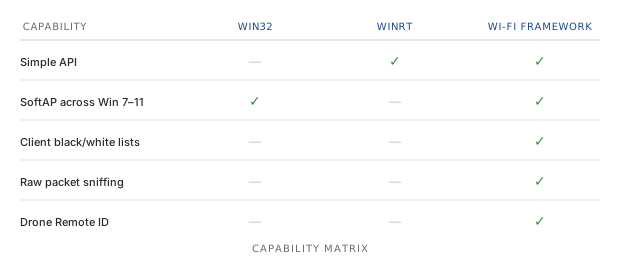
The problem with "native" tools: Win32 vs. WinRT
Historically, Windows developers have had two paths for working with Wi-Fi: Native Wi-Fi API (Win32) and Windows.Devices.WiFi (WinRT). Let's be honest — neither option is perfect.
Nightmare #1 — good old Native Wi-Fi API (Win32)
The Win32 API is powerful, but it is insanely complex. Writing code turns into juggling C structures, pointers, and
manual memory allocation. Want to call a simple function? Don't forget to correctly fill out a structure first, pass it by a pointer, and
then remember to call WlanFreeMemory in time so you don't get a memory leak. If you make a mistake by a single byte, your
application crashes into a silent blue screen or throws a mysterious access violation error.
Nightmare #2 — the limited WinRT (UWP / Windows Runtime)
It seemed like Microsoft created the modern WinRT API to fix everything. Yes, working with it feels nicer, the code
looks modern, and async/await is great to use. However, developers quickly hit a hard wall of security restrictions (Sandbox).
- Many functions require special capabilities in the application package manifest.
- If you take one step away from the standard "find a network and connect" scenario, the API simply says "no."
- Want to create a custom software access point (SoftAP), manage connected clients in detail, or dig into raw packets? Forget about it — WinRT simply cannot do that.
The lifesaver: what is Wi-Fi Framework?
Wi-Fi Framework is a commercial SDK that does all the dirty work of interacting with Windows subsystems for you. It runs exclusively on Windows OS, but it does so with maximum efficiency.
Instead of forcing you to read thousands of pages of Microsoft documentation, the framework provides a single, clean, high-level, and perfectly documented object-oriented interface (API). It is available for various development ecosystems:
- .NET Edition — C#, VB.NET
- C++ Edition — MSVC
- VCL Edition — Delphi and C++Builder
Now, let's look at the real architectural benefits that make Wi-Fi Framework stand out from any other wrapper library.
Key advantages of Wi-Fi Framework over competitors
Most free libraries on GitHub are just shallow wrappers over the same Win32 API. They do not add any new logic; they just slightly mask old code. Wi-Fi Framework goes much further.
1. Ultimate access point management (SoftAP and Wi-Fi Direct)
Try using the standard Win32 API to launch a software access point (SoftAP) so that it runs stably across different Windows versions — from Windows 7 to Windows 11. You will quickly find out that in Windows 10 and 11, the old Wireless Hosted Network feature was removed or replaced by Mobile Hotspot and Wi-Fi Direct.
Wi-Fi Framework completely shields you from these changes. You just call a single "Create Access Point" method, and the library automatically decides under the hood which technology to use — including Wi-Fi Direct SoftAP. See Wi-Fi SoftAP and Hosted Network for the full details.
2. Total control over clients (blacklists and whitelists)
There is no standard built-in way in the Windows API to say: "This device with this specific MAC address is forbidden from connecting to my SoftAP" or "Disconnect this user right now." In Wi-Fi Framework, this takes just one command. You can manage the pool of connected devices on the fly, creating blacklists and whitelists — which is critical for IoT solutions and enterprise software.
3. Raw packet sniffing
This is a killer feature that neither Win32 nor WinRT has. If your application needs to analyze the airwaves, collect telemetry, or diagnose a network, Wi-Fi Framework lets you capture raw Wi-Fi frames right out of the air. All you need is a compatible adapter and the Microsoft Network Monitor driver installed. Writing a similar solution from scratch would take a development team months of work. See Capture raw Wi-Fi frames for details.
4. Hardware range management (2.4, 5, and 6 GHz)
Switching adapter frequency bands programmatically in Windows is a real challenge. Wi-Fi Framework lets you switch radio module modes between 2.4 GHz, 5 GHz, and the latest 6 GHz standard directly from your code. Your app's users will no longer need to dig into the depths of the Windows Device Manager. See WLAN interface advanced parameters.
5. Out-of-the-box trends (Drone Remote ID)
The framework keeps up with the times. It includes built-in support for decoding Drone Remote ID (DRI) signals. If you are writing software for security monitoring or tracking drones, you won't have to manually parse specific Wi-Fi packets — the library will give you ready-to-use structured data. See Drone Remote ID for the full article.
How it looks in practice
Instead of hundreds of lines of initialization code, handles, and exception handling, working with Wi-Fi Framework comes down to intuitive events and methods.
You simply drop a component onto a form (in Delphi) or initialize a class (in C#), subscribe to simple events like
OnDeviceFound or OnClientConnected, and focus on writing your application's business logic. All memory
management, asynchronous threads, and Windows version specifics are safely hidden under the hood.
Summary
If your team's task is to write a simple home app that checks for an internet connection once a day, the standard Win32 / WinRT workarounds might be enough. But see the Wi-Fi client guide for the kind of code you would actually be writing.
However, if you are developing commercial software, working with IoT devices, creating monitoring or security systems, or writing plugins for Unity, Wi-Fi Framework pays for itself within the first few days of development. It saves hundreds of hours of working time, protects against memory leaks, and guarantees that your application will run reliably on any version of Windows.
Ready to see it in action? Head over to the Wi-Fi Framework download section to grab a free trial version for your environment of choice (.NET, C++, Delphi, or C++Builder).
Frequently asked questions
- Why is Wi-Fi development on Windows so painful?
- Windows offers two native paths: the Win32 Native Wi-Fi API, which is powerful but extremely complex (manual memory management,
C structures, pointers,
WlanFreeMemory), and the WinRT API, which is modern but heavily restricted by the UWP sandbox and cannot handle advanced scenarios like SoftAP or raw packet access. - What is Wi-Fi Framework?
- Wi-Fi Framework is a commercial Windows SDK from Soft Service Company that provides a clean, high-level, object-oriented API for wireless development. It is available for .NET (C#, VB.NET), C++ (MSVC), and Delphi / C++Builder (VCL).
- Can Wi-Fi Framework create a software access point (SoftAP)?
- Yes. Wi-Fi Framework shields developers from the Windows 10 and 11 changes where the legacy Wireless Hosted Network was replaced by
Mobile Hotspot and Wi-Fi Direct. A single
Create Access Pointmethod automatically selects the right technology, including Wi-Fi Direct SoftAP. - Does Wi-Fi Framework support raw packet sniffing and Drone Remote ID?
- Yes. Wi-Fi Framework can capture raw Wi-Fi frames from the air (with a compatible adapter and the Microsoft Network Monitor driver installed) and includes built-in support for decoding Drone Remote ID (DRI) signals.