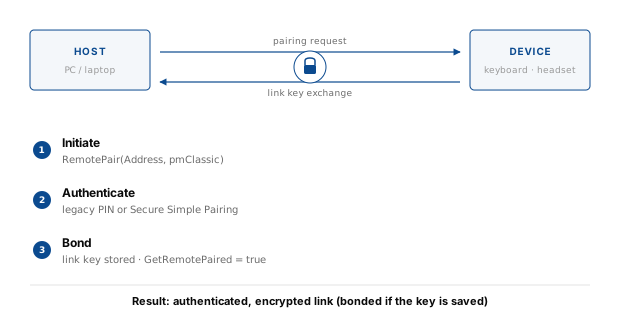
Bluetooth Classic, also known as BR/EDR (Basic Rate / Enhanced Data Rate), carries the profile traffic that has defined Bluetooth for decades — RFCOMM serial ports, OBEX file transfer, audio, and HID keyboards. Before any of that traffic is allowed to flow, the two devices must decide whether the link will be trusted. That decision is pairing.
Pairing is the process by which two Classic devices exchange enough information to compute a shared link key. That key is then used to authenticate and encrypt the link. Pairing is not the same as connecting: connecting establishes the radio link, while pairing decides whether that link will be trusted.
The Bluetooth Framework exposes the whole workflow through the wclBluetoothManager
class. Applications choose whether the framework or the operating system answers pairing requests, provide a PIN when asked, and
receive a single completion event with the final result.
Pairing vs bonding
The two terms describe different things, even though they are often used interchangeably.
Pairing is the act of establishing a shared link key. The key exists for the lifetime of the connection and is discarded when the link drops — unless bonding is enabled.
Bonding is the act of saving the link key in non-volatile storage on both sides, so that the next time the devices meet they can skip the pairing exchange and go straight to an authenticated link using the stored key.
The difference is visible in the API. A device that has been paired but not bonded reports GetRemotePaired as
true only while the link is active. A bonded device reports true even before a connection is established,
because the bond record persists in the host's Bluetooth stack and on the remote device.
How classic pairing works
Classic pairing has two generations, and the device determines which one is used.
Legacy pairing. Devices that predate Bluetooth 2.1 use a shared secret called a PIN — a short alphanumeric value, typically four digits. Both sides combine the PIN with random numbers and the devices' addresses to derive the link key. If the PIN is guessed or captured, the link key is compromised, which is why legacy pairing is considered weak by modern standards.
Secure Simple Pairing (SSP). Introduced in Bluetooth 2.1, SSP replaces the fixed PIN with public-key cryptography (Elliptic-Curve Diffie-Hellman). It defines four association models — Just Works, Passkey Entry, Numeric Comparison, and Out of Band. These are the same models used by Bluetooth LE, so the framework exposes them through the same events described in the BLE pairing article.
In the Bluetooth Framework, the classic-specific piece is the OnPinRequest event,
which answers legacy PIN requests. Everything else — IO capabilities, passkeys, numeric comparison, and completion — is handled by
the same event-driven API used for BLE pairing.
The HandlePairing flag
Before any pairing event can fire, the application must decide who answers pairing requests. This is controlled by the
HandlePairing parameter of wclBluetoothManager.Open.
When HandlePairing is true, the Bluetooth Framework registers itself as the Bluetooth authentication
agent. It intercepts pairing requests and delivers them to the application through the pairing events —
OnPinRequest, OnPasskeyRequest, OnConfirm, and so on. The application is in full control of
which PIN or passkey to return and whether to accept each request.
When HandlePairing is false, the framework does not intercept pairing. The operating
system's own Bluetooth agent handles the request, usually by showing its native pairing dialog, and the framework only observes the
outcome through OnAuthenticationCompleted. This applies to automatic pairing and to an explicit RemotePair
call alike — with HandlePairing set to false, the framework raises no pairing events other than
OnAuthenticationCompleted. In this mode the framework may report
WCL_E_BLUETOOTH_PAIRING_HANDLED_BY_SYSTEM.
The BluetoothManager demo passes the state of a checkbox straight into Open:
procedure TfmMain.btOpenClick(Sender: TObject);
var
  Res: Integer;
begin
  Res := wclBluetoothManager.Open(cbHandlePairing.Checked);
  if Res <> WCL_E_SUCCESS then
    ShowError(Res);
end;
void __fastcall TfmMain::btOpenClick(TObject *Sender)
{
int Res = wclBluetoothManager->Open(cbHandlePairing->Checked);
if (Res != WCL_E_SUCCESS)
ShowError(Res);
}private void btOpen_Click(object sender, EventArgs e)
{
Int32 Res = Manager.Open(cbHandlePairing.Checked);
if (Res != wclErrors.WCL_E_SUCCESS)
ShowError(Res);
}Private Sub btOpen_Click(ByVal sender As System.Object, ByVal e As System.EventArgs) Handles btOpen.Click
Dim Res As Int32 = Manager.Open(cbHandlePairing.Checked)
If Res <> wclErrors.WCL_E_SUCCESS Then ShowError(Res)
End Subvoid CBluetoothManagerDlg::OnBnClickedButtonOpen()
{
int Res = wclBluetoothManager.Open(cbHandlePairing.GetCheck() == TRUE);
if (Res != WCL_E_SUCCESS)
ShowError(Res);
}The current value of the flag is available after opening, on the HandlePairing property. The demo logs it from the
AfterOpen event:
procedure TfmMain.wclBluetoothManagerAfterOpen(Sender: TObject);
begin
  TraceEvent(nil, 'AfterOpen', 'HandlePairing',
    BoolToStr(wclBluetoothManager.HandlePairing, True));
end;
void __fastcall TfmMain::wclBluetoothManagerAfterOpen(TObject *Sender)
{
TraceEvent(NULL, "AfterOpen", "HandlePairing",
BoolToStr(wclBluetoothManager->HandlePairing, true));
}void Manager_AfterOpen(object sender, EventArgs e)
{
TraceEvent(null, "AfterOpen", "Handle pairing", Manager.HandlePairing.ToString());
}Private Sub Manager_AfterOpen(ByVal sender As Object, ByVal e As System.EventArgs) Handles Manager.AfterOpen
TraceEvent(Nothing, "AfterOpen", "Handle pairing", Manager.HandlePairing.ToString())
End Subvoid CBluetoothManagerDlg::wclBluetoothManagerAfterOpen(void* Sender)
{
UNREFERENCED_PARAMETER(Sender);
CString s;
if (wclBluetoothManager.HandlePairing)
s = _T("True");
else
s = _T("False");
TraceEvent(NULL, _T("AfterOpen"), _T("Handle pairing"), s);
}Legacy PIN pairing
When a legacy device asks for a PIN, the framework raises OnPinRequest. The event carries the remote device's address
and an out Pin parameter that the application must fill with the shared secret. The BluetoothManager
demo takes the value from an edit box on the form:
procedure TfmMain.wclBluetoothManagerPinRequest(Sender: TObject;
  const Radio: TwclBluetoothRadio; const Address: Int64; out Pin: String);
begin
  Pin := edPin.Text;

  TraceEvent(Radio, 'PinRequest', 'Address', IntToHex(Address, 12));
  TraceEvent(nil, '', 'PIN', Pin);
end;
void __fastcall TfmMain::wclBluetoothManagerPinRequest(TObject *Sender,
const TwclBluetoothRadio *Radio, const __int64 Address,
String& Pin)
{
Pin = edPin->Text;
TraceEvent((TwclBluetoothRadio*)Radio, "PinRequest", "Address",
IntToHex(Address, 12));
TraceEvent(NULL, "", "PIN", Pin);
}void Manager_OnPinRequest(object Sender, wclBluetoothRadio Radio, long Address, out string Pin)
{
Pin = edPIN.Text;
TraceEvent(Radio, "PinRequest", "Address", Address.ToString("X12"));
TraceEvent(null, "", "PIN", Pin);
}Private Sub Manager_OnPinRequest(ByVal Sender As Object, ByVal Radio As wclBluetooth.wclBluetoothRadio, ByVal Address As Long, ByRef Pin As String) Handles Manager.OnPinRequest
Pin = edPIN.Text
TraceEvent(Radio, "PinRequest", "Address", Address.ToString("X12"))
TraceEvent(Nothing, "", "PIN", Pin)
End Subvoid CBluetoothManagerDlg::wclBluetoothManagerPinRequest(void* Sender, CwclBluetoothRadio* const Radio,
const __int64 Address, tstring& Pin)
{
UNREFERENCED_PARAMETER(Sender);
CString s;
edPIN.GetWindowText(s);
Pin = s;
TraceEvent(Radio, _T("PinRequest"), _T("Address"), IntToHex(Address));
TraceEvent(NULL, _T(""), _T("PIN"), s);
}In a real application, OnPinRequest would show a dialog asking the user for the device's PIN. The sample reads it from
the form's PIN field to keep the demonstration deterministic.
Secure Simple Pairing methods
When Secure Simple Pairing is negotiated, the framework picks an association model based on the IO capabilities exchanged
with the peer. The same four models apply to Classic and BLE, and each one is delivered through a dedicated event. The
BluetoothManager demo implements all of them.
Just Works
Both devices have no display and no keyboard, so pairing proceeds without any user interaction beyond an optional
confirmation. The framework raises OnConfirm, and the application accepts or rejects the pairing. The demo
accepts unconditionally:
procedure TfmMain.wclBluetoothManagerConfirm(Sender: TObject;
  const Radio: TwclBluetoothRadio; const Address: Int64;
  out Confirm: Boolean);
begin
  Confirm := True;

  TraceEvent(Radio, 'Just Works pairing', 'Address', IntToHex(Address, 12));
end;
void __fastcall TfmMain::wclBluetoothManagerConfirm(TObject *Sender,
const TwclBluetoothRadio *Radio, const __int64 Address, bool& Confirm)
{
Confirm = true;
TraceEvent((TwclBluetoothRadio*)Radio, "Just Works pairing", "Address",
IntToHex(Address, 12));
}void Manager_OnConfirm(object Sender, wclBluetoothRadio Radio, long Address, out bool Confirm)
{
Confirm = true;
TraceEvent(Radio, "Just Works pairing", "Address", Address.ToString("X12"));
}Private Sub Manager_OnConfirm(ByVal Sender As Object, ByVal Radio As wclBluetooth.wclBluetoothRadio, ByVal Address As Long, ByRef Confirm As Boolean) Handles Manager.OnConfirm
Confirm = True
TraceEvent(Radio, "Just Works pairing", "Address", Address.ToString("X12"))
End Subvoid CBluetoothManagerDlg::wclBluetoothManagerConfirm(void* Sender, CwclBluetoothRadio* const Radio,
const __int64 Address, bool& Confirm)
{
UNREFERENCED_PARAMETER(Sender);
Confirm = true;
TraceEvent(Radio, _T("Just Works pairing"), _T("Address"), IntToHex(Address));
}Passkey Entry
One device displays a 6-digit passkey and the user types it into the other. Two events are involved:
OnPasskeyNotificationfires on the device that displays the passkey.OnPasskeyRequestfires on the device that inputs the passkey.
The demo logs the notification and returns a fixed passkey 123456:
procedure TfmMain.wclBluetoothManagerPasskeyNotification(Sender: TObject;
  const Radio: TwclBluetoothRadio; const Address: Int64;
  const Passkey: Cardinal);
begin
  TraceEvent(Radio, 'PasskeyNotification', 'Address', IntToHex(Address, 12));
  TraceEvent(nil, '', 'Passkey', IntToStr(Passkey));
end;

procedure TfmMain.wclBluetoothManagerPasskeyRequest(Sender: TObject;
  const Radio: TwclBluetoothRadio; const Address: Int64;
  out Passkey: Cardinal);
begin
  Passkey := 123456;

  TraceEvent(Radio, 'PasskeyRequest', 'Address', IntToHex(Address, 12));
  TraceEvent(nil, '', 'Passkey', IntToStr(Passkey));
end;
void __fastcall TfmMain::wclBluetoothManagerPasskeyNotification(
TObject *Sender, const TwclBluetoothRadio *Radio,
const __int64 Address, const DWORD Passkey)
{
TraceEvent((TwclBluetoothRadio*)Radio, "PasskeyNotification", "Address",
IntToHex(Address, 12));
TraceEvent(NULL, "", "Passkey", IntToStr((int)Passkey));
}
void __fastcall TfmMain::wclBluetoothManagerPasskeyRequest(TObject *Sender,
const TwclBluetoothRadio *Radio, const __int64 Address,
DWORD& Passkey)
{
Passkey = 123456;
TraceEvent((TwclBluetoothRadio*)Radio, "PasskeyRequest", "Address",
IntToHex(Address, 12));
TraceEvent(NULL, "", "Passkey", IntToStr((int)Passkey));
}void Manager_OnPasskeyNotification(object Sender, wclBluetoothRadio Radio, long Address, uint Passkey)
{
TraceEvent(Radio, "PasskeyNotification", "Address", Address.ToString("X12"));
TraceEvent(null, "", "Passkey", Passkey.ToString());
}
void Manager_OnPasskeyRequest(object Sender, wclBluetoothRadio Radio, long Address, out uint Passkey)
{
Passkey = 123456;
TraceEvent(Radio, "PasskeyRequest", "Address", Address.ToString());
TraceEvent(null, "", "Passkey", Passkey.ToString());
}Private Sub Manager_OnPasskeyNotification(ByVal Sender As Object, ByVal Radio As wclBluetooth.wclBluetoothRadio, ByVal Address As Long, ByVal Passkey As UInteger) Handles Manager.OnPasskeyNotification
TraceEvent(Radio, "PasskeyNotification", "Address", Address.ToString("X12"))
TraceEvent(Nothing, "", "Passkey", Passkey.ToString())
End Sub
Private Sub Manager_OnPasskeyRequest(ByVal Sender As Object, ByVal Radio As wclBluetooth.wclBluetoothRadio, ByVal Address As Long, ByRef Passkey As UInteger) Handles Manager.OnPasskeyRequest
Passkey = 123456
TraceEvent(Radio, "PasskeyRequest", "Address", Address.ToString())
TraceEvent(Nothing, "", "Passkey", Passkey.ToString())
End Subvoid CBluetoothManagerDlg::wclBluetoothManagerPasskeyNotification(void* Sender,
CwclBluetoothRadio* const Radio, const __int64 Address, const unsigned long Passkey)
{
UNREFERENCED_PARAMETER(Sender);
TraceEvent(Radio, _T("PasskeyNotification"), _T("Address"), IntToHex(Address));
TraceEvent(NULL, _T(""), _T("Passkey"), IntToStr(Passkey));
}
void CBluetoothManagerDlg::wclBluetoothManagerPasskeyRequest(void* Sender,
CwclBluetoothRadio* const Radio, const __int64 Address, unsigned long& Passkey)
{
UNREFERENCED_PARAMETER(Sender);
Passkey = 123456;
TraceEvent(Radio, _T("PasskeyRequest"), _T("Address"), IntToHex(Address));
TraceEvent(NULL, _T(""), _T("Passkey"), IntToStr(Passkey));
}Numeric Comparison
Both devices display the same 6-digit number and the user confirms that they match. The OnNumericComparison
event carries the Number and a Confirm output:
procedure TfmMain.wclBluetoothManagerNumericComparison(Sender: TObject;
  const Radio: TwclBluetoothRadio; const Address: Int64;
  const Number: Cardinal; out Confirm: Boolean);
begin
  Confirm := True;

  TraceEvent(Radio, 'NumericComparison', 'Address', IntToHex(Address, 12));
  TraceEvent(nil, '', 'Number', IntToStr(Number));
  TraceEvent(nil, '', 'Confirm', BoolToStr(Confirm, True));
end;
void __fastcall TfmMain::wclBluetoothManagerNumericComparison(
TObject *Sender, const TwclBluetoothRadio *Radio,
const __int64 Address, const DWORD Number, bool& Confirm)
{
Confirm = true;
TraceEvent((TwclBluetoothRadio*)Radio, "NumericComparison", "Address",
IntToHex(Address, 12));
TraceEvent(NULL, "", "Number", IntToStr((int)Number));
TraceEvent(NULL, "", "Confirm", BoolToStr(Confirm, true));
}void Manager_OnNumericComparison(object Sender, wclBluetoothRadio Radio, long Address, uint Number, out bool Confirm)
{
Confirm = true;
TraceEvent(Radio, "NumericComparison", "Address", Address.ToString("X12"));
TraceEvent(null, "", "Number", Number.ToString());
TraceEvent(null, "", "Confirm", Confirm.ToString());
}Private Sub Manager_OnNumericComparison(ByVal Sender As Object, ByVal Radio As wclBluetooth.wclBluetoothRadio, ByVal Address As Long, ByVal Number As UInteger, ByRef Confirm As Boolean) Handles Manager.OnNumericComparison
Confirm = True
TraceEvent(Radio, "NumericComparison", "Address", Address.ToString("X12"))
TraceEvent(Nothing, "", "Number", Number.ToString())
TraceEvent(Nothing, "", "Confirm", Confirm.ToString())
End Subvoid CBluetoothManagerDlg::wclBluetoothManagerNumericComparison(void* Sender,
CwclBluetoothRadio* const Radio, const __int64 Address, const unsigned long Number,
bool& Confirm)
{
UNREFERENCED_PARAMETER(Sender);
Confirm = true;
TraceEvent(Radio, _T("NumericComparison"), _T("Address"), IntToHex(Address));
TraceEvent(NULL, _T(""), _T("Number"), IntToStr(Number));
TraceEvent(NULL, _T(""), _T("Confirm"), BoolToStr(Confirm));
}Out of Band
The pairing key is exchanged through a channel other than Bluetooth — an NFC tap, a QR code, or a wired connection. Support
is signalled through the OobPresent output of OnIoCapabilityRequest, and the actual data is supplied
by OnOobDataRequest. The demo sets OobPresent to false because no OOB hardware is assumed.
IO capabilities and MITM protection
For Secure Simple Pairing the framework must know what the local device can do and how much protection the application
wants. Both are set in the OnIoCapabilityRequest event, which fires for Classic pairing exactly as it does for
BLE:
procedure TfmMain.wclBluetoothManagerIoCapabilityRequest(Sender: TObject;
  const Radio: TwclBluetoothRadio; const Address: Int64;
  out Mitm: TwclBluetoothMitmProtection;
  out IoCapability: TwclBluetoothIoCapability; out OobPresent: Boolean);
begin
  case cbMitmProtection.ItemIndex of
    0: Mitm := mitmProtectionNotRequired;
    1: Mitm := mitmProtectionRequired;
    2: Mitm := mitmProtectionNotRequiredBonding;
    3: Mitm := mitmProtectionRequiredBonding;
    4: Mitm := mitmProtectionNotRequiredGeneralBonding;
    5: Mitm := mitmProtectionRequiredGeneralBonding;
    else Mitm := mitmProtectionNotDefined;
  end;

  case cbIoCap.ItemIndex of
    0: IoCapability := iocapDisplayOnly;
    1: IoCapability := iocapDisplayYesNo;
    2: IoCapability := iocapKeyboardOnly;
    3: IoCapability := iocapNoInputNoOutput;
    4: IoCapability := iocapDisplayKeyboard;
    else IoCapability := iocapNotDefined;
  end;

  // To accept OOB pairing set this parameter to True.
  OobPresent := False;
end;
void __fastcall TfmMain::wclBluetoothManagerIoCapabilityRequest(
TObject *Sender, const TwclBluetoothRadio *Radio,
const __int64 Address, TwclBluetoothMitmProtection& Mitm,
TwclBluetoothIoCapability& IoCapability, bool& OobPresent)
{
switch (cbMitmProtection->ItemIndex)
{
case 0:
Mitm = mitmProtectionNotRequired;
break;
case 1:
Mitm = mitmProtectionRequired;
break;
case 2:
Mitm = mitmProtectionNotRequiredBonding;
break;
case 3:
Mitm = mitmProtectionRequiredBonding;
break;
case 4:
Mitm = mitmProtectionNotRequiredGeneralBonding;
break;
case 5:
Mitm = mitmProtectionRequiredGeneralBonding;
break;
default:
Mitm = mitmProtectionNotDefined;
break;
}
switch (cbIoCap->ItemIndex)
{
case 0:
IoCapability = iocapDisplayOnly;
break;
case 1:
IoCapability = iocapDisplayYesNo;
break;
case 2:
IoCapability = iocapKeyboardOnly;
break;
case 3:
IoCapability = iocapNoInputNoOutput;
break;
case 4:
IoCapability = iocapDisplayKeyboard;
break;
default:
IoCapability = iocapNotDefined;
break;
}
// To accept OOB pairing set this parameter to True.
OobPresent = false;
}void Manager_OnIoCapabilityRequest(object Sender, wclBluetoothRadio Radio, long Address,
out wclBluetoothMitmProtection Mitm, out wclBluetoothIoCapability IoCapability, out bool OobPresent)
{
switch (cbMitmProtection.SelectedIndex)
{
case 0:
Mitm = wclBluetoothMitmProtection.mitmProtectionNotRequired;
break;
case 1:
Mitm = wclBluetoothMitmProtection.mitmProtectionRequired;
break;
case 2:
Mitm = wclBluetoothMitmProtection.mitmProtectionNotRequiredBonding;
break;
case 3:
Mitm = wclBluetoothMitmProtection.mitmProtectionRequiredBonding;
break;
case 4:
Mitm = wclBluetoothMitmProtection.mitmProtectionNotRequiredGeneralBonding;
break;
case 5:
Mitm = wclBluetoothMitmProtection.mitmProtectionRequiredGeneralBonding;
break;
default:
Mitm = wclBluetoothMitmProtection.mitmProtectionNotDefined;
break;
}
switch (cbIoCap.SelectedIndex)
{
case 0:
IoCapability = wclBluetoothIoCapability.iocapDisplayOnly;
break;
case 1:
IoCapability = wclBluetoothIoCapability.iocapDisplayYesNo;
break;
case 2:
IoCapability = wclBluetoothIoCapability.iocapKeyboardOnly;
break;
case 3:
IoCapability = wclBluetoothIoCapability.iocapNoInputNoOutput;
break;
case 4:
IoCapability = wclBluetoothIoCapability.iocapDisplayKeyboard;
break;
default:
IoCapability = wclBluetoothIoCapability.iocapNotDefined;
break;
}
// To accept OOB pairing set this parameter to True.
OobPresent = false;
}Private Sub Manager_OnIoCapabilityRequest(ByVal Sender As Object, ByVal Radio As wclBluetooth.wclBluetoothRadio, ByVal Address As Long, ByRef Mitm As wclBluetooth.wclBluetoothMitmProtection, ByRef IoCapability As wclBluetooth.wclBluetoothIoCapability, ByRef OobPresent As Boolean) Handles Manager.OnIoCapabilityRequest
Select Case cbMitmProtection.SelectedIndex
Case 0
Mitm = wclBluetoothMitmProtection.mitmProtectionNotRequired
Case 1
Mitm = wclBluetoothMitmProtection.mitmProtectionRequired
Case 2
Mitm = wclBluetoothMitmProtection.mitmProtectionNotRequiredBonding
Case 3
Mitm = wclBluetoothMitmProtection.mitmProtectionRequiredBonding
Case 4
Mitm = wclBluetoothMitmProtection.mitmProtectionNotRequiredGeneralBonding
Case 5
Mitm = wclBluetoothMitmProtection.mitmProtectionRequiredGeneralBonding
Case Else
Mitm = wclBluetoothMitmProtection.mitmProtectionNotDefined
End Select
Select Case cbIoCap.SelectedIndex
Case 0
IoCapability = wclBluetoothIoCapability.iocapDisplayOnly
Case 1
IoCapability = wclBluetoothIoCapability.iocapDisplayYesNo
Case 2
IoCapability = wclBluetoothIoCapability.iocapKeyboardOnly
Case 3
IoCapability = wclBluetoothIoCapability.iocapNoInputNoOutput
Case 4
IoCapability = wclBluetoothIoCapability.iocapDisplayKeyboard
Case Else
IoCapability = wclBluetoothIoCapability.iocapNotDefined
End Select
' To accept OOB pairing set this parameter to True.
OobPresent = False
End Subvoid CBluetoothManagerDlg::wclBluetoothManagerIoCapabilityRequest(void* Sender,
CwclBluetoothRadio* const Radio, const __int64 Address, wclBluetoothMitmProtection& Mitm,
wclBluetoothIoCapability& IoCapability, bool& OobPresent)
{
UNREFERENCED_PARAMETER(Sender);
UNREFERENCED_PARAMETER(Radio);
UNREFERENCED_PARAMETER(Address);
switch (cbMitmProtection.GetCurSel())
{
case 0:
Mitm = mitmProtectionNotRequired;
break;
case 1:
Mitm = mitmProtectionRequired;
break;
case 2:
Mitm = mitmProtectionNotRequiredBonding;
break;
case 3:
Mitm = mitmProtectionRequiredBonding;
break;
case 4:
Mitm = mitmProtectionNotRequiredGeneralBonding;
break;
case 5:
Mitm = mitmProtectionRequiredGeneralBonding;
break;
default:
Mitm = mitmProtectionNotDefined;
break;
}
switch (cbIoCap.GetCurSel())
{
case 0:
IoCapability = iocapDisplayOnly;
break;
case 1:
IoCapability = iocapDisplayYesNo;
break;
case 2:
IoCapability = iocapKeyboardOnly;
break;
case 3:
IoCapability = iocapNoInputNoOutput;
break;
case 4:
IoCapability = iocapDisplayKeyboard;
break;
default:
IoCapability = iocapNotDefined;
break;
}
// To accept OOB pairing set this parameter to True.
OobPresent = false;
}The Mitm parameter carries the requested protection level (mitmProtectionNotRequired,
mitmProtectionRequired, and the bonding variants), and IoCapability describes the local IO
(iocapDisplayOnly, iocapDisplayYesNo, iocapKeyboardOnly,
iocapNoInputNoOutput, iocapDisplayKeyboard). The complete set of values is listed in the
BLE pairing article. The framework combines them with the peer's capabilities to select the
association model automatically.
Pairing completion
Every pairing attempt — automatic or manual, legacy PIN or Secure Simple Pairing — ends with the
OnAuthenticationCompleted event. Its Error parameter is
WCL_E_SUCCESS on success, or one of the pairing error codes on failure:
procedure TfmMain.wclBluetoothManagerAuthenticationCompleted(
  Sender: TObject; const Radio: TwclBluetoothRadio; const Address: Int64;
  const Error: Integer);
begin
  TraceEvent(Radio, 'AuthenticationCompleted', 'Address',
    IntToHex(Address, 12));
  TraceEvent(nil, '', 'Error', '0x' + IntToHex(Error, 8));
end;
void __fastcall TfmMain::wclBluetoothManagerAuthenticationCompleted(
TObject *Sender, const TwclBluetoothRadio *Radio,
const __int64 Address, const int Error)
{
TraceEvent((TwclBluetoothRadio*)Radio, "AuthenticationCompleted", "Address",
IntToHex(Address, 12));
TraceEvent(NULL, "", "Error", "0x" + IntToHex(Error, 8));
}void Manager_OnAuthenticationCompleted(object Sender, wclBluetoothRadio Radio, long Address, int Error)
{
TraceEvent(Radio, "AuthenticationCompleted", "Address", Address.ToString("X12"));
TraceEvent(null, "", "Error", "0x" + Error.ToString("X8"));
}Private Sub Manager_OnAuthenticationCompleted(ByVal Sender As Object, ByVal Radio As wclBluetooth.wclBluetoothRadio, ByVal Address As Long, ByVal [Error] As Integer) Handles Manager.OnAuthenticationCompleted
TraceEvent(Radio, "AuthenticationCompleted", "Address", Address.ToString("X12"))
TraceEvent(Nothing, "", "Error", "0x" + [Error].ToString("X8"))
End Subvoid CBluetoothManagerDlg::wclBluetoothManagerAuthenticationCompleted(void* Sender,
CwclBluetoothRadio* const Radio, const __int64 Address, const int Error)
{
UNREFERENCED_PARAMETER(Sender);
TraceEvent(Radio, _T("AuthenticationCompleted"), _T("Address"), IntToHex(Address));
TraceEvent(NULL, _T(""), _T("Error"), _T("0x") + IntToHex(Error));
}Automatic and manual pairing
When HandlePairing is true, the Bluetooth Framework is registered as the Bluetooth authentication
agent and automatically intercepts every pairing request — the application does not need to do anything. This
automatic pairing is always active for Bluetooth Classic, and it does not matter whether the pairing is triggered by an
incoming or an outgoing connection: the framework answers the request through the pairing events (OnPinRequest,
OnPasskeyRequest, OnConfirm, and so on). In particular, an RFCOMM client or server
that opens a connection requiring authentication or encryption is paired automatically, without any call to
RemotePair.
Manual pairing is simply an explicit call to RemotePair. It is the application, not the framework,
that decides when and against which device pairing runs. The second parameter selects the method — pmClassic forces
classic BR/EDR pairing, pmLe forces BLE pairing, and pmAuto lets the framework choose based on the device
type. The demo maps a combo box selection to the method and then calls RemotePair:
procedure TfmMain.btPairClick(Sender: TObject);
var
  Item: TListItem;
  Radio: TwclBluetoothRadio;
  Address: Int64;
  Res: Integer;
  Method: TwclBluetoothPairingMethod;
begin
  if lvDevices.Selected = nil then
    MessageDlg('Select device', mtWarning, [mbOK], 0)

  else begin
    Item := lvDevices.Selected;
    Radio := TwclBluetoothRadio(Item.Data);
    Address := StrToInt64('$' + Item.SubItems[0]);

    case cbPairingMethod.ItemIndex of
      1: Method := pmClassic;
      2: Method := pmLe;
      else Method := pmAuto;
    end;

    Res := Radio.RemotePair(Address, Method);
    if Res <> WCL_E_SUCCESS then
      ShowError(Res);
  end;
end;
void __fastcall TfmMain::btPairClick(TObject *Sender)
{
if (lvDevices->Selected == NULL)
MessageDlg("Select device", mtWarning, TMsgDlgButtons() << mbOK, 0);
else
{
TListItem* Item = lvDevices->Selected;
TwclBluetoothRadio* Radio = (TwclBluetoothRadio*)Item->Data;
__int64 Address = StrToInt64("$" + Item->SubItems->Strings[0]);
TwclBluetoothPairingMethod Method;
switch (cbPairingMethod->ItemIndex)
{
case 1:
Method = pmClassic;
break;
case 2:
Method = pmLe;
break;
default:
Method = Wclbluetooth::pmAuto;
break;
}
int Res = Radio->RemotePair(Address, Method);
if (Res != WCL_E_SUCCESS)
ShowError(Res);
}
}private void btPair_Click(object sender, EventArgs e)
{
if (lvDevices.SelectedItems.Count == 0)
MessageBox.Show("Select device", "Warning", MessageBoxButtons.OK,
MessageBoxIcon.Warning);
else
{
ListViewItem Item = lvDevices.SelectedItems[0];
wclBluetoothRadio Radio = (wclBluetoothRadio)Item.Tag;
Int64 Address = Convert.ToInt64(Item.SubItems[1].Text, 16);
wclBluetoothPairingMethod Method;
switch (cbPairingMethod.SelectedIndex)
{
case 1:
Method = wclBluetoothPairingMethod.pmClassic;
break;
case 2:
Method = wclBluetoothPairingMethod.pmLe;
break;
default:
Method = wclBluetoothPairingMethod.pmAuto;
break;
}
Int32 Res = Radio.RemotePair(Address, Method);
if (Res != wclErrors.WCL_E_SUCCESS)
ShowError(Res);
}
}Private Sub btPair_Click(ByVal sender As System.Object, ByVal e As System.EventArgs) Handles btPair.Click
If lvDevices.SelectedItems.Count = 0 Then
MessageBox.Show("Select device", "Warning", MessageBoxButtons.OK, MessageBoxIcon.Warning)
Else
Dim Item As ListViewItem = lvDevices.SelectedItems(0)
Dim Radio As wclBluetoothRadio = CType(Item.Tag, wclBluetoothRadio)
Dim Address As Int64 = Convert.ToInt64(Item.SubItems(1).Text, 16)
Dim Method As wclBluetoothPairingMethod
Select Case cbPairingMethod.SelectedIndex
Case 1
Method = wclBluetoothPairingMethod.pmClassic
Case 2
Method = wclBluetoothPairingMethod.pmLe
Case Else
Method = wclBluetoothPairingMethod.pmAuto
End Select
Dim Res As Int32 = Radio.RemotePair(Address, Method)
If Res <> wclErrors.WCL_E_SUCCESS Then
ShowError(Res)
End If
End If
End Subvoid CBluetoothManagerDlg::OnBnClickedButtonPair()
{
POSITION Pos = lvDevices.GetFirstSelectedItemPosition();
if (Pos == NULL)
AfxMessageBox(_T("Select device"));
else
{
int Item = lvDevices.GetNextSelectedItem(Pos);
CwclBluetoothRadio* Radio = (CwclBluetoothRadio*)lvDevices.GetItemData(Item);
__int64 Address = StrToInt64(lvDevices.GetItemText(Item, 1));
wclBluetoothPairingMethod Method;
switch (cbPairingMethod.GetCurSel())
{
case 1:
Method = pmClassic;
break;
case 2:
Method = pmLe;
break;
default:
Method = pmAuto;
break;
}
int Res = Radio->RemotePair(Address, Method);
if (Res != WCL_E_SUCCESS)
ShowError(Res);
}
}Note that RemotePair still relies on HandlePairing. If HandlePairing is false,
the operating system handles the pairing even when RemotePair is called, and the framework raises no pairing events
except OnAuthenticationCompleted.
Explicit classic pairing is useful when a device supports both classic and BLE and the application must pin down which transport the link key belongs to, or when pairing must happen before any profile-level connection is attempted.
Unpairing
Removing a bond is done through RemoteUnpair. The pairing method must match the one used during the initial pair:
procedure TfmMain.btUnpairClick(Sender: TObject);
var
  Item: TListItem;
  Radio: TwclBluetoothRadio;
  Address: Int64;
  Res: Integer;
  Method: TwclBluetoothPairingMethod;
begin
  if lvDevices.Selected = nil then
    MessageDlg('Select device', mtWarning, [mbOK], 0)

  else begin
    Item := lvDevices.Selected;
    Radio := TwclBluetoothRadio(Item.Data);
    Address := StrToInt64('$' + Item.SubItems[0]);

    case cbPairingMethod.ItemIndex of
      1: Method := pmClassic;
      2: Method := pmLe;
      else Method := pmAuto;
    end;

    Res := Radio.RemoteUnpair(Address, Method);
    if Res <> WCL_E_SUCCESS then
      ShowError(Res);

    RefreshDevice(Item);
  end;
end;
void __fastcall TfmMain::btUnpairClick(TObject *Sender)
{
if (lvDevices->Selected == NULL)
MessageDlg("Select device", mtWarning, TMsgDlgButtons() << mbOK, 0);
else
{
TListItem* Item = lvDevices->Selected;
TwclBluetoothRadio* Radio = (TwclBluetoothRadio*)Item->Data;
__int64 Address = StrToInt64("$" + Item->SubItems->Strings[0]);
TwclBluetoothPairingMethod Method;
switch (cbPairingMethod->ItemIndex)
{
case 1:
Method = pmClassic;
break;
case 2:
Method = pmLe;
break;
default:
Method = Wclbluetooth::pmAuto;
break;
}
int Res = Radio->RemoteUnpair(Address, Method);
if (Res != WCL_E_SUCCESS)
ShowError(Res);
RefreshDevice(Item);
}
}private void btUnpair_Click(object sender, EventArgs e)
{
if (lvDevices.SelectedItems.Count == 0)
MessageBox.Show("Select device", "Warning", MessageBoxButtons.OK,
MessageBoxIcon.Warning);
else
{
ListViewItem Item = lvDevices.SelectedItems[0];
wclBluetoothRadio Radio = (wclBluetoothRadio)Item.Tag;
Int64 Address = Convert.ToInt64(Item.SubItems[1].Text, 16);
wclBluetoothPairingMethod Method;
switch (cbPairingMethod.SelectedIndex)
{
case 1:
Method = wclBluetoothPairingMethod.pmClassic;
break;
case 2:
Method = wclBluetoothPairingMethod.pmLe;
break;
default:
Method = wclBluetoothPairingMethod.pmAuto;
break;
}
Int32 Res = Radio.RemoteUnpair(Address, Method);
if (Res != wclErrors.WCL_E_SUCCESS)
ShowError(Res);
RefreshDevice(Item);
}
}Private Sub btUnpair_Click(ByVal sender As System.Object, ByVal e As System.EventArgs) Handles btUnpair.Click
If lvDevices.SelectedItems.Count = 0 Then
MessageBox.Show("Select device", "Warning", MessageBoxButtons.OK, MessageBoxIcon.Warning)
Else
Dim Item As ListViewItem = lvDevices.SelectedItems(0)
Dim Radio As wclBluetoothRadio = CType(Item.Tag, wclBluetoothRadio)
Dim Address As Int64 = Convert.ToInt64(Item.SubItems(1).Text, 16)
Dim Method As wclBluetoothPairingMethod
Select Case cbPairingMethod.SelectedIndex
Case 1
Method = wclBluetoothPairingMethod.pmClassic
Case 2
Method = wclBluetoothPairingMethod.pmLe
Case Else
Method = wclBluetoothPairingMethod.pmAuto
End Select
Dim Res As Int32 = Radio.RemoteUnpair(Address, Method)
If Res <> wclErrors.WCL_E_SUCCESS Then
ShowError(Res)
End If
RefreshDevice(Item)
End If
End Subvoid CBluetoothManagerDlg::OnBnClickedButtonUnpair()
{
POSITION Pos = lvDevices.GetFirstSelectedItemPosition();
if (Pos == NULL)
AfxMessageBox(_T("Select device"));
else
{
int Item = lvDevices.GetNextSelectedItem(Pos);
CwclBluetoothRadio* Radio = (CwclBluetoothRadio*)lvDevices.GetItemData(Item);
__int64 Address = StrToInt64(lvDevices.GetItemText(Item, 1));
wclBluetoothPairingMethod Method;
switch (cbPairingMethod.GetCurSel())
{
case 1:
Method = pmClassic;
break;
case 2:
Method = pmLe;
break;
default:
Method = pmAuto;
break;
}
int Res = Radio->RemoteUnpair(Address, Method);
if (Res != WCL_E_SUCCESS)
ShowError(Res);
RefreshDevice(Item);
}
}Bond management
Enumerating the devices the host has already bonded with is done through EnumPairedDevices. The demo selects a radio
and fills the device list with the result:
procedure TfmMain.btEnumPairedClick(Sender: TObject);
var
  Item: TListItem;
  Radio: TwclBluetoothRadio;
  Devices: TwclBluetoothAddresses;
  Res: Integer;
  i: Integer;
begin
  if lvRadios.Selected = nil then
    MessageDlg('Select radio', mtWarning, [mbOK], 0)

  else begin
    ClearDevices;

    Item := lvRadios.Selected;
    Radio := TwclBluetoothRadio(Item.Data);

    Res := Radio.EnumPairedDevices(Devices);
    if Res <> WCL_E_SUCCESS then
      ShowError(Res)

    else begin
      if Devices <> nil then begin
        for i := 0 to Length(Devices) - 1 do
          AddDevice(Radio, Devices[i]);

        RefreshDevices;
      end;
    end;
  end;
end;
void __fastcall TfmMain::btEnumPairedClick(TObject *Sender)
{
if (lvRadios->Selected == NULL)
MessageDlg("Select radio", mtWarning, TMsgDlgButtons() << mbOK, 0);
else
{
ClearDevices();
TListItem* Item = lvRadios->Selected;
TwclBluetoothRadio* Radio = (TwclBluetoothRadio*)Item->Data;
TwclBluetoothAddresses Devices;
int Res = Radio->EnumPairedDevices(Devices);
if (Res != WCL_E_SUCCESS)
ShowError(Res);
else
{
for (int i = 0; i < Devices.Length; i++)
AddDevice(Radio, Devices[i]);
RefreshDevices();
}
}
}private void btEnumPaired_Click(object sender, EventArgs e)
{
if (lvRadios.SelectedItems.Count == 0)
MessageBox.Show("Select radio", "Warning", MessageBoxButtons.OK, MessageBoxIcon.Warning);
else
{
ClearDevices();
ListViewItem Item = lvRadios.SelectedItems[0];
wclBluetoothRadio Radio = (wclBluetoothRadio)Item.Tag;
Int64[] Devices;
Int32 Res = Radio.EnumPairedDevices(out Devices);
if (Res != wclErrors.WCL_E_SUCCESS)
ShowError(Res);
else
{
if (Devices != null)
{
for (Int32 i = 0; i < Devices.Length; i++)
AddDevice(Radio, Devices[i]);
RefreshDevices();
}
}
}
}Private Sub btEnumPaired_Click(ByVal sender As System.Object, ByVal e As System.EventArgs) Handles btEnumPaired.Click
If lvRadios.SelectedItems.Count = 0 Then
MessageBox.Show("Select radio", "Warning", MessageBoxButtons.OK, MessageBoxIcon.Warning)
Else
ClearDevices()
Dim Item As ListViewItem = lvRadios.SelectedItems(0)
Dim Radio As wclBluetoothRadio = CType(Item.Tag, wclBluetoothRadio)
Dim Devices As Int64() = Nothing
Dim Res As Int32 = Radio.EnumPairedDevices(Devices)
If Res <> wclErrors.WCL_E_SUCCESS Then
ShowError(Res)
Else
If Devices IsNot Nothing Then
For i As Int32 = 0 To Devices.Length - 1
AddDevice(Radio, Devices(i))
Next i
RefreshDevices()
End If
End If
End If
End Subvoid CBluetoothManagerDlg::OnBnClickedButtonEnumPaired()
{
POSITION Pos = lvRadios.GetFirstSelectedItemPosition();
if (Pos == NULL)
AfxMessageBox(_T("Select radio"));
else
{
ClearDevices();
int Item = lvRadios.GetNextSelectedItem(Pos);
CwclBluetoothRadio* Radio = (CwclBluetoothRadio*)lvRadios.GetItemData(Item);
wclBluetoothAddresses Devices;
int Res = Radio->EnumPairedDevices(Devices);
if (Res != WCL_E_SUCCESS)
ShowError(Res);
else
{
if (Devices.size() != 0)
{
for (wclBluetoothAddresses::iterator i = Devices.begin(); i != Devices.end(); i++)
AddDevice(Radio, (*i));
RefreshDevices();
Devices.clear();
}
}
}
}Checking whether a specific device is bonded is a single call. The demo reads it while refreshing a device row in the list:
Res := Radio.GetRemotePaired(Address, Paired);
if Res <> WCL_E_SUCCESS then
  Item.SubItems[4] := 'Error: 0x' + IntToHex(Res, 8)
else
  Item.SubItems[4] := BoolToStr(Paired, True);
bool Paired = false;
Res = Radio->GetRemotePaired(Address, Paired);
if (Res != WCL_E_SUCCESS)
Item->SubItems->Strings[4] = "Error: 0x" + IntToHex(Res, 8);
else
Item->SubItems->Strings[4] = BoolToStr(Paired, true);Boolean Paired;
Res = Radio.GetRemotePaired(Address, out Paired);
if (Res != wclErrors.WCL_E_SUCCESS)
Item.SubItems[5].Text = "Error: 0x" + Res.ToString("X8");
else
Item.SubItems[5].Text = Paired.ToString();Dim Paired As Boolean
Res = Radio.GetRemotePaired(Address, Paired)
If Res <> wclErrors.WCL_E_SUCCESS Then
Item.SubItems(5).Text = "Error: 0x" + Res.ToString("X8")
Else
Item.SubItems(5).Text = Paired.ToString()
End Ifbool Paired;
Res = Radio->GetRemotePaired(Address, Paired);
if (Res != WCL_E_SUCCESS)
lvDevices.SetItemText(Item, 5, _T("Error: 0x") + IntToHex(Res));
else
lvDevices.SetItemText(Item, 5, BoolToStr(Paired));The paired status reflects the operating system's bond record — the same record that Windows keeps in its device manager. A
true value means the link key has been saved and future connections can skip the pairing exchange.
Troubleshooting
WCL_E_BLUETOOTH_ALREADY_PAIRED from RemotePair. The device is
already bonded. This is not an error — the link key exists and can be used directly. Applications that need to re-pair should call
RemoteUnpair first.
WCL_E_BLUETOOTH_PAIRED_BY_OTHER from RemotePair. The device is
bonded to a different host, or the remote device has a stale link key that no longer matches. RemoteUnpair followed by
RemotePair usually resolves it.
WCL_E_BLUETOOTH_PAIRING_HANDLED_BY_SYSTEM. Pairing was not intercepted by the
framework because HandlePairing is false. Pass true to Open if the application
must answer the pairing requests itself.
WCL_E_BLUETOOTH_AUTHENTICATION_FAILED. Authentication failed — usually the
wrong PIN or passkey was supplied. Verify the value returned from OnPinRequest (or OnPasskeyRequest) and
try again.
WCL_E_BLUETOOTH_INVALID_PAIRING_METHOD. The pairing method passed to
RemotePair or RemoteUnpair is not valid for this device. A dual-mode device should accept
pmClassic, pmLe, or pmAuto; a BLE-only device does not support pmClassic.
WCL_E_BLUETOOTH_AUTHENTICATION_DEVICE_IGNORED. A Microsoft-specific result
meaning the classic pairing request was not started and must be re-initiated. Retry the RemotePair call.
Frequently asked questions
- What is the difference between a PIN and a passkey?
- A PIN is used by legacy BR/EDR pairing (Bluetooth before 2.1). It is a short alphanumeric value, usually four digits, and is
delivered through
OnPinRequest. A passkey is the numeric 6-digit value used by Secure Simple Pairing and is delivered throughOnPasskeyRequestorOnPasskeyNotification. - How do I make the framework handle pairing instead of the OS?
- Pass
truetowclBluetoothManager.Open. This setsHandlePairingtotrue, and the framework intercepts pairing requests and fires the pairing events. Passfalseto leave pairing to the operating system's own Bluetooth agent. - How do I force classic pairing on a dual-mode device?
- Call
RemotePairwithpmClassicon the target radio. This forces classic BR/EDR pairing even on a device that also supports Bluetooth LE.pmAutolets the framework choose, andpmLeforces BLE pairing. - How do I remove a bond?
- Call
RemoteUnpairwith the same pairing method that was used to establish the bond. The bond is removed from the operating system's device record, and the remote device discards the stored link key.