The Wireless Communication Library uses an internal messaging subsystem to safely
deliver hardware events from system callbacks to your application. Choose synchronous processing (mpSync)
for UI frameworks like VCL, WinForms, or MFC, and asynchronous processing (mpAsync) for console and
service applications.
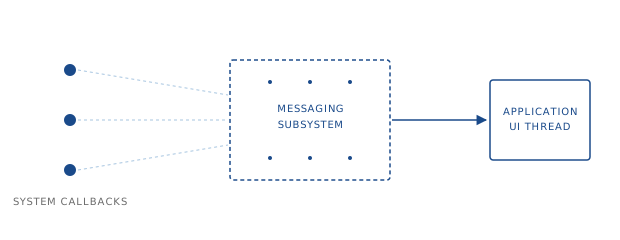
The Wireless Communication Library works with different hardware devices: Bluetooth, Serial, and Wi-Fi. These devices send notifications — when a device is found, connected, disconnected, and so on — to an application through callbacks in different system-defined threads. However, UI frameworks (VCL, LCL, MFC, WinForms, WPF) require that UI updates always be performed in the main UI thread. To work with these UI frameworks, the Library needs to synchronize those callbacks with an application's main thread. To achieve this, the Library uses an internal inter-threading communication mechanism called Messaging.
The Messaging Subsystem
The Wireless Communication Library messaging subsystem provides a universal and cross-platform way to deliver inter-threading notifications. This subsystem allows sending notifications from one application's thread to another. The Library uses it to deliver system notifications from system callbacks to the Library objects. The messaging subsystem notifications are called messages. Sending messages is called synchronization. Currently, the Library messaging works on Windows and macOS.
The Library provides two synchronization methods called message processing methods: synchronous and asynchronous.
Each class of the Library can use its own independent synchronization method. You can specify the message processing method by setting
the MessageProcessing property. By default, synchronous message processing is used.
The message processing methods are described by the wclMessageProcessingMethod enumeration. The enumeration defines two
values: mpAsync is defined for asynchronous message processing, and mpSync is defined for
synchronous message processing.
Message processing methods
Asynchronous message processing
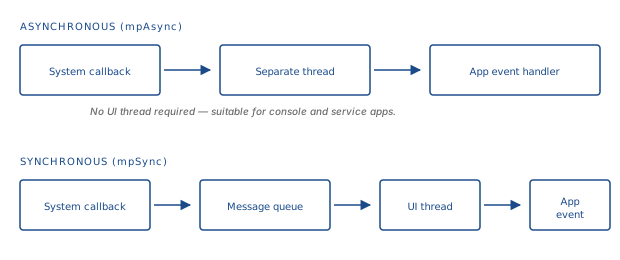
The asynchronous message processing uses a separate thread for notification delivery. All
Wireless Communication Library class events are called in a separate independent thread. This method is useful
for console or service applications. It can also be used in UI applications when you need to run some Library functions in a separate
thread. To switch a component to asynchronous message processing, set the MessageProcessing property to mpAsync.
Synchronous message processing
The synchronous message processing — the default one — uses Windows messages (on Windows platforms) or RunLoop and GCD (on macOS) for delivering notifications. All Wireless Communication Library class events are called in the same UI thread. To receive the synchronous notifications (events), an application must have a UI and run a message loop. It is possible to use synchronous message processing in non-UI threads, but such threads must have a message loop. This is the default Library message processing method.
Message processing in Bluetooth Framework
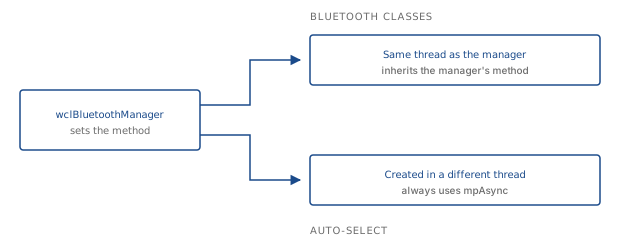
The Bluetooth Framework manages message processing methods slightly differently. You can change the
message processing method of the wclBluetoothManager and wclBleSniffer classes only. All other
Bluetooth Framework classes select a message processing method automatically.
- If a class is created and used in the same thread that was used to open
wclBluetoothManager, the class will inherit the Bluetooth manager's message processing method. - If a class is created and used in a different thread, then it will use the asynchronous message processing method
(
mpAsync).
Note: even if the audio classes are shipped with the Bluetooth Framework, formally those classes are part of the Audio Framework and use common synchronization settings as described above.
Frequently asked questions
- What is the Wireless Communication Library messaging subsystem?
- It is an internal inter-thread communication mechanism that synchronizes hardware event callbacks with an application's main UI thread, ensuring thread-safe UI updates.
- What is the difference between synchronous and asynchronous message processing?
- Asynchronous processing delivers events on a separate thread — ideal for console and service apps. Synchronous processing uses the main UI thread's message loop, suitable for VCL, WinForms, and MFC.
- How do I switch between processing methods?
- Set the
MessageProcessingproperty tompAsyncfor asynchronous, ormpSync(default) for synchronous delivery. In Bluetooth Framework, onlywclBluetoothManagerandwclBleSniffercan be explicitly configured; other classes follow automatically.