Developing Bluetooth-enabled software for Windows has historically been a challenging task. Building a reliable application — whether it is for connecting to a medical sensor, reading data from a smartwatch, or controlling industrial equipment — often turns into a prolonged battle with operating system quirks. This article looks at how Bluetooth Framework helps developers build stable wireless software significantly faster, and compares it to Microsoft's native tools (Win32 and WinRT) as well as 32feet.NET, a popular open-source alternative.
The core challenges of Bluetooth development on Windows
When you start writing code to interact with Bluetooth devices, you immediately run into three major roadblocks:
- Technology fragmentation. You have to simultaneously support Classic Bluetooth (BR/EDR) for audio and file streaming, and modern Bluetooth Low Energy (BLE) for smart IoT hardware.
- API complexity. Native Windows tools demand massive amounts of boilerplate code just to discover a nearby device and read a single byte of data.
- OS version inconsistencies. Code that runs perfectly fine on Windows 11 might exhibit completely unpredictable behavior on older Windows 10 builds or legacy environments.
Bluetooth Framework is a production-ready SDK designed to abstract away this low-level complexity. It provides developers with a clean, intuitive, and unified API that works identically across multiple programming languages.
Head-to-head: Bluetooth Framework vs. alternatives
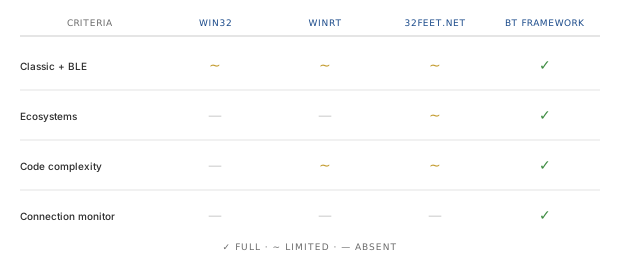
Let's take an objective look at how Bluetooth Framework stacks up against Microsoft's built-in options and the open-source 32feet.NET library.
| Feature / Criteria | Win32 Bluetooth API | WinRT Bluetooth API | 32feet.NET (InTheHand) | Bluetooth Framework |
|---|---|---|---|---|
| Classic & BLE support | Great for Classic; weak or absent for BLE | BLE only (very limited Classic) | Good for Classic; complex or basic for BLE | Full, high-level support for both Classic and BLE |
| Ecosystem versatility | Primarily C++ / C | Modern .NET and C++ only | .NET ecosystems only (C#, VB.NET) | .NET, C++, Delphi, C++ Builder, and Unity |
| Code & logic complexity | Very high (low-level structural management) | High (complex asynchronous state machines) | Moderate for Classic; high for BLE | Low (streamlined components and event-driven model) |
| Connection monitoring | Requires custom polling or triggers | Prone to hanging on sudden disconnects | Requires manual connection loops | Automated, rock-solid OnConnect / OnDisconnect events |
1. Versus Win32 Bluetooth API
The Win32 API is a legacy interface. While it remains reliable for Classic Bluetooth profiles (like SPP or RFCOMM), it was never built to handle modern BLE infrastructure. To simply discover a device, developers have to manually manage memory allocations, run continuous loops, and handle low-level pointers. Bluetooth Framework replaces this entire headache with a single command that safely populates a clean device list out of the box.
2. Versus WinRT Bluetooth API
WinRT is Microsoft's modern subsystem. While it handles BLE well, it introduces strict architectural limitations. It forces
an entirely asynchronous (async/await) pattern that can quickly clutter your codebase with complex thread-management logic.
Furthermore, WinRT was originally tailored for Microsoft Store (UWP) apps; integrating it into a traditional desktop application (like WinForms, WPF, or a native C++ utility) frequently triggers permission and initialization issues. Memory management is another weak spot: if a device loses power unexpectedly, WinRT can "hang" on the connection state indefinitely. Bluetooth Framework runs flawlessly in any application type, manages system resources cleanly, and never freezes your UI thread. See GATT connection state change detection for a detailed look at the underlying problem.
3. Versus 32feet.NET (InTheHand)
32feet.NET is a well-known, free open-source library for .NET developers. It handles Classic Bluetooth beautifully, but BLE support is where things get tricky. Its BLE implementation was integrated later, making it highly dependent on the specific Windows update version installed on the end-user's machine.
As a community-driven project, bug fixes and adaptations to new standards can sometimes take a backseat. Bluetooth Framework provides the peace of mind of a commercial product backed by professional technical support. It delivers a deeply optimized experience for both Classic and BLE, and extends far beyond .NET into the C++ and Delphi ecosystems.
Why Bluetooth Framework stands out
- Accelerated time-to-market. Instead of writing hundreds of lines of defensive code to catch OS-level errors, you just drop the component into your project and listen to clean events. You get real-time, reliable notifications the moment a device is found, paired, connected, or dropped.
- Streamlined BLE architecture (GATT profiles). Interacting with BLE means reading and writing GATT characteristics, like heart rate or sensor telemetry. Native APIs require you to manually parse long UUID strings, map services, and handle packet transmission queues. Bluetooth Framework automates this: you subscribe to a characteristic, and the framework safely pushes new data to your app as soon as it arrives. See BLE GATT communication for the full workflow.
- Resilient connection handling. Wireless devices disconnect — batteries die, and users walk out of range. Handling these dirty disconnects natively requires aggressive polling loops. Bluetooth Framework features a built-in monitoring engine that instantly fires a disconnect event, letting your app immediately and gracefully inform the user or trigger a seamless auto-reconnect routine.
- Advanced features (raw data sniffing). A standout capability of the framework is its support for Bluetooth LE Advertising Sniffing. Your app can passively listen to the wireless environment. This is a crucial feature for tracking BLE beacons or grabbing telemetry packets from hardware without wasting time or battery on a formal pairing process. See Capture raw Bluetooth LE frames.
- Profile-level abstractions. Instead of dealing with raw RFCOMM channels and OBEX sessions, the framework speaks in terms of Bluetooth Classic profiles — SPP, OPP, FTP, HID, A2DP, and HFP. For a general reference on what each profile does, see the Bluetooth Classic profiles overview.
Conclusion
Native APIs and open-source wrappers are powerful tools, but they force you to spend valuable engineering hours deciphering low-level OS behaviors. You end up spending weeks making your software play nice with Windows rather than polishing your core application features.
Bluetooth Framework bridges that gap elegantly. It bundles the robustness of Win32, the modernity of WinRT, and cross-platform flexibility under one hood. It lets you bypass the platform-specific friction and build a high-performance Bluetooth application in a fraction of the time.
Ready to see it in action? Head over to the Bluetooth Framework download section to grab a free trial version for your environment of choice (.NET, C++, Delphi, or Unity).
Frequently asked questions
- Why is Bluetooth development on Windows so difficult?
- There are three main reasons: technology fragmentation (Classic and BLE must be supported at once), API complexity (native APIs require large amounts of boilerplate code), and OS version inconsistencies between Windows 10 and Windows 11 builds.
- How does Bluetooth Framework differ from Win32 and WinRT Bluetooth APIs?
- Bluetooth Framework is a high-level SDK that abstracts away low-level complexity. Unlike Win32 (legacy, weak BLE support) and WinRT (BLE-only, UWP-oriented, prone to hanging on unexpected disconnects), it provides unified Classic and BLE support, clean event-driven code, and reliable connection monitoring in any application type.
- Does Bluetooth Framework support both Classic Bluetooth and Bluetooth LE?
- Yes. Bluetooth Framework provides full, high-level support for both Classic Bluetooth (BR/EDR) and Bluetooth Low Energy (BLE), unlike Win32 (Classic-focused) or WinRT (BLE-only).
- Which programming languages and platforms does Bluetooth Framework support?
- Bluetooth Framework supports .NET (C#, VB.NET), C++, Delphi, C++ Builder, and Unity, while 32feet.NET targets only .NET and native APIs are limited to C++ or modern .NET.