A Bluetooth LE peripheral exposes its data through a GATT server — the side of the connection that owns the attribute database, accepts read and write requests, and pushes notifications and indications to subscribed centrals. Everything a central can find on a BLE device lives somewhere in that database: a service, a characteristic, or a descriptor underneath. The Bluetooth Framework implements the full GATT server role on Windows with a single API that works across .NET, C++, and VCL.
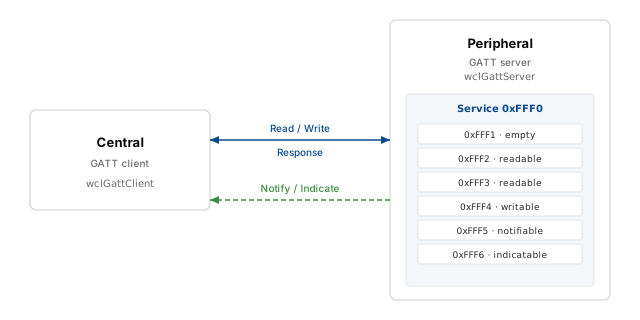
At the ATT layer, two roles exist. Client devices (Centrals) access remote resources over a BLE link. Server devices (Peripherals) hold the GATT database, control access to it, and provide resources to clients. The GATT client article covers the central side of the same protocol; this article covers the peripheral side. Both roles are implemented by the same framework and share the same service, characteristic, and descriptor model described in the Generic Attributes section of the client article.
The Bluetooth Framework supports the GATT server role with Microsoft and the BLED112 USB dongle. On Windows, the peripheral role requires a Bluetooth adapter and a driver that exposes the GattServiceProvider API — typically Windows 10 version 1703 or newer with the Microsoft Bluetooth driver. Applications that must run on older Windows versions can use the BLED112 dongle instead.
Local service and characteristics
A GATT server starts with an empty database. The application populates it with one or more services, and each service with a set of characteristics. A characteristic declares a type (its UUID), a set of properties that tell the client which operations it supports, and — for user-facing characteristics — a user description that a client can read to learn what the characteristic is for.
The Bluetooth Framework exposes service and characteristic creation through the wclGattServer class and its helper classes wclGattLocalService and wclGattLocalCharacteristic. The GattServer sample application that ships with the library demonstrates the full workflow and defines a small but complete example service:
- Service 0xFFF0 — the demo service itself.
- Characteristic 0xFFF1 — no properties. A placeholder characteristic that cannot be read, written, or subscribed to. It exists only to show that a characteristic without any property flags is allowed.
- Characteristic 0xFFF2 —
cpReadable. A short readable characteristic that returns 5 bytes of demo data. - Characteristic 0xFFF3 —
cpReadable. A long readable characteristic that returns a 1024-byte buffer and demonstrates how a read request with a non-zero offset is handled. - Characteristic 0xFFF4 —
cpWritableandcpWritableWithoutResponse. Accepts both write-with-response and write-without-response requests. - Characteristic 0xFFF5 —
cpNotifiable. A client can subscribe to it and receive notifications. - Characteristic 0xFFF6 —
cpIndicatable. A client can subscribe to it and receive indications, which are acknowledged by the receiver.
The property set of a characteristic is defined by the wclGattLocalCharacteristicProperty enumeration. A characteristic may combine several properties at once — for example, a single characteristic can be readable and notifiable, or writable and indicatable. The framework applies the properties exactly as specified and does not add any implicit capabilities.
Starting the server
Starting a GATT server is a multi-step procedure: open the Bluetooth manager, get a working LE radio, initialize the server, add a service, add characteristics, and finally start the server. Each step can fail independently, and the GattServer sample application checks every return code so that a problem at any stage is reported clearly and the already-allocated resources are released.
Opening the manager and getting an LE radio
Communication begins with the wclBluetoothManager class. Open it, then ask for a radio that supports Bluetooth LE with the GetLeRadio method — the same method used in the GATT client article. If a working LE radio is found, the framework stores it in a wclBluetoothRadio object that the rest of the application reuses. If no LE radio is available, the manager is closed and the application reports the failure.
Trace('Opening Bluetooth Manager');
Res := wclBluetoothManager.Open;
if Res <> WCL_E_SUCCESS then
  Trace('Open Bluetooth Manager', Res)

else begin
  Trace('Get working LE Radio');
  Res := wclBluetoothManager.GetLeRadio(Radio);
  if Res <> WCL_E_SUCCESS then
    Trace('Get working LE Radio', Res)

  else begin
    Trace('Working radio found. Use ' + Radio.ApiName + ' radio');
    Result := True;
  end;

  if not Result then begin
    Trace('Closing Bluetooth Manager');
    wclBluetoothManager.Close;
  end;
end;
Trace("Opening Bluetooth Manager");
int Res = wclBluetoothManager->Open();
if (Res != WCL_E_SUCCESS)
Trace("Open Bluetooth Manager", Res);
else
{
Trace("Get working LE Radio");
Res = wclBluetoothManager->GetLeRadio(Radio);
if (Res != WCL_E_SUCCESS)
Trace("Get working LE Radio", Res);
else
{
Trace("Working radio found. Use " + Radio->ApiName + " radio");
Result = true;
}
if (!Result)
{
Trace("Closing Bluetooth Manager");
wclBluetoothManager->Close();
}
}Trace("Opening Bluetooth Manager");
Int32 Res = FManager.Open();
if (Res != wclErrors.WCL_E_SUCCESS)
{
Trace("Open Bluetooth Manager", Res);
return false;
}
Trace("Get working LE Radio");
Res = FManager.GetLeRadio(out Radio);
if (Res != wclErrors.WCL_E_SUCCESS)
{
Trace("Get working LE Radio", Res);
FManager.Close();
return false;
}
Trace("Working radio found. Use " + Radio.ApiName + " radio");
return true;Trace("Opening Bluetooth Manager")
Dim Res As Int32 = FManager.Open()
If Res <> wclErrors.WCL_E_SUCCESS Then
Trace("Open Bluetooth Manager", Res)
Return False
End If
Trace("Get working LE Radio")
Res = FManager.GetLeRadio(Radio)
If Res <> wclErrors.WCL_E_SUCCESS Then
Trace("Get working LE Radio", Res)
FManager.Close()
Return False
End If
Trace("Working radio found. Use " + Radio.ApiName + " radio")
Return TrueRadio = NULL;
Trace(_T("Opening Bluetooth Manager"));
int Res = FManager.Open();
if (Res != WCL_E_SUCCESS)
{
Trace(_T("Open Bluetooth Manager"), Res);
return false;
}
Trace(_T("Get working LE Radio"));
Res = FManager.GetLeRadio(Radio);
if (Res != WCL_E_SUCCESS)
{
Trace(_T("Get working LE Radio"), Res);
Trace(_T("Closing Bluetooth Manager"));
FManager.Close();
return false;
}
Trace(_T("Working radio found. Use ") + CString(Radio->ApiName.c_str()) + _T(" radio"));
return true;Initializing the server
Before anything can be added to the database, the wclGattServer object must be initialized with the LE radio obtained in the previous step. The Initialize method binds the server to that radio and prepares the underlying stack. Until Initialize succeeds, the server's Initialized property returns false and any attempt to add services fails.
Trace('Initializing GATT server');
Res := wclGattServer.Initialize(Radio);
if Res <> WCL_E_SUCCESS then begin
  Trace('GATT server initialization', Res);
  Result := False;

end else begin
  Trace('GATT server initialized');
  Result := True;
end;
Trace("Initializing GATT server");
int Res = wclGattServer->Initialize(Radio);
if (Res != WCL_E_SUCCESS)
{
Trace("GATT server initialization", Res);
return false;
}
Trace("GATT server initialized");
return true;Trace("Initializing GATT server");
Int32 Res = FServer.Initialize(Radio);
if (Res != wclErrors.WCL_E_SUCCESS)
{
Trace("GATT server initialization", Res);
return false;
}
Trace("GATT server initialized");
return true;Trace("Initializing GATT server")
Dim Res As Int32 = FServer.Initialize(Radio)
If Res <> wclErrors.WCL_E_SUCCESS Then
Trace("GATT server initialization", Res)
Return False
End If
Trace("GATT server initialized")
Return TrueTrace(_T("Initializing GATT server"));
int Res = FServer.Initialize(Radio);
if (Res != WCL_E_SUCCESS)
{
Trace(_T("GATT server initialization"), Res);
return false;
}
Trace(_T("GATT server initialized"));
return true;Adding a service
A service is identified by its UUID. Both short 16-bit UUIDs and long 128-bit UUIDs are supported. The sample uses a short UUID (0xFFF0) because the service is a private test service and does not need to allocate a vendor-specific 128-bit ID. The AddService method receives the UUID and returns a wclGattLocalService object that represents the newly created service and is used to add characteristics to it.
Trace('Adding GATT service');

Uuid.IsShortUuid := True;
Uuid.ShortUuid := $FFF0;
Res := wclGattServer.AddService(Uuid, Result);
if Res <> WCL_E_SUCCESS then
  Trace(4, 'Add GATT service', Res)
else
  Trace('GATT service added');
Trace("Adding GATT service");
TwclGattUuid Uuid;
Uuid.IsShortUuid = true;
Uuid.ShortUuid = 0xFFF0;
TwclGattLocalService* Result = NULL;
int Res = wclGattServer->AddService(Uuid, Result);
if (Res != WCL_E_SUCCESS)
Trace(4, "Add GATT service", Res);
else
Trace("GATT service added");Trace("Adding GATT service");
wclGattUuid Uuid = new wclGattUuid();
Uuid.IsShortUuid = true;
Uuid.ShortUuid = 0xFFF0;
wclGattLocalService Result;
Int32 Res = FServer.AddService(Uuid, out Result);
if (Res != wclErrors.WCL_E_SUCCESS)
Trace(4, "Add GATT service", Res);
else
Trace("GATT service added");
return Result;Trace("Adding GATT service")
Dim Uuid As wclGattUuid = New wclGattUuid()
Uuid.IsShortUuid = True
Uuid.ShortUuid = &HFFF0
Dim Result As wclGattLocalService = Nothing
Dim Res As Int32 = FServer.AddService(Uuid, Result)
If Res <> wclErrors.WCL_E_SUCCESS Then
Trace(4, "Add GATT service", Res)
Else
Trace("GATT service added")
End If
Return ResultTrace(_T("Adding GATT service"));
wclGattUuid Uuid;
Uuid.IsShortUuid = true;
Uuid.ShortUuid = 0xFFF0;
CwclGattLocalService* Result;
int Res = FServer.AddService(Uuid, Result);
if (Res != WCL_E_SUCCESS)
{
Trace(4, _T("Add GATT service"), Res);
return NULL;
}
Trace(_T("GATT service added"));
return Result;Adding characteristics
Each characteristic belongs to a service and is created with the AddCharacteristic method of the wclGattLocalService class. The method takes a UUID and a wclGattLocalCharacteristicParameters record that carries the characteristic's properties, its optional descriptors, its optional presentation formats, and its user-visible description.
The property set is stored in the Props field. In the .NET editions it is a bitwise combination of wclGattLocalCharacteristicProperty flags; in the C++, VCL, and C++ Builder editions it is a set. The framework uses the same flag names in every edition — cpReadable, cpWritable, cpWritableWithoutResponse, cpNotifiable, and cpIndicatable — so that the code reads identically across languages.
The sample creates six characteristics in the same service, one for each interesting combination of properties. An empty characteristic with no properties, a short readable one, a long readable one, a writable one, a notifiable one, and an indicatable one. Each call returns a wclGattLocalCharacteristic object that can later be used to send notifications or indications.
Trace(4, 'Adding GATT characteristics');

Uuid.IsShortUuid := True;
Params.Descriptors := nil;
Params.PresentationFormats := nil;

// Empty characteristic.
Uuid.ShortUuid := $FFF1;
Params.Props := [];
Params.UserDescription := 'Empty characteristic';
Res := Service.AddCharacteristic(Uuid, Params, Char);

// Short readable characteristic.
Uuid.ShortUuid := $FFF2;
Params.Props := [cpReadable];
Params.UserDescription := 'Short readable characteristic';
Res := Service.AddCharacteristic(Uuid, Params, Char);

// Long readable characteristic.
Uuid.ShortUuid := $FFF3;
Params.Props := [cpReadable];
Params.UserDescription := 'Long readable characteristic';
Res := Service.AddCharacteristic(Uuid, Params, Char);

// Writable characteristic.
Uuid.ShortUuid := $FFF4;
Params.Props := [cpWritable, cpWritableWithoutResponse];
Params.UserDescription := 'Writable characteristic';
Res := Service.AddCharacteristic(Uuid, Params, Char);

// Notifiable characteristic.
Uuid.ShortUuid := $FFF5;
Params.Props := [cpNotifiable];
Params.UserDescription := 'Notifiable characteristic';
Res := Service.AddCharacteristic(Uuid, Params, Char);

// Indicatable characteristic.
Uuid.ShortUuid := $FFF6;
Params.Props := [cpIndicatable];
Params.UserDescription := 'Indicatable characteristic';
Res := Service.AddCharacteristic(Uuid, Params, Char);
Trace(4, "Adding GATT characteristics");
TwclGattLocalCharacteristic* Char;
TwclGattUuid Uuid;
Uuid.IsShortUuid = true;
TwclGattLocalCharacteristicParameters Params;
Params.Descriptors.Length = 0;
Params.PresentationFormats.Length = 0;
// Empty characteristic.
Uuid.ShortUuid = 0xFFF1;
Params.Props.Clear();
Params.UserDescription = "Empty characteristic";
int Res = Service->AddCharacteristic(Uuid, Params, Char);
// Short readable characteristic.
Uuid.ShortUuid = 0xFFF2;
Params.Props << cpReadable;
Params.UserDescription = "Short readable characteristic";
Res = Service->AddCharacteristic(Uuid, Params, Char);
// Long readable characteristic.
Uuid.ShortUuid = 0xFFF3;
Params.Props.Clear();
Params.Props << cpReadable;
Params.UserDescription = "Long readable characteristic";
Res = Service->AddCharacteristic(Uuid, Params, Char);
// Writable characteristic.
Uuid.ShortUuid = 0xFFF4;
Params.Props.Clear();
Params.Props << cpWritable << cpWritableWithoutResponse;
Params.UserDescription = "Writable characteristic";
Res = Service->AddCharacteristic(Uuid, Params, Char);
// Notifiable characteristic.
Uuid.ShortUuid = 0xFFF5;
Params.Props.Clear();
Params.Props << cpNotifiable;
Params.UserDescription = "Notifiable characteristic";
Res = Service->AddCharacteristic(Uuid, Params, Char);
// Indicatable characteristic.
Uuid.ShortUuid = 0xFFF6;
Params.Props.Clear();
Params.Props << cpIndicatable;
Params.UserDescription = "Indicatable characteristic";
Res = Service->AddCharacteristic(Uuid, Params, Char);Trace(4, "Adding GATT characteristics");
wclGattLocalCharacteristic Char;
wclGattUuid Uuid = new wclGattUuid();
Uuid.IsShortUuid = true;
wclGattLocalCharacteristicParameters Params = new wclGattLocalCharacteristicParameters();
Params.Descriptors = null;
Params.PresentationFormats = null;
// Empty characteristic.
Uuid.ShortUuid = 0xFFF1;
Params.Props = 0;
Params.UserDescription = "Empty characteristic";
Int32 Res = Service.AddCharacteristic(Uuid, Params, out Char);
// Short readable characteristic.
Uuid.ShortUuid = 0xFFF2;
Params.Props = wclGattLocalCharacteristicProperty.cpReadable;
Params.UserDescription = "Short readable characteristic";
Res = Service.AddCharacteristic(Uuid, Params, out Char);
// Long readable characteristic.
Uuid.ShortUuid = 0xFFF3;
Params.Props = wclGattLocalCharacteristicProperty.cpReadable;
Params.UserDescription = "Long readable characteristic";
Res = Service.AddCharacteristic(Uuid, Params, out Char);
// Writable characteristic.
Uuid.ShortUuid = 0xFFF4;
Params.Props = wclGattLocalCharacteristicProperty.cpWritable |
wclGattLocalCharacteristicProperty.cpWritableWithoutResponse;
Params.UserDescription = "Writable characteristic";
Res = Service.AddCharacteristic(Uuid, Params, out Char);
// Notifiable characteristic.
Uuid.ShortUuid = 0xFFF5;
Params.Props = wclGattLocalCharacteristicProperty.cpNotifiable;
Params.UserDescription = "Notifiable characteristic";
Res = Service.AddCharacteristic(Uuid, Params, out Char);
// Indicatable characteristic.
Uuid.ShortUuid = 0xFFF6;
Params.Props = wclGattLocalCharacteristicProperty.cpIndicatable;
Params.UserDescription = "Indicatable characteristic";
Res = Service.AddCharacteristic(Uuid, Params, out Char);Trace(4, "Adding GATT characteristics")
Dim [Char] As wclGattLocalCharacteristic = Nothing
Dim Uuid As wclGattUuid = New wclGattUuid()
Uuid.IsShortUuid = True
Dim Params As wclGattLocalCharacteristicParameters = New wclGattLocalCharacteristicParameters()
Params.Descriptors = Nothing
Params.PresentationFormats = Nothing
' Empty characteristic.
Uuid.ShortUuid = &HFFF1
Params.Props = 0
Params.UserDescription = "Empty characteristic"
Dim Res As Int32 = Service.AddCharacteristic(Uuid, Params, [Char])
' Short readable characteristic.
Uuid.ShortUuid = &HFFF2
Params.Props = wclGattLocalCharacteristicProperty.cpReadable
Params.UserDescription = "Short readable characteristic"
Res = Service.AddCharacteristic(Uuid, Params, [Char])
' Long readable characteristic.
Uuid.ShortUuid = &HFFF3
Params.Props = wclGattLocalCharacteristicProperty.cpReadable
Params.UserDescription = "Long readable characteristic"
Res = Service.AddCharacteristic(Uuid, Params, [Char])
' Writable characteristic.
Uuid.ShortUuid = &HFFF4
Params.Props = wclGattLocalCharacteristicProperty.cpWritable Or wclGattLocalCharacteristicProperty.cpWritableWithoutResponse
Params.UserDescription = "Writable characteristic"
Res = Service.AddCharacteristic(Uuid, Params, [Char])
' Notifiable characteristic.
Uuid.ShortUuid = &HFFF5
Params.Props = wclGattLocalCharacteristicProperty.cpNotifiable
Params.UserDescription = "Notifiable characteristic"
Res = Service.AddCharacteristic(Uuid, Params, [Char])
' Indicatable characteristic.
Uuid.ShortUuid = &HFFF6
Params.Props = wclGattLocalCharacteristicProperty.cpIndicatable
Params.UserDescription = "Indicatable characteristic"
Res = Service.AddCharacteristic(Uuid, Params, [Char])Trace(4, _T("Adding GATT characteristics"));
wclGattUuid Uuid;
Uuid.IsShortUuid = true;
wclGattLocalCharacteristicParameters Params;
Params.Descriptors.clear();
Params.PresentationFormats.clear();
CwclGattLocalCharacteristic* Char;
// Empty characteristic.
Uuid.ShortUuid = 0xFFF1;
Params.Props.clear();
Params.UserDescription = _T("Empty characteristic");
int Res = Service->AddCharacteristic(Uuid, Params, Char);
// Short readable characteristic.
Uuid.ShortUuid = 0xFFF2;
Params.Props.insert(cpReadable);
Params.UserDescription = _T("Short readable characteristic");
Res = Service->AddCharacteristic(Uuid, Params, Char);
// Long readable characteristic.
Uuid.ShortUuid = 0xFFF3;
Params.Props.clear();
Params.Props.insert(cpReadable);
Params.UserDescription = _T("Long readable characteristic");
Res = Service->AddCharacteristic(Uuid, Params, Char);
// Writable characteristic.
Uuid.ShortUuid = 0xFFF4;
Params.Props.clear();
Params.Props.insert(cpWritable);
Params.Props.insert(cpWritableWithoutResponse);
Params.UserDescription = _T("Writable characteristic");
Res = Service->AddCharacteristic(Uuid, Params, Char);
// Notifiable characteristic.
Uuid.ShortUuid = 0xFFF5;
Params.Props.clear();
Params.Props.insert(cpNotifiable);
Params.UserDescription = _T("Notifiable characteristic");
Res = Service->AddCharacteristic(Uuid, Params, Char);
// Indicatable characteristic.
Uuid.ShortUuid = 0xFFF6;
Params.Props.clear();
Params.Props.insert(cpIndicatable);
Params.UserDescription = _T("Indicatable characteristic");
Res = Service->AddCharacteristic(Uuid, Params, Char);Starting the server
Once the database is populated, the Start method begins advertising and makes the server visible to nearby BLE centrals. When the server has entered the running state, the framework fires the OnStarted event — the appropriate place to update the user interface, log the state change, or begin accepting connections. If the framework cannot start the server, the error code returned by Start is reported and the already-allocated service and characteristic objects are released by calling Uninitialize.
Radio := nil;
if InitializeBluetooth(Radio) then begin
  BoolRes := InitializeServer(Radio);
  if BoolRes then begin
    Service := AddService;
    if Service = nil then
      BoolRes := False

    else begin
      BoolRes := AddCharacteristics(Service);
      if BoolRes then begin
        Trace('Starting GATT server');
        Res := wclGattServer.Start;
        if Res <> WCL_E_SUCCESS then begin
          Trace('GATT server start', Res);
          BoolRes := False;
        end;
      end;
    end;

    if not BoolRes then
      UninitializeServer;
  end;

  if not BoolRes then
    UninitializeBluetooth;
end;
TwclBluetoothRadio* Radio = NULL;
if (InitializeBluetooth(Radio))
{
bool BoolRes = InitializeServer(Radio);
if (BoolRes)
{
TwclGattLocalService* Service = AddService();
if (Service == NULL)
BoolRes = false;
else
{
BoolRes = AddCharacteristics(Service);
if (BoolRes)
{
Trace("Starting GATT server");
int Res = wclGattServer->Start();
if (Res != WCL_E_SUCCESS)
{
Trace("GATT server start", Res);
BoolRes = false;
}
}
}
if (!BoolRes)
UninitializeServer();
}
if (!BoolRes)
UninitializeBluetooth();
}wclBluetoothRadio Radio = null;
if (InitializeBluetooth(out Radio))
{
Boolean BoolRes = InitializeServer(Radio);
if (BoolRes)
{
wclGattLocalService Service = AddService();
if (Service == null)
BoolRes = false;
else
{
BoolRes = AddCharacteristics(Service);
if (BoolRes)
{
Trace("Starting GATT server");
Int32 Res = FServer.Start();
if (Res != wclErrors.WCL_E_SUCCESS)
{
Trace("GATT server start", Res);
BoolRes = false;
}
}
}
if (!BoolRes)
UninitializeServer();
}
if (!BoolRes)
UninitializeBluetooth();
}Dim Radio As wclBluetoothRadio = Nothing
If InitializeBluetooth(Radio) Then
Dim BoolRes As Boolean = InitializeServer(Radio)
If BoolRes Then
Dim Service As wclGattLocalService = AddService()
If Service Is Nothing Then
BoolRes = False
Else
BoolRes = AddCharacteristics(Service)
If BoolRes Then
Trace("Starting GATT server")
Dim Res As Int32 = FServer.Start()
If Res <> wclErrors.WCL_E_SUCCESS Then
Trace("GATT server start", Res)
BoolRes = False
End If
End If
End If
If Not BoolRes Then UninitializeServer()
End If
If Not BoolRes Then UninitializeBluetooth()
End IfCwclBluetoothRadio* Radio = NULL;
if (InitializeBluetooth(Radio))
{
bool BoolRes = InitializeServer(Radio);
if (BoolRes)
{
CwclGattLocalService* Service = AddService();
if (Service == NULL)
BoolRes = false;
else
{
BoolRes = AddCharacteristics(Service);
if (BoolRes)
{
Trace(_T("Starting GATT server"));
int Res = FServer.Start();
if (Res != WCL_E_SUCCESS)
{
Trace(_T("GATT server start"), Res);
BoolRes = false;
}
}
}
if (!BoolRes)
UninitializeServer();
}
if (!BoolRes)
UninitializeBluetooth();
}Handling clients
Once the server is running, the framework delivers real client connection events — a capability the standard Windows UWP GATT provider does not offer. There is no need to wait for a client to read, write, or subscribe to a characteristic; the server knows that a central is connected the moment the physical link is established. See GATT connection state change detection for the background on why this matters.
Connection events
The OnClientConnected event fires when a central establishes a link, and OnClientDisconnected fires when the link is dropped. Each event carries a wclGattServerClient object that represents the connected client. That object exposes the client's Bluetooth address and a set of per-client methods that are used throughout the rest of the article to read connection parameters, read PHY, get the maximum PDU size, get the maximum notification size, and disconnect the client on demand.
The GattServer sample application records every connected client in a list and, on disconnection, removes it from the list. Characteristics a client had subscribed to are automatically removed from the list before the disconnection event fires, so the disconnection handler only needs to remove the client row.
procedure TfmMain.wclGattServerClientConnected(Sender: TObject;
  const Client: TwclGattServerClient);
begin
  Trace('Client connected: ' + IntToHex(Client.Address, 12));

  Item := lvDevices.Items.Add;
  Item.Caption := IntToHex(Client.Address, 12);
  Item.Data := Client;
  // ...fill remaining columns with empty strings...

  UpdateMaxPduSize(Client);
  UpdateConnectionParams(Client);
  UpdatePhy(Client);
  UpdateNotificationSize(Client);
end;

procedure TfmMain.wclGattServerClientDisconnected(Sender: TObject;
  const Client: TwclGattServerClient);
begin
  Trace('Client disconnected: ' + IntToHex(Client.Address, 12));

  Item := FindItem(Client);
  if Item <> nil then begin
    lvDevices.Items.Delete(Item.Index);

    UpdateNotifyAllStatus;
  end;
end;
void __fastcall TfmMain::wclGattServerClientConnected(TObject *Sender,
const TwclGattServerClient *Client)
{
Trace("Client connected: " + IntToHex(Client->Address, 12));
TListItem* Item = lvDevices->Items->Add();
Item->Caption = IntToHex(Client->Address, 12);
Item->Data = (void*)Client;
// ...fill remaining columns with empty strings...
UpdateMaxPduSize((TwclGattServerClient*)Client);
UpdateConnectionParams((TwclGattServerClient*)Client);
UpdatePhy((TwclGattServerClient*)Client);
UpdateNotificationSize((TwclGattServerClient*)Client);
}
void __fastcall TfmMain::wclGattServerClientDisconnected(TObject *Sender,
const TwclGattServerClient *Client)
{
Trace("Client disconnected: " + IntToHex(Client->Address, 12));
TListItem* Item = FindItem((TwclGattServerClient*)Client);
if (Item != NULL)
{
lvDevices->Items->Delete(Item->Index);
UpdateNotifyAllStatus();
}
}void GettServerClientConnected(object Sender, wclGattServerClient Client)
{
Trace("Client connected: " + Client.Address.ToString("X12"));
ListViewItem Item = lvDevices.Items.Add(Client.Address.ToString("X12"));
Item.Tag = Client;
// ...fill remaining columns with empty strings...
UpdateMaxPduSize(Client);
UpdateConnectionParams(Client);
UpdatePhy(Client);
UpdateNotificationSize(Client);
}
void GattServerClientDisconnected(object Sender, wclGattServerClient Client)
{
Trace("Client disconnected: " + Client.Address.ToString("X12"));
ListViewItem Item = FindItem(Client);
if (Item != null)
{
lvDevices.Items.Remove(Item);
UpdateNotifyAllStatus();
}
}Private Sub FServer_OnClientConnected(Sender As Object, Client As wclBluetooth.wclGattServerClient) Handles FServer.OnClientConnected
Trace("Client connected: " + Client.Address.ToString("X12"))
Dim Item As ListViewItem = lvDevices.Items.Add(Client.Address.ToString("X12"))
Item.Tag = Client
' ...fill remaining columns with empty strings...
UpdateMaxPduSize(Client)
UpdateConnectionParams(Client)
UpdatePhy(Client)
UpdateNotificationSize(Client)
End Sub
Private Sub FServer_OnClientDisconnected(Sender As Object, Client As wclBluetooth.wclGattServerClient) Handles FServer.OnClientDisconnected
Trace("Client disconnected: " + Client.Address.ToString("X12"))
Dim Item As ListViewItem = FindItem(Client)
If Item IsNot Nothing Then
lvDevices.Items.Remove(Item)
UpdateNotifyAllStatus()
End If
End Subvoid CGattServerDlg::GattServerClientConnected(void* Sender,
CwclGattServerClient* const Client)
{
Trace(_T("Client connected: ") + IntToHex(Client->Address));
int Ndx = lvDevices.GetItemCount();
lvDevices.InsertItem(Ndx, IntToHex(Client->Address));
lvDevices.SetItemData(Ndx, (DWORD_PTR)Client);
// ...fill remaining columns with empty strings...
UpdateMaxPduSize(Client);
UpdateConnectionParams(Client);
UpdatePhy(Client);
UpdateNotificationSize(Client);
}
void CGattServerDlg::GattServerClientDisconnected(void* Sender,
CwclGattServerClient* const Client)
{
Trace(_T("Client disconnected: ") + IntToHex(Client->Address));
int Item = FindItem(Client);
if (Item > -1)
{
lvDevices.DeleteItem(Item);
UpdateNotifyAllStatus();
}
}Disconnecting a client
The server can also force a client to disconnect. The Disconnect method of the wclGattServerClient class terminates the link at the radio level and the client is removed from the server's list through the normal OnClientDisconnected event. This is the same operation that the framework performs when a central drops the connection on its own, except that the server initiates it.
Force-disconnecting a client is useful for enforcing policies such as a maximum session length, an allow-list check performed after the connection is established, or a firmware update that requires exclusive access to the radio. The standard UWP GATT provider does not expose this capability.
Res := TwclGattServerClient(lvDevices.Selected.Data).Disconnect;
if Res <> WCL_E_SUCCESS then
  ShowMessage('Disconnect error: 0x' + IntToHex(Res, 8));
int Res = ((TwclGattServerClient*)lvDevices->Selected->Data)->Disconnect();
if (Res != WCL_E_SUCCESS)
ShowMessage("Disconnect error: 0x" + IntToHex(Res, 8));Int32 Res = ((wclGattServerClient)lvDevices.SelectedItems[0].Tag).Disconnect();
if (Res != wclErrors.WCL_E_SUCCESS)
MessageBox.Show("Disconnect error: 0x" + Res.ToString("X8"));Dim Res As Int32 = CType(lvDevices.SelectedItems(0).Tag, wclGattServerClient).Disconnect()
If Res <> wclErrors.WCL_E_SUCCESS Then MessageBox.Show("Disconnect error: 0x" + Res.ToString("X8"))int Res = ((CwclGattServerClient*)lvDevices.GetItemData(Item))->Disconnect();
if (Res != WCL_E_SUCCESS)
AfxMessageBox(_T("Disconnect error: 0x") + IntToHex(Res));Reading and writing
Read and write requests from a client are delivered as events. Each request is a transaction that the server must complete by calling a Respond or a RespondWithError method on the request object. Until the request is completed, the client remains blocked waiting for the answer, so the handler should respond as quickly as possible — heavy processing belongs outside the event.
Read requests
The OnRead event fires when a client reads a characteristic value. The event provides the client, the characteristic, and a wclGattLocalCharacteristicReadRequest object that carries three pieces of information: the requested offset within the characteristic value, the maximum size of the response the client will accept, and a set of methods that the server uses to complete the request.
A read request may arrive with a non-zero offset. This happens when a client reads a characteristic whose value is longer than the maximum PDU size negotiated for the link: the client reads the value in chunks, and each chunk arrives with a different offset. The server is responsible for returning the correct slice of its stored value in response to each request.
The GattServer sample demonstrates both cases. A read of the short characteristic (0xFFF2) returns a fixed 5-byte array. A read of the long characteristic (0xFFF3) returns the remainder of a 1024-byte buffer, starting at the requested offset. Both responses are delivered through the Respond method. If the framework or the application cannot fulfil the request, the server responds with an error through RespondWithError — the sample uses WCL_E_BLUETOOTH_LE_UNLIKELY as a generic failure code.
procedure TfmMain.wclGattServerRead(Sender: TObject;
  const Client: TwclGattServerClient;
  const Characteristic: TwclGattLocalCharacteristic;
  const Request: TwclGattLocalCharacteristicReadRequest);
var
  Res: Integer;
begin
  Trace('Read request received from: ' + IntToHex(Client.Address, 12));
  Trace(4, 'Characteristic: ' + IntToHex(Characteristic.Uuid.ShortUuid, 4));
  Trace(4, 'Offset: ' + IntToStr(Request.Offset));
  Trace(4, 'Buffer size: ' + IntToStr(Request.Size));

  if Characteristic.Uuid.ShortUuid = $FFF2 then
    Res := Request.Respond(@ShortData, SHORT_DATA_LEN)
  else begin
    Res := Request.Respond(@LongData[Request.Offset],
      LONG_DATA_LEN - Request.Offset);
  end;

  if Res <> WCL_E_SUCCESS then begin
    Trace(8, 'Set data', Res);
    Trace(8, 'Respond with error');
    Res := Request.RespondWithError(WCL_E_BLUETOOTH_LE_UNLIKELY);
    if Res <> WCL_E_SUCCESS then
      Trace(12, 'Respond', Res);

  end else
    Trace(8, 'Data sent');
end;
void __fastcall TfmMain::wclGattServerRead(TObject *Sender,
const TwclGattServerClient *Client,
const TwclGattLocalCharacteristic *Characteristic,
const TwclGattLocalCharacteristicReadRequest *Request)
{
Trace("Read request received from: " + IntToHex(Client->Address, 12));
Trace(4, "Characteristic: " + IntToHex(Characteristic->Uuid.ShortUuid, 4));
Trace(4, "Offset: " + IntToStr((int)Request->Offset));
Trace(4, "Buffer size: " + IntToStr((int)Request->Size));
int Res;
if (Characteristic->Uuid.ShortUuid == 0xFFF2)
Res = ((TwclGattLocalCharacteristicReadRequest*)Request)->Respond(&ShortData, SHORT_DATA_LEN);
else
{
Res = ((TwclGattLocalCharacteristicReadRequest*)Request)->Respond(&LongData[Request->Offset],
LONG_DATA_LEN - Request->Offset);
}
if (Res != WCL_E_SUCCESS)
{
Trace(8, "Set data", Res);
Trace(8, "Respond with error");
Res = ((TwclGattLocalCharacteristicReadRequest*)Request)->RespondWithError(
WCL_E_BLUETOOTH_LE_UNLIKELY);
if (Res != WCL_E_SUCCESS)
Trace(12, "Respond", Res);
}
else
Trace(8, "Data sent");
}void GattServerRead(object Sender, wclGattServerClient Client, wclGattLocalCharacteristic Characteristic,
wclGattLocalCharacteristicReadRequest Request)
{
Trace("Read request received from: " + Client.Address.ToString("X12"));
Trace(4, "Characteristic: " + Characteristic.Uuid.ShortUuid.ToString("X4"));
Trace(4, "Offset: " + Request.Offset.ToString());
Trace(4, "Buffer size: " + Request.Size.ToString());
Int32 Res;
if (Characteristic.Uuid.ShortUuid == 0xFFF2)
Res = Request.Respond(ShortData);
else
{
Byte[] ToSend = new Byte[LONG_DATA_LEN - Request.Offset];
Array.Copy(LongData, Request.Offset, ToSend, 0, LONG_DATA_LEN - Request.Offset);
Res = Request.Respond(ToSend);
}
if (Res != wclErrors.WCL_E_SUCCESS)
{
Trace(8, "Set data", Res);
Trace(8, "Respond with error");
Res = Request.RespondWithError(wclBluetoothErrors.WCL_E_BLUETOOTH_LE_UNLIKELY);
if (Res != wclErrors.WCL_E_SUCCESS)
Trace(12, "Respond", Res);
}
else
Trace(8, "Data sent");
}Private Sub FServer_OnRead(Sender As Object, Client As wclBluetooth.wclGattServerClient, Characteristic As wclBluetooth.wclGattLocalCharacteristic, Request As wclBluetooth.wclGattLocalCharacteristicReadRequest) Handles FServer.OnRead
Trace("Read request received from: " + Client.Address.ToString("X12"))
Trace(4, "Characteristic: " + Characteristic.Uuid.ShortUuid.ToString("X4"))
Trace(4, "Offset: " + Request.Offset.ToString())
Trace(4, "Buffer size: " + Request.Size.ToString())
Dim Res As Integer
If Characteristic.Uuid.ShortUuid = &HFFF2 Then
Res = Request.Respond(ShortData)
Else
Dim ToSend(LONG_DATA_LEN - Request.Offset) As Byte
Array.Copy(LongData, Request.Offset, ToSend, 0, LONG_DATA_LEN - Request.Offset)
Res = Request.Respond(ToSend)
End If
If Res <> wclErrors.WCL_E_SUCCESS Then
Trace(8, "Set data", Res)
Trace(8, "Respond with error")
Res = Request.RespondWithError(wclBluetoothErrors.WCL_E_BLUETOOTH_LE_UNLIKELY)
If Res <> wclErrors.WCL_E_SUCCESS Then Trace(12, "Respond", Res)
Else
Trace(8, "Data sent")
End If
End Subvoid CGattServerDlg::GattServerRead(void* Sender,
CwclGattServerClient* const Client,
CwclGattLocalCharacteristic* const Characteristic,
CwclGattLocalCharacteristicReadRequest* const Request)
{
Trace(_T("Read request received from: ") + IntToHex(Client->Address));
Trace(4, _T("Characteristic: ") + IntToHex(Characteristic->Uuid.ShortUuid));
Trace(4, _T("Offset: ") + IntToStr(Request->Offset));
Trace(4, _T("Buffer size: ") + IntToStr(Request->Size));
int Res;
if (Characteristic->Uuid.ShortUuid == 0xFFF2)
Res = Request->Respond(&ShortData, SHORT_DATA_LEN);
else
Res = Request->Respond(&LongData[Request->Offset],
LONG_DATA_LEN - Request->Offset);
if (Res != WCL_E_SUCCESS)
{
Trace(8, _T("Set data"), Res);
Trace(8, _T("Respond with error"));
Res = Request->RespondWithError(WCL_E_BLUETOOTH_LE_UNLIKELY);
if (Res != WCL_E_SUCCESS)
Trace(12, _T("Respond"), Res);
}
else
Trace(8, _T("Data sent"));
}Write requests
The OnWrite event fires when a client writes to a characteristic. Unlike a read request, a write request may or may not expect a response. The WithResponse flag on the wclGattLocalCharacteristicWriteRequest object tells the handler which flavour of write arrived.
If WithResponse is true, the client is waiting for a confirmation. The server must call either Respond to acknowledge the write or RespondWithError to reject it. If WithResponse is false, the client does not expect an answer and the request completes as soon as the handler returns — no response method should be called in that case.
The data received by the write request is available through the Data and Size fields (or a byte array in the .NET editions), and the starting offset of the write within the characteristic value is available through the Offset field. As with reads, a long write may be split into several requests with different offsets, and the server is responsible for assembling the pieces if the characteristic's value is longer than a single PDU.
procedure TfmMain.wclGattServerWrite(Sender: TObject;
  const Client: TwclGattServerClient;
  const Characteristic: TwclGattLocalCharacteristic;
  const Request: TwclGattLocalCharacteristicWriteRequest);
var
  s: String;
  i: Cardinal;
  Res: Integer;
begin
  Trace('Write request received from: ' + IntToHex(Client.Address, 12));
  Trace(4, 'Characteristic: ' + IntToHex(Characteristic.Uuid.ShortUuid, 4));
  Trace(4, 'Size: ' + IntToStr(Request.Size));
  Trace(4, 'Offset: ' + IntToStr(Request.Offset));

  s := '';
  if (Request.Size > 0) and (Request.Data <> nil) then begin
    for i := 0 to Request.Size - 1 do
      s := s + IntToHex(Byte(PAnsiChar(Request.Data)[i]), 2);
  end;
  Trace(8, s);

  if Request.WithResponse then begin
    Trace(4, 'Sending response');
    Res := Request.Respond;
    // If data is incorrect you can answer with error using:
    //         Res := Request.RespondWithError(Error);
    // For possible error code refer to RespondWithError() method description.
    if Res <> WCL_E_SUCCESS then
      Trace(8, 'Send response', Res)
    else
      Trace(8, 'Response sent');
  end;
end;
void __fastcall TfmMain::wclGattServerWrite(TObject *Sender,
const TwclGattServerClient *Client,
const TwclGattLocalCharacteristic *Characteristic,
const TwclGattLocalCharacteristicWriteRequest *Request)
{
Trace("Write request received from: " + IntToHex(Client->Address, 12));
Trace(4, "Characteristic: " + IntToHex(Characteristic->Uuid.ShortUuid, 4));
Trace(4, "Size: " + IntToStr((int)Request->Size));
Trace(4, "Offset: " + IntToStr((int)Request->Offset));
String s = "";
for (unsigned i = 0; i < Request->Size; i++)
s = s + IntToHex(((Byte*)Request->Data)[i], 2);
Trace(8, s);
if (Request->WithResponse)
{
Trace(4, "Sending response");
int Res = ((TwclGattLocalCharacteristicWriteRequest*)Request)->Respond();
// If data is incorrect you can answer with error using:
// Res = Request->RespondWithError(Error);
// For possible error code refer to RespondWithError() method
// description.
if (Res != WCL_E_SUCCESS)
Trace(8, "Send response", Res);
else
Trace(8, "Response sent");
}
}void GattServerWrite(object Sender, wclGattServerClient Client, wclGattLocalCharacteristic Characteristic,
wclGattLocalCharacteristicWriteRequest Request)
{
Trace("Write request received from: " + Client.Address.ToString("X12"));
Trace(4, "Characteristic: " + Characteristic.Uuid.ShortUuid.ToString("X4"));
if (Request.Data == null)
Trace(4, "Size: 0");
else
Trace(4, "Size: " + Request.Data.Length.ToString());
Trace(4, "Offset: " + Request.Offset.ToString());
String s = "";
if (Request.Data != null && Request.Data.Length > 0)
{
for (int i = 0; i < Request.Data.Length; i++)
s = s + Request.Data[i].ToString("X2");
}
Trace(8, s);
if (Request.WithResponse)
{
Trace(4, "Sending response");
Int32 Res = Request.Respond();
// If data is incorrect you can answer with error using:
// Res = Request.RespondWithError(Error);
// For possible error code refer to RespondWithError() method description.
if (Res != wclErrors.WCL_E_SUCCESS)
Trace(8, "Send response", Res);
else
Trace(8, "Response sent");
}
}Private Sub FServer_OnWrite(Sender As Object, Client As wclBluetooth.wclGattServerClient, Characteristic As wclBluetooth.wclGattLocalCharacteristic, Request As wclBluetooth.wclGattLocalCharacteristicWriteRequest) Handles FServer.OnWrite
Trace("Write request received from: " + Client.Address.ToString("X12"))
Trace(4, "Characteristic: " + Characteristic.Uuid.ShortUuid.ToString("X4"))
If Request.Data Is Nothing Then
Trace(4, "Size: 0")
Else
Trace(4, "Size: " + Request.Data.Length.ToString())
End If
Trace(4, "Offset: " + Request.Offset.ToString())
Dim s As String = ""
If Request.Data IsNot Nothing AndAlso Request.Data.Length > 0 Then
For i As Integer = 0 To Request.Data.Length - 1
s = s + Request.Data(i).ToString("X2")
Next
End If
Trace(8, s)
If Request.WithResponse Then
Trace(4, "Sending response")
Dim Res As Int32 = Request.Respond()
' If data is incorrect you can answer with error using:
' Res = Request.RespondWithError(Error)
' For possible error code refer to RespondWithError() method description.
If Res <> wclErrors.WCL_E_SUCCESS Then
Trace(8, "Send response", Res)
Else
Trace(8, "Response sent")
End If
End If
End Subvoid CGattServerDlg::GattServerWrite(void* Sender, CwclGattServerClient* const Client,
CwclGattLocalCharacteristic* const Characteristic,
CwclGattLocalCharacteristicWriteRequest* const Request)
{
Trace(_T("Write request received from: ") + IntToHex(Client->Address));
Trace(4, _T("Characteristic: ") + IntToHex(Characteristic->Uuid.ShortUuid));
Trace(4, _T("Size: ") + IntToStr(Request->Size));
Trace(4, _T("Offset: ") + IntToStr(Request->Offset));
CString s = _T("");
if (Request->Size > 0 && Request->Data != NULL)
{
for (unsigned long i = 0; i < Request->Size; i++)
s = s + IntToHex(((PBYTE)Request->Data)[i]);
}
Trace(8, s);
if (Request->WithResponse)
{
Trace(4, _T("Sending response"));
int Res = Request->Respond();
// If data is incorrect you can answer with error using:
// Res = Request->RespondWithError(Error);
// For possible error code refer to RespondWithError() method description.
if (Res != WCL_E_SUCCESS)
Trace(8, _T("Send response"), Res);
else
Trace(8, _T("Response sent"));
}
}Notifications and indications
A characteristic with cpNotifiable or cpIndicatable set can push value changes to subscribed clients. Notifications are unacknowledged and fast; indications are acknowledged and, because the protocol forbids two consecutive indications without a confirmation in between, slower. From the server's point of view both are delivered through the same Notify method on the wclGattLocalCharacteristic class — the characteristic's property flags decide which of the two the framework actually uses on the air. The client article covers the difference in more detail in the Notifications vs indications section.
Subscriptions
The OnSubscribed event fires when a client subscribes to a characteristic, and OnUnsubscribed fires when the subscription is cancelled. The framework calls OnUnsubscribed before OnClientDisconnected when a client drops its link, so a disconnection does not leave stale subscriptions in the server's bookkeeping.
The sample tracks each subscription as a sub-row beneath the connected client's row in the list. When a client subscribes, a new row is inserted under the client with the characteristic's UUID. When the client unsubscribes, the row is removed. Tracking subscriptions in the user interface is optional — the framework knows the subscription state internally and does not need the application to assist it.
procedure TfmMain.wclGattServerSubscribed(Sender: TObject;
  const Client: TwclGattServerClient;
  const Characteristic: TwclGattLocalCharacteristic);
begin
  Trace('Client ' + IntToHex(Client.Address, 12) + ' subscribed to');
  Trace(4, 'Characteristic: ' + IntToHex(Characteristic.Uuid.ShortUuid, 4));

  // Client already connected on this stage.
  Item := FindItem(Client);
  if Item <> nil then begin
    Item := lvDevices.Items.Insert(Item.Index + 1);
    Item.Caption := '';
    Item.Data := Characteristic;
    Item.SubItems.Add(IntToHex(Characteristic.Uuid.ShortUuid, 4));
    // ...fill remaining columns with empty strings...

    UpdateNotificationSize(Client);
    UpdateNotifyAllStatus;
  end;
end;

procedure TfmMain.wclGattServerUnsubscribed(Sender: TObject;
  const Client: TwclGattServerClient;
  const Characteristic: TwclGattLocalCharacteristic);
begin
  Trace('Client ' + IntToHex(Client.Address, 12) + ' unsubscribed from');
  Trace(4, 'Characteristic: ' + IntToHex(Characteristic.Uuid.ShortUuid, 4));

  Item := FindItem(Client);
  if Item <> nil then begin
    if Item.Index < lvDevices.Items.Count - 1 then begin
      for i := Item.Index + 1 to lvDevices.Items.Count - 1 do begin
        Item := lvDevices.Items[i];
        if Item.Caption <> '' then
          Break;

        if Item.Data = Characteristic then begin
          lvDevices.Items.Delete(Item.Index);

          UpdateNotificationSize(Client);
          UpdateNotifyAllStatus;

          Break;
        end;
      end;
    end;
  end;
end;
void __fastcall TfmMain::wclGattServerSubscribed(TObject *Sender,
const TwclGattServerClient *Client,
const TwclGattLocalCharacteristic *Characteristic)
{
Trace("Client " + IntToHex(Client->Address, 12) + " subscribed to");
Trace(4, "Characteristic: " + IntToHex(Characteristic->Uuid.ShortUuid, 4));
TListItem* Item = FindItem((TwclGattServerClient*)Client);
if (Item != NULL)
{
Item = lvDevices->Items->Insert(Item->Index + 1);
Item->Caption = "";
Item->Data = (void*)Characteristic;
Item->SubItems->Add(IntToHex(Characteristic->Uuid.ShortUuid, 4));
// ...fill remaining columns with empty strings...
UpdateNotificationSize((TwclGattServerClient*)Client);
UpdateNotifyAllStatus();
}
}
void __fastcall TfmMain::wclGattServerUnsubscribed(TObject *Sender,
const TwclGattServerClient *Client,
const TwclGattLocalCharacteristic *Characteristic)
{
Trace("Client " + IntToHex(Client->Address, 12) + " unsubscribed from");
Trace(4, "Characteristic: " + IntToHex(Characteristic->Uuid.ShortUuid, 4));
TListItem* Item = FindItem((TwclGattServerClient*)Client);
if (Item != NULL)
{
if (Item->Index < lvDevices->Items->Count - 1)
{
for (int i = Item->Index + 1; i < lvDevices->Items->Count; i++)
{
Item = lvDevices->Items->Item[i];
if (Item->Caption != "")
break;
if (Item->Data == (void*)Characteristic)
{
lvDevices->Items->Delete(Item->Index);
UpdateNotificationSize((TwclGattServerClient*)Client);
UpdateNotifyAllStatus();
break;
}
}
}
}
}void GattServerSubscribed(object Sender, wclGattServerClient Client, wclGattLocalCharacteristic Characteristic)
{
Trace("Client " + Client.Address.ToString("X12") + " subscribed to");
Trace(4, "Characteristic: " + Characteristic.Uuid.ShortUuid.ToString("X4"));
ListViewItem Item = FindItem(Client);
if (Item != null)
{
Item = lvDevices.Items.Insert(Item.Index + 1, "");
Item.Tag = Characteristic;
Item.SubItems.Add(Characteristic.Uuid.ShortUuid.ToString("X4"));
// ...fill remaining columns with empty strings...
UpdateNotificationSize(Client);
UpdateNotifyAllStatus();
}
}
void GattServerUnsubscribed(object Sender, wclGattServerClient Client, wclGattLocalCharacteristic Characteristic)
{
Trace("Client " + Client.Address.ToString("X12") + " unsubscribed from");
Trace(4, "Characteristic: " + Characteristic.Uuid.ShortUuid.ToString("X4"));
ListViewItem Item = FindItem(Client);
if (Item != null)
{
if (Item.Index < lvDevices.Items.Count - 1)
{
for (Int32 i = Item.Index + 1; i < lvDevices.Items.Count; i++)
{
Item = lvDevices.Items[i];
if (Item.Text != "")
break;
if (Item.Tag == Characteristic)
{
lvDevices.Items.Remove(Item);
UpdateNotificationSize(Client);
UpdateNotifyAllStatus();
break;
}
}
}
}
}Private Sub FServer_OnSubscribed(Sender As Object, Client As wclBluetooth.wclGattServerClient, Characteristic As wclBluetooth.wclGattLocalCharacteristic) Handles FServer.OnSubscribed
Trace("Client " + Client.Address.ToString("X12") + " subscribed to")
Trace(4, "Characteristic: " + Characteristic.Uuid.ShortUuid.ToString("X4"))
Dim Item As ListViewItem = FindItem(Client)
If Item IsNot Nothing Then
Item = lvDevices.Items.Insert(Item.Index + 1, "")
Item.Tag = Characteristic
Item.SubItems.Add(Characteristic.Uuid.ShortUuid.ToString("X4"))
' ...fill remaining columns with empty strings...
UpdateNotificationSize(Client)
UpdateNotifyAllStatus()
End If
End Sub
Private Sub FServer_OnUnsubscribed(Sender As Object, Client As wclBluetooth.wclGattServerClient, Characteristic As wclBluetooth.wclGattLocalCharacteristic) Handles FServer.OnUnsubscribed
Trace("Client " + Client.Address.ToString("X12") + " unsubscribed from")
Trace(4, "Characteristic: " + Characteristic.Uuid.ShortUuid.ToString("X4"))
Dim Item As ListViewItem = FindItem(Client)
If Item IsNot Nothing Then
If Item.Index < lvDevices.Items.Count - 1 Then
For i As Integer = Item.Index + 1 To lvDevices.Items.Count - 1
Item = lvDevices.Items(i)
If Item.Text <> "" Then Exit For
If Item.Tag Is Characteristic Then
lvDevices.Items.Remove(Item)
UpdateNotificationSize(Client)
UpdateNotifyAllStatus()
Exit For
End If
Next
End If
End If
End Subvoid CGattServerDlg::GattServerSubscribed(void* Sender, CwclGattServerClient* const Client,
CwclGattLocalCharacteristic* const Characteristic)
{
Trace(_T("Client ") + IntToHex(Client->Address) + _T(" subscribed to"));
Trace(4, _T("Characteristic: ") + IntToHex(Characteristic->Uuid.ShortUuid));
int Item = FindItem(Client);
if (Item > -1)
{
Item++;
lvDevices.InsertItem(Item, _T(""));
lvDevices.SetItemData(Item, (DWORD_PTR)Characteristic);
lvDevices.SetItemText(Item, 1, IntToHex(Characteristic->Uuid.ShortUuid));
// ...fill remaining columns with empty strings...
UpdateNotificationSize(Client);
UpdateNotifyAllStatus();
}
}
void CGattServerDlg::GattServerUnsubscribed(void* Sender, CwclGattServerClient* const Client,
CwclGattLocalCharacteristic* const Characteristic)
{
Trace(_T("Client ") + IntToHex(Client->Address) + _T(" unsubscribed from"));
Trace(4, _T("Characteristic: ") + IntToHex(Characteristic->Uuid.ShortUuid));
int Item = FindItem(Client);
if (Item > -1)
{
if (Item < lvDevices.GetItemCount() - 1)
{
for (int i = Item + 1; i < lvDevices.GetItemCount(); i++)
{
if (lvDevices.GetItemText(i, 0) != _T(""))
break;
if ((CwclGattLocalCharacteristic*)lvDevices.GetItemData(i) == Characteristic)
{
lvDevices.DeleteItem(i);
UpdateNotificationSize(Client);
UpdateNotifyAllStatus();
break;
}
}
}
}
}Sending notifications
Once a client has subscribed, the server can push new data to it. The Notify method of the wclGattLocalCharacteristic class is the single entry point for both notifications and indications — the framework chooses the correct PDU type based on the characteristic's properties. There are two overloads:
Notify(data, length)— sends the value to every client subscribed to this characteristic.Notify(address, data, length)— sends the value to a single client identified by its Bluetooth address.
The GattServer sample application exposes both through two buttons. The "Notify all" button sends the current data to every subscriber and demonstrates the first overload. The "Notify" button sends the data to the single client associated with the selected list row, using the second overload. The demo also measures the elapsed time for each send, so that the cost of a notification can be observed on the user interface.
Notifications are subject to the link's maximum notification size, which the server can read on a per-client basis. If the payload exceeds the limit, the framework splits it automatically across several PDUs. Writing notification handlers that respect the caller's timing — for example, not sending more than a few notifications per connection event — is the application's responsibility.
Characteristic := TwclGattLocalCharacteristic(lvDevices.Selected.Data);

// Data conversion skipped for clarity: build a Byte array from edData.Text.

for i := 0 to Repeats - 1 do begin
  if Address = 0 then begin
    Start := GetTickCount;
    Res := Characteristic.Notify(@Data[0], DataLen);
    _End := GetTickCount;
  end else begin
    Start := GetTickCount;
    Res := Characteristic.Notify(Address, @Data[0], DataLen);
    _End := GetTickCount;
  end;

  if Res <> WCL_E_SUCCESS then
    Trace(8, 'Attempt [' + IntToStr(i + 1) + ']', Res)
  else
    Trace(8, 'Attempt [' + IntToStr(i + 1) + '] took ' +
      IntToStr(_End - Start) + ' ms');
end;
TwclGattLocalCharacteristic* Characteristic = (TwclGattLocalCharacteristic*)lvDevices->Selected->Data;
// Data conversion skipped for clarity: build a Byte array from edData.Text.
for (int i = 0; i < Repeats; i++)
{
DWORD Start;
DWORD End;
int Res;
if (Address == 0)
{
Start = GetTickCount();
Res = Characteristic->Notify(&Data[0], DataLen);
End = GetTickCount();
}
else
{
Start = GetTickCount();
Res = Characteristic->Notify(Address, &Data[0], DataLen);
End = GetTickCount();
}
if (Res != WCL_E_SUCCESS)
Trace(8, "Attempt [" + IntToStr(i + 1) + "]", Res);
else
Trace(8, "Attempt [" + IntToStr(i + 1) + "] took " +
IntToStr((int)(End - Start)) + " ms");
}wclGattLocalCharacteristic Characteristic = (wclGattLocalCharacteristic)lvDevices.SelectedItems[0].Tag;
// Data conversion skipped for clarity: build a Byte array from edData.Text.
for (Int32 i = 0; i < Repeats; i++)
{
Int32 Start;
Int32 End;
Int32 Res;
if (Address == 0)
{
Start = Environment.TickCount;
Res = Characteristic.Notify(Data);
End = Environment.TickCount;
}
else
{
Start = Environment.TickCount;
Res = Characteristic.Notify(Address, Data);
End = Environment.TickCount;
}
if (Res != wclErrors.WCL_E_SUCCESS)
Trace(8, "Attempt [" + (i + 1).ToString() + "]", Res);
else
Trace(8, "Attempt [" + (i + 1).ToString() + "] took " +
(End - Start).ToString() + " ms");
}Dim Characteristic As wclGattLocalCharacteristic = CType(lvDevices.SelectedItems(0).Tag, wclGattLocalCharacteristic)
' Data conversion skipped for clarity: build a Byte array from edData.Text.
For i As Integer = 0 To Repeats - 1
Dim Start As Int32
Dim [End] As Int32
Dim Res As Int32
If Address = 0 Then
Start = Environment.TickCount
Res = Characteristic.Notify(Data)
[End] = Environment.TickCount
Else
Start = Environment.TickCount
Res = Characteristic.Notify(Address, Data)
[End] = Environment.TickCount
End If
If Res <> wclErrors.WCL_E_SUCCESS Then
Trace(8, "Attempt [" + (i + 1).ToString() + "]", Res)
Else
Trace(8, "Attempt [" + (i + 1).ToString() + "] took " + ([End] - Start).ToString() + " ms")
End If
NextCwclGattLocalCharacteristic* Characteristic = (CwclGattLocalCharacteristic*)lvDevices.GetItemData(Item);
// Data conversion skipped for clarity: build a Byte array from edData.Text.
for (i = 0; i < Repeats; i++)
{
DWORD Start;
DWORD End;
int Res;
if (Address == 0)
{
Start = GetTickCount();
Res = Characteristic->Notify(Data, DataLen);
End = GetTickCount();
}
else
{
Start = GetTickCount();
Res = Characteristic->Notify(Address, Data, DataLen);
End = GetTickCount();
}
if (Res != WCL_E_SUCCESS)
Trace(8, _T("Attempt [") + IntToStr(i + 1) + _T("]"), Res);
else
{
Trace(8, _T("Attempt [") + IntToStr(i + 1) + _T("] took ") +
IntToStr(End - Start) + _T(" ms"));
}
}Per-client parameters
Every connected client has a set of BLE link parameters that the server can read and, in most cases, change. The wclGattServerClient object exposes those parameters through dedicated methods, and the framework fires an event whenever any of them changes so that the application does not have to poll.
Reading parameters
Four pieces of information are available on a per-client basis:
- Maximum PDU size. The largest ATT PDU that the client and the server have agreed on for this link. Read with
GetMaxPduSize. The value changes during the life of the connection whenever the peer renegotiates the MTU, which the framework reports through theOnMaxPduSizeChangedevent. - Connection parameters. The active interval, latency, and supervision timeout of the link. Read with
GetConnectionParams. See the connection parameters article for a full explanation of what each of the three values means and how they affect throughput and power consumption. - Connection PHY. The active physical layer in each direction, in the form of four flags per direction:
Coded,Uncoded1MPhy,Uncoded2MPhy. Read withGetConnectionPhyInfo. The BLE PHY article describes the underlying PHY types. This information is only available on Windows 11 and above. - Maximum notification size. The largest value the client is willing to receive in a single notification PDU. Read with
GetMaxNotificationSize. This value is renegotiated when the client changes its subscription preferences, and the framework reports the change through theOnNotificationSizeChangedevent.
procedure TfmMain.UpdateMaxPduSize(const Client: TwclGattServerClient);
var
  Item: TListItem;
  Size: Word;
begin
  Item := FindItem(Client);
  if Item <> nil then begin
    if Client.GetMaxPduSize(Size) = WCL_E_SUCCESS then
      Item.SubItems[1] := IntToStr(Size)
    else
      Item.SubItems[1] := '-----';
  end;
end;

procedure TfmMain.UpdateConnectionParams(const Client: TwclGattServerClient);
var
  Item: TListItem;
  Params: TwclBluetoothLeConnectionParameters;
begin
  Item := FindItem(Client);
  if Item <> nil then begin
    if Client.GetConnectionParams(Params) = WCL_E_SUCCESS then begin
      Item.SubItems[2] := IntToStr(Params.Interval);
      Item.SubItems[3] := IntToStr(Params.Latency);
      Item.SubItems[4] := IntToStr(Params.LinkTimeout);

    end else begin
      Item.SubItems[2] := '-----';
      Item.SubItems[3] := '-----';
      Item.SubItems[4] := '-----';
    end;
  end;
end;

procedure TfmMain.UpdatePhy(const Client: TwclGattServerClient);
var
  Item: TListItem;
  Phy: TwclBluetoothLeConnectionPhy;
begin
  Item := FindItem(Client);
  if Item <> nil then begin
    if Client.GetConnectionPhyInfo(Phy) = WCL_E_SUCCESS then begin
      Item.SubItems[5] := BoolToStr(Phy.Receive.IsCoded);
      Item.SubItems[6] := BoolToStr(Phy.Receive.IsUncoded1MPhy);
      Item.SubItems[7] := BoolToStr(Phy.Receive.IsUncoded2MPhy);

      Item.SubItems[8] := BoolToStr(Phy.Transmit.IsCoded);
      Item.SubItems[9] := BoolToStr(Phy.Transmit.IsUncoded1MPhy);
      Item.SubItems[10] := BoolToStr(Phy.Transmit.IsUncoded2MPhy);

    end else begin
      // ...fill columns 5 through 10 with "-----"...
    end;
  end;
end;

procedure TfmMain.UpdateNotificationSize(const Client: TwclGattServerClient);
var
  Item: TListItem;
  Size: Word;
begin
  Item := FindItem(Client);
  if Item <> nil then begin
    if Client.GetMaxNotificationSize(Size) = WCL_E_SUCCESS then
      Item.SubItems[11] := IntToStr(Size)
    else
      Item.SubItems[11] := '-----';
  end;
end;
void __fastcall TfmMain::UpdateMaxPduSize(TwclGattServerClient* const Client)
{
TListItem* Item = FindItem(Client);
if (Item != NULL)
{
Word Size;
if (Client->GetMaxPduSize(Size) == WCL_E_SUCCESS)
Item->SubItems->Strings[1] = IntToStr(Size);
else
Item->SubItems->Strings[1] = "-----";
}
}
void __fastcall TfmMain::UpdateConnectionParams(
TwclGattServerClient* const Client)
{
TListItem* Item = FindItem(Client);
if (Item != NULL)
{
TwclBluetoothLeConnectionParameters Params;
if (Client->GetConnectionParams(Params) == WCL_E_SUCCESS)
{
Item->SubItems->Strings[2] = IntToStr(Params.Interval);
Item->SubItems->Strings[3] = IntToStr(Params.Latency);
Item->SubItems->Strings[4] = IntToStr(Params.LinkTimeout);
}
else
{
Item->SubItems->Strings[2] = "-----";
Item->SubItems->Strings[3] = "-----";
Item->SubItems->Strings[4] = "-----";
}
}
}
void __fastcall TfmMain::UpdatePhy(TwclGattServerClient* const Client)
{
TListItem* Item = FindItem(Client);
if (Item != NULL)
{
TwclBluetoothLeConnectionPhy Phy;
if (Client->GetConnectionPhyInfo(Phy) == WCL_E_SUCCESS)
{
Item->SubItems->Strings[5] = BoolToStr(Phy.Receive.IsCoded);
Item->SubItems->Strings[6] = BoolToStr(Phy.Receive.IsUncoded1MPhy);
Item->SubItems->Strings[7] = BoolToStr(Phy.Receive.IsUncoded2MPhy);
Item->SubItems->Strings[8] = BoolToStr(Phy.Transmit.IsCoded);
Item->SubItems->Strings[9] = BoolToStr(Phy.Transmit.IsUncoded1MPhy);
Item->SubItems->Strings[10] = BoolToStr(Phy.Transmit.IsUncoded2MPhy);
}
else
{
// ...fill columns 5 through 10 with "-----"...
}
}
}
void __fastcall TfmMain::UpdateNotificationSize(
TwclGattServerClient* const Client)
{
TListItem* Item = FindItem(Client);
if (Item != NULL)
{
Word Size;
if (Client->GetMaxNotificationSize(Size) == WCL_E_SUCCESS)
Item->SubItems->Strings[11] = IntToStr(Size);
else
Item->SubItems->Strings[11] = "-----";
}
}private void UpdateMaxPduSize(wclGattServerClient Client)
{
ListViewItem Item = FindItem(Client);
if (Item != null)
{
UInt16 Size;
if (Client.GetMaxPduSize(out Size) == wclErrors.WCL_E_SUCCESS)
Item.SubItems[2].Text = Size.ToString();
else
Item.SubItems[2].Text = "-----";
}
}
private void UpdateConnectionParams(wclGattServerClient Client)
{
ListViewItem Item = FindItem(Client);
if (Item != null)
{
wclBluetoothLeConnectionParameters Params;
if (Client.GetConnectionParams(out Params) == wclErrors.WCL_E_SUCCESS)
{
Item.SubItems[3].Text = Params.Interval.ToString();
Item.SubItems[4].Text = Params.Latency.ToString();
Item.SubItems[5].Text = Params.LinkTimeout.ToString();
}
else
{
Item.SubItems[3].Text = "-----";
Item.SubItems[4].Text = "-----";
Item.SubItems[5].Text = "-----";
}
}
}
private void UpdatePhy(wclGattServerClient Client)
{
ListViewItem Item = FindItem(Client);
if (Item != null)
{
wclBluetoothLeConnectionPhy Phy;
if (Client.GetConnectionPhyInfo(out Phy) == wclErrors.WCL_E_SUCCESS)
{
Item.SubItems[6].Text = Phy.Receive.IsCoded.ToString();
Item.SubItems[7].Text = Phy.Receive.IsUncoded1MPhy.ToString();
Item.SubItems[8].Text = Phy.Receive.IsUncoded2MPhy.ToString();
Item.SubItems[9].Text = Phy.Transmit.IsCoded.ToString();
Item.SubItems[10].Text = Phy.Transmit.IsUncoded1MPhy.ToString();
Item.SubItems[11].Text = Phy.Transmit.IsUncoded2MPhy.ToString();
}
else
{
// ...fill columns 6 through 11 with "-----"...
}
}
}
private void UpdateNotificationSize(wclGattServerClient Client)
{
ListViewItem Item = FindItem(Client);
if (Item != null)
{
UInt16 Size;
if (Client.GetMaxNotificationSize(out Size) == wclErrors.WCL_E_SUCCESS)
Item.SubItems[12].Text = Size.ToString();
else
Item.SubItems[12].Text = "-----";
}
}Private Sub UpdateMaxPduSize(Client As wclGattServerClient)
Dim Item As ListViewItem = FindItem(Client)
If Item IsNot Nothing Then
Dim Size As UInt16
If Client.GetMaxPduSize(Size) = wclErrors.WCL_E_SUCCESS Then
Item.SubItems(2).Text = Size.ToString()
Else
Item.SubItems(2).Text = "-----"
End If
End If
End Sub
Private Sub UpdateConnectionParams(Client As wclGattServerClient)
Dim Item As ListViewItem = FindItem(Client)
If Item IsNot Nothing Then
Dim Params As wclBluetoothLeConnectionParameters
If Client.GetConnectionParams(Params) = wclErrors.WCL_E_SUCCESS Then
Item.SubItems(3).Text = Params.Interval.ToString()
Item.SubItems(4).Text = Params.Latency.ToString()
Item.SubItems(5).Text = Params.LinkTimeout.ToString()
Else
Item.SubItems(3).Text = "-----"
Item.SubItems(4).Text = "-----"
Item.SubItems(5).Text = "-----"
End If
End If
End Sub
Private Sub UpdatePhy(Client As wclGattServerClient)
Dim Item As ListViewItem = FindItem(Client)
If Item IsNot Nothing Then
Dim Phy As wclBluetoothLeConnectionPhy
If Client.GetConnectionPhyInfo(Phy) = wclErrors.WCL_E_SUCCESS Then
Item.SubItems(6).Text = Phy.Receive.IsCoded.ToString()
Item.SubItems(7).Text = Phy.Receive.IsUncoded1MPhy.ToString()
Item.SubItems(8).Text = Phy.Receive.IsUncoded2MPhy.ToString()
Item.SubItems(9).Text = Phy.Transmit.IsCoded.ToString()
Item.SubItems(10).Text = Phy.Transmit.IsUncoded1MPhy.ToString()
Item.SubItems(11).Text = Phy.Transmit.IsUncoded2MPhy.ToString()
Else
' ...fill columns 6 through 11 with "-----"...
End If
End If
End Sub
Private Sub UpdateNotificationSize(Client As wclGattServerClient)
Dim Item As ListViewItem = FindItem(Client)
If Item IsNot Nothing Then
Dim Size As UInt16
If Client.GetMaxNotificationSize(Size) = wclErrors.WCL_E_SUCCESS Then
Item.SubItems(12).Text = Size.ToString()
Else
Item.SubItems(12).Text = "-----"
End If
End If
End Subvoid CGattServerDlg::UpdateMaxPduSize(CwclGattServerClient* const Client)
{
int Item = FindItem(Client);
if (Item > -1)
{
unsigned short Size;
if (Client->GetMaxPduSize(Size) == WCL_E_SUCCESS)
lvDevices.SetItemText(Item, 2, IntToStr(Size));
else
lvDevices.SetItemText(Item, 2, _T("-----"));
}
}
void CGattServerDlg::UpdateConnectionParams(CwclGattServerClient* const Client)
{
int Item = FindItem(Client);
if (Item > -1)
{
wclBluetoothLeConnectionParameters Params;
if (Client->GetConnectionParams(Params) == WCL_E_SUCCESS)
{
lvDevices.SetItemText(Item, 3, IntToStr(Params.Interval));
lvDevices.SetItemText(Item, 4, IntToStr(Params.Latency));
lvDevices.SetItemText(Item, 5, IntToStr(Params.LinkTimeout));
}
else
{
lvDevices.SetItemText(Item, 3, _T("-----"));
lvDevices.SetItemText(Item, 4, _T("-----"));
lvDevices.SetItemText(Item, 5, _T("-----"));
}
}
}
void CGattServerDlg::UpdatePhy(CwclGattServerClient* const Client)
{
int Item = FindItem(Client);
if (Item > -1)
{
wclBluetoothLeConnectionPhy Phy;
if (Client->GetConnectionPhyInfo(Phy) == WCL_E_SUCCESS)
{
lvDevices.SetItemText(Item, 6, BoolToStr(Phy.Receive.IsCoded));
lvDevices.SetItemText(Item, 7, BoolToStr(Phy.Receive.IsUncoded1MPhy));
lvDevices.SetItemText(Item, 8, BoolToStr(Phy.Receive.IsUncoded2MPhy));
lvDevices.SetItemText(Item, 9, BoolToStr(Phy.Transmit.IsCoded));
lvDevices.SetItemText(Item, 10, BoolToStr(Phy.Transmit.IsUncoded1MPhy));
lvDevices.SetItemText(Item, 11, BoolToStr(Phy.Transmit.IsUncoded2MPhy));
}
else
{
// ...fill columns 6 through 11 with "-----"...
}
}
}
void CGattServerDlg::UpdateNotificationSize(CwclGattServerClient* const Client)
{
int Item = FindItem(Client);
if (Item > -1)
{
unsigned short Size;
if (Client->GetMaxNotificationSize(Size) == WCL_E_SUCCESS)
lvDevices.SetItemText(Item, 12, IntToStr(Size));
else
lvDevices.SetItemText(Item, 12, _T("-----"));
}
}Setting connection parameters
The server can request a change to the connection parameters of an already-connected client. The client is not required to accept the request, but in practice most centrals honour it. The SetConnectionParams method of the wclGattServerClient class has two overloads:
- Predefined profile. A
wclBluetoothLeConnectionParametersTypevalue:ppBalanced,ppPowerOptimized, orppThroughputOptimized. The exact values applied by each profile are chosen by the operating system and reflect the system's policy for that use case. - Custom values. A
wclBluetoothLeConnectionParametersValuestructure with explicitMinInterval,MaxInterval,Latency, andLinkTimeoutfields. The sample uses84,84,0, and800respectively. The interval fields are in units of1.25 ms, the latency field is a count of events, and the timeout field is in units of10 ms.
Requesting a change does not guarantee that the peer will accept it — both sides negotiate the final set, and the framework reports the outcome through the OnConnectionParamsChanged event. If the new values are successfully negotiated, that event fires with the updated parameters, which the sample writes back into the client row.
Client := TwclGattServerClient(lvDevices.Selected.Data);

Trace('Set connection parameters for ' + IntToHex(Client.Address, 12));
if cbParams.ItemIndex = 3 then begin
  ParamsValue.MinInterval := 84;
  ParamsValue.MaxInterval := 84;
  ParamsValue.Latency := 0;
  ParamsValue.LinkTimeout := 800;
  Res := Client.SetConnectionParams(ParamsValue);

end else begin
  case cbParams.ItemIndex of
    0: Params := ppBalanced;
    1: Params := ppPowerOptimized;
    2: Params := ppThroughputOptimized;
    else raise wclEInvalidArgument.Create('Invalid connection parameters.');
  end;
  Res := Client.SetConnectionParams(Params);
end;

if Res <> WCL_E_SUCCESS then
  Trace(4, 'Set connection parameters', Res)
else
  Trace(4, 'Connection parameters set');
TwclGattServerClient* Client = (TwclGattServerClient*)lvDevices->Selected->Data;
Trace("Set connection parameters for " + IntToHex(Client->Address, 12));
int Res;
if (cbParams->ItemIndex == 3)
{
TwclBluetoothLeConnectionParametersValue ParamsValue;
ParamsValue.MinInterval = 84;
ParamsValue.MaxInterval = 84;
ParamsValue.Latency = 0;
ParamsValue.LinkTimeout = 800;
Res = Client->SetConnectionParams(ParamsValue);
}
else
{
TwclBluetoothLeConnectionParametersType Params;
switch (cbParams->ItemIndex)
{
case 0:
Params = ppBalanced;
break;
case 1:
Params = ppPowerOptimized;
break;
case 2:
Params = ppThroughputOptimized;
break;
default:
throw new wclEInvalidArgument("Invalid connection parameters.");
}
Res = Client->SetConnectionParams(Params);
}
if (Res != WCL_E_SUCCESS)
Trace(4, "Set connection parameters", Res);
else
Trace(4, "Connection parameters set");wclGattServerClient Client = (wclGattServerClient)lvDevices.SelectedItems[0].Tag;
Trace("Set connection parameters for " + Client.Address.ToString("X12"));
Int32 Res;
wclBluetoothLeConnectionParametersValue ParamsValue = new wclBluetoothLeConnectionParametersValue();
wclBluetoothLeConnectionParametersType Params;
if (cbParams.SelectedIndex == 3)
{
ParamsValue.MinInterval = 84;
ParamsValue.MaxInterval = 84;
ParamsValue.Latency = 0;
ParamsValue.LinkTimeout = 800;
Res = Client.SetConnectionParams(ParamsValue);
}
else
{
switch (cbParams.SelectedIndex)
{
case 0:
Params = wclBluetoothLeConnectionParametersType.ppBalanced;
break;
case 1:
Params = wclBluetoothLeConnectionParametersType.ppPowerOptimized;
break;
case 2:
Params = wclBluetoothLeConnectionParametersType.ppThroughputOptimized;
break;
default:
throw new wclEInvalidArgument("Invalid connection parameters.");
}
Res = Client.SetConnectionParams(Params);
}
if (Res != wclErrors.WCL_E_SUCCESS)
Trace(4, "Set connection parameters", Res);
else
Trace(4, "Connection parameters set");Dim Client As wclGattServerClient = CType(lvDevices.SelectedItems(0).Tag, wclGattServerClient)
Trace("Set connection parameters for " + Client.Address.ToString("X12"))
Dim Res As Int32
Dim ParamsValue As wclBluetoothLeConnectionParametersValue = New wclBluetoothLeConnectionParametersValue()
Dim Params As wclBluetoothLeConnectionParametersType
If cbParams.SelectedIndex = 3 Then
ParamsValue.MinInterval = 84
ParamsValue.MaxInterval = 84
ParamsValue.Latency = 0
ParamsValue.LinkTimeout = 800
Res = Client.SetConnectionParams(ParamsValue)
Else
Select cbParams.SelectedIndex
Case 0
Params = wclBluetoothLeConnectionParametersType.ppBalanced
Case 1
Params = wclBluetoothLeConnectionParametersType.ppPowerOptimized
Case 2
Params = wclBluetoothLeConnectionParametersType.ppThroughputOptimized
Case Else
Throw New wclEInvalidArgument("Invalid connection parameters.")
End Select
Res = Client.SetConnectionParams(Params)
End If
If Res <> wclErrors.WCL_E_SUCCESS Then
Trace(4, "Set connection parameters", Res)
Else
Trace(4, "Connection parameters set")
End IfCwclGattServerClient* Client = (CwclGattServerClient*)lvDevices.GetItemData(Item);
Trace(_T("Set connection parameters for ") + IntToHex(Client->Address));
int Res;
if (cbParams.GetCurSel() == 3)
{
wclBluetoothLeConnectionParametersValue ParamsValue;
ParamsValue.MinInterval = 84;
ParamsValue.MaxInterval = 84;
ParamsValue.Latency = 0;
ParamsValue.LinkTimeout = 800;
Res = Client->SetConnectionParams(ParamsValue);
}
else
{
wclBluetoothLeConnectionParametersType Params;
switch (cbParams.GetCurSel())
{
case 0:
Params = ppBalanced;
break;
case 1:
Params = ppPowerOptimized;
break;
case 2:
Params = ppThroughputOptimized;
break;
default:
throw new wclEInvalidArgument("Invalid connection parameters.");
}
Res = Client->SetConnectionParams(Params);
}
if (Res != WCL_E_SUCCESS)
Trace(4, _T("Set connection parameters"), Res);
else
Trace(4, _T("Connection parameters set"));Stopping the server
Stopping the GATT server reverses the startup sequence. The Stop method stops advertising and disconnects any remaining clients; Uninitialize releases the service and characteristic objects; Close on the Bluetooth manager releases the radio. The OnStopped event fires when the server has finished shutting down, and the BeforeClose and OnClosed events of the Bluetooth manager mark the same transitions on the manager side.
The same teardown logic runs when the application exits — the sample calls Stop from its FormDestroy handler and unhooks all events before releasing the objects. Applications that use wclBluetoothManager in service or console applications should follow the same pattern, since leaving a server running when the process exits can leave a stale GATT service visible to nearby centrals until the radio is reset. See the message processing article for how the events are delivered in non-UI applications.
procedure TfmMain.Stop;
var
  Res: Integer;
begin
  Trace('Stopping GATT server');

  Res := wclGattServer.Stop;
  if Res <> WCL_E_SUCCESS then
    Trace('Stop GATT server', Res);

  UninitializeServer;
  UninitializeBluetooth;
end;

procedure TfmMain.FormDestroy(Sender: TObject);
begin
  Stop;
end;
void __fastcall TfmMain::Stop()
{
Trace("Stopping GATT server");
int Res = wclGattServer->Stop();
if (Res != WCL_E_SUCCESS)
Trace("Stop GATT server", Res);
UninitializeServer();
UninitializeBluetooth();
}
void __fastcall TfmMain::FormDestroy(TObject *Sender)
{
Stop();
}private void Stop()
{
Trace("Stopping GATT server");
Int32 Res = FServer.Stop();
if (Res != wclErrors.WCL_E_SUCCESS)
Trace("Stop GATT server", Res);
UninitializeServer();
UninitializeBluetooth();
}
private void fmMain_FormClosed(object sender, FormClosedEventArgs e)
{
Stop();
}Private Sub [Stop]()
Trace("Stopping GATT server")
Dim Res As Int32 = FServer.Stop()
If Res <> wclErrors.WCL_E_SUCCESS Then Trace("Stop GATT server", Res)
UninitializeServer()
UninitializeBluetooth()
End Sub
Private Sub fmMain_FormClosed(sender As System.Object, e As System.Windows.Forms.FormClosedEventArgs) Handles MyBase.FormClosed
[Stop]()
End Subvoid CGattServerDlg::Stop()
{
Trace(_T("Stopping GATT server"));
int Res = FServer.Stop();
if (Res != WCL_E_SUCCESS)
Trace(_T("Stop GATT server"), Res);
UninitializeServer();
UninitializeBluetooth();
}
void CGattServerDlg::OnDestroy()
{
CDialog::OnDestroy();
Stop();
__unhook(&FServer);
__unhook(&FManager);
}Frequently asked questions
- What is a GATT server in Bluetooth Low Energy?
- A GATT server (peripheral) holds the GATT database, controls access to it, and provides its services, characteristics, and descriptors to connected GATT clients (centrals). It answers read and write requests and can push notifications and indications to subscribed clients. See the GATT client article for the central side of the same protocol.
- How do I start a GATT server with the Bluetooth Framework?
- Use the
wclGattServerclass. Open the Bluetooth manager, get an LE radio, callInitialize, add a service and characteristics, then callStart. The server begins advertising automatically and firesOnClientConnectedwhen a central connects. - How can I detect a client connection on the GATT server side?
- The Bluetooth Framework delivers real client connection and disconnection events through
OnClientConnectedandOnClientDisconnected. You do not need to wait for a client to read or subscribe to a characteristic to know that it is connected. See GATT connection state change detection for details.