Serial port communication has a reputation for being simple — until you actually try to ship it. Building a reliable application — whether it is a barcode scanner, an industrial modem, a medical device, or an IoT gateway — often turns into a prolonged battle with platform-specific quirks. This article looks at how Serial Framework helps developers build stable serial software significantly faster, and compares it to Microsoft's native Win32 API, the .NET System.IO.Ports class, and the POSIX termios interface used on macOS.
The core challenges of serial development
When you start writing code to talk to serial devices, you immediately run into three major roadblocks:
- Platform fragmentation. Windows applications work through Win32
CreateFileandDCBstructures, macOS applications rely on POSIX termios and/dev/cu.*device nodes. Sharing code between the two is close to impossible. - API complexity. Native serial APIs demand low-level buffer management, overlapped I/O, manual timeouts, and custom threads just to read a few bytes without blocking the UI.
- Device lifecycle issues. USB-to-serial adapters appear and disappear at runtime, Bluetooth virtual COM ports come and go, and laptops enter sleep mode mid-transfer. Tracking all of that from scratch is an endless source of bugs.
Serial Framework is a production-ready SDK designed to abstract away this low-level complexity. It provides developers with a clean, intuitive, and unified API that works identically across multiple programming languages and operating systems.
Head-to-head: Serial Framework vs. alternatives
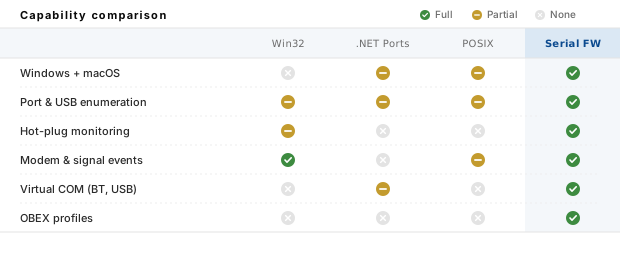
Let's take an objective look at how Serial Framework stacks up against the built-in options available on Windows and macOS.
| Feature / Criteria | Win32 Serial API | System.IO.Ports (.NET) | POSIX termios (macOS) | Serial Framework |
|---|---|---|---|---|
| Cross-platform support | Windows only | Windows, limited on macOS and Linux | POSIX systems only | Windows and macOS with a single API |
| Port & USB enumeration | Manual SetupAPI walk-through | Only SerialPort.GetPortNames(); no USB detail |
Manual /dev directory parsing |
COM ports, modems, and USB devices out of the box |
| Device monitoring (hot-plug) | Requires WM_DEVICECHANGE handling |
Not supported | Not supported | Built-in hardware and power-state monitoring |
| Event model | Manual threads and overlapped I/O | Background threads with known quirks | Non-blocking select() loops |
Async and sync events with no UI blocking |
| Modem events | Manual WaitCommEvent wiring |
Not supported | Not supported | Full modem event support |
| Virtual COM ports | Only native devices | Only OS-registered ports | Only native devices | Bluetooth vCOM, USB vCOM, Com0Com |
| OBEX profiles | Not included | Not included | Not included | OPP + FTP client, OPP server |
| Code complexity | Very high | Moderate for simple cases; high for real-world devices | High (POSIX specifics, hardware parity, flow control) | Low (drop-in components and event-driven API) |
1. Versus the Win32 Serial API
The Win32 API is powerful and fast, but it is not friendly. To open a port you have to build a
\\\\.\\COMx path, call CreateFile with the right share flags, then configure a DCB structure,
set up COMMTIMEOUTS, choose between overlapped and synchronous I/O, and finally wire your own thread loop to catch
WaitCommEvent for line-status changes. Every step is a chance to introduce a resource leak or a race condition.
Serial Framework replaces this entire headache with a component you drop into your project.
You open a port by name, subscribe to clean events like OnData, OnModemChange, or OnHardwareChange,
and the framework handles all the low-level plumbing — including safe teardown and reconnection when the device is unplugged.
2. Versus System.IO.Ports (.NET)
System.IO.Ports.SerialPort is the go-to option for .NET developers, and it is fine for quick scripts. It quickly hits a ceiling as soon as a real product is involved. Device enumeration is limited to what the OS registered last — no USB details, no ability to enable, disable, or read the state of a USB serial adapter. There is no event for hardware changes, no modem event API, and the behavior of edge cases (dirty disconnects, suspended laptops, Bluetooth virtual COM ports) varies between Windows versions.
Serial Framework keeps the .NET convenience but adds everything the BCL class is missing: full USB enumeration and control, hardware and power-state monitoring, modem events, signal-line control, and support for Bluetooth and USB virtual COM ports — all in one API that also happens to run on macOS. See event processing for how the framework handles UI, console, and service applications.
3. Versus POSIX termios (macOS)
On macOS, serial work goes through POSIX termios. You are back to raw file descriptors, tcsetattr calls,
baud-rate constants that differ between drivers, and non-blocking select() loops. Naming conventions
(/dev/tty.* vs /dev/cu.*), hot-plug behavior, and USB device metadata are all left as an exercise
for the developer. Writing one application that runs identically on Windows and macOS usually means maintaining two completely
separate codebases.
Serial Framework flattens that difference. The same source code compiles and runs on Windows and macOS: port enumeration, event handling, OBEX, and vCOM support all work the same way on both platforms.
Why Serial Framework stands out
- One API, two platforms. Windows and macOS are supported by the same library, with identical concepts for ports, events, and configuration. Porting an application between platforms stops being a project on its own.
- Full device lifecycle awareness. Hardware change monitoring, power-state notifications, USB device enumeration, and the ability to enable or disable USB serial adapters directly from code. Your application reacts correctly when the user plugs in or yanks a device mid-transfer.
- Modem events and signal control. Ring indicator, carrier detect, and every other modem line are exposed as clean events. Controlling DTR, RTS, and other signals takes a single property change.
- Bluetooth and USB virtual COM ports. The framework speaks the protocols used by Bluetooth SPP vCOM drivers and USB-to-serial bridges out of the box, including the popular Com0Com null-modem emulator on Windows.
- Complete OBEX implementation. Object Push (OPP) and File Transfer (FTP) clients, plus an Object Push server, ship with the SDK. Transferring large payloads over a serial link becomes a matter of a few method calls — see Serial Framework and OBEX for the full workflow.
- Part of a bigger ecosystem. Serial Framework integrates seamlessly with the Bluetooth and Wi-Fi frameworks through the shared Wireless Communication Library. If your product grows beyond a single transport, nothing has to be rewritten.
Conclusion
Native serial APIs are powerful, but they force you to spend valuable engineering hours deciphering platform quirks, wiring low-level I/O, and reimplementing the same boilerplate on every OS. You end up spending weeks making your software play nicely with Windows and macOS rather than polishing the features your users actually care about.
Serial Framework bridges that gap elegantly. It bundles the reliability of the Win32 API, the convenience of the .NET BCL, and true cross-platform reach under one roof. It lets you skip the platform-specific friction and build a production-ready serial application in a fraction of the time.
Ready to see it in action? Head over to the Serial Framework download section to grab a free trial version for your environment of choice (.NET, C++, or VCL).
Frequently asked questions
- Why is serial port development on Windows and macOS so painful?
- There are three main reasons: platform fragmentation (Windows uses Win32 and COM ports, macOS relies on POSIX termios and
/dev/cu.*devices), API complexity (DCB structures, overlapped I/O, manual thread management), and device lifecycle issues (USB serial adapters appear and disappear, and you must monitor hardware changes and system power states yourself). - How does Serial Framework differ from Win32 and System.IO.Ports?
- Serial Framework is a high-level SDK that abstracts away the low-level complexity of native APIs. Unlike Win32 (manual DCB structures, overlapped I/O, thread management) and System.IO.Ports (limited enumeration, no USB device control, inconsistent behavior across platforms), it provides a unified Windows and macOS API, automatic device monitoring, modem events, and OBEX support in a single package.
- Does Serial Framework support OBEX?
- Yes. Serial Framework includes a complete implementation of OBEX, including Object Push Profile (OPP) and File Transfer Profile (FTP) clients, as well as an Object Push server. This makes it possible to transfer large amounts of data over a serial connection with a few lines of code.
- Which programming languages and platforms does Serial Framework support?
- Serial Framework supports .NET (C#, VB.NET), C++, Delphi, and C++ Builder (VCL), and it runs on both Windows and macOS. It is also part of the Wireless Communication Library and can be used as a standalone library or together with the Bluetooth and Wi-Fi frameworks.