The Serial Framework's wclSerialClient class is the piece
of the SDK that actually opens a serial port and talks to a device. It handles configuration, timeouts, buffer sizes, serial
control lines, and — most importantly — gives you an event-driven channel for sending and receiving bytes. This article walks
through a complete Serial Client sample implemented in Delphi, C++ Builder, C#, and VB.NET.
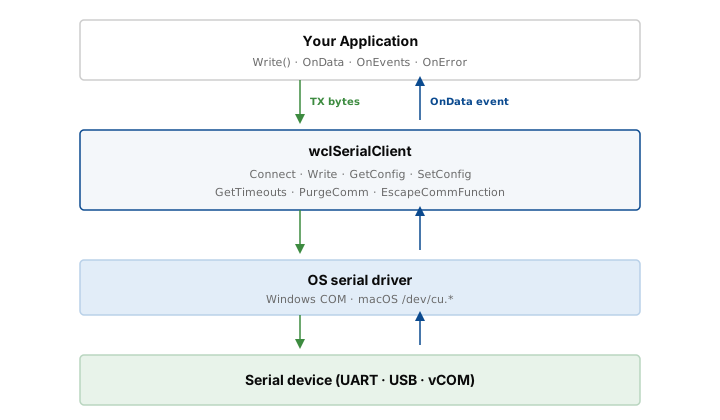
The wclSerialClient has a single responsibility: given a device name (for example, COM4 on
Windows or /dev/cu.usbserial-1420 on macOS), it opens the port, applies your configuration, and starts
delivering data. It does not enumerate devices — that job belongs to the wclSerialMonitor class. In a typical
application you use both: the monitor to discover ports, the client to open one. See
Monitoring serial and USB devices for the discovery side.
Getting started
The sample is a simple forms application with buttons for enumeration, connect, disconnect, and send, plus a large log window. The essential pieces are the same in every language: create the client, subscribe to its events, create the monitor for enumeration, then wire up the UI.
Creating the client
Both objects — the client and the monitor — are created once, usually in the form's Create or
Load handler. All event subscriptions happen here as well.
procedure TfmMain.FormCreate(Sender: TObject);
begin
  FClient := TwclSerialClient.Create;
  FClient.OnConnect := ClientConnect;
  FClient.OnData := ClientData;
  FClient.OnDisconnect := ClientDisconnect;
  FClient.OnError := ClientError;
  FClient.OnReadError := ClientReadError;
  FClient.OnEvents := ClientEvents;

  FMonitor := TwclSerialMonitor.Create;
end;

procedure TfmMain.FormDestroy(Sender: TObject);
begin
  FClient.Disconnect;
  FMonitor.Stop;

  FMonitor.Free;
  FClient.Free;
end;
void __fastcall TfmMain::FormCreate(TObject *Sender)
{
FClient = new TwclSerialClient();
FClient->OnConnect = ClientConnect;
FClient->OnData = ClientData;
FClient->OnDisconnect = ClientDisconnect;
FClient->OnError = ClientError;
FClient->OnReadError = ClientReadError;
FClient->OnEvents = ClientEvents;
FMonitor = new TwclSerialMonitor();
}
void __fastcall TfmMain::FormDestroy(TObject *Sender)
{
FClient->Disconnect();
FMonitor->Stop();
FClient->Free();
FMonitor->Free();
}private void fmMain_Load(Object sender, EventArgs e)
{
FClient = new wclSerialClient();
FClient.OnConnect += ClientConnect;
FClient.OnData += ClientData;
FClient.OnDisconnect += ClientDisconnect;
FClient.OnError += ClientError;
FClient.OnReadError += ClientReadError;
FClient.OnEvents += ClientEvents;
FMonitor = new wclSerialMonitor();
}
private void fmMain_FormClosed(Object sender, FormClosedEventArgs e)
{
FClient.Disconnect();
FMonitor.Stop();
}Private Sub fmMain_Load(sender As Object, e As EventArgs) Handles MyBase.Load
FClient = New wclSerialClient()
AddHandler FClient.OnConnect, AddressOf ClientConnect
AddHandler FClient.OnData, AddressOf ClientData
AddHandler FClient.OnDisconnect, AddressOf ClientDisconnect
AddHandler FClient.OnError, AddressOf ClientError
AddHandler FClient.OnReadError, AddressOf ClientReadError
AddHandler FClient.OnEvents, AddressOf ClientEvents
FMonitor = New wclSerialMonitor()
End Sub
Private Sub fmMain_FormClosed(sender As Object, e As FormClosedEventArgs) Handles MyBase.FormClosed
FClient.Disconnect()
FMonitor.Stop()
End SubEnumerating ports
Before the client can connect to anything, the user has to choose a port. Enumeration is a one-shot operation: the code below fills a combo box with the device names returned by the monitor.
procedure TfmMain.EnumComPorts;
var
  Ports: TwclSerialDevices;
  Res: Integer;
  i: Integer;
begin
  cbPorts.Clear;
  Res := FMonitor.EnumSerialDevices(Ports);
  if Res <> WCL_E_SUCCESS then
    lbEvents.Items.Add('Error enumerating COM ports: 0x' + IntToHex(Res, 8))
  else begin
    for i := 0 to Length(Ports) - 1 do
      cbPorts.Items.Add(Ports[i].DeviceName);

    if cbPorts.Items.Count > 0 then
      cbPorts.ItemIndex := 0
    else
      cbPorts.ItemIndex := -1;
  end;
end;
void __fastcall TfmMain::EnumComPorts()
{
cbPorts->Clear();
TwclSerialDevices Ports;
int Res = FMonitor->EnumSerialDevices(Ports);
if (Res != WCL_E_SUCCESS)
{
lbEvents->Items->Add("Error enumerating COM ports: 0x" + IntToHex(Res, 8));
return;
}
for (int i = 0; i < Ports.Length; i++)
cbPorts->Items->Add(Ports[i].DeviceName);
if (cbPorts->Items->Count > 0)
cbPorts->ItemIndex = 0;
else
cbPorts->ItemIndex = -1;
}private void EnumComPorts()
{
cbPorts.Items.Clear();
List<wclSerialDevice> Ports;
Int32 Res = FMonitor.EnumSerialDevices(out Ports);
if (Res != wclErrors.WCL_E_SUCCESS)
{
lbEvents.Items.Add("Error enumerating COM ports: 0x" + Res.ToString("X8"));
return;
}
foreach (wclSerialDevice Port in Ports)
cbPorts.Items.Add(Port.DeviceName);
if (cbPorts.Items.Count > 0)
cbPorts.SelectedIndex = 0;
else
cbPorts.SelectedIndex = -1;
}Private Sub EnumComPorts()
cbPorts.Items.Clear()
Dim Ports As List(Of wclSerialDevice) = Nothing
Dim Res As Int32 = FMonitor.EnumSerialDevices(Ports)
If Res <> wclErrors.WCL_E_SUCCESS Then
lbEvents.Items.Add("Error enumerating COM ports: 0x" + Res.ToString("X8"))
Return
End If
For Each Port As wclSerialDevice In Ports
cbPorts.Items.Add(Port.DeviceName)
Next
If cbPorts.Items.Count > 0 Then
cbPorts.SelectedIndex = 0
Else
cbPorts.SelectedIndex = -1
End If
End SubConnecting and disconnecting
Connecting is a two-step dance. The Connect method only starts the connection procedure — it
returns immediately with a success code if the request was accepted, but the real outcome (port opened, or error) is
delivered later through the OnConnect event. Check the event's Error parameter to know what
actually happened.
procedure TfmMain.btConnectClick(Sender: TObject);
var
  Res: Integer;
begin
  if cbPorts.ItemIndex = -1 then
    MessageDlg('Select COM port', mtWarning, [mbOK], 0)
  else begin
    Res := FClient.Connect(cbPorts.Items[cbPorts.ItemIndex]);
    if Res <> WCL_E_SUCCESS then
      MessageDlg('Error: 0x' + IntToHex(Res, 8), mtError, [mbOK], 0);
  end;
end;

procedure TfmMain.ClientConnect(Sender: TObject; const Error: Integer);
begin
  if Error = WCL_E_SUCCESS then begin
    lbEvents.Items.Add('Connected to Serial Device: ' + FClient.DeviceName);
    ReadConfiguration;
    ReadTimeouts;
    ReadBuffers;
  end else
    lbEvents.Items.Add('Connect error: 0x' + IntToHex(Error, 8));
end;

procedure TfmMain.btDisconnectClick(Sender: TObject);
var
  Res: Integer;
begin
  Res := FClient.Disconnect;
  if Res <> WCL_E_SUCCESS then
    MessageDlg('Error: 0x' + IntToHex(Res, 8), mtError, [mbOK], 0);
end;
void __fastcall TfmMain::btConnectClick(TObject *Sender)
{
if (cbPorts->ItemIndex == -1)
{
MessageDlg("Select COM port", mtWarning, TMsgDlgButtons() << mbOK, 0);
return;
}
int Res = FClient->Connect(cbPorts->Items->Strings[cbPorts->ItemIndex]);
if (Res != WCL_E_SUCCESS)
MessageDlg("Error: 0x" + IntToHex(Res, 8), mtError,
TMsgDlgButtons() << mbOK, 0);
}
void __fastcall TfmMain::ClientConnect(TObject *Sender, const int Error)
{
if (Error != WCL_E_SUCCESS)
{
lbEvents->Items->Add("Connect error: 0x" + IntToHex(Error, 8));
return;
}
lbEvents->Items->Add("Connected to Serial Device: " + FClient->DeviceName);
ReadConfiguration();
ReadTimeouts();
ReadBuffers();
}
void __fastcall TfmMain::btDisconnectClick(TObject *Sender)
{
int Res = FClient->Disconnect();
if (Res != WCL_E_SUCCESS)
MessageDlg("Error: 0x" + IntToHex(Res, 8), mtError,
TMsgDlgButtons() << mbOK, 0);
}private void btConnect_Click(Object sender, EventArgs e)
{
if (cbPorts.SelectedIndex == -1)
{
MessageBox.Show("Select COM port");
return;
}
Int32 Res = FClient.Connect(cbPorts.Items[cbPorts.SelectedIndex].ToString());
if (Res != wclErrors.WCL_E_SUCCESS)
MessageBox.Show("Error: 0x" + Res.ToString("X8"));
}
private void ClientConnect(Object sender, Int32 Error)
{
if (Error == wclErrors.WCL_E_SUCCESS)
{
lbEvents.Items.Add("Connected to Serial Device: " + FClient.DeviceName);
ReadConfiguration();
ReadTimeouts();
ReadBuffers();
}
else
lbEvents.Items.Add("Connect error: 0x" + Error.ToString("X8"));
}
private void btDisconnect_Click(Object sender, EventArgs e)
{
Int32 Res = FClient.Disconnect();
if (Res != wclErrors.WCL_E_SUCCESS)
MessageBox.Show("Error: 0x" + Res.ToString("X8"));
}Private Sub btConnect_Click(sender As Object, e As EventArgs) Handles btConnect.Click
If cbPorts.SelectedIndex = -1 Then
MessageBox.Show("Select COM port")
Return
End If
Dim Res As Int32 = FClient.Connect(cbPorts.Items(cbPorts.SelectedIndex).ToString())
If Res <> wclErrors.WCL_E_SUCCESS Then
MessageBox.Show("Error: 0x" + Res.ToString("X8"))
End If
End Sub
Private Sub ClientConnect(Sender As Object, [Error] As Integer)
If [Error] = wclErrors.WCL_E_SUCCESS Then
lbEvents.Items.Add("Connected to Serial Device: " + FClient.DeviceName)
ReadConfiguration()
ReadTimeouts()
ReadBuffers()
Else
lbEvents.Items.Add("Connect error: 0x" + [Error].ToString("X8"))
End If
End Sub
Private Sub btDisconnect_Click(sender As Object, e As EventArgs) Handles btDisconnect.Click
Dim Res As Int32 = FClient.Disconnect()
If Res <> wclErrors.WCL_E_SUCCESS Then
MessageBox.Show("Error: 0x" + Res.ToString("X8"))
End If
End SubSerial port configuration
The port's operating parameters — baud rate, byte size, parity, stop bits, flow control, DTR/RTS behaviour, XON/XOFF
limits, and the special characters — are bundled into a single wclSerialConfig structure. Get the current
configuration with GetConfig, modify what you need, then push it back with SetConfig. The
structure has the same fields on every platform and every language binding.
The structure is large, but the values map one-to-one with the classic DCB structure from Win32 — plus
matching semantics on macOS via termios. The sample UI exposes them all. The two parameters most applications
actually change are BaudRate and the Parity / ByteSize / StopBits
triple; everything else has safe defaults.
procedure TfmMain.btSetConfigClick(Sender: TObject);
var
  Config: TwclSerialConfig;
  Res: Integer;
begin
  Config.BaudRate := StrToInt64(edBaudRate.Text);
  Config.XonLim := StrToInt(edXonLim.Text);
  Config.XoffLim := StrToInt(edXoffLim.Text);
  Config.XonChar := AnsiChar(StrToInt(edXonChar.Text));
  Config.XoffChar := AnsiChar(StrToInt(edXoffChar.Text));
  Config.ErrorChar := AnsiChar(StrToInt(edErrorChar.Text));
  Config.EofChar := AnsiChar(StrToInt(edEofChar.Text));
  Config.EvtChar := AnsiChar(StrToInt(edEvtChar.Text));

  Config.ParityCheck := cbParityCheck.Checked;
  Config.OutxCtsFlow := cbOutxCtsFlow.Checked;
  Config.OutxDsrFlow := cbOutxDsrFlow.Checked;
  Config.DsrSensitivity := cbDsrSensitivity.Checked;
  Config.TxContinueOnXoff := cbTXContinueOnXoff.Checked;
  Config.OutX := cbOutX.Checked;
  Config.InX := cbInX.Checked;
  Config.ErrorCharReplace := cbErrorCharReplace.Checked;
  Config.NullStrip := cbNullStrip.Checked;
  Config.AbortOnError := cbAbortOnError.Checked;

  Config.RtsControl := IndexToRtsControl(cbRtsControl.ItemIndex);
  Config.DtrControl := IndexToDtrControl(cbDtrControl.ItemIndex);
  Config.Parity := IndexToParity(cbParity.ItemIndex);
  Config.StopBits := IndexToStopBits(cbStopBits.ItemIndex);
  Config.ByteSize := cbByteSize.ItemIndex + 4;

  Res := FClient.SetConfig(Config);
  if Res <> WCL_E_SUCCESS then
    MessageDlg('Error: 0x' + IntToHex(Res, 8), mtError, [mbOK], 0);
end;
void __fastcall TfmMain::btSetConfigClick(TObject *Sender)
{
TwclSerialConfig Config;
Config.BaudRate = StrToInt64(edBaudRate->Text);
Config.XonLim = StrToInt(edXonLim->Text);
Config.XoffLim = StrToInt(edXoffLim->Text);
Config.XonChar = Char(StrToInt(edXonChar->Text));
Config.XoffChar = Char(StrToInt(edXoffChar->Text));
Config.ErrorChar = Char(StrToInt(edErrorChar->Text));
Config.EofChar = Char(StrToInt(edEofChar->Text));
Config.EvtChar = Char(StrToInt(edEvtChar->Text));
Config.ParityCheck = cbParityCheck->Checked;
Config.OutxCtsFlow = cbOutxCtsFlow->Checked;
Config.OutxDsrFlow = cbOutxDsrFlow->Checked;
Config.DsrSensitivity = cbDsrSensitivity->Checked;
Config.TxContinueOnXoff = cbTXContinueOnXoff->Checked;
Config.OutX = cbOutX->Checked;
Config.InX = cbInX->Checked;
Config.ErrorCharReplace = cbErrorCharReplace->Checked;
Config.NullStrip = cbNullStrip->Checked;
Config.AbortOnError = cbAbortOnError->Checked;
Config.RtsControl = IndexToRtsControl(cbRtsControl->ItemIndex);
Config.DtrControl = IndexToDtrControl(cbDtrControl->ItemIndex);
Config.Parity = IndexToParity(cbParity->ItemIndex);
Config.StopBits = IndexToStopBits(cbStopBits->ItemIndex);
Config.ByteSize = cbByteSize->ItemIndex + 4;
int Res = FClient->SetConfig(Config);
if (Res != WCL_E_SUCCESS)
MessageDlg("Error: 0x" + IntToHex(Res, 8), mtError,
TMsgDlgButtons() << mbOK, 0);
}private void btSetConfig_Click(Object sender, EventArgs e)
{
wclSerialConfig Config = new wclSerialConfig();
Config.BaudRate = Convert.ToUInt32(edBaudRate.Text);
Config.XonLim = Convert.ToUInt16(edXonLim.Text);
Config.XoffLim = Convert.ToUInt16(edXoffLim.Text);
Config.XonChar = Convert.ToByte(edXonChar.Text);
Config.XoffChar = Convert.ToByte(edXoffChar.Text);
Config.ErrorChar = Convert.ToByte(edErrorChar.Text);
Config.EofChar = Convert.ToByte(edEofChar.Text);
Config.EvtChar = Convert.ToByte(edEvtChar.Text);
Config.ParityCheck = cbParityCheck.Checked;
Config.OutxCtsFlow = cbOutxCtsFlow.Checked;
Config.OutxDsrFlow = cbOutxDsrFlow.Checked;
Config.DsrSensitivity = cbDsrSensitivity.Checked;
Config.TxContinueOnXoff = cbTXContinueOnXoff.Checked;
Config.OutX = cbOutX.Checked;
Config.InX = cbInX.Checked;
Config.ErrorCharReplace = cbErrorCharReplace.Checked;
Config.NullStrip = cbNullStrip.Checked;
Config.AbortOnError = cbAbortOnError.Checked;
Config.RtsControl = IndexToRtsControl(cbRtsControl.SelectedIndex);
Config.DtrControl = IndexToDtrControl(cbDtrControl.SelectedIndex);
Config.Parity = IndexToParity(cbParity.SelectedIndex);
Config.StopBits = IndexToStopBits(cbStopBits.SelectedIndex);
Config.ByteSize = (Byte)(cbByteSize.SelectedIndex + 4);
Int32 Res = FClient.SetConfig(Config);
if (Res != wclErrors.WCL_E_SUCCESS)
MessageBox.Show("Error: 0x" + Res.ToString("X8"));
}Private Sub btSetConfig_Click(sender As Object, e As EventArgs) Handles btSetConfig.Click
Dim Config As wclSerialConfig = New wclSerialConfig()
Config.BaudRate = Convert.ToUInt32(edBaudRate.Text)
Config.XonLim = Convert.ToUInt16(edXonLim.Text)
Config.XoffLim = Convert.ToUInt16(edXoffLim.Text)
Config.XonChar = Convert.ToByte(edXonChar.Text)
Config.XoffChar = Convert.ToByte(edXoffChar.Text)
Config.ErrorChar = Convert.ToByte(edErrorChar.Text)
Config.EofChar = Convert.ToByte(edEofChar.Text)
Config.EvtChar = Convert.ToByte(edEvtChar.Text)
Config.ParityCheck = cbParityCheck.Checked
Config.OutxCtsFlow = cbOutxCtsFlow.Checked
Config.OutxDsrFlow = cbOutxDsrFlow.Checked
Config.DsrSensitivity = cbDsrSensitivity.Checked
Config.TxContinueOnXoff = cbTXContinueOnXoff.Checked
Config.OutX = cbOutX.Checked
Config.InX = cbInX.Checked
Config.ErrorCharReplace = cbErrorCharReplace.Checked
Config.NullStrip = cbNullStrip.Checked
Config.AbortOnError = cbAbortOnError.Checked
Config.RtsControl = IndexToRtsControl(cbRtsControl.SelectedIndex)
Config.DtrControl = IndexToDtrControl(cbDtrControl.SelectedIndex)
Config.Parity = IndexToParity(cbParity.SelectedIndex)
Config.StopBits = IndexToStopBits(cbStopBits.SelectedIndex)
Config.ByteSize = CType(cbByteSize.SelectedIndex + 4, Byte)
Dim Res As Int32 = FClient.SetConfig(Config)
If Res <> wclErrors.WCL_E_SUCCESS Then
MessageBox.Show("Error: 0x" + Res.ToString("X8"))
End If
End SubThe GetConfig method works the opposite way: call it right after OnConnect succeeds to fill
the UI with the port's current defaults, so the user can see what the driver has set. The sample does exactly that — it
refreshes configuration, timeouts, and buffer sizes as soon as a connection is established.
Timeouts are handled through a separate structure, wclSerialTimeouts, and buffer sizes through the
GetReadBufferSize / SetReadBufferSize and GetWriteBufferSize /
SetWriteBufferSize pair. All three groups — configuration, timeouts, buffers — are independent and use
the same WCL_E_SUCCESS / error-code convention.
Sending data
Once connected, sending is a direct method call: build a byte array and pass it to Write. The method
returns the number of bytes the driver accepted through an out parameter — on a serial port this can be less than
you passed in if the output buffer is full, so check both the return code and the count.
procedure TfmMain.btSendClick(Sender: TObject);
var
  Res: Integer;
  Str: AnsiString;
  Written: Cardinal;
begin
  Str := AnsiString(edText.Text);
  case cbLineFeed.ItemIndex of
    1: Str := Str + #13;
    2: Str := Str + #10;
    3: Str := Str + #13#10;
  end;

  Res := FClient.Write(Pointer(Str), Length(Str), Written);
  lbEvents.Items.Add('Sent: ' + IntToStr(Written) + ' bytes from ' +
    IntToStr(Length(Str)));
  if Res <> WCL_E_SUCCESS then
    lbEvents.Items.Add('Write error: 0x' + IntToHex(Res, 8));
end;
void __fastcall TfmMain::btSendClick(TObject *Sender)
{
AnsiString Str = AnsiString(edText->Text);
switch (cbLineFeed->ItemIndex)
{
case 1: Str += AnsiChar(13); break;
case 2: Str += AnsiChar(10); break;
case 3: Str += (AnsiChar(13) + AnsiChar(10)); break;
}
unsigned int Written = 0;
int Res = FClient->Write(Str.c_str(), Str.Length(), Written);
lbEvents->Items->Add("Sent: " + IntToStr((int)Written) + " bytes from " +
IntToStr(Str.Length()));
if (Res != WCL_E_SUCCESS)
lbEvents->Items->Add("Write error: 0x" + IntToHex(Res, 8));
}private void btSend_Click(Object sender, EventArgs e)
{
String Str = edText.Text;
switch (cbLineFeed.SelectedIndex)
{
case 1: Str += "\r"; break;
case 2: Str += "\n"; break;
case 3: Str += "\r\n"; break;
}
Byte[] Ansi = Encoding.ASCII.GetBytes(Str);
UInt32 Sent = 0;
Int32 Res = FClient.Write(Ansi, out Sent);
lbEvents.Items.Add("Sent: " + Sent.ToString() + " bytes from " + Ansi.Length.ToString());
if (Res != wclErrors.WCL_E_SUCCESS)
lbEvents.Items.Add("Write error: 0x" + Res.ToString("X8"));
}Private Sub btSend_Click(sender As Object, e As EventArgs) Handles btSend.Click
Dim Str As String = edText.Text
Select Case cbLineFeed.SelectedIndex
Case 1
Str += vbCr
Case 2
Str += vbLf
Case 3
Str += vbCrLf
End Select
Dim Ansi As Byte() = Encoding.ASCII.GetBytes(Str)
Dim Sent As UInt32 = 0
Dim Res As Int32 = FClient.Write(Ansi, Sent)
lbEvents.Items.Add("Sent: " + Sent.ToString() + " bytes from " + Ansi.Length.ToString())
If Res <> wclErrors.WCL_E_SUCCESS Then
lbEvents.Items.Add("Write error: 0x" + Res.ToString("X8"))
End If
End SubIf you need to send a single character out of band — for example, an XOFF or a break — use
TransmitCommChar. For sending a break condition on the line itself, use SetCommBreak followed
by ClearCommBreak. Both are direct method calls, no event involvement.
Receiving data
There is no synchronous Read method. Data arrives through the OnData event, which fires
with a byte array (or pointer plus size in native languages) whenever the OS reports bytes available on the port.
The framework does not split or merge frames — it hands you exactly what the driver returned, in whatever chunks
it happened to deliver. Protocols with a defined frame length, a delimiter, or a length prefix need to be assembled
by your own state machine.
procedure TfmMain.ClientData(Sender: TObject; const Data: Pointer;
  const Size: Cardinal);
var
  Str: AnsiString;
begin
  if Size > 0 then begin
    SetLength(Str, Size);
    CopyMemory(Pointer(Str), Data, Size);
    lbEvents.Items.Add('Received: ' + string(Str));
  end else
    lbEvents.Items.Add('Empty data received');
end;
void __fastcall TfmMain::ClientData(TObject *Sender, const void* Data,
const unsigned int Size)
{
if (Size == 0)
{
lbEvents->Items->Add("Empty data received");
return;
}
AnsiString Str((char*)Data, Size);
lbEvents->Items->Add("Received: " + Str);
}private void ClientData(Object sender, Byte[] Data)
{
if (Data != null && Data.Length > 0)
{
String Str = Encoding.ASCII.GetString(Data);
lbEvents.Items.Add("Received: " + Str);
}
else
lbEvents.Items.Add("Empty data received");
}Private Sub ClientData(Sender As Object, Data() As Byte)
If Data IsNot Nothing AndAlso Data.Length > 0 Then
Dim Str As String = Encoding.ASCII.GetString(Data)
lbEvents.Items.Add("Received: " + Str)
Else
lbEvents.Items.Add("Empty data received")
End If
End SubSerial events and errors
Besides OnData, the client raises three more events that describe the state of the line itself. They come
straight from the OS driver and tell you about the hardware-level conditions on the port:
OnEvents— line-status notifications such asevRing(a ring indicator on a modem),evCts,evDsr,evRlsd(carrier detect),evBreak(a break condition received), andevChar(a character matched theEvtCharconfiguration value).OnError— communication errors (erFrame,erOverrun,erRxParity) combined with the driver's current communication state (csCtsHold,csDsrHold,csXoffHold, and so on).OnReadError— a lower-level error that occurred while reading from the port. In practice this means the OS reported a problem with the read operation itself, as opposed to a framing error inside the data.
Both OnEvents and OnError pass flag sets. The natural follow-up is to query the modem status
with GetModemStatus, which returns another flag set (msCtsOn, msDsrOn,
msRingOn, msRlsdOn) telling you which control lines are currently asserted.
procedure TfmMain.ClientEvents(Sender: TObject; const Events: TwclSerialEvents);
var
  Str: string;
  Res: Integer;
  Status: TwclModemStatuses;
begin
  Str := '';
  if evBreak in Events then Str := Str + 'evBreak ';
  if evCts in Events   then Str := Str + 'evCts ';
  if evDsr in Events   then Str := Str + 'evDsr ';
  if evRing in Events  then Str := Str + 'evRing ';
  if evRlsd in Events  then Str := Str + 'evRlsd ';
  if evChar in Events  then Str := Str + 'evChar ';
  lbEvents.Items.Add('Event: ' + Str);

  if Events <> [] then begin
    Res := FClient.GetModemStatus(Status);
    if Res <> WCL_E_SUCCESS then
      lbEvents.Items.Add('GetModemStatus error: 0x' + IntToHex(Res, 8))
    else begin
      Str := '';
      if msCtsOn in Status  then Str := Str + 'msCtsOn ';
      if msDsrOn in Status  then Str := Str + 'msDsrOn ';
      if msRingOn in Status then Str := Str + 'msRingOn ';
      if msRlsdOn in Status then Str := Str + 'msRlsdOn ';
      if Str <> '' then
        lbEvents.Items.Add('Modem status: ' + Str);
    end;
  end;
end;
void __fastcall TfmMain::ClientEvents(TObject *Sender,
const TwclSerialEvents Events)
{
String Str = "";
if (Events.Contains(evBreak)) Str += "evBreak ";
if (Events.Contains(evCts)) Str += "evCts ";
if (Events.Contains(evDsr)) Str += "evDsr ";
if (Events.Contains(evRing)) Str += "evRing ";
if (Events.Contains(evRlsd)) Str += "evRlsd ";
if (Events.Contains(evChar)) Str += "evChar ";
lbEvents->Items->Add("Event: " + Str);
if (!Events.Empty())
{
TwclModemStatuses Status;
int Res = FClient->GetModemStatus(Status);
if (Res != WCL_E_SUCCESS)
lbEvents->Items->Add("GetModemStatus error: 0x" + IntToHex(Res, 8));
else
{
Str = "";
if (Status.Contains(msCtsOn)) Str += "msCtsOn ";
if (Status.Contains(msDsrOn)) Str += "msDsrOn ";
if (Status.Contains(msRingOn)) Str += "msRingOn ";
if (Status.Contains(msRlsdOn)) Str += "msRlsdOn ";
if (Str != "")
lbEvents->Items->Add("Modem status: " + Str);
}
}
}private void ClientEvents(Object sender, wclSerialEvent Events)
{
String Str = "";
if ((Events & wclSerialEvent.evBreak) != 0) Str += "evBreak ";
if ((Events & wclSerialEvent.evCts) != 0) Str += "evCts ";
if ((Events & wclSerialEvent.evDsr) != 0) Str += "evDsr ";
if ((Events & wclSerialEvent.evRing) != 0) Str += "evRing ";
if ((Events & wclSerialEvent.evRlsd) != 0) Str += "evRlsd ";
if ((Events & wclSerialEvent.evChar) != 0) Str += "evChar ";
lbEvents.Items.Add("Event: " + Str);
if (Events != 0)
{
wclModemStatus Status;
Int32 Res = FClient.GetModemStatus(out Status);
if (Res != wclErrors.WCL_E_SUCCESS)
lbEvents.Items.Add("GetModemStatus error: 0x" + Res.ToString("X8"));
else
{
Str = "";
if ((Status & wclModemStatus.msCtsOn) != 0) Str += "msCtsOn ";
if ((Status & wclModemStatus.msDsrOn) != 0) Str += "msDsrOn ";
if ((Status & wclModemStatus.msRingOn) != 0) Str += "msRingOn ";
if ((Status & wclModemStatus.msRlsdOn) != 0) Str += "msRlsdOn ";
if (Str != "")
lbEvents.Items.Add("Modem status: " + Str);
}
}
}Private Sub ClientEvents(Sender As Object, Events As wclSerialEvent)
Dim Str As String = ""
If (Events And wclSerialEvent.evBreak) <> 0 Then Str += "evBreak "
If (Events And wclSerialEvent.evCts) <> 0 Then Str += "evCts "
If (Events And wclSerialEvent.evDsr) <> 0 Then Str += "evDsr "
If (Events And wclSerialEvent.evRing) <> 0 Then Str += "evRing "
If (Events And wclSerialEvent.evRlsd) <> 0 Then Str += "evRlsd "
If (Events And wclSerialEvent.evChar) <> 0 Then Str += "evChar "
lbEvents.Items.Add("Event: " + Str)
If Events <> 0 Then
Dim Status As wclModemStatus
Dim Res As Int32 = FClient.GetModemStatus(Status)
If Res <> wclErrors.WCL_E_SUCCESS Then
lbEvents.Items.Add("GetModemStatus error: 0x" + Res.ToString("X8"))
Else
Str = ""
If (Status And wclModemStatus.msCtsOn) <> 0 Then Str += "msCtsOn "
If (Status And wclModemStatus.msDsrOn) <> 0 Then Str += "msDsrOn "
If (Status And wclModemStatus.msRingOn) <> 0 Then Str += "msRingOn "
If (Status And wclModemStatus.msRlsdOn) <> 0 Then Str += "msRlsdOn "
If Str <> "" Then
lbEvents.Items.Add("Modem status: " + Str)
End If
End If
End If
End SubIf you need to actively drive the control lines yourself, the client exposes EscapeCommFunction —
a single method that takes one of the standard escape codes (escSetDtr, escClrDtr,
escSetRts, escClrRts, escSetBreak, escClrBreak,
escSetXon, escSetXoff) and applies it immediately. SetCommBreak and
ClearCommBreak are convenience wrappers around the two break-related escape codes.
Cross-platform notes: macOS
The wclSerialClient class is fully cross-platform, but there are two things to keep in mind on macOS.
First, the device name is the full node path — for example, /dev/cu.usbserial-1420 or
/dev/cu.Bluetooth-Incoming-Port — not a short name like COM4. Second, when you call
Connect, pass wclMessageProcessingMethod.mpAsync. On macOS there is no Windows-style
message pump, so events must be delivered on a worker thread and marshalled by the framework. The macOS demo shows
the pattern — the rest of the API is byte-for-byte identical to the Windows sample.
// macOS (C#) — the Serial Framework API is identical to Windows,
// except that Connect() needs the mpAsync message processing method.
wclSerialClient client = new wclSerialClient();
client.OnConnect += (s, error) => {
    if (error == wclErrors.WCL_E_SUCCESS)
        Console.WriteLine("Connected to " + client.DeviceName);
};
client.OnData += (s, data) =>
    Console.WriteLine("Received " + data.Length + " bytes");

int res = client.Connect("/dev/cu.usbserial-1420",
    wclMessageProcessingMethod.mpAsync);
if (res != wclErrors.WCL_E_SUCCESS)
    Console.WriteLine("Connect failed: 0x" + res.ToString("X8"));

// Send bytes exactly like on Windows:
byte[] payload = Encoding.ASCII.GetBytes("hello\r\n");
uint written;
client.Write(payload, out written);

client.Disconnect();
Everything else — GetConfig / SetConfig, timeouts, buffer sizes, OnEvents,
OnError, EscapeCommFunction, PurgeComm — behaves the same on both platforms.
The complete macOS UI example (which builds a native Cocoa interface through the Objective-C runtime) ships with the
SDK and uses exactly this core.
Frequently asked questions
- Why does
Connect()return success before the port is actually open? Connect()only starts the connection procedure. The real result is delivered asynchronously through theOnConnectevent. Check theErrorparameter ofOnConnectto know whether the port was opened successfully.- Does the Serial Client work on macOS?
- Yes.
wclSerialClientis cross-platform. On macOS, pass the full device node path (for example,/dev/cu.usbserial-1420) as the device name, and usewclMessageProcessingMethod.mpAsyncwhen callingConnect(). The rest of the API — configuration, timeouts, events, writes — is identical to Windows. - How do I read data from the port?
- Data arrives asynchronously through the
OnDataevent. There is no synchronousRead()method: bytes are delivered as soon as the driver reports them. You may have to split or concatenate frames yourself based on your device protocol. - Do I need the Serial Monitor to use the Serial Client?
- No. The client works with any device name you already know (
COM4,/dev/cu.usbserial-1420, and so on). ThewclSerialMonitoris only needed if you want to enumerate the ports dynamically instead of hard-coding a name. See Monitoring serial and USB devices for that.